









Skip to content

vLLM vs Ollama (2026): Production Serving vs Local Dev

Matt Li By Matt Li, Co-Founder and Director 12 min read
vLLM vs Ollama: production serving vs local development in 2026, by Second Talent.
TL;DR: vLLM vs Ollama in November 2026: develop on Ollama, serve production traffic on vLLM. In Red Hat's published test on one A100 GPU, vLLM peaked at 793 output tokens per second against Ollama's 41. Ollama has the larger following, with 187.9K GitHub stars to vLLM's 97.4K, but vLLM is the engine built for many users on Linux GPUs.

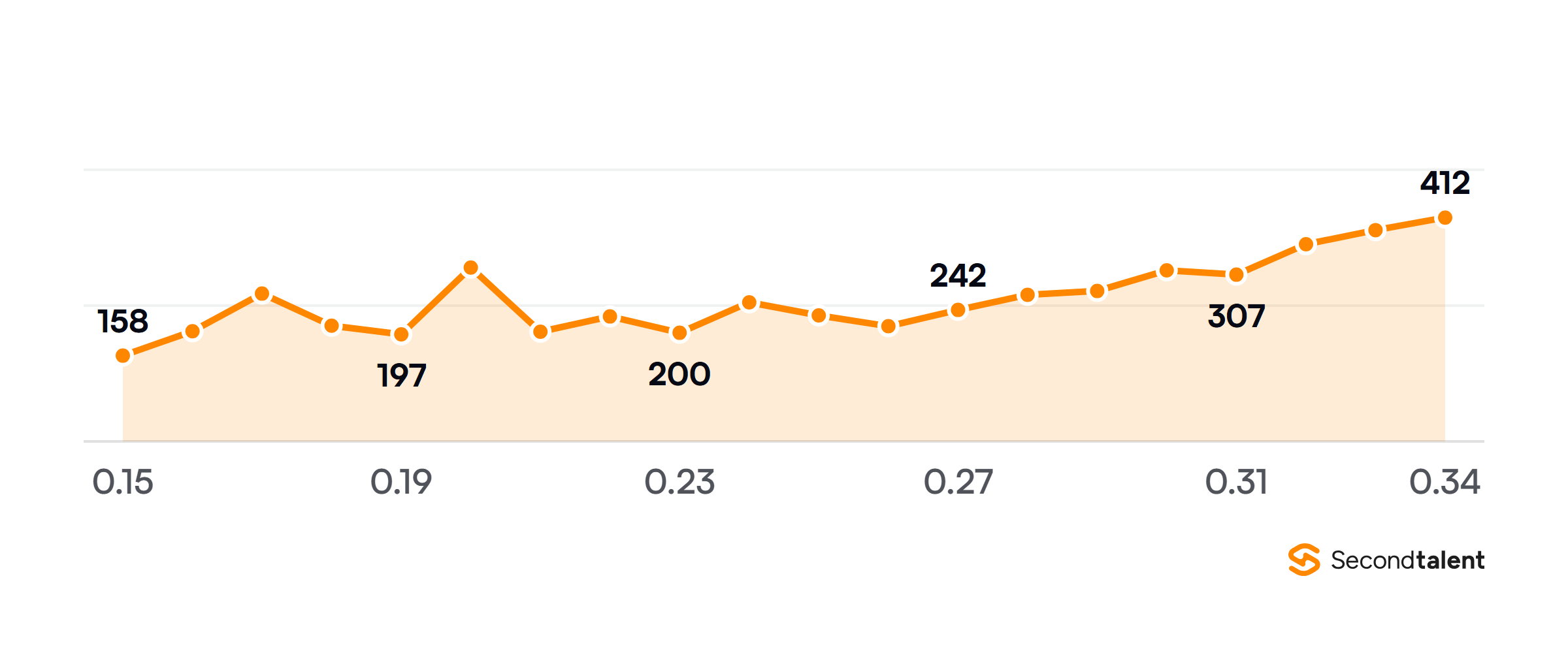
vLLM's v0.34.0 release on 16 November 2026 carried 1,061 commits from 412 contributors, 120 of them first-timers.

Ollama, the friendlier tool, shipped 28 releases in the 90 days to 23 November against vLLM's seven, each of vLLM's a two-week minor version.

The two sit at different layers. Ollama is a one-command runtime for one machine; vLLM is a Python serving engine for GPU servers and clusters.

I would prototype on the first and serve on the second, and the docs, benchmarks and download numbers below show where that line falls.

Key takeaways
  1. 1Ollama now handles one request at a time per model by default outside Apple's MLX backend, down from the cap of four in the version Red Hat benchmarked.
  2. 2vLLM runs on Linux only; its docs point Windows users to WSL or a community fork.
  3. 3GGUF, Ollama's native format, is "highly experimental" in vLLM and now needs a separate plugin.
  4. 4vLLM has half Ollama's stars but more forks: 25,181 to 19,148, a sign of how many teams build on its code.
vLLM vs Ollama: The Short Comparison

vLLM started in UC Berkeley's Sky Computing Lab and describes itself as "a fast and easy-to-use library for LLM inference and serving". Ollama installs with one script or a desktop installer and runs a model with ollama run.

The table draws on each project's README, docs and GitHub data as of 23 November 2026.

FeaturevLLMOllama
Built forHigh-throughput serving on GPU serversRunning models on one machine
Latest releasev0.34.0 (16 Nov 2026)v0.40.17 (10 Nov 2026)
Licence, languageApache 2.0, PythonMIT, Go
Installuv pip install vllm or DockerInstall script, macOS and Windows apps, Docker
Operating systemsLinux onlymacOS, Windows, Linux
Model formatHugging Face weights (Safetensors), many quantised formatsGGUF and Safetensors via a Modelfile
ConcurrencyContinuous batching, PagedAttention1 parallel request per model by default, queue of 512
Multi-GPU and multi-nodeTensor, pipeline, data, expert and context parallelismNot in the docs
APIsOpenAI-compatible, Anthropic Messages, gRPCNative API, OpenAI-compatible, Anthropic Messages subset

How vLLM Serves Many Users at Once

PagedAttention is vLLM's founding idea: it stores each request's attention key-value cache in small fixed-size blocks, the way an operating system pages memory, so GPU memory is not reserved for tokens a reply may never produce.

The project's June 2023 launch post said existing systems wasted 60% to 80% of that memory, and PagedAttention under 4%.

Freed memory turns into more requests in flight. vLLM's README lists continuous batching, chunked prefill and prefix caching, so new requests join a running batch instead of waiting for the current one to finish.

The 0.34.0 notes went further: the KV cache is now sized from memory free after warmup, and the team advises most users to drop gpu_memory_utilization from their configs.

vLLM launch postJun 2023
Up to 24x
Throughput vs Hugging Face Transformers, 3.5x vs TGI. LLaMA-7B on an A10G, LLaMA-13B on an A100 40GB
PagedAttention paperSep 2023
2x to 4x
Throughput vs FasterTransformer and Orca at the same latency, per the SOSP 2023 paper
vLLM v0.6.0 updateSep 2024
2.7x
Throughput over v0.5.3 on Llama 3 8B, one H100; 5x faster time per output token
Sources: the vLLM team's own figures, from its launch post, the PagedAttention paper and the v0.6.0 performance update. None compares against Ollama.

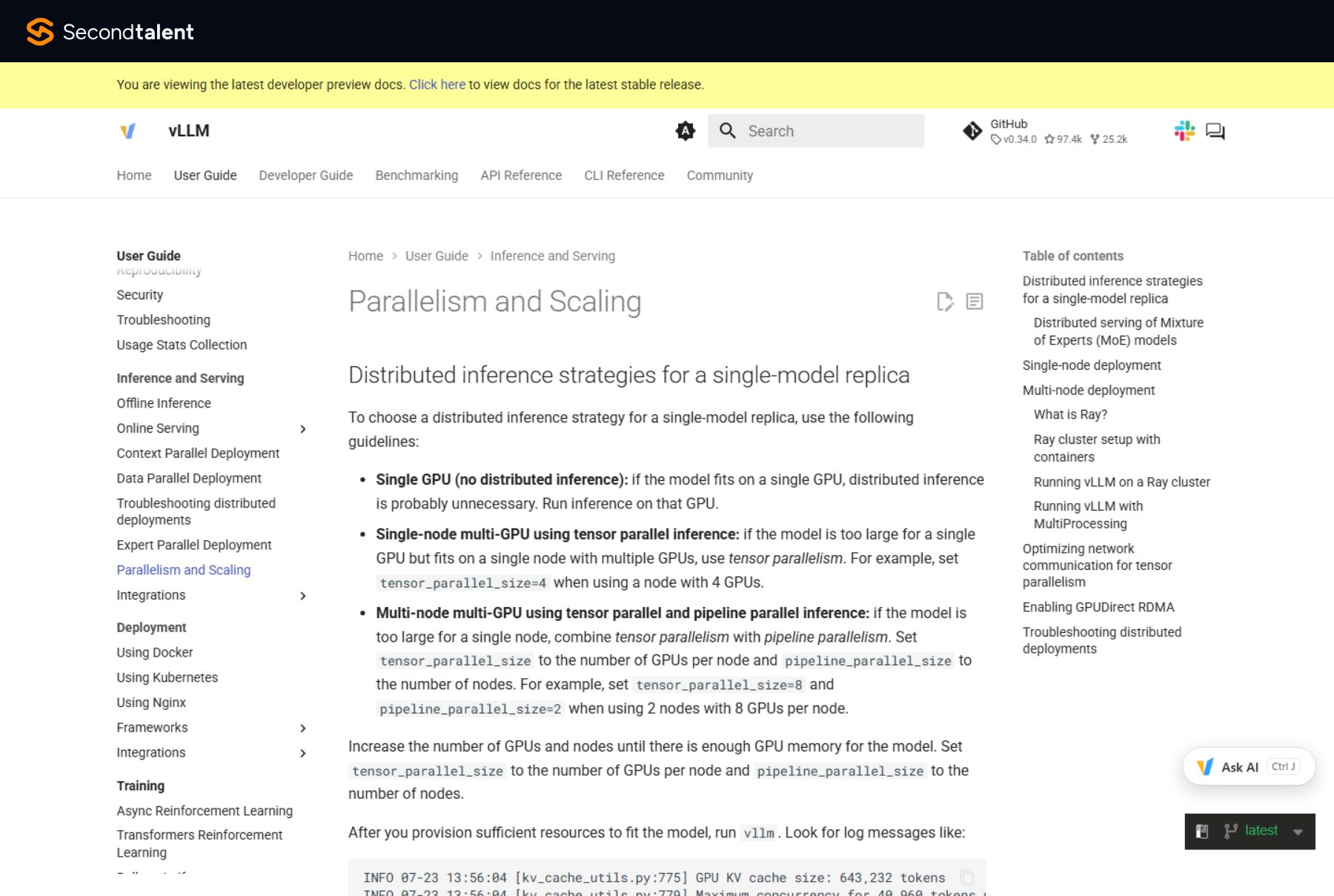
A model too big for one GPU gets split across several. Its parallelism guide sets tensor_parallel_size to the GPUs per node and pipeline_parallel_size to the node count, so two nodes of eight GPUs run as 8 and 2.

Ray handles multi-node runs; plain Python multiprocessing handles one node.

Screenshot of the vLLM docs page Parallelism and Scaling on 23 November 2026, with guidelines for a single GPU, single-node tensor parallelism with tensor_parallel_size=4, and multi-node tensor plus pipeline parallelism with tensor_parallel_size=8 and pipeline_parallel_size=2.

The guide also tells you how many users a setup can hold.

At startup vLLM logs the GPU KV cache size in tokens and a "Maximum concurrency" estimate for the model's full context length; its example reads 643,232 tokens and 15.70x for 40,960-token requests.

These are the knobs an LLM engineer interview tends to probe, from block size to the batch scheduler.

How Ollama Handles Concurrent Requests

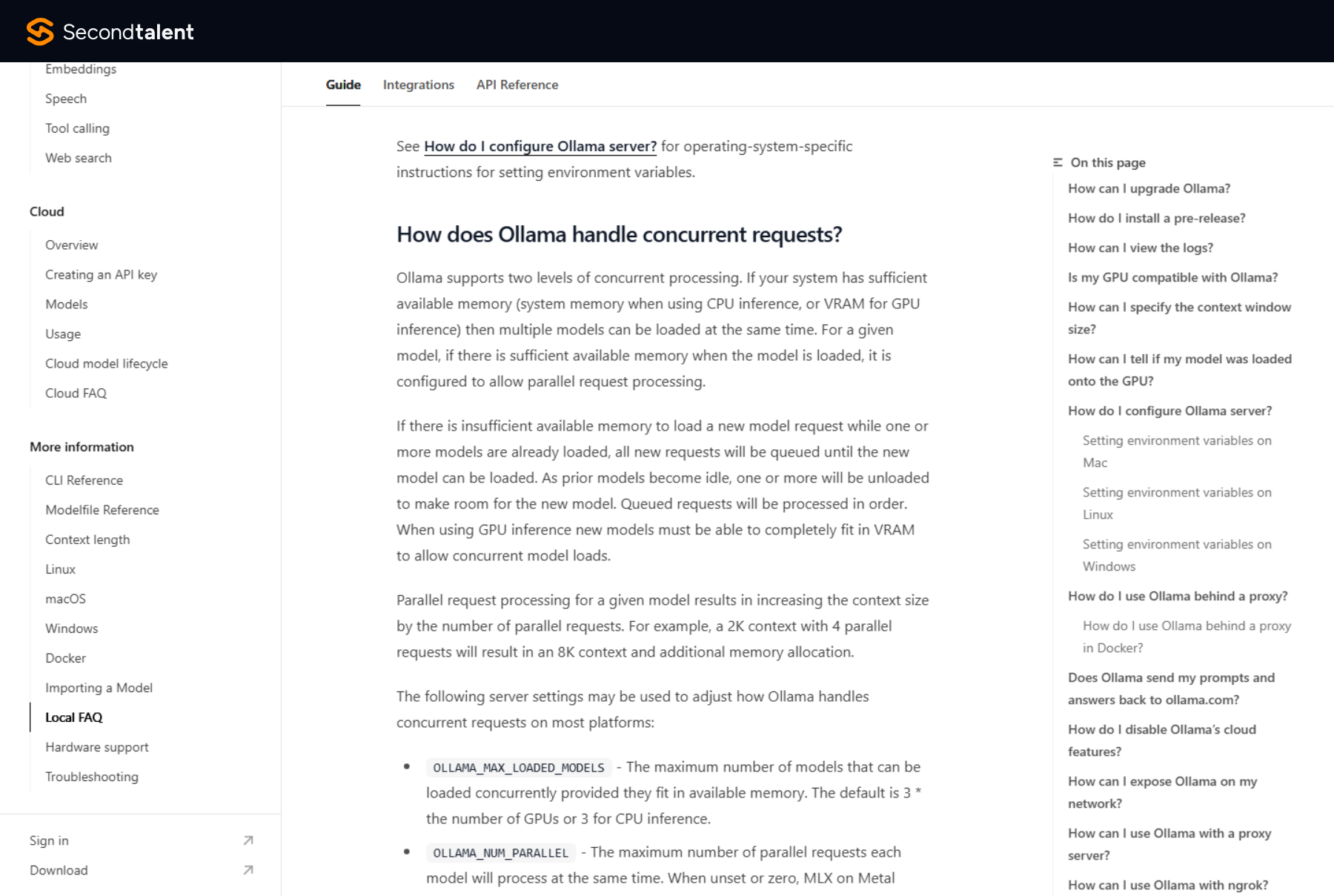
Ollama's OLLAMA_NUM_PARALLEL setting now defaults to 1 on every backend except MLX on Metal, which picks its own value from free memory.

Requests beyond that wait in a queue of up to 512, and the next one gets a 503 error, per the Ollama FAQ.

Screenshot of the Ollama Local FAQ section How does Ollama handle concurrent requests, explaining that parallel requests multiply the context size and listing the OLLAMA_MAX_LOADED_MODELS and OLLAMA_NUM_PARALLEL settings, 23 November 2026.

Raising the setting costs memory in a direct way. Ollama multiplies the context by the number of parallel slots, so a 2K context with 4 parallel requests becomes an 8K context.

It can also keep several models loaded at once, up to three per GPU by default, which suits a developer switching between a chat model and an embedding model.

That design fits one person at a keyboard or a coding agent on a laptop. ollama launch claude points Claude Code at a local model, and the README lists Codex, Copilot CLI and OpenCode as other targets.

Nothing in Ollama's docs covers splitting one model across machines.

Published Benchmarks: vLLM vs Ollama Throughput

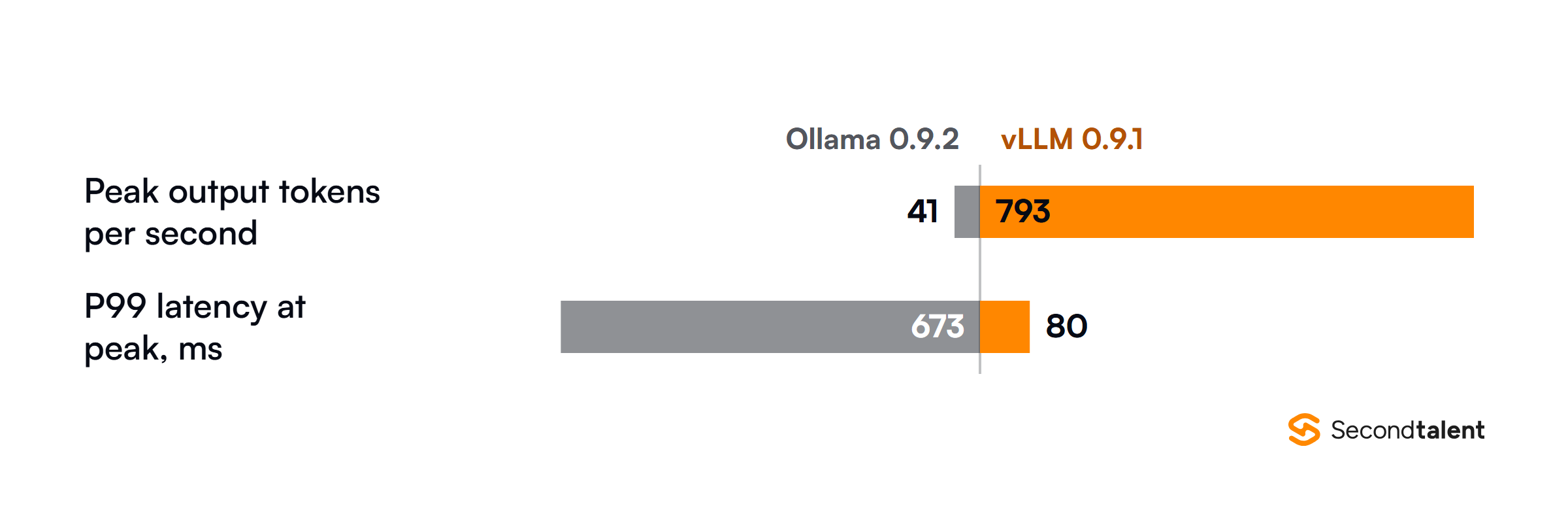
The cleanest head-to-head is Red Hat's Ollama vs vLLM benchmark by Harshith Umesh, published 8 August 2025. It ran Llama 3.1 8B on one NVIDIA A100 40GB, vLLM 0.9.1 against Ollama 0.9.2, from 1 to 256 concurrent users for 300 seconds each.

Split bar chart of Red Hat's August 2025 benchmark on one NVIDIA A100 40GB with Llama 3.1 8B: peak output 41 tokens per second for Ollama 0.9.2 against 793 for vLLM 0.9.1, and P99 latency at peak of 673 ms against 80 ms.

vLLM's throughput rose as concurrency climbed while Ollama's stayed flat. Raising Ollama to 32 parallel slots narrowed the gap but did not close it, and its inter-token latency turned erratic at higher load.

Red Hat's verdict: "vLLM is unequivocally the superior choice for production deployment", while "Ollama excels in its intended role".

Red Hat repeated the exercise against llama.cpp, the engine Ollama credits in its README.

In the September 2025 test on one H200 with vLLM 0.10.0, vLLM delivered more than 44 times llama.cpp's output tokens per second at peak load, and the two were level at a single user.

Read these with their dates. Both tests are Red Hat's, on one GPU and one 8B model at 16-bit precision, more than a year and twenty-five vLLM versions ago. They show the shape of the gap under load, not today's exact ratio, and we ran no benchmark of our own.

Setup and Local Development

Ollama's README gives three ways in: a one-line install script on macOS and Linux, a PowerShell one-liner or installer on Windows, and the ollama/ollama Docker image.

The Windows build runs natively with NVIDIA and AMD Radeon support on Windows 10 22H2 or newer. Models arrive by name from the Ollama library, already quantised.

vLLM asks more of the machine. Its GPU install page requires Linux and Python 3.11 to 3.14, and NVIDIA cards of compute capability 7.5 or newer, which starts at the T4 and RTX 20 series.

Ollama goes back to compute capability 5.0, the GTX 750 Ti generation.

Formats split the same way.

Ollama runs GGUF files, the quantised single-file format built for llama.cpp, and imports Safetensors through a Modelfile. vLLM loads Hugging Face weights and quantised formats such as FP8, AWQ and GPTQ, and its GGUF page warns the support is "highly experimental and under-optimized" and now lives in a separate vllm-gguf-plugin.

On a laptop running a 4-bit model, Ollama wins on setup alone. For small open models that fit both tools, see our list of small language models.

Hardware Support

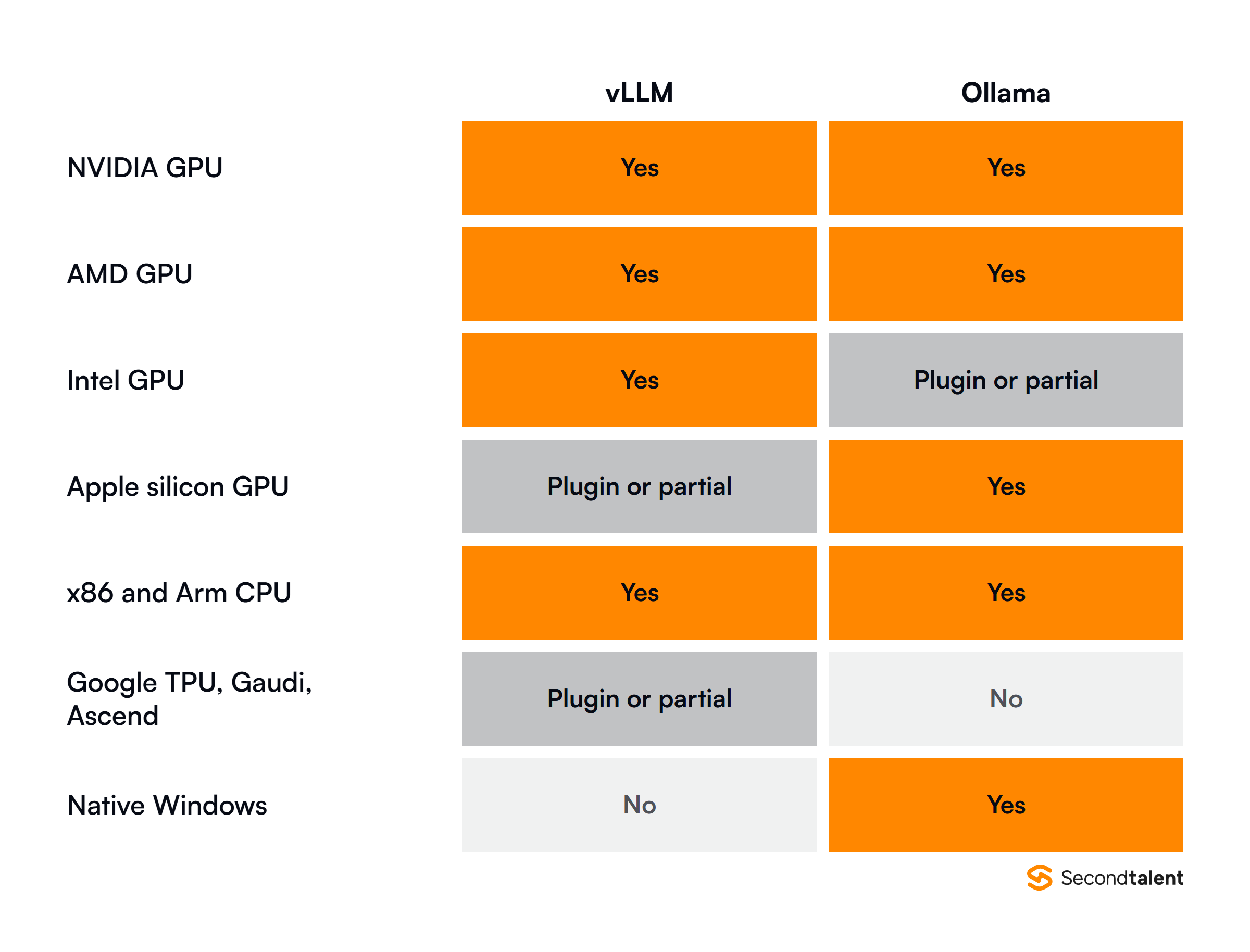
vLLM covers more data-centre hardware; Ollama covers more desks. vLLM's install docs list NVIDIA CUDA, AMD ROCm and Intel XPU GPUs, and x86, Arm, Apple silicon and IBM Z CPUs, with Google TPU, Intel Gaudi, Huawei Ascend and others as hardware plugins outside the main repository.

Heatmap of hardware support in the vLLM and Ollama docs, 23 November 2026: both support NVIDIA and AMD GPUs and x86 and Arm CPUs; Intel GPUs yes on vLLM, partial on Ollama through Vulkan; Apple silicon GPU through a plugin on vLLM, yes on Ollama; Google TPU, Gaudi and Ascend through plugins on vLLM, no on Ollama; native Windows no on vLLM, yes on Ollama.

Apple silicon is the clearest reversal. Ollama runs on Metal out of the box, while vLLM's GPU path on a Mac is vLLM-Metal, a community-maintained plugin built on MLX that wants MLX-format models.

On the PC side, Ollama's hardware page adds Vulkan for Intel and other GPUs that its CUDA and ROCm paths miss.

Model Support and Model Libraries

vLLM's README claims support for "200+ model architectures on Hugging Face".

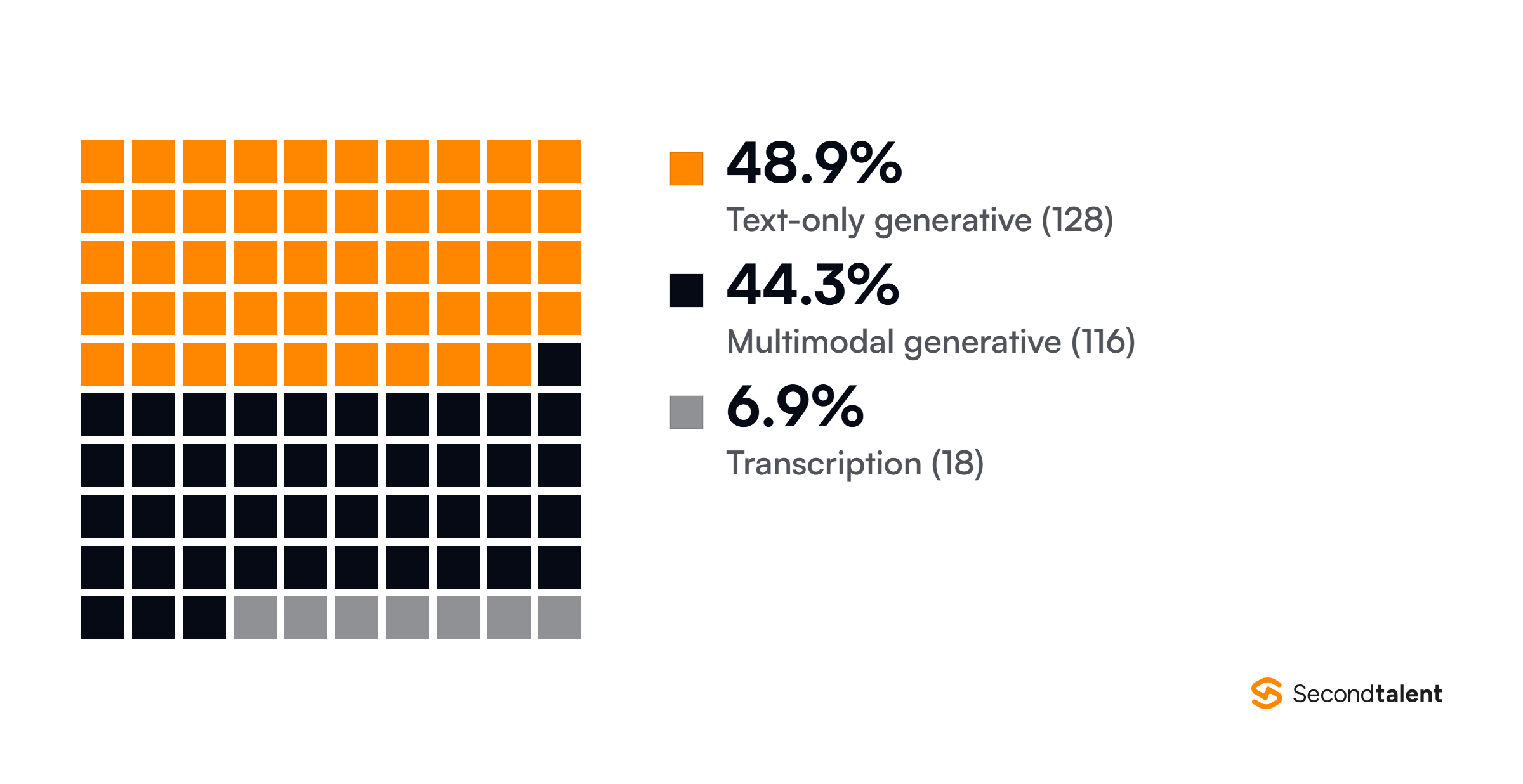
We counted the rows in its supported models page on 23 November 2026 and found 259 unique architecture names before pooling and embedding models, which live on separate pages.

Waffle chart of the 262 architecture rows on vLLM's supported models page, 23 November 2026: text-only generative 128 (48.9%), multimodal generative 116 (44.3%), transcription 18 (6.9%).

An architecture is a model family's code path, not a single download, so one row such as LlamaForCausalLM covers many fine-tunes.

Release 0.34.0 alone added ten, including Mistral Large 4 with 1 trillion total and 52 billion active parameters. If you fine-tune your own model, our guide to platforms to fine-tune open-source LLMs covers the step before serving.

Ollama counts models, not architectures. Its library listed 272 curated models on 23 November, each with prepared quantised tags, and Llama 3.1 led with 121.3 million pulls.

Our Llama model guide covers which of those versions is worth running.

vLLM vs Ollama by the Numbers: GitHub, Docker and PyPI

Ollama is the bigger name and vLLM the busier codebase. We read these figures from the GitHub, Docker Hub, PyPI and Stack Exchange APIs on 23 November 2026, using the same calls as our LocalAI vs Ollama comparison.

4,183
vLLM contributor entries incl. anonymous (Ollama: 630)
7,972
Open vLLM pull requests (Ollama: 2,073)
204.4M
Ollama Docker Hub pulls (vllm-openai: 45.4M)
2.76M
vllm PyPI downloads, last month
Source: GitHub REST API (contributors with anon=1, search API for open PRs), Docker Hub v2 API, pypistats.org, 23 November 2026.

The PyPI numbers measure different things. The vllm package is the server itself, so its 2.76 million monthly downloads include installs into GPU images and CI jobs. The ollama package is only a client library, and it logged 12.5 million.

Stack Overflow shows the same tilt toward Ollama: 258 questions under its tag, 30 under vLLM's.

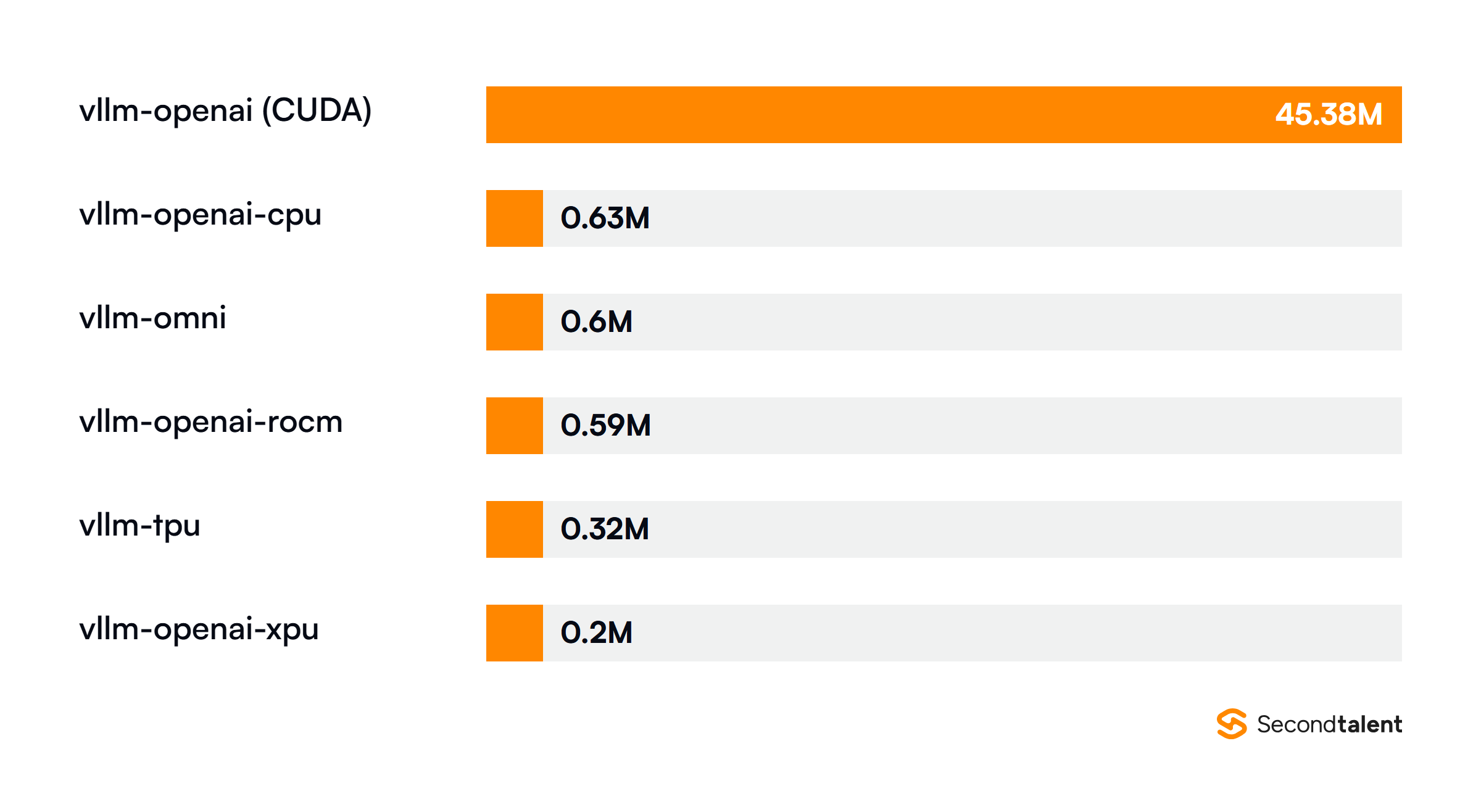
Inside vLLM's Docker namespace, the CUDA image dominates. vllm/vllm-openai has more than 70 times the pulls of the next image, the CPU build, and the ROCm, TPU and Intel XPU images trail further.

Bar chart of all-time Docker Hub pulls for vLLM images on 23 November 2026: vllm-openai (CUDA) 45.38 million, vllm-openai-cpu 0.63 million, vllm-omni 0.60 million, vllm-openai-rocm 0.59 million, vllm-tpu 0.32 million, vllm-openai-xpu 0.20 million. Source: Docker Hub API.

Release pace tells the two projects apart. vLLM cut a minor version every 13 to 15 days from v0.28.0 on 26 August to v0.34.0 on 16 November, and the contributors named per release rose from 158 on v0.15 in January to 412 on v0.34.

Ollama releases more often: 13 versions in October alone.

Area chart of contributors per vLLM minor release in 2026, from the release notes: 158 for v0.15 in January, around 200 to 320 through the spring and summer, then 307 for v0.31, 363 for v0.32, 389 for v0.33 and 412 for v0.34 in November.

Fast releases carry upgrade work. The 0.34.0 notes open with a "Before you upgrade" table: Model Runner V1 removed, the default block size raised from 16 to 64, ROCm 7.2 images dropped.

Pin a version in production and read that table each time. vLLM has also been a hosted project of the PyTorch Foundation since May 2025, which puts its governance outside any one company.

Which to Use for Development and Production

Use Ollama for development
  • A Mac or Windows laptop, or an older NVIDIA card
  • One user, or a coding agent on your own machine
  • Quantised GGUF models pulled by name
  • Trying several models in an afternoon
Use vLLM for production
  • Many concurrent users on Linux GPU servers
  • Models too large for one GPU or one node
  • FP8, AWQ or GPTQ weights from Hugging Face
  • Kubernetes, Ray or a managed GPU platform

The common path is both: prototype on Ollama, serve on vLLM.

Both expose an OpenAI-style /v1/chat/completions endpoint, so application code written against Ollama on port 11434 moves to vllm serve on port 8000 with a new base URL and model name. Plan for two catches when you switch:

  • Different weights: the 4-bit GGUF you tested on Ollama is not what vLLM will serve. Re-run your evaluation prompts on the production weights.
  • Different defaults: context length, sampling settings and chat templates come from different places, Ollama's Modelfile and vLLM's server flags and model config.
  • Different operations: vLLM on a cluster needs GPU scheduling, autoscaling and monitoring that a laptop never did. Our post on Run:ai vs Ollama covers the scheduling layer.

Some teams need neither. Teams shipping a model inside a Windows or desktop app should read Foundry Local vs Ollama. The question I would ask first is how many people will call the model at the same moment. One, Ollama.

Dozens or more, vLLM.

How we collected this data. On 23 November 2026 we called the GitHub REST API for vllm-project/vllm (repo, releases, contributors with anon=1, and search counts for open issues and PRs), the Docker Hub v2 API for every image in the vllm namespace, pypistats.org's recent-downloads API and the Stack Exchange tags API. Ollama figures come from the same calls made that day for our LocalAI post. We counted architecture rows in vLLM's supported_models.md on the main branch and read contributor counts from each release's notes. Feature claims come from each project's README and docs the same day; we installed and ran nothing.

Hire Engineers Who Run LLM Inference

Moving from an Ollama prototype to a vLLM cluster is a different job: GPU sizing, parallelism settings, upgrade testing and on-call. Second Talent places vetted remote LLM developers and Kubernetes engineers who run this stack.

If you are still defining the role, our comparison of ML infrastructure and MLOps engineers helps, or tell us what you are building on the talent request page.

FAQ

Is vLLM faster than Ollama?

Under concurrent load, yes, by a wide margin in Red Hat's published tests. With a single user the gap is small: Red Hat found llama.cpp, Ollama's underlying engine, level with vLLM at a concurrency of one.

Can vLLM run on Windows or a Mac?

Not natively on Windows; the docs suggest WSL. On Apple silicon, GPU acceleration comes through the community vLLM-Metal plugin, and the CPU build also runs.

Can vLLM use Ollama's models?

Not as they are. vLLM can load GGUF files through its experimental plugin, but its team built it around Hugging Face weights, so most teams pull the original or an FP8 or AWQ version of the same model.

Is vLLM free for commercial use?

Yes. vLLM is Apache 2.0 and Ollama is MIT, and both allow commercial use. The model weights carry their own licences.

Get developers who ship with AI agents. Starts at $25/Hour.

Start Hiring $0 cost until you hire
Matt Li

Written by

Matt Li is a tech-driven entrepreneur with deep expertise in global talent strategy, digital experience optimization, e-commerce, and Web3 innovation. He is the Co-Founder of Second Talent, a US-based company that connects businesses with top-tier tech professionals worldwide. Since launching the company in 2024, Matt has led its growth by leveraging technology to streamline remote hiring and scale distributed teams. With a background spanning product, operations, and innovation, Matt brings a cross-disciplinary perspective to the evolving digital economy. His work sits at the intersection of global talent, emerging technology, and scalable digital transformation.

More posts by Matt Li →