TL;DR: Ollama excels in simplicity with 160K GitHub stars. LocalAI offers full OpenAI API compatibility with multimodal support. Choose based on complexity needs.
What’s your AI deployment priority?
Select your situation below.
You need AI running today, not next week. Ollama’s Docker-like simplicity means your team can deploy models in minutes without complex configuration. Over 160K developers chose this path for rapid prototyping. Hire AI developers →
You’re spending thousands monthly on OpenAI and want full API compatibility without vendor lock-in. LocalAI’s drop-in replacement supports your existing code while cutting costs by 80% with on-premise deployment. Get cloud engineer rates →
Your product requires text, image, audio, and video AI capabilities. LocalAI’s comprehensive multimodal support handles all formats through one API, while Ollama focuses primarily on text models. Find full-stack AI talent →
You need enterprise-grade deployment with 99.9% uptime and data sovereignty. Both platforms support on-premise hosting, but your choice impacts team size and infrastructure costs significantly. Compare DevOps engineer costs →
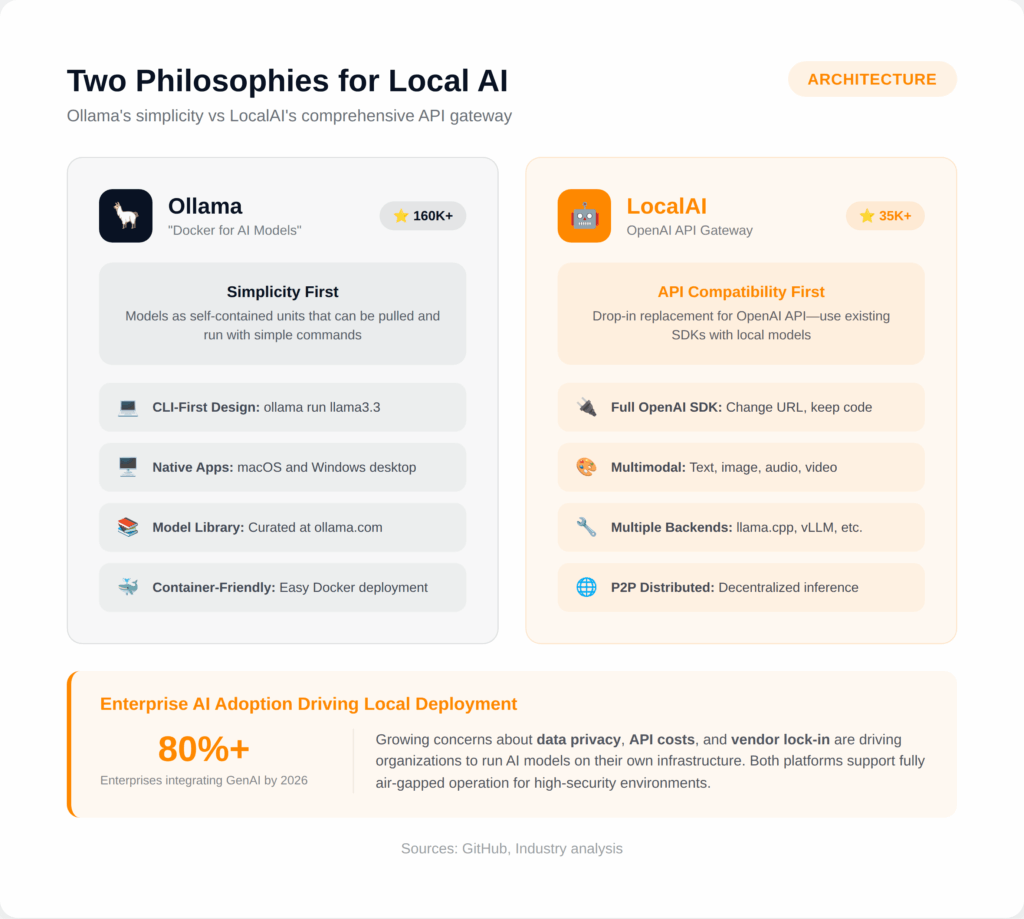
By 2026, over 80% of enterprises are expected to integrate generative AI into their operations, with growing concerns about data privacy, API costs, and vendor lock-in driving organizations to run AI models on their own infrastructure.
Two platforms have emerged as the leading solutions: Ollama with over 160,000 GitHub stars and LocalAI with 35,000+ stars.
Ollama follows a Docker-like philosophy for AI models, treating them as self-contained units that can be pulled and run with simple commands.
LocalAI takes a different approach as a comprehensive OpenAI-compatible API gateway supporting text, image, audio, and video generation. ‘
This guide breaks down the differences, use cases, and trade-offs to help you choose the right platform for your local AI deployment.
Quick Comparison: LocalAI vs Ollama in 2026
| Feature | Ollama | LocalAI |
|---|---|---|
| GitHub Stars | 160,000+ | 35,000+ |
| Primary Focus | Simplicity, CLI-first | OpenAI API compatibility |
| Text Generation | Excellent | Excellent |
| Image Generation | Limited | Stable Diffusion, Flux |
| Audio Transcription | Limited | Whisper built-in |
| Text-to-Speech | Limited | Multiple TTS backends |
| GPU Required | Optional (faster) | No (runs on CPU) |
| Native Desktop App | macOS, Windows | No (container-based) |
| P2P/Distributed | No | Yes |
| Function Calling | Basic | Full OpenAI tools API |
Architecture and Philosophy
Understanding the architectural differences between Ollama and LocalAI reveals why each platform excels in different scenarios.
Ollama: Docker for AI Models
Ollama is built for simplicity and ease of use, abstracting away much of the underlying complexity. According to industry analysis, Ollama treats models as self-contained units that can be pulled, run, and managed with simple commands.
This design prioritizes ease of use over configurability.
Key architectural characteristics:
- CLI-First Design: Run any model with
ollama run llama3.3 - Native Desktop Apps: Available for macOS and Windows
- Model Library: Curated repository at ollama.com/library
- Docker-Friendly: Easy containerization for deployment
- Thinking Feature: Toggle model’s internal reasoning process
Ollama’s explosive growth to 160,000+ GitHub stars since late 2023 reflects its appeal to developers who want to run local models without configuration complexity.
The platform handles model downloading, quantization, and memory management automatically.
LocalAI: OpenAI-Compatible API Gateway
LocalAI is engineered as a drop-in replacement for the OpenAI API, allowing developers to use existing OpenAI SDKs and tools with local models seamlessly.
Written in Go, it functions as an API shim that translates OpenAI-compatible requests and directs them to various model backends.
Key architectural characteristics:
- Full OpenAI Compatibility: Works with existing OpenAI SDKs
- Multiple Backends: llama.cpp, vLLM, Transformers, ExLlama2
- Multimodal Support: Text, image, audio, video generation
- P2P Distributed Inference: Decentralized LLM hosting
- LocalAGI: Autonomous agent platform
- LocalRecall: Semantic search and memory management
LocalAI positions itself as a comprehensive AI stack, going beyond text generation to support multimodal applications. This flexibility comes with additional complexity compared to Ollama’s streamlined approach.
Model Support and Ecosystem
Both platforms support a wide range of models, though their approaches to model management differ significantly.

Ollama Model Library
Ollama maintains a curated model library with optimized versions of popular models:
- Llama 4: Scout (109B) and Maverick (400B) variants
- Llama 3.3: 70B parameter model with state-of-the-art performance
- DeepSeek-R1: Reasoning models from 7B to 671B parameters
- Gemma 3: Google’s multimodal models from 270M to 27B
- Qwen 2.5/3: Alibaba’s multilingual models up to 128K context
- Phi 4: Microsoft’s 14B and 3.8B Mini variants
- Mistral: 7B efficient model
Hardware requirements scale with model size: 8GB RAM for 7B models, 16GB for 13B models, and 32GB for 33B models.
Ollama handles quantization automatically, with 4-bit quantization allowing models up to 110B parameters on systems with limited VRAM.
LocalAI Model Support
LocalAI offers the most versatile model format support among local LLM platforms:
- File Formats: GGUF, GGML, Safetensors, PyTorch, GPTQ, AWQ
- Backends: llama.cpp, vLLM, Transformers, ExLlama, ExLlama2
- Image Models: Stable Diffusion, Flux, Diffusers
- Audio Models: Whisper, Coqui TTS, Kokoro, Bark
- Embedding Models: BERT and compatible models
LocalAI’s model gallery provides pre-configured models, but the platform also supports custom configurations for specialized deployments. This flexibility serves teams requiring fine-tuned or specialized models across different modalities.
Performance Benchmarks
Performance varies significantly based on hardware configuration, model size, and use case. According to Red Hat benchmarks, understanding these trade-offs is essential for production planning.
Ollama Inference Speed
Ollama performance scales with hardware investment:
| Hardware | Model | Tokens/Second | Notes |
|---|---|---|---|
| RTX 3060 Ti | Llama 2 7B | 70+ | 98% GPU utilization |
| RTX 4060 | DeepSeek-Coder | 52-53 | After 4-bit quantization |
| RTX 4090 | Falcon 40B | 8.61 | 24GB VRAM limit |
| H100 | DeepSeek 14B | 75.02 | Enterprise GPU |
| 2x RTX 5090 | Llama 3.3 70B | 26.85 | 70.9% GPU utilization |
| H100 | Qwen 110B | 20.19 | Large model degradation |
By default, Ollama handles a maximum of four parallel requests, reflecting its design for single-user scenarios.
For high-concurrency production workloads, specialized platforms like vLLM achieve significantly higher throughput (793 TPS versus Ollama’s 41 TPS in benchmarks).
LocalAI Performance Considerations
LocalAI is designed to run on consumer-grade hardware without requiring a GPU, though performance improves significantly with GPU acceleration.
The platform keeps models loaded in memory for faster inference and supports multiple concurrent backends.
For production deployments, LocalAI can route requests to external high-performance backends like vLLM while maintaining the unified OpenAI-compatible API.
This architecture allows teams to optimize performance for specific workloads without changing client code.
Multimodal Capabilities
The multimodal story strongly differentiates these platforms. While Ollama focuses primarily on text generation, LocalAI provides comprehensive support for multiple modalities.

LocalAI Multimodal Features
LocalAI supports a full range of AI capabilities through its unified API:
- Image Generation: Stable Diffusion, Flux, and Diffusers backends for text-to-image
- Audio Transcription: Whisper models via whisper.cpp for speech-to-text
- Text-to-Speech: Coqui, Kokoro, Bark, and other TTS backends
- Voice Cloning: Create custom voices from samples
- Vision Models: SmollVLM, Gemma vision, and multimodal LLMs
- Video Generation: Emerging support for video models
This comprehensive multimodal support makes LocalAI suitable for applications requiring multiple AI capabilities through a single deployment.
Organizations building enterprise AI applications can consolidate their AI infrastructure rather than managing separate services for each modality.
Ollama Multimodal Support
Ollama’s multimodal support is more limited but expanding:
- Vision Models: LLaVA, Gemma 3 vision variants
- Image Generation: Recently added to /api/generate API
- Text Focus: Primary strength remains text generation
For teams whose primary need is running text-based LLMs locally, Ollama’s focused approach provides a simpler deployment path.
Teams requiring image generation, audio processing, or other modalities benefit from LocalAI’s comprehensive stack.
Use Cases and Trade-offs
The right choice depends on your specific requirements, team expertise, and deployment environment.
When to Choose Ollama
- Developer Experience: Getting started in minutes with simple CLI commands
- Desktop Development: Native macOS and Windows apps for local testing
- Single-User Workloads: Individual developers or small teams
- Text Generation Focus: Primary need is running LLMs for chat/completion
- Container Deployments: Docker-friendly architecture for microservices
- Consumer Applications: B2C products with optimized inference speed
Ollama’s simplicity accelerates development for straightforward use cases.
The platform handles model management, quantization, and optimization automatically, reducing operational overhead for teams focused on application development rather than infrastructure.
When to Choose LocalAI
- OpenAI API Migration: Switching existing applications from OpenAI to local models
- Multimodal Requirements: Applications needing image, audio, and text capabilities
- Function Calling: Complex agent workflows with tool use
- Custom Backends: Routing to vLLM, Transformers, or specialized inference engines
- Distributed Inference: P2P capabilities for decentralized deployments
- Enterprise Middleware: Universal API hub managing multiple model backends
LocalAI’s flexibility enables complex deployments where a single OpenAI-compatible endpoint routes to multiple specialized backends. This architecture serves teams requiring specialized or fine-tuned models across different modalities.
Privacy and Security
Both platforms excel at keeping data on-premise, but their security characteristics differ for enterprise deployments.
Air-Gapped Deployment
According to security analysis, both Ollama and LocalAI support fully air-gapped operation, making them suitable for high-security environments:
- Government/Defense: Secure NLP for intelligence analysis on classified data
- Healthcare: Process patient records under HIPAA compliance
- Financial Services: Fraud detection with sensitive customer data
- Legal: Document analysis maintaining attorney-client privilege
Local LLM deployment automatically satisfies data residency requirements since all processing occurs on-premise. This eliminates cross-border data transfer concerns that complicate cloud AI compliance.
Organizations can deploy models like Llama, Mistral, or DeepSeek behind their firewall with full encryption, RBAC, audit trails, and compliance with SOC 2, HIPAA, or GDPR.
Security Trade-offs
Ollama’s simpler architecture means fewer attack surfaces but also fewer security controls.
LocalAI provides more enterprise security features including API key authentication, rate limiting, and fine-grained access control, but requires more careful configuration.
For teams building secure AI applications, both platforms require additional infrastructure (reverse proxies, authentication layers, network isolation) for production security. Neither provides enterprise-grade security out of the box.
Integration and Migration
Migration paths and integration capabilities significantly impact long-term flexibility.
OpenAI SDK Compatibility
LocalAI provides full OpenAI API compatibility, enabling teams to switch from OpenAI to local models with minimal code changes. Simply update the base URL and API key. This compatibility extends to:
- Chat Completions: /v1/chat/completions endpoint
- Embeddings: /v1/embeddings for vector generation
- Function Calling: Full tools API with parallel function invocations
- Audio: Transcription and TTS endpoints
- Images: Generation via DALL-E compatible API
Ollama provides its own API but also offers an OpenAI-compatible endpoint for basic use cases. The compatibility is less comprehensive than LocalAI’s, particularly for advanced features like function calling and multimodal operations.
LangChain and LlamaIndex Integration
Both platforms integrate with popular LLM frameworks:
- LangChain: Native integrations for both Ollama and LocalAI
- LlamaIndex: Support for local model deployments
- OpenWebUI: Works seamlessly with Ollama (121K GitHub stars)
- Custom Applications: Standard REST APIs for direct integration
For teams building RAG applications or AI agents, both platforms provide the necessary integration points.
LocalAI’s LocalAGI component specifically enables autonomous agents with tool calling, while Ollama integrates cleanly with external agent frameworks.
Production Deployment Patterns
Production considerations vary based on scale, reliability requirements, and operational maturity.
Ollama Production Stack
Ollama’s container-friendly design enables standard Kubernetes deployment patterns:
- Container Deployment: Official Docker images with GPU support
- Horizontal Scaling: Multiple replicas behind load balancer
- Model Caching: Persistent volumes for downloaded models
- Health Checks: Built-in endpoints for orchestration
For consumer-facing applications, Ollama’s optimized inference speed and reliability work well with containerized scaling. The 4-request parallel limit can be addressed through horizontal scaling of Ollama instances.
LocalAI Production Stack
LocalAI serves as an orchestration layer for complex production deployments:
- API Gateway: Single endpoint routing to multiple backends
- Backend Flexibility: Route to llama.cpp, vLLM, or external services
- Rate Limiting: Built-in request throttling
- API Authentication: Key-based access control
- Agent Jobs: Background task scheduling with cron syntax
For multi-tenant SaaS platforms, LocalAI’s model management and resource isolation capabilities provide flexibility. Teams can route different tenants or use cases to optimized backends while maintaining a consistent API surface.
Cost Considerations
Both platforms are free and open source, but total cost of ownership includes hardware and operational expenses.
Hardware Requirements
LocalAI is designed to run on consumer-grade hardware without GPU, making it accessible for initial exploration. Ollama benefits significantly from GPU acceleration but supports CPU-only operation for smaller models.
Practical hardware guidelines:
- 7B Models: 8GB RAM minimum, consumer laptop capable
- 13B Models: 16GB RAM, mid-range workstation
- 33B+ Models: 32GB+ RAM, dedicated server or GPU
- 70B+ Models: Enterprise GPU (A100, H100) or multi-GPU setup
For organizations comparing against cloud API costs, local deployment becomes cost-effective at moderate usage levels. The break-even point depends on hardware costs, usage patterns, and the value of data privacy.
Making Your Decision

Ollama’s 160,000+ GitHub stars and Docker-like simplicity make it the default choice for teams wanting to run LLMs locally with minimal friction.
LocalAI’s comprehensive OpenAI compatibility and multimodal support serve teams migrating from cloud APIs or building complex AI applications.
For new projects exploring local LLMs, Ollama provides the fastest path to running models. For organizations with existing OpenAI-based applications or multimodal requirements, LocalAI’s API compatibility reduces migration effort.
Many teams benefit from using both: Ollama for development and exploration, LocalAI for production deployments requiring advanced features.
Hire vetted remote AI developers with Second Talent to deploy secure local LLM infrastructure using Ollama, LocalAI, or enterprise AI platforms.



![Is Micro1 Legit?. Is Micro1 Legit? Pay, Reviews and How It Works [2026], by Second Talent.](https://www.secondtalent.com/wp-content/uploads/2026/09/is-micro1-legit-featured-v2-768x403.jpg)