











Skip to content

How to Download and Install OpenAI Codex (Nov 2026): App, CLI and IDE Extension

Matt Li By Matt Li, Co-Founder and Director 11 min read
How to download and install OpenAI Codex: the CLI, the ChatGPT desktop app and the IDE extension, by Second Talent.
TL;DR: To install the Codex CLI, run npm install -g @openai/codex or OpenAI's one-line installer; on our Windows 11 PC it took 26 seconds and put 523 MB on disk. For a desktop app, install the ChatGPT desktop app, which now carries Codex, from the Microsoft Store, the macOS DMG or the Linux preview packages. For an editor, add the Codex extension (openai.chatgpt) to VS Code, Cursor or Windsurf, then sign in with any ChatGPT plan, Free included.

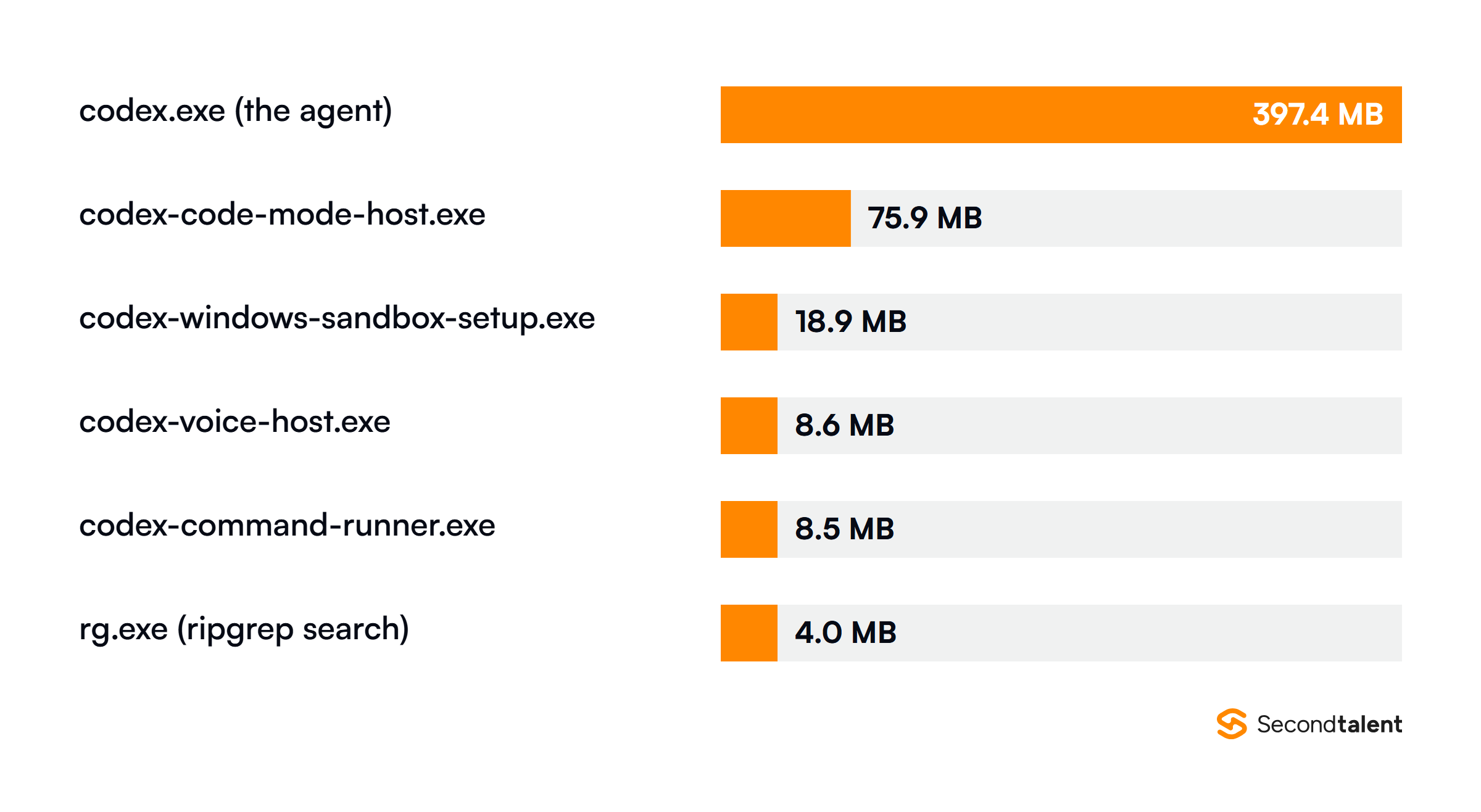
The Codex CLI binary that npm unpacks on Windows is a single 397.4 MB file, signed by OpenAI OpCo, LLC. I installed it on a Windows 11 Pro PC on November 27, 2026, and its own health check flagged Microsoft Defender first.

OpenAI has also renamed the desktop app: it is now the ChatGPT desktop app, with Codex as a mode.

Key takeaways
  1. 1Windows no longer needs WSL: OpenAI's Windows docs make the native Windows sandbox the default, and WSL1 stopped working at Codex 0.115.
  2. 2Five of the six executables in our install carry a valid OpenAI OpCo, LLC signature; the bundled ripgrep search tool is the unsigned one.
  3. 3The VS Code extension has 17.2 million installs, and the CLI and extension share one sign-in.
  4. 4An API key works for local use but skips the cloud features, GitHub code review among them.
Which Codex download do you need?

Codex now ships in four places, and they share one account. OpenAI's Codex quickstart starts with the desktop app; the CLI and the editor extension are listed beside it. Pick by where you already work:

You live in a terminal
Codex CLI
v0.172.0. npm, Homebrew or a one-line installer. The command is codex.
You want a desktop workspace
ChatGPT desktop app
Codex mode for parallel projects, worktrees and scheduled tasks. macOS, Windows, Linux preview.
You want to keep your editor
IDE extension
openai.chatgpt for VS Code, Cursor and Windsurf. JetBrains has it in AI Chat.
You want nothing installed
Web and Cloud
Codex in ChatGPT on the web, with cloud tasks on Plus and above.
Versions and platforms as listed on learn.chatgpt.com, the npm registry and the VS Code Marketplace, November 27, 2026.

The full list, with what each one installs and where it runs:

DownloadHow you get itRuns on
Codex CLInpm, Homebrew cask, install script, or a binary from GitHub ReleasesmacOS (Apple Silicon and Intel), Linux x64 and ARM64, Windows
ChatGPT desktop appCodex.dmg, Microsoft Store (winget ID 9PLM9XGG6VKS), .deb, .rpm or Arch scriptmacOS (Apple Silicon build), Windows, Linux in preview
IDE extensionVS Code Marketplace: openai.chatgptVS Code and Insiders, Cursor, Windsurf
JetBrains and XcodeBuilt into each IDE's own AI integrationJetBrains IDEs (AI Chat), Xcode
Web and Cloudchatgpt.com, no installAny browser

How to install the Codex CLI on Windows: our test install

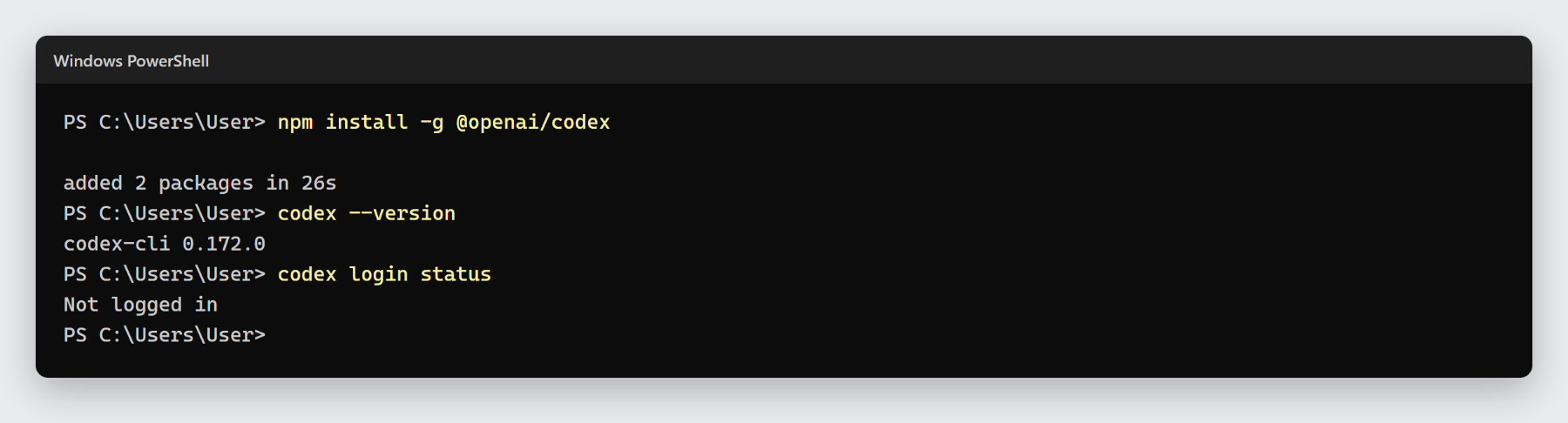
A clean npm install took 26 seconds on our office line and added only two packages: the @openai/codex launcher and a Windows binary package that holds the real program.

We ran it in PowerShell on Windows 11 Pro x64 with Node.js 24, no administrator prompt, on November 27, 2026. These are the steps:

  1. Install Node.js 16 or newer if you do not have it. The npm package lists node >=16; we used Node 24.
  2. Open PowerShell and run npm install -g @openai/codex.
  3. Check it with codex --version. Ours printed codex-cli 0.172.0, the current npm release that day.
  4. Run codex in a project folder and choose Sign in with ChatGPT when it asks.
PowerShell on Windows 11 showing npm install -g @openai/codex finishing with added 2 packages in 26s, codex --version printing codex-cli 0.172.0, and codex login status printing Not logged in.

If you do not want npm, the openai/codex README gives a standalone installer for Windows. It downloads from releases.openai.com and needs no Node.js:

powershell -ExecutionPolicy ByPass -c "irm https://chatgpt.com/codex/install.ps1 | iex"
26 s
Clean npm install, cache cleared first
523 MB
On disk under AppData\Roaming\npm
6
Executables in the package, 5 of them signed by OpenAI
Source: Second Talent install test, Windows 11 Pro x64, codex-cli 0.172.0, November 27, 2026.

Most of that space is one file: codex.exe is 397.4 MB on its own. The helpers around it run a code-mode host, the Windows sandbox setup, voice and a command runner.

Bar chart of the executables in an npm install of the Codex CLI on Windows 11: codex.exe 397.4 MB, codex-code-mode-host.exe 75.9 MB, codex-windows-sandbox-setup.exe 18.9 MB, codex-voice-host.exe 8.6 MB, codex-command-runner.exe 8.5 MB and rg.exe 4.0 MB, 523 MB in total.

To check the signature yourself, run the line below in PowerShell. You want Valid and a subject of CN="OpenAI OpCo, LLC".

Our codex.exe, sandbox setup, command runner, voice host and code-mode host all passed; rg.exe, the open-source ripgrep search tool Codex bundles, is not signed.

Get-ChildItem "$env:APPDATA\npm\node_modules\@openai\codex" -Recurse -Filter *.exe | ForEach-Object { "{0}  {1}" -f $_.Name, (Get-AuthenticodeSignature $_.FullName).Status }

Check the install with codex doctor

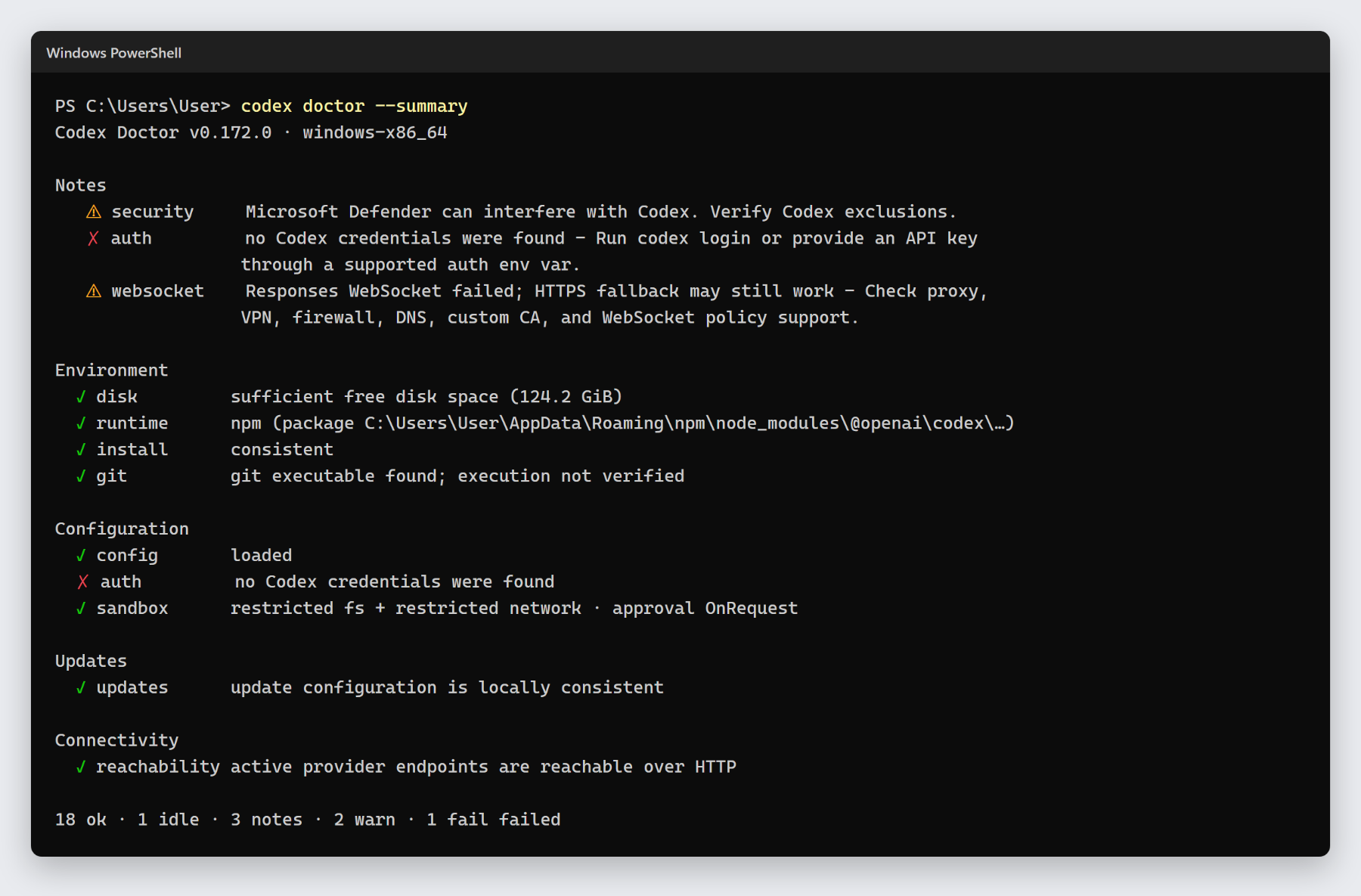
Codex 0.172 ships a health check, and on a fresh Windows install it reports one failure you should expect. Run codex doctor --summary before you sign in and it lists 18 passing checks, two warnings and the missing credentials:

Output of codex doctor --summary on a fresh Windows install: warnings for Microsoft Defender and the Responses WebSocket, a failure for missing credentials, and passing checks for disk, runtime, install, git, config, sandbox, updates and reachability.

The auth failure clears when you sign in. So should the WebSocket warning: the full report showed the handshake returning HTTP 401, which is what an unauthenticated request gets.

The Defender note is the one to act on.

Doctor names the files it wants excluded, the signed Codex app plus codex.exe, codex-windows-sandbox-setup.exe, codex-command-runner.exe and codex-code-mode-host.exe, and suggests a certificate or executable-path exclusion.

Default permissions are tight. Doctor reported a restricted file system, restricted network and approval "OnRequest". In a Git folder Codex starts in its Auto preset, which can write inside the workspace and asks before anything else; outside Git it starts read-only. Change it mid-session with /permissions.

How to install the Codex CLI on macOS and Linux

On macOS and Linux the quickest route is OpenAI's install script, and the same line updates Codex later. The Codex CLI page lists it first, with npm and Homebrew as alternatives:

# macOS or Linux, standalone installer
curl -fsSL https://chatgpt.com/codex/install.sh | sh

# or with npm (Node.js 16+)
npm install -g @openai/codex

# or with Homebrew
brew install --cask codex
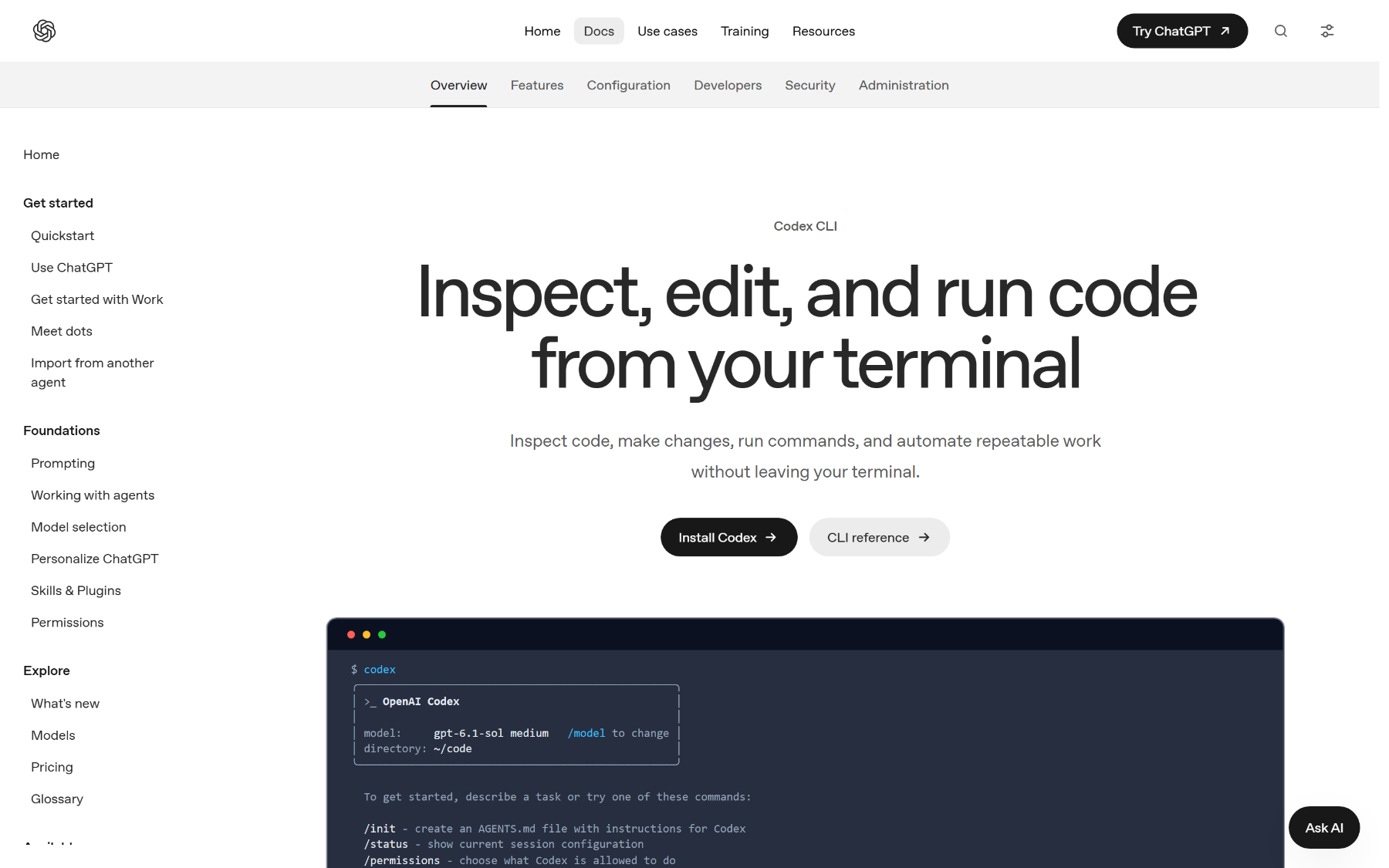
OpenAI's Codex CLI documentation page on learn.chatgpt.com with the headline Inspect, edit, and run code from your terminal and an Install Codex button.

The project's install requirements ask for macOS 12 or later, Ubuntu 20.04+ or Debian 10+, 4 GB of RAM (8 GB recommended) and Git 2.23+ if you want the pull request helpers.

If you cannot use a package manager, GitHub Releases carries prebuilt binaries for Apple Silicon and Intel Macs and for x64 and ARM64 Linux; extract the archive and rename the file to codex.

Do not install with sudo npm install -g. If codex is "command not found" afterwards, run npm config get prefix, add that folder's bin to your PATH and open a new shell.

How to install the ChatGPT desktop app with Codex

The app that launched as "Codex" on February 2, 2026 now installs as the ChatGPT desktop app. OpenAI's app page describes it as a place to run projects in parallel and keep long-running work moving, and Codex is a mode inside it.

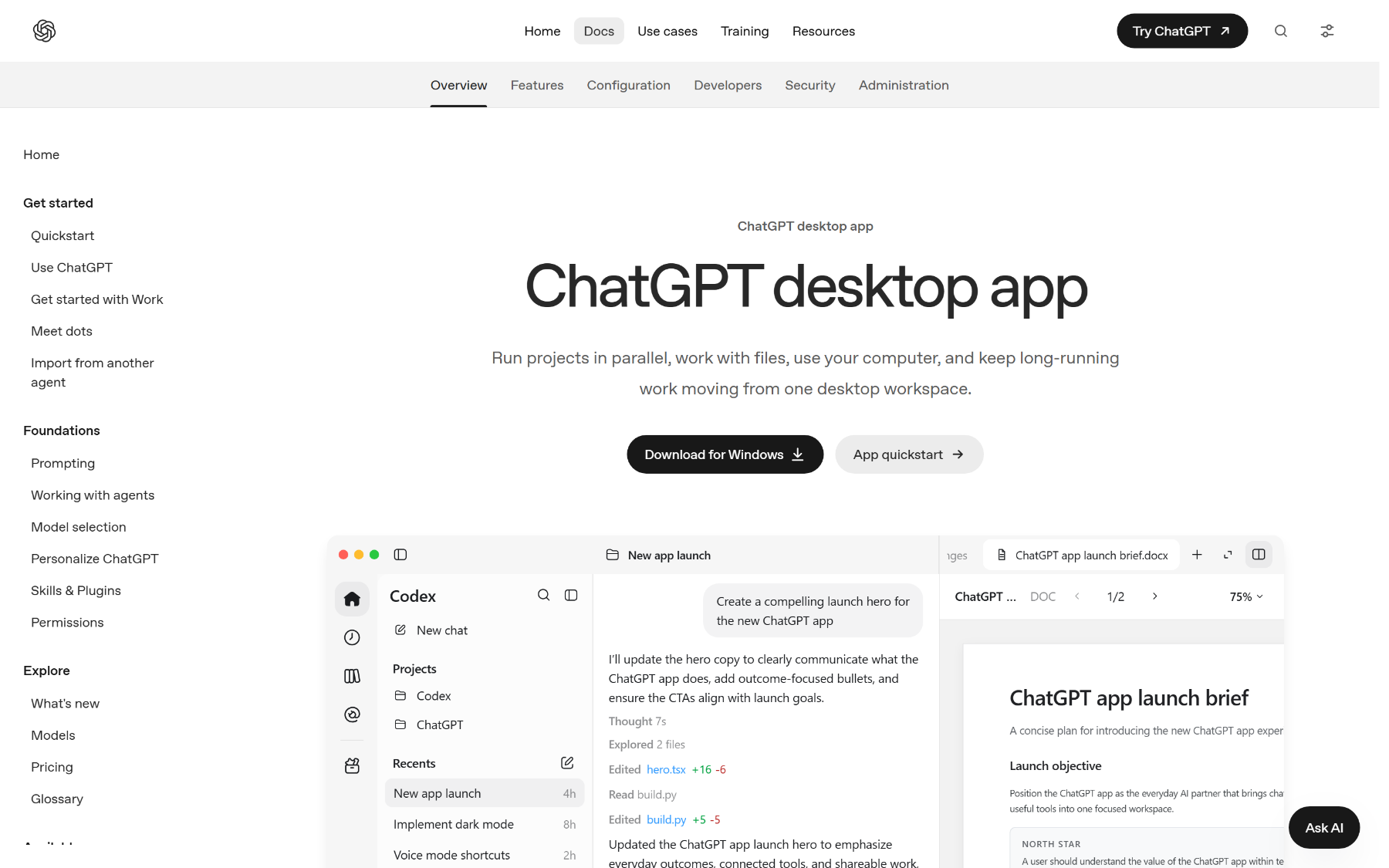
OpenAI's ChatGPT desktop app documentation page with a Download for Windows button and a preview of the app's Codex mode sidebar.
  • Windows: install from the Microsoft Store, or run winget install --id 9PLM9XGG6VKS -s msstore. The Windows app docs add winget install Git.Git if you want the Git features.
  • macOS: download Codex.dmg from the app page and drag it to Applications. The download button is labelled Apple Silicon.
  • Linux: the Linux app is in preview for Ubuntu 24.04 and 26.04, Debian 13, Fedora 43 and 44, and Arch, in x64 and ARM64 builds. On Ubuntu or Debian that is sudo apt install ./chatgpt_amd64.deb.

If you already have the CLI, codex app opens the desktop app and starts the installer when it is missing. The app went from one platform to three in nine months:

Apr 16, 2025
Codex CLI announced alongside o3 and o4-mini as an open-source terminal agent
Feb 2, 2026
Codex app launches for macOS
Mar 4, 2026
Windows version of the Codex app released
By Nov 27, 2026
ChatGPT desktop app carries Codex mode, with a Linux preview
Sources: OpenAI, Introducing o3 and o4-mini and Introducing the Codex app; learn.chatgpt.com app docs.

How to install the Codex extension in VS Code, Cursor or Windsurf

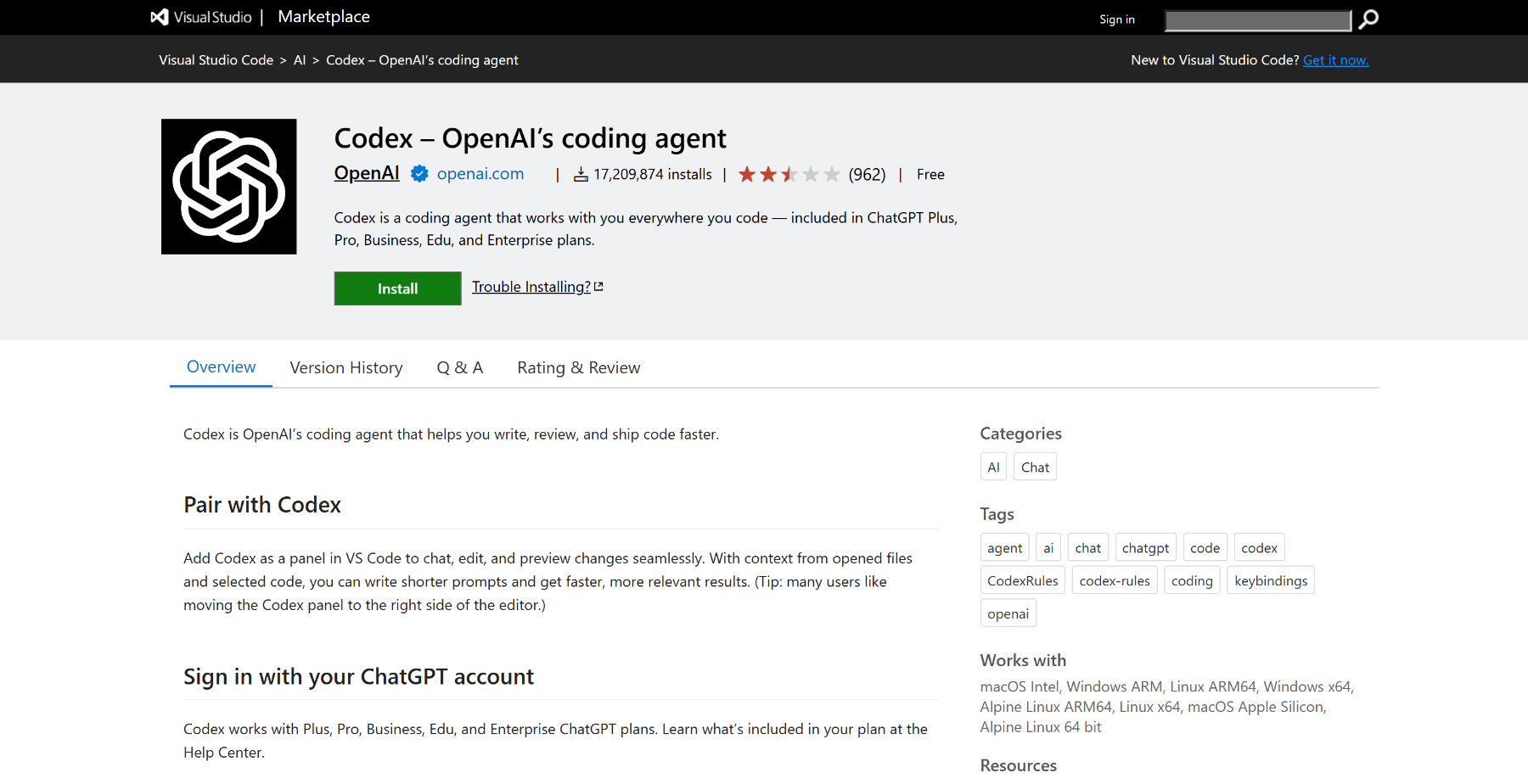
The extension's Marketplace page counted 17,209,874 installs when we captured it, under the name "Codex, OpenAI's coding agent" and the ID openai.chatgpt.

Install it from the VS Code Marketplace, or search "Codex" in the Extensions panel of VS Code, Cursor or Windsurf.

VS Code Marketplace listing for Codex, OpenAI's coding agent, published by OpenAI, showing 17,209,874 installs and an Install button.

After install, Codex opens as a sidebar panel. If you do not see its icon, run Codex: Open Codex Sidebar from the Command Palette.

The IDE extension docs list one Windows fix worth knowing: if the panel stops responding, install the C++ build tools with winget install --id Microsoft.VisualStudio.2022.BuildTools -e.

JetBrains users do not need the extension; open AI Chat and pick Codex. If you are choosing an editor first, our guide to AI code assistants for Visual Studio Code compares the alternatives.

Sign in: which ChatGPT plans include Codex

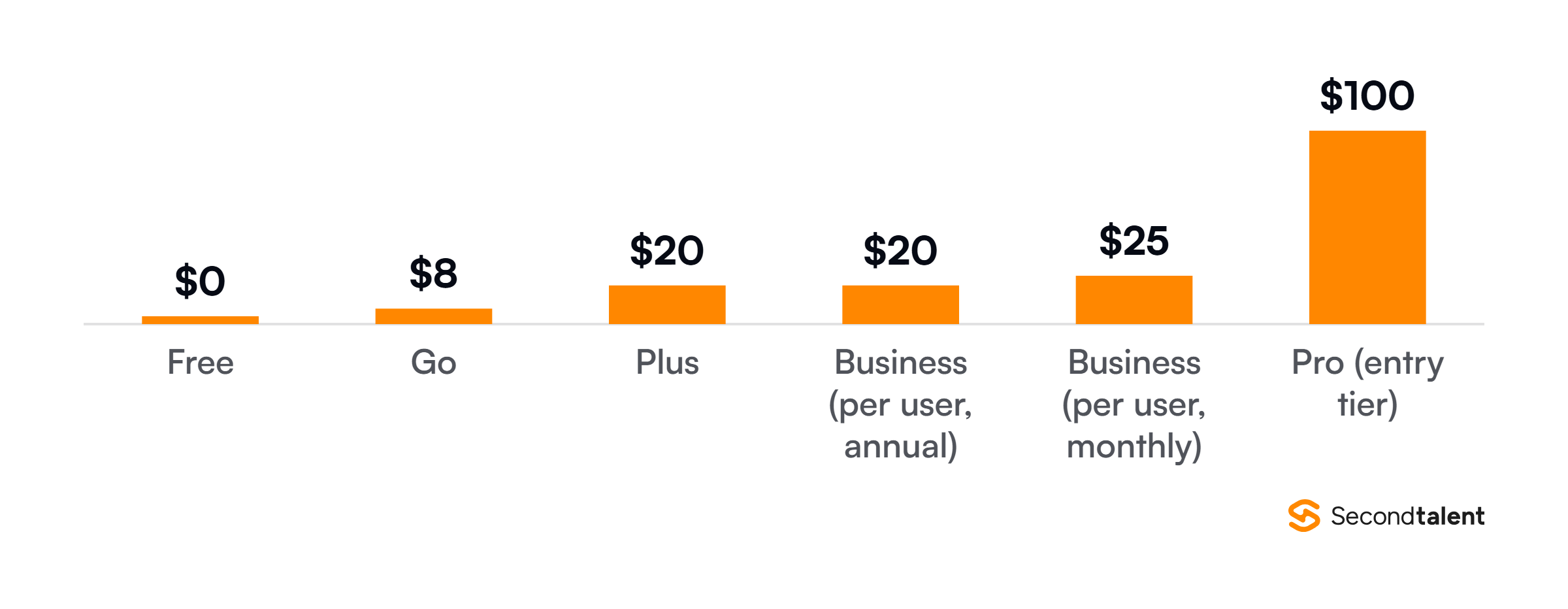
Every ChatGPT plan includes Codex now, the free one too. OpenAI's Codex pricing page lists Free, Go, Plus, Pro, Business, Edu and Enterprise, and the Marketplace listing still names only the paid ones.

Column chart of monthly prices for ChatGPT plans that include Codex: Free $0, Go $8, Plus $20, Business $20 per user billed annually or $25 monthly, and Pro from $100.

Limits are what change between plans. Plus and Business get an estimated number of messages per five hours, which the page says "are not fixed message limits", and Pro has no five-hour limit for now.

Cloud tasks, where Codex works in OpenAI's sandbox while your laptop is closed, need Plus or above.

The CLI and the extension share one login, stored in ~/.codex/auth.json, which the authentication docs tell you to treat like a password. These are the sign-in commands:

codex login                                         # browser sign-in with ChatGPT
printenv OPENAI_API_KEY | codex login --with-api-key  # pay per token instead
codex login --device-auth                           # headless machine or SSH session
codex login status                                  # check which account is active

An API key bills at API rates and leaves out the cloud features, GitHub code review included. For a model-by-model view of what Codex runs on, see every OpenAI model explained.

Fixes for common Codex install problems

Most failed installs on Windows trace back to PowerShell's execution policy. If PowerShell refuses to run npm.ps1 or codex.ps1 because scripts are disabled, OpenAI's Windows docs say to set the policy to RemoteSigned for your user:

Set-ExecutionPolicy -Scope CurrentUser RemoteSigned
  • Still on WSL1: Codex 0.115 moved the Linux sandbox to bubblewrap, so WSL1 no longer works. Upgrade the distro to WSL2 or use native Windows.
  • Projects under \\wsl$: keep them on the Windows drive when you use the native app or CLI. To share settings with WSL, point CODEX_HOME at your Windows .codex folder.
  • Sandbox error 1385: a logon-rights policy on managed PCs. Ask IT, or switch the sandbox to unelevated for now.
  • No browser on the machine: use codex login --device-auth, or forward the login port with ssh -L 1455:localhost:1455.
  • Two copies fighting: an npm install and a script install can both sit on PATH. On Windows, Get-Command codex -All shows every copy.
The docs disagree on WSL. The GitHub install page still lists "Windows 11 via WSL2" as the requirement, while OpenAI's Windows sandbox page says to use the native sandbox by default and reach for WSL only for Linux-native tooling. Our native install ran without WSL.

Developers who already work with coding agents

Installing Codex takes a minute; getting a team to ship with it takes engineers who already review agent output for a living.

If you are comparing agents, our pieces on Claude vs ChatGPT for coding, editors for Claude Code and Cursor vs GitHub Copilot cover the rest of the field, and our Antigravity install guide walks through Google's equivalent.

Second Talent matches US teams with pre-vetted senior engineers who use agents like Codex daily, within 24 hours, and employs them for you under employer of record. Hire developers who can start on your stack this month.

FAQs

Is Codex free to install?

Yes. The CLI is open source on GitHub, the extension is free on the Marketplace, and the free ChatGPT plan includes Codex with lower usage limits than the paid plans.

How do I update or uninstall the Codex CLI?

Run codex update, or repeat the command you installed with: the install script, npm install -g @openai/codex or brew upgrade --cask codex.

To remove it, run npm uninstall -g @openai/codex or brew uninstall --cask codex, then delete ~/.codex if you also want your settings and saved login gone.

Is Codex the same as the ChatGPT desktop app?

The desktop app is where Codex lives on the desktop now, as one of its modes. The CLI and the IDE extension are separate installs that sign in with the same ChatGPT account.

Does Codex run on Intel Macs?

The CLI does: GitHub Releases has an x86_64 macOS build and Homebrew installs it. The desktop app's download button is labelled Apple Silicon only.

Get developers who ship with AI agents. Starts at $25/Hour.

Start Hiring $0 cost until you hire
Matt Li

Written by

Matt Li is a tech-driven entrepreneur with deep expertise in global talent strategy, digital experience optimization, e-commerce, and Web3 innovation. He is the Co-Founder of Second Talent, a US-based company that connects businesses with top-tier tech professionals worldwide. Since launching the company in 2024, Matt has led its growth by leveraging technology to streamline remote hiring and scale distributed teams. With a background spanning product, operations, and innovation, Matt brings a cross-disciplinary perspective to the evolving digital economy. His work sits at the intersection of global talent, emerging technology, and scalable digital transformation.

More posts by Matt Li →