AI coding assistants are changing how developers write software. Instead of spending hours fixing errors or searching for code examples, many developers now ask AI tools for instant help.
These assistants can write functions, debug programs, explain logic, and even build small apps in minutes.
Among the leading AI models, Claude by Anthropic and ChatGPT by OpenAI stand out. Both are trained to understand natural language and generate working code, but they approach problems in different ways.
Developers worldwide are curious to know: which one is more reliable for real coding tasks?
In this comparison guide, we put Claude and ChatGPT to the test. We will give them the same coding challenges, check their correctness, clarity, and reasoning, and see which one performs better.
By the end, you will have a clear idea of which AI assistant is the stronger partner for coding.
What is Claude?
Claude is an AI model created by Anthropic, a company that focuses on building safe and reliable AI. Claude is designed to reason well and give clear, natural explanations.
For coding, Claude has some strong features. It offers a very large context window (up to 200K tokens), which lets it handle big codebases or long documents without losing track.
It is also good at step-by-step explanations, making it helpful for learning and debugging.
Its main drawback is the weaker IDE and plugin ecosystem. While it explains and reasons well, it is not as connected to popular coding tools yet.
What is ChatGPT?
ChatGPT is built by OpenAI and is one of the most widely used AI models among developers. It is known for its strong coding ability and fast response speed.
ChatGPT comes in multiple versions like GPT-4 and GPT-4o, which are powerful for writing, fixing, and explaining code.
It also connects with popular developer tools through IDE integrations (such as VS Code and JetBrains) and supports plugins that extend its abilities.
It is strong in code accuracy and quick for prototyping small apps or scripts. The main limitation is its shorter context window compared to Claude, which can make it harder to handle very large codebases at once.
How We Compared Them
To make the comparison fair, we tested both Claude and ChatGPT 5.0 using the same coding prompts. Each model received identical tasks, and we compared their outputs side by side.
We focused on five key parameters:
Correctness – does the code run without errors?
Code quality – is the code clean, structured, and easy to read?
Reasoning depth – does the model explain the “why” behind the solution?
Explanation clarity – are the explanations simple and easy to follow?
Practicality – is the code useful for real-world scenarios?
We selected five real coding tasks that range from small apps to problem-solving challenges. These tasks helped us see not only how well each AI writes code, but also how they reason, explain, and support a developer in practice.
To present our findings visually, we used an AI presentation maker to lay out the comparisons you’ll see below.
“Build a Lumpsum Investment Calculator in HTML, CSS, and JavaScript. Inputs: initial amount, annual return rate %, years. Output: final amount and total gain. Add input validation, edge cases, and a short help note.
Include light/dark theme toggle. Keep code modular.”
A lumpsum calculator is a common finance use case. It tests whether the model can apply formulas correctly, design a working UI, and add a smooth user experience with features like theme toggle and validation.
This task checks not only coding but also how the AI handles math accuracy, UI design, and UX details in a single project.
Claude Response:
Claude generated a code setup that looked very polished. The UI was better, colorful, and bright, making it feel like a professional web app. It also included a working light/dark mode toggle, which added a nice touch for user experience.
However, the main problem was that the lumpsum calculation did not work correctly. The app looked good but failed in its core purpose of calculating the final amount and gain.
ChatGPT’s Response:
ChatGPT delivered a more functional calculator. It included all the required inputs and outputs, light/dark mode toggle, along with two buttons: Calculate and Reset. The reset button was especially helpful for clearing inputs quickly.
The calculator worked and displayed the results, but there was one flaw. The values were calculated and shown even before clicking the Calculate button, which slightly reduced the usability.
Still, the main formula and logic worked as expected.
Better Performer: ChatGPT ✅
Task 2: Debug a Python Function With Hidden Edge Cases
Prompt:
“Fix the following Python function so it returns the median of a list safely. Handle empty lists, non‑numeric values, and even/odd lengths. Explain each change.
Real code breaks on edge cases. This task checks if the model can spot hidden traps like mutable default arguments, wrong index math, and bad inputs. It shows how well the model thinks, fixes bugs, and explains each change in simple steps.
Claude Response:
Claude shared an updated code, shown below:
Along with the test cases, Claude included inline comments, which made the code clear and concise. Also explained what changes have been made to the previous code and why.
ChatGPT Response:
ChatGPT first shared the issues with the presented code, then shared an updated code versionas below.
ChatGPT also provided an example test case along with a short explanation of the changes, but the explanation was too brief.
Better Performer: Claude✅
Task 3: Portfolio Homepage with Dark/Light Mode
Prompt:
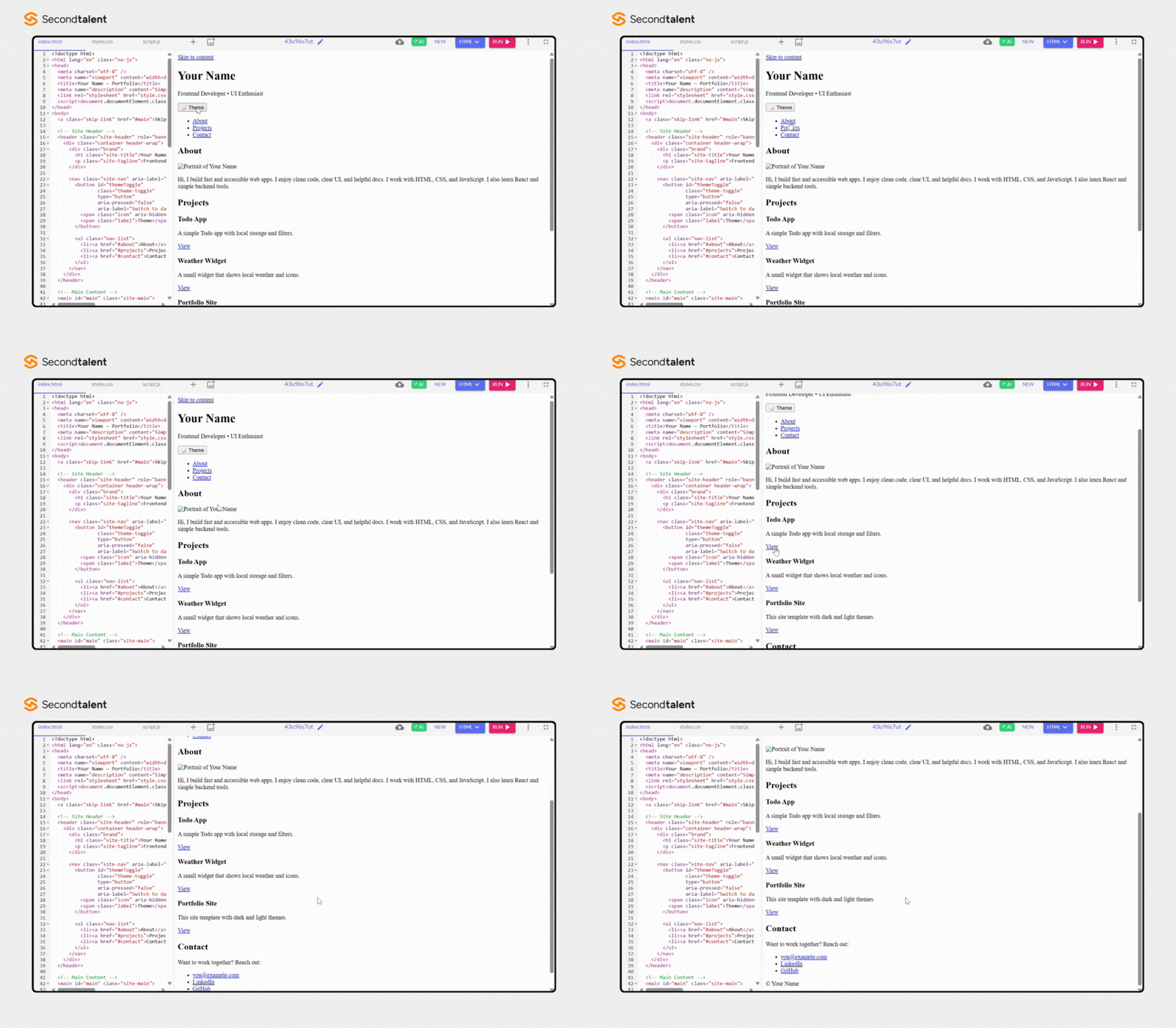
“Build a simple portfolio homepage in HTML, CSS, and JavaScript. Sections: Header (with name + nav), About, Projects, Contact. Add a dark/light mode toggle button that remembers the user’s choice using localStorage.
Use semantic HTML and Flexbox or Grid for layout.”
This is a real-world website task. It checks if the model can structure a clean UI, write semantic HTML, and build a dark/light theme that persists using localStorage.
It also tests layout skills with Flexbox or Grid and basic responsive design.
Claude Response:
Claude’s response stood out with a well-designed, responsive, and modern web page. Every section (Header, About, Projects, Contact) was placed neatly and managed effectively, giving the site a better look.
ChatGPT Response:
In contrast, ChatGPT’s output, though functional, was much more basic. The page structure worked, but it lacked the visual refinement and responsive design elements that Claude included.
Better Performer: Claude✅
Task 4: Ball Bouncer – HTML + CSS + JS
Prompt: “Build a Ball Bouncer game in one HTML file (embed CSS and JS). The player controls a paddle at the bottom with Left/Right keys and mouse. A ball bounces off walls and the paddle.
The goal is simple: keep the ball in play and score points over time.
Add:
Score that increases every second the ball stays alive
3 lives (lose one when the ball falls below the paddle)
Pause/Resume and Reset buttons
Speed ramp: ball speed increases a little every 10 seconds
Simple particle effect on paddle hit (optional)
Dark/Light mode toggle (CSS variables + localStorage) Keep functions small and avoid global variables. Write a short note on your game loop and collision math.”
This task tests real game logic and UI control. It checks input handling (keyboard + mouse), a clean game loop, collision math, scoring, lives, and state (pause, resume, reset).
It also tests theme handling with CSS variables and localStorage. The one‑file limit shows how well the model keeps code modular without global leaks.
Claude Response:
Claude’s response was impressive. It implemented all the requested features smoothly, and the overall user experience was excellent. There were no issues in functionality, and every feature worked as expected.
The controls, especially with the mouse, felt natural and responsive, making the game enjoyable to play.
ChatGPT Response:
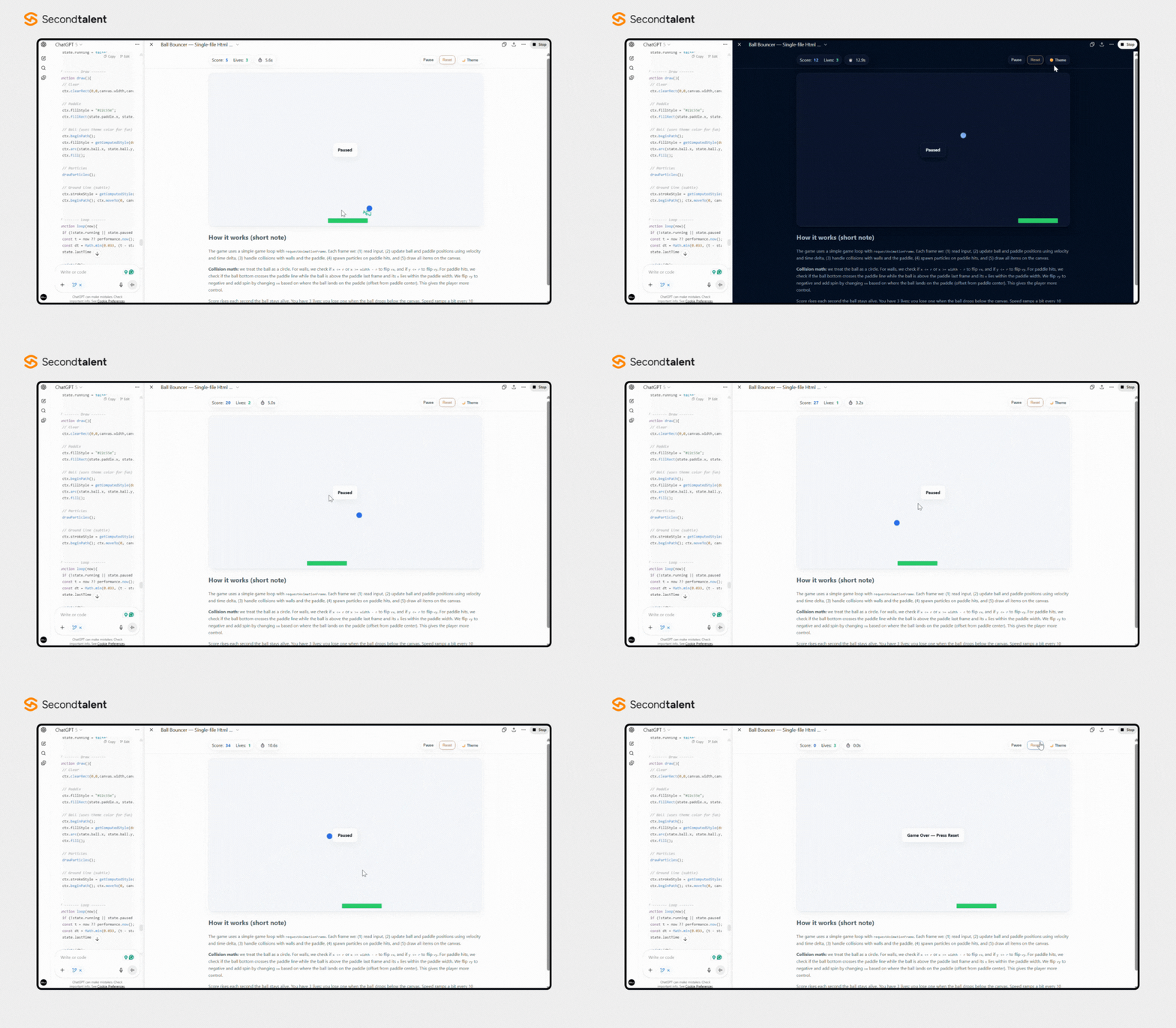
ChatGPT’s response was not up to the mark. The screen showed a pause button that was unnecessary, and the reset button did not work as expected. However, the resume, pause, and dark/light theme buttons were functional.
The game calculated the score correctly during play, but it did not display the total score once the game was over.
This test checks if the model can pick and explain algorithms, visualize logic step by step, and build a clean UI. It shows the difference in time complexity in a way users can see.
Claude Response:
Claude built a Sorting Visualizer that ran both Bubble Sort and Merge Sort smoothly.
A key improvement was that each bar showed its numeric height value on it, which made it much easier to understand how the array was being rearranged during sorting.
The animations were fluid, and the overall look felt more refined from a user’s perspective.
Bubble Sort:
Merge Sort:
ChatGPT Response:
ChatGPT also generated a functional Sorting Visualizer with both algorithms working correctly. The bars sorted in the right order, and the animations worked as expected.
However, it did not include the numeric values on the bars, which made Claude’s version more informative and user-friendly.
Bubble sort:
Merge Sort:
Better Performer: Claude✅
Claude vs ChatGPT: Coding Test Results
Task
Winner
Why It Is Better
Lumpsum Investment Calculator
ChatGPT ✅
ChatGPT’s calculator worked correctly with proper inputs/outputs and reset button, while Claude’s calculation logic was wrong despite a polished UI.
Debug Python Function (Median)
Claude ✅
Claude provided a fully corrected function with inline comments, test cases, and clear explanations. ChatGPT’s fix was shorter and less detailed.
Portfolio Homepage
Claude ✅
Claude produced a responsive, well-crafted site with modern design, while ChatGPT’s output was functional but very basic.
Ball Bouncer Game
Claude ✅
Claude implemented all requested features smoothly, with natural controls and good gameplay. ChatGPT’s version had flaws in reset and scoring logic.
Sorting Visualizer
Claude ✅
Both outputs were functional, but Claude displayed numeric bar values, making the visualization clearer and more user-friendly.
Conclusion: Which One Comes Out on Top
After running five coding tests, the results are clear: Claude won 4 out of 5 tasks, while ChatGPT won 1. Both AI assistants are powerful, but they shine in different ways.
Claude’s Strengths:
Handles reasoning-heavy problems with step-by-step clarity.
Provides natural explanations that are easy to follow.
Excels in UI design and visual polish, producing outputs that look high-quality.
Large context window (200K tokens) makes it strong for big projects and debugging long codebases.
ChatGPT’s Strengths:
Strong in code correctness and accuracy for direct implementations.
Works well with IDE integrations like VS Code and JetBrains.
Great for fast prototyping and small app development.
Wide plugin and tool support make it practical for real-world workflows.
Verdict:
If you’re a developer who needs quick answers, working prototypes, and tool integrations, go with ChatGPT.
If you want deeper reasoning, clean explanations, and better UI output with large context support, Claude is the better choice.
In the end, the right assistant depends on your workflow: ChatGPT is a strong everyday partner for coding tasks, while Claude is a reliable guide for understanding, debugging, reasoning, and building clearer and better outputs.
FAQs
Is Claude or ChatGPT better for coding?
Claude is better for reasoning, detailed explanations, and UI-focused outputs, while ChatGPT is better for code accuracy, IDE integration, and quick prototyping.
In tests, Claude won 4 out of 5 tasks, making it stronger for reasoning-heavy coding, while ChatGPT is more reliable for everyday coding tasks.
Can Claude handle large coding projects better than ChatGPT?
Yes, Claude can handle larger projects better because it supports a 200K token context window.
This allows it to work with long codebases or documents without losing context, while ChatGPT’s shorter context makes it less effective for very large projects.
Which AI assistant is more accurate for coding: Claude or ChatGPT?
ChatGPT is generally more accurate for direct coding tasks like building calculators, writing scripts, or small apps. Claude is stronger in reasoning, debugging, and explaining code, but sometimes produces errors in calculations or logic.
Which AI model explains code better: Claude or ChatGPT?
Claude explains code better than ChatGPT. It provides step-by-step reasoning, inline comments, and test cases, making it easier for beginners and learners. ChatGPT explains well, too, but often gives shorter, less detailed answers.
Should developers choose Claude or ChatGPT for coding?
Developers should choose ChatGPT for fast prototyping, IDE integrations, and accurate small-scale coding. Claude is better for debugging, reasoning-heavy tasks, and learning.
The right choice depends on whether you need speed and accuracy (ChatGPT) or depth and clarity (Claude).
Matt Li is a tech-driven entrepreneur with deep expertise in global talent strategy, digital experience optimization, e-commerce, and Web3 innovation.
He is the Co-Founder of Second Talent, a US-based company that connects businesses with top-tier tech professionals worldwide. Since launching the company in 2024, Matt has led its growth by leveraging technology to streamline remote hiring and scale distributed teams.
With a background spanning product, operations, and innovation, Matt brings a cross-disciplinary perspective to the evolving digital economy. His work sits at the intersection of global talent, emerging technology, and scalable digital transformation.