TL;DR: To run GLM in Claude Code, subscribe to Z.ai's GLM Coding Plan (from $18 a month), then point Claude Code at https://api.z.ai/api/anthropic with your plan key in ~/.claude/settings.json, or let Z.ai's coding-helper write the file for you. For Kimi, use https://api.moonshot.ai/anthropic with a Kimi API key and the model kimi-k3[1m]. Claude Code itself does not change; only the endpoint, the token and the model names do.
Z.ai's setup tool installs in 16 seconds, and its health check spotted Claude Code and Codex on our Windows 11 PC before we typed a key. I tested it on November 27, 2026 with Claude Code 2.1.332.
The catch is in Anthropic's docs: it does not support non-Claude models behind a gateway.
Key takeaways
1A GLM Coding Plan key only works with Z.ai's approved tools; calling other models or tools returns error 1113.
2Kimi has two routes with different variables: the pay-as-you-go API takes ANTHROPIC_AUTH_TOKEN, the Kimi Code membership takes ANTHROPIC_API_KEY.
3With a third-party token active, Remote Control and voice dictation stop working in Claude Code.
4Run /status after any change: it shows which base URL and which credential Claude Code is using.
How GLM and Kimi run inside Claude Code
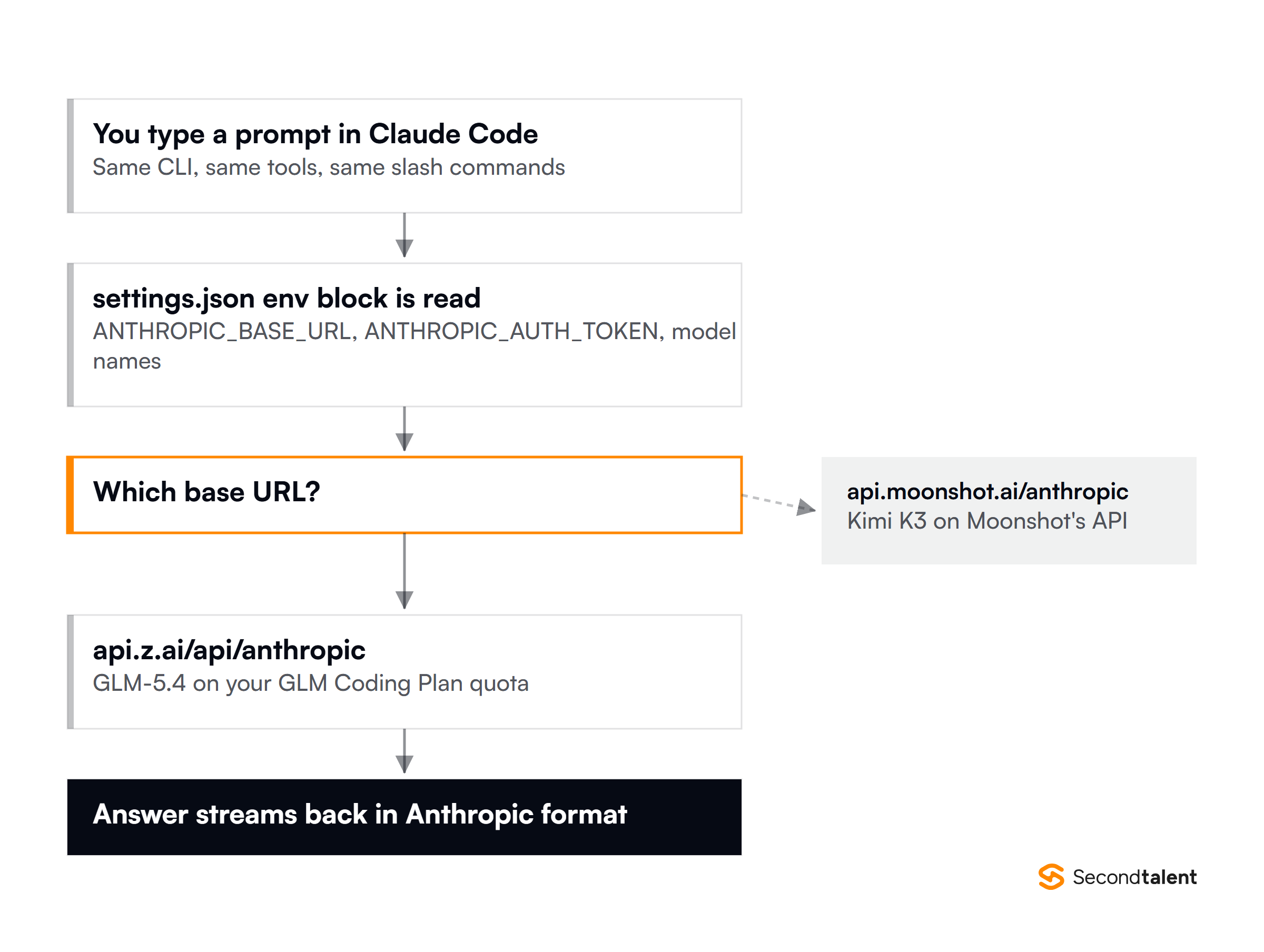
Z.ai and Moonshot both run endpoints that speak Anthropic's Messages API, so Claude Code cannot tell it is talking to someone else.
Three environment variables do the switch: ANTHROPIC_BASE_URL sends requests to the other provider, ANTHROPIC_AUTH_TOKEN carries that provider's key, and the ANTHROPIC_DEFAULT_*_MODEL variables map Claude Code's Opus, Sonnet and Haiku slots to the provider's model names.
Anthropic's LLM gateway page is blunt about where it stands: Anthropic "doesn't support routing Claude Code to non-Claude models through any gateway."
While a gateway credential is set, requests use it instead of your claude.ai login and your subscription limits do not apply. Remote Control and voice dictation switch off, and /feedback saves a local file instead of sending.
Provider
Base URL
Key variable
Model to set
Z.ai GLM Coding Plan
https://api.z.ai/api/anthropic
ANTHROPIC_AUTH_TOKEN
glm-5.4[1m]
Zhipu, mainland China
https://open.bigmodel.cn/api/anthropic
ANTHROPIC_AUTH_TOKEN
glm-5.4[1m]
Kimi API (pay as you go)
https://api.moonshot.ai/anthropic
ANTHROPIC_AUTH_TOKEN
kimi-k3[1m]
Kimi Code membership
https://api.kimi.ai/coding/
ANTHROPIC_API_KEY
k3.1-pro
MiniMax M Plan
https://api.minimax.io/anthropic
ANTHROPIC_AUTH_TOKEN
MiniMax-M3.1-Flash[1m]
The [1m] suffix asks for the one-million-token context window. If Claude Code says the model does not exist, update it with claude update.
How to set up GLM in Claude Code
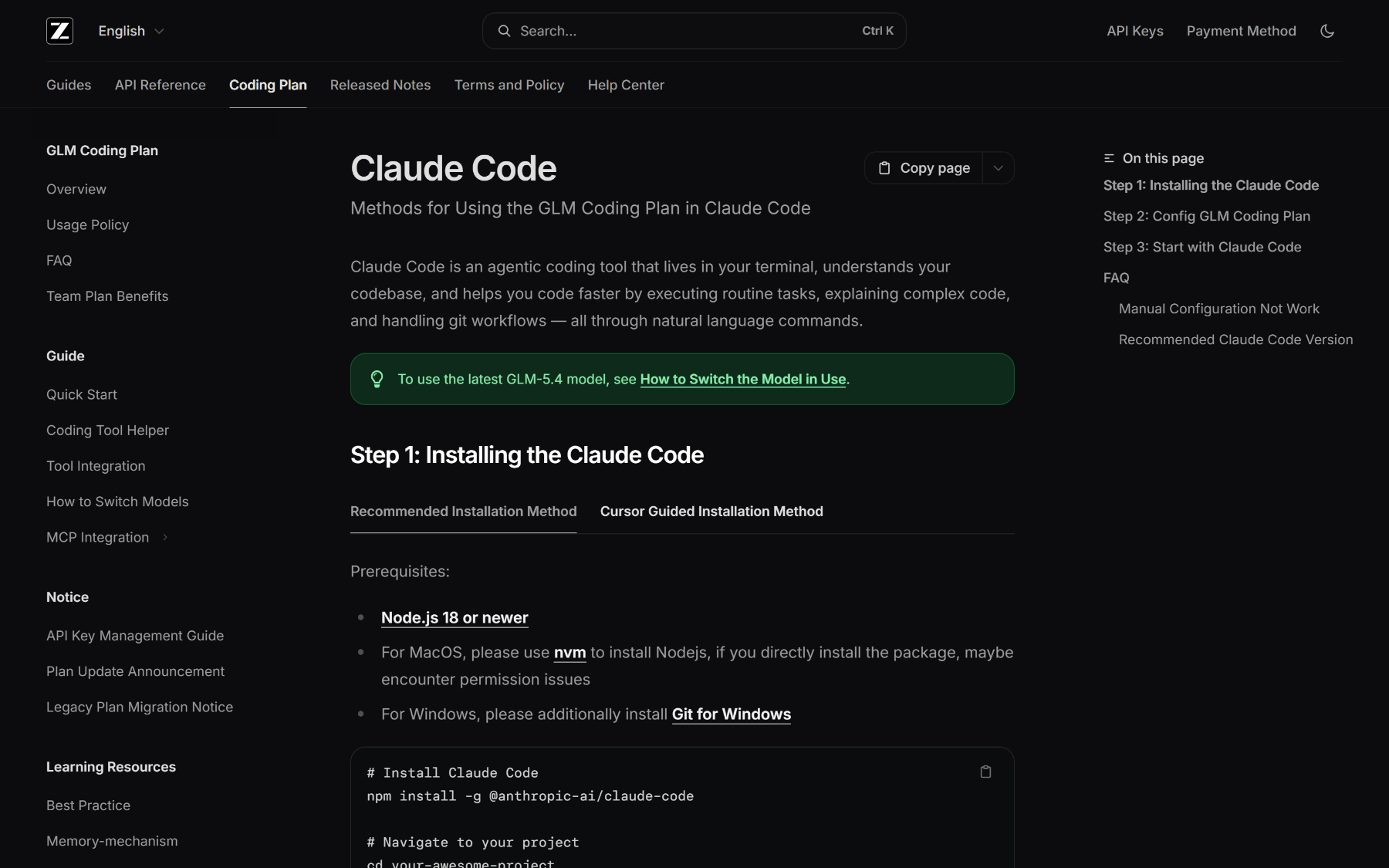
You need three things: Claude Code installed, a GLM Coding Plan, and a key created under Personal Coding Plan, Plan Overview in your Z.ai account.
Z.ai's quick start warns that Individual, Team and standard API keys are not interchangeable, so a key from the general API console will not unlock the plan.
Z.ai's Claude Code page still installs Claude Code with npm and Node.js 18. Anthropic's setup docs now recommend the native installer and require Node.js 22 for npm, so use Anthropic's command:
# macOS or Linux
curl -fsSL https://claude.ai/install.sh | bash

# Windows PowerShell
irm https://claude.ai/install.ps1 | iex
Option 1: the Coding Tool Helper
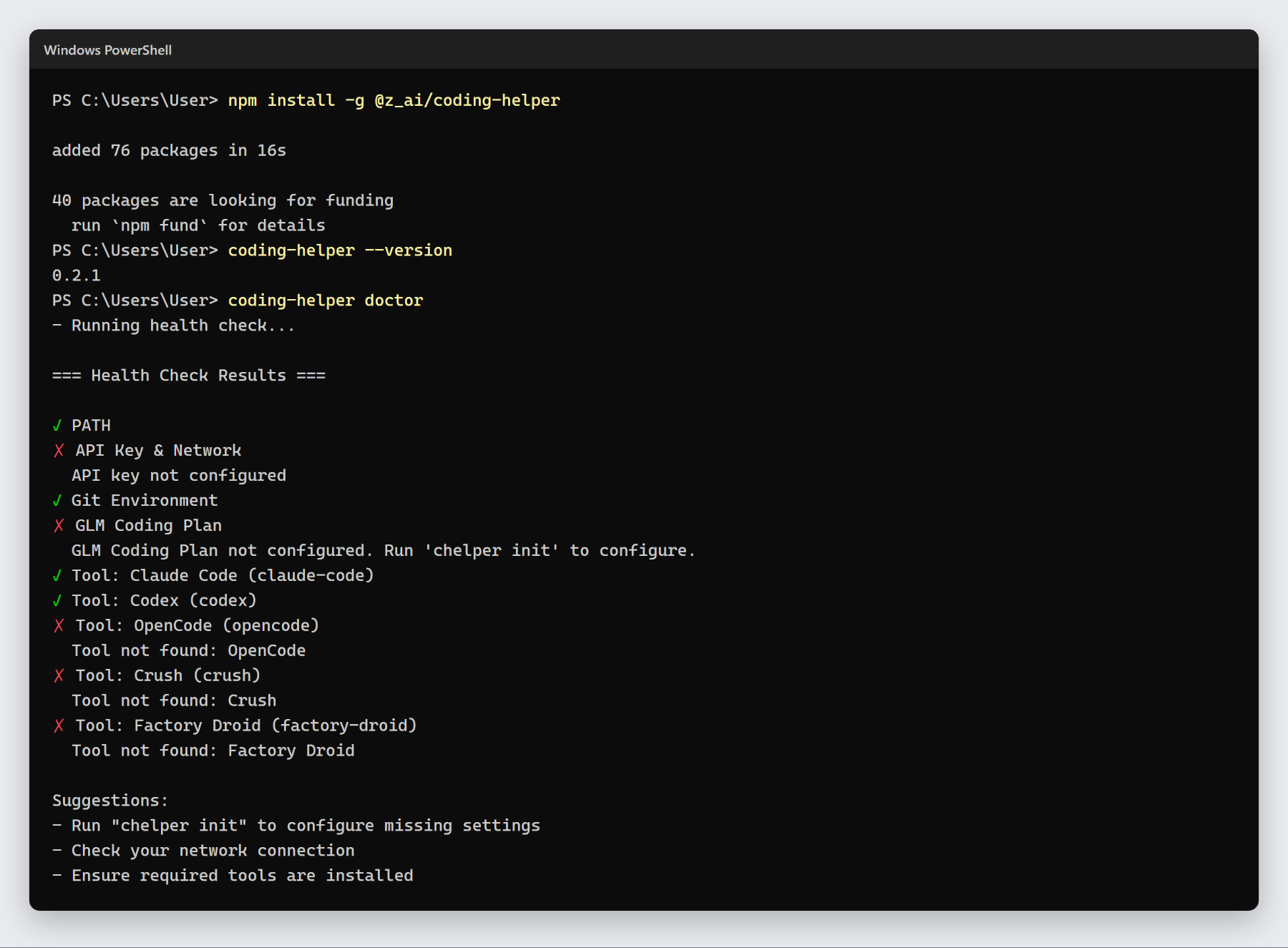
The helper is a wizard that asks for your plan and key, then writes the Claude Code settings for you. We installed version 0.2.1 globally and ran its health check before entering any key:
16 s
npm install of coding-helper 0.2.1
76
npm packages it pulled in
5
Coding tools its doctor checks for
Source: Second Talent test install, Windows 11 Pro x64, Node.js 24, November 27, 2026.
The two failures are the missing key and plan, which chelper init fills in. The helper looks for five tools: Claude Code, Codex, OpenCode, Crush and Factory Droid.
Once your key is set, chelper auth reload claude pushes the plan into Claude Code again after any change.
npm install -g @z_ai/coding-helper
chelper init                                   # wizard: language, plan, key, tools
chelper auth glm_coding_plan_global YOUR_KEY   # or set the key directly
chelper auth reload claude                     # re-apply the plan to Claude Code
Option 2: edit settings.json yourself
The manual route is one file. Open ~/.claude/settings.json (on Windows, %USERPROFILE%\.claude\settings.json) and add an env block.
This is Z.ai's recommended mapping for GLM-5.4 with the long context window, trimmed to the lines that matter:
Close every Claude Code window, open a new terminal, run claude and answer Yes when it asks whether to use the API key. Then type /status: the settings source should read ~/.claude/settings.json and the model should read glm-5.4.
On macOS and Linux, Z.ai also publishes a shell script that writes the same file.
What the GLM Coding Plan costs
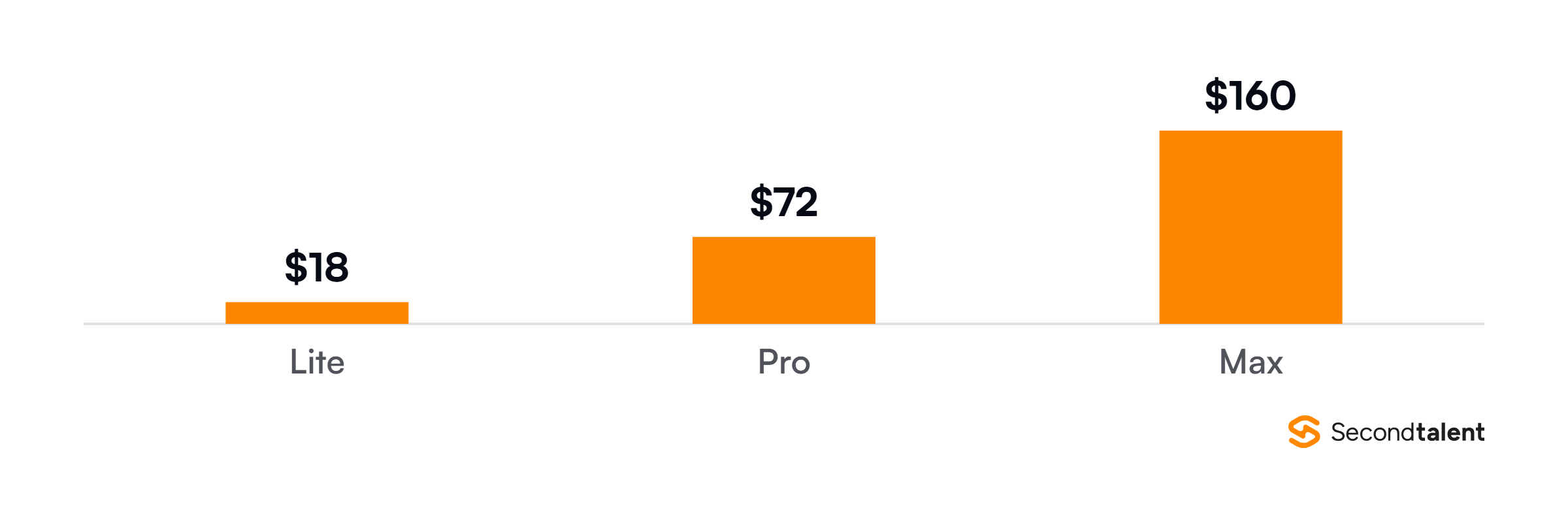
Z.ai lists Lite at $18 a month, Pro at $72 and Max at $160 on monthly billing, per its plan migration notice. Quarterly and yearly billing cut the monthly cost, and the FAQ says subscriptions are not refundable.
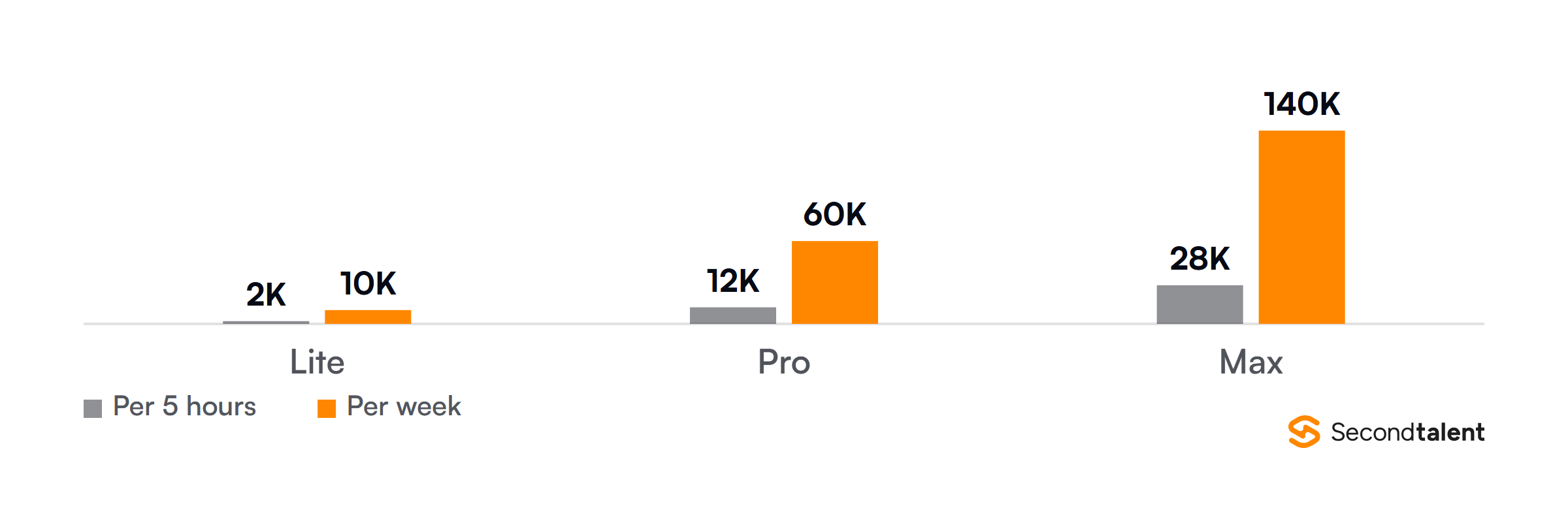
Z.ai counts usage in credits, not prompts, with a rolling five-hour window and a weekly cap. Z.ai's estimate for Lite at a 95% cache-hit rate is 72 to 146 million GLM-5.4 tokens a week.
Off-peak use, outside 14:00 to 18:00 Beijing time on weekdays, costs half the credits.
An empty window means waiting for the reset; the plan does not bill your account balance.
The plan covers GLM-5.4, GLM-5.3 and GLM-5.3-Flash only, inside a list of approved tools that includes Claude Code, Codex, Cursor, Cline, OpenCode and Roo Code.
Moonshot's guide maps every Claude Code model slot to one model, kimi-k3[1m], and warns that a slot left unset fails silently. Leave out the Haiku variable and Claude Code's background tasks stop working without an error.
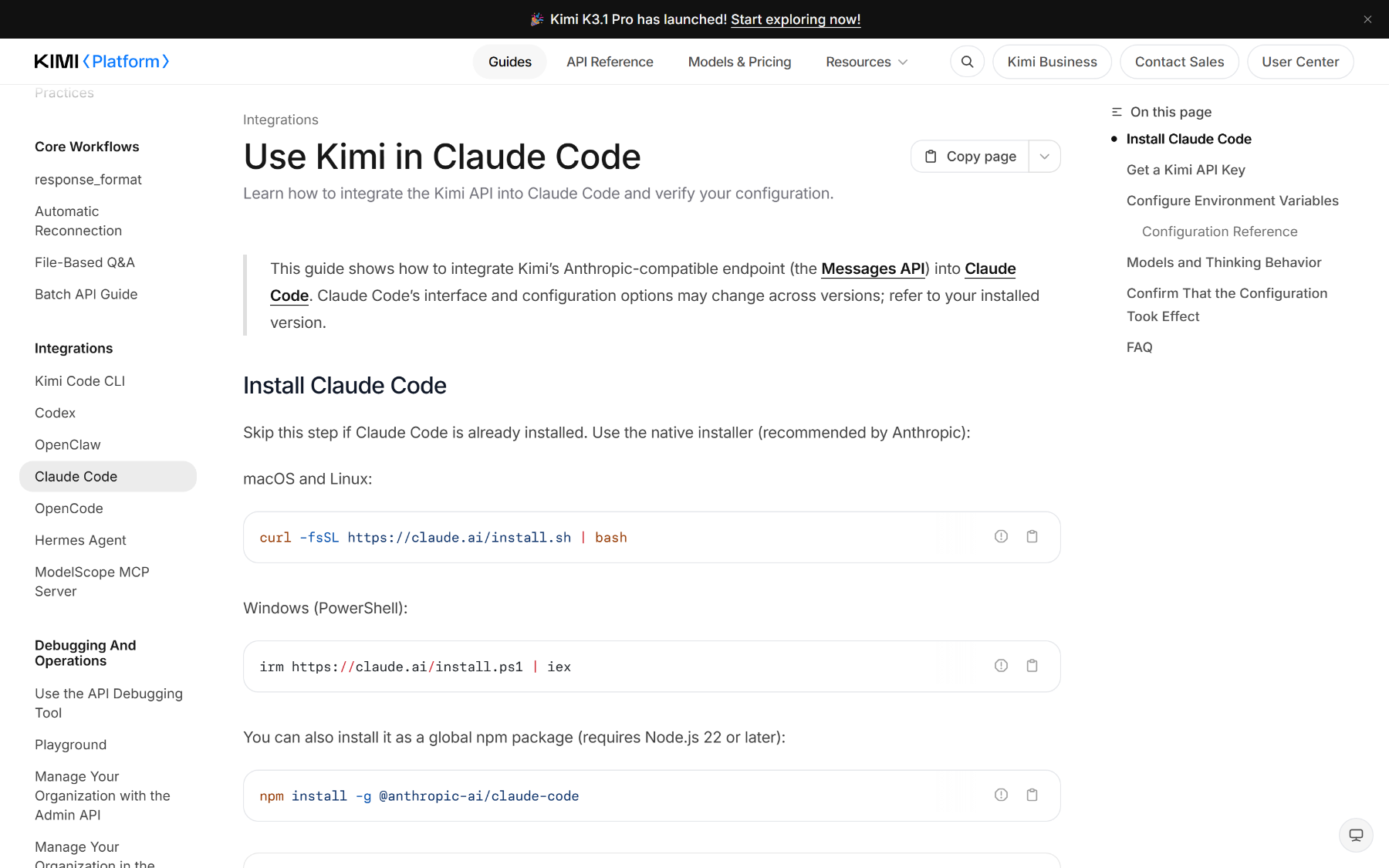
Get a key from the Kimi platform console, then use this block from Moonshot's Claude Code guide:
Mainland accounts swap the base URL for https://api.moonshot.cn/anthropic. After restarting, /status should show the Moonshot base URL and kimi-k3[1m] as the model.
The Kimi Code membership route
GLM Coding Plan
Subscription, $18 to $160 a month
Credits per 5 hours and per week
Key in ANTHROPIC_AUTH_TOKEN
Kimi API
Pay per token on Moonshot's platform
Model kimi-k3[1m] in every slot
Key in ANTHROPIC_AUTH_TOKEN
Kimi Code
Membership, Plus tier and above
Rolling 5-hour window plus a monthly total
Key in ANTHROPIC_API_KEY
Kimi Code is the subscription option, bundled with Kimi's Plus tier and above, and it uses its own endpoint.
Its Claude Code page uses the base URL https://api.kimi.ai/coding/, puts the key in ANTHROPIC_API_KEY rather than the auth token, and sets every model slot to k3.1-pro. For the one-million-token window, use k3.1-pro[1m] instead.
In VS Code or JetBrains, set up the CLI first. The Claude Code extension reads the same ~/.claude folder, so the settings above carry over. If the extension keeps showing a login page, Kimi's docs suggest clicking "Run claude in terminal", trusting the folder and confirming the key once, then restarting the editor.
How to check the switch worked
Moonshot suggests testing the key outside Claude Code first, so you know whether a failure is the key or the configuration. A plain request to its Anthropic-compatible endpoint should return a message, not a 401:
Inside Claude Code, /status is the check that counts. It lists the Anthropic base URL, the credential source (auth token or API key) and the active model.
If the base URL still reads Anthropic's, Claude Code never saw your env block: look for a typo in the file path or a project setting that overrides it. On Kimi Code the model can still show a Claude name. Kimi's docs say that is normal.
Z.ai's helper has its own check. chelper doctor reruns the health check above, and with a key set it also tests the network path to Z.ai's API.
Fixes when Claude Code ignores your settings
Most failures come from two credentials fighting. Claude Code checks ANTHROPIC_AUTH_TOKEN before ANTHROPIC_API_KEY, which it checks before your saved claude.ai login, according to its authentication docs.
A startup warning that ends "auth may not work as expected" means two sources are set; remove the one you do not want, or run /logout to drop the old login.
401 errors: the key is in the wrong variable. Z.ai, Moonshot's API and MiniMax read ANTHROPIC_AUTH_TOKEN; Kimi Code reads ANTHROPIC_API_KEY.
Old values win: the env block in settings.json overrides shell exports, so stale ANTHROPIC_* lines in settings or in your .zshrc or PowerShell profile can mask new ones.
Error 1113 "Insufficient Balance" on GLM: wrong base URL, an unsupported tool, or a model outside the plan.
Changes not applying: close every Claude Code window and open a new terminal. Check the JSON for a trailing comma.
Corporate proxy: point NODE_EXTRA_CA_CERTS at your company's certificate.
To go back to Claude, delete the env block and restart. If you are still choosing a coding agent, our Codex install guide and editors for Claude Code cover the other setups.
Engineers who run agents on any model
Swapping the model under an agent is a ten-minute change; deciding which model fits which job takes engineers who have shipped with several.
Second Talent matches US teams with pre-vetted senior developers within 24 hours and employs them for you under employer of record. Hire developers who already work with Claude Code, Codex and open models.
FAQs
Do I still need a Claude subscription?
Anthropic's setup page lists a Claude plan, a Console account or a cloud provider such as Bedrock as the ways to run Claude Code.
Z.ai's and Moonshot's guides sign in with their own key instead, and while that key is active your Claude subscription limits do not apply.
Can I switch between Claude and GLM quickly?
Yes. Keep the env block in a project's .claude/settings.json instead of your user settings, and Claude Code applies it only in that folder, after you trust it. Your other projects keep using Claude.
Can I use the GLM Coding Plan outside Claude Code?
Yes, in the tools Z.ai approves. Codex, Cursor, Cline, OpenCode and Roo Code are on the list. Codex uses a different endpoint, https://api.z.ai/api/v1, and other OpenAI-style tools use https://api.z.ai/api/coding/paas/v4.
The same plan key works in each.
Does this work with the Claude Code IDE extension?
Yes. Z.ai's IDE guide covers VS Code, Cursor, Trae and JetBrains; configure the CLI first, then install the Claude Code extension from the marketplace.
Get developers who ship with AI agents. Starts at $25/Hour.
Matt Li is a tech-driven entrepreneur with deep expertise in global talent strategy, digital experience optimization, e-commerce, and Web3 innovation.
He is the Co-Founder of Second Talent, a US-based company that connects businesses with top-tier tech professionals worldwide. Since launching the company in 2024, Matt has led its growth by leveraging technology to streamline remote hiring and scale distributed teams.
With a background spanning product, operations, and innovation, Matt brings a cross-disciplinary perspective to the evolving digital economy. His work sits at the intersection of global talent, emerging technology, and scalable digital transformation.