![How to Download and Install Google's Antigravity. How to Download and Install Google's Antigravity IDE [2026], by Second Talent.](https://www.secondtalent.com/wp-content/uploads/2026/09/how-to-download-and-install-googles-antigravity-ide-featured-v2.jpg)
TL;DR: Google Antigravity is a free agent-first development platform, launched November 2025 and now on v2.9.1. It ships as five separate downloads: desktop client, standalone IDE, IDE extensions for VS Code and JetBrains, a CLI, and a Python SDK. All of them come from antigravity.google/download, for macOS, Windows or Linux.
What’s your development team need?
Select your situation below.
With AI tools like Antigravity changing workflows, you need developers who can leverage them. Our AI/ML engineers in Southeast Asia cost 60% less than US rates while delivering enterprise-grade expertise. Start building smarter. Hire AI engineers →
Need to onboard developers who can hit the ground running with modern IDEs? Our full-stack developers in Vietnam and Philippines are proficient in cutting-edge tools and ready in 2-3 weeks. Average cost: $3,500-5,500/month. Scale with full-stack devs →
Planning your 2026 engineering budget? Our rate card shows real salaries for backend, DevOps, and AI engineers across Asia. You’ll see exactly what senior talent costs in Vietnam ($4,200/mo) vs Singapore ($8,500/mo). View developer rates →
Want to tap into Asia’s tech talent without setting up offices? Our EOR service handles payroll, compliance, and benefits in 5+ countries. You focus on building products while we manage the legal complexity. Get EOR pricing →
On November 18, 2025, Google dropped a bombshell on the developer community.
Alongside the launch of Gemini 3, their most advanced AI model to date, Google unveiled Antigravity, a free agentic development platform that’s redefining how developers write code.
Within hours of the announcement, developer communities on Hacker News and Reddit erupted with discussions about whether Google had just “killed Cursor,” the $29.3 billion AI coding assistant that had dominated the market.

The timing wasn’t coincidental. Google acquired the Windsurf team for $2.4 billion in July 2025, bringing CEO Varun Mohan and his engineering talent into Google DeepMind. The result?
An IDE that doesn’t just suggest code, it autonomously plans, writes, tests, and validates entire applications while you focus on architecture and business logic.
I have watched this thing change shape twice since that launch. What shipped in November was one download.
What you get today is five, on four different version numbers, and the one still called the IDE is no longer the one Google puts first. That is the part most install guides have not caught up with, so this one starts there.
What is Google Antigravity IDE?
Google Antigravity represents a fundamental shift in AI-assisted development.
Unlike traditional AI coding tools that offer autocomplete suggestions or answer coding questions, Antigravity introduces an agent-first architecture where AI agents autonomously handle complex, multi-step software tasks from start to finish.
Powered by Gemini 3 Pro, the platform launched on a 76.2% score on SWE-bench Verified, a benchmark measuring coding agents’ ability to solve real-world GitHub issues.
It also scored 54.2% on Terminal-Bench 2.0, significantly outperforming its predecessor, Gemini 2.5 Pro. These aren’t just numbers; they represent the IDE’s ability to understand complex requirements and deliver production-ready code.
The Three-Surface Architecture
Antigravity’s interface consists of three integrated “surfaces” that work together seamlessly. The Agent Manager Dashboard lets you oversee multiple autonomous agents working on different tasks simultaneously.
The VS Code-Style Editor provides the familiar development environment developers know and love. Finally, Deep Browser Integration via a Chrome extension allows agents to test web applications in real-time, similar to Playwright MCP.
This multi-surface approach means you can assign an agent to “build a user authentication system with OAuth 2.0,” and watch as it creates files, writes backend logic, builds frontend forms, configures environment variables, and validates the implementation, all while you work on other priorities.
The agents communicate progress through detailed artifacts, keeping you informed without requiring constant oversight.
System Requirements: What You Need Before Installing
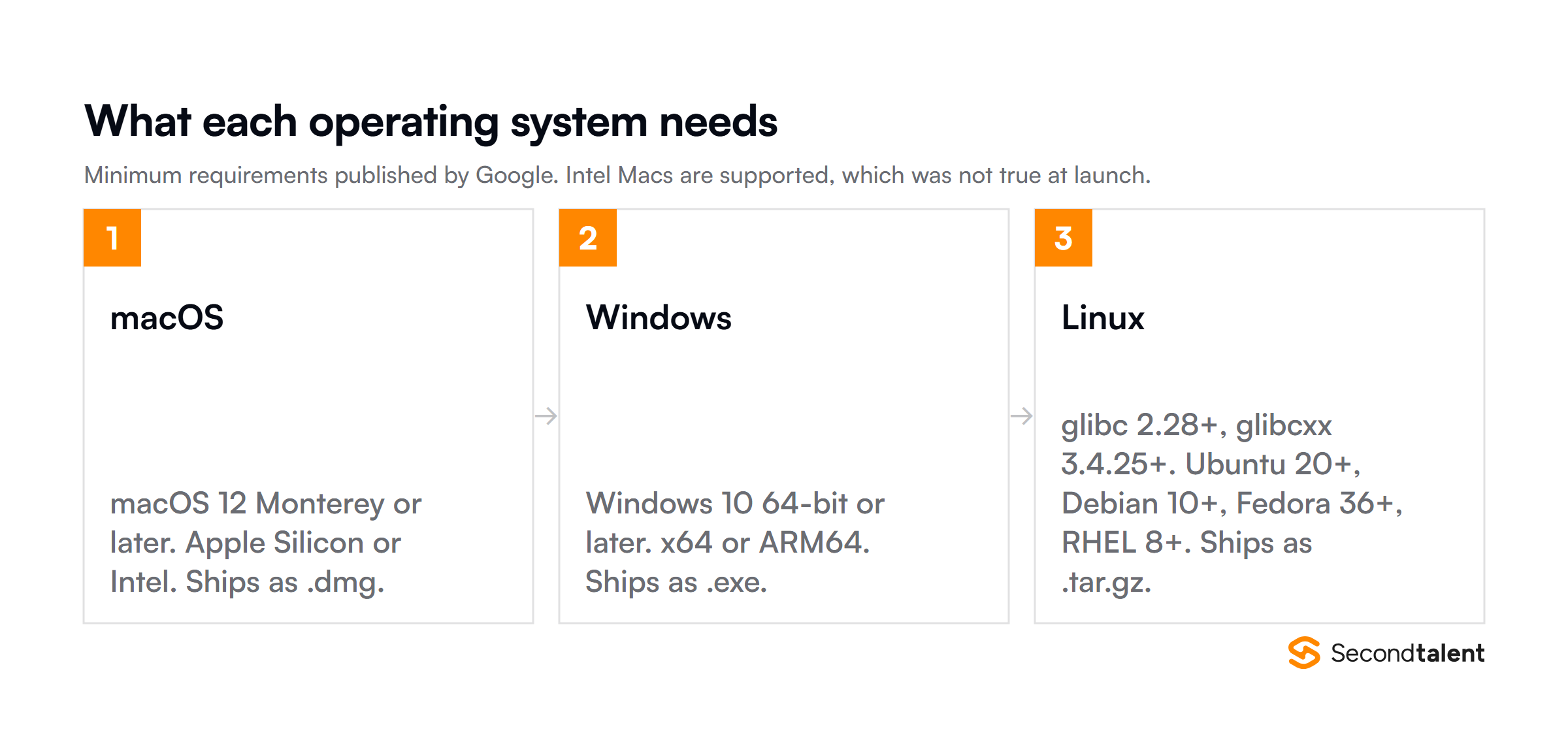
Before downloading Antigravity, ensure your system meets the minimum requirements. Google has optimized the IDE for modern hardware, but older systems may experience performance limitations.
| Operating System | Minimum Requirements | Supported Architectures | Additional Notes |
|---|---|---|---|
| macOS | macOS 12 (Monterey) or later | Apple Silicon Intel | Intel Macs were unsupported at launch and are supported now |
| Windows | Windows 10 (64-bit) or later | x64 ARM64 | 64-bit required; 32-bit not supported |
| Linux | glibc >= 2.28 glibcxx >= 3.4.25 | x64 ARM64 | Examples: Ubuntu 20+, Debian 10+, Fedora 36+, RHEL 8+ |
Google Account Requirement
Antigravity requires a Google Account to function. That account carries your model quota, syncs projects across devices, and is what the “Weekly Limit Remaining” and “Five Hour Limit Remaining” counters are tied to.
If you’re working in a corporate environment, check with your IT department about using company Google Workspace accounts versus personal accounts.
Step-by-Step Installation Guide
Which Download Do You Actually Need?
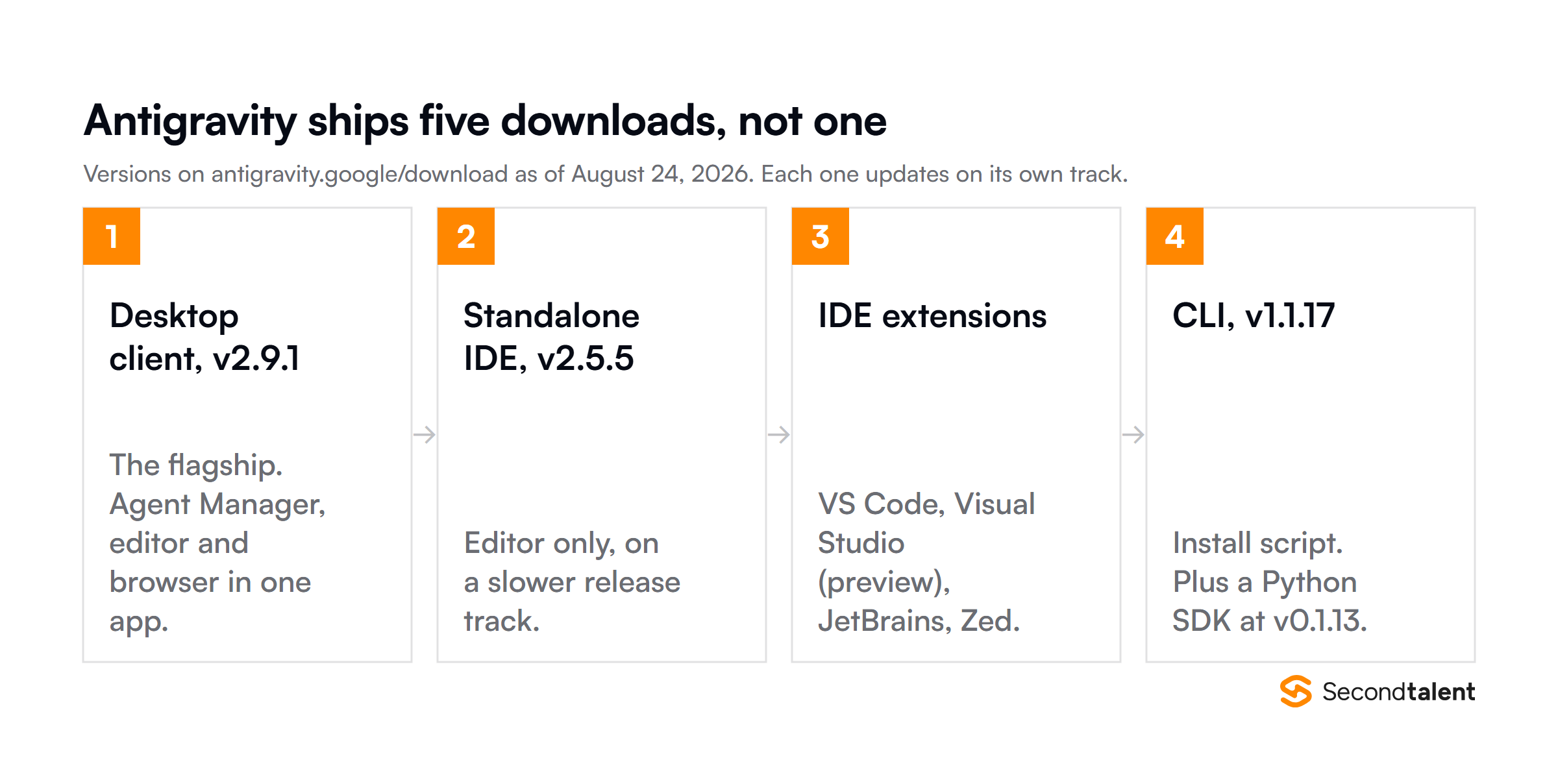
Antigravity is five downloads now, not one, and they sit on separate version numbers.
The download page lists a desktop client at v2.9.1, a standalone Antigravity IDE at v2.5.5, extensions for VS Code, Visual Studio (preview), JetBrains and Zed, a CLI at v1.1.17, and a Python SDK at v0.1.13.
If you are picking one, I would take the desktop client.
It carries the Agent Manager, the editor and the browser surface in a single app, and you can see where Google is putting the work: the client has moved through v2.5 to v2.9 while the standalone IDE sits at v2.5.5.
The extensions are the better call if your team already lives in JetBrains or VS Code and you want agents without moving everyone to a new editor.
The steps below cover the desktop client, which is what the installers on that page give you by default.
For macOS Users (Apple Silicon or Intel)
Step 1: Download the Installer
Visit antigravity.google/download and take the .dmg for your chip, Apple Silicon or Intel. Both are listed now; only Apple Silicon was at launch. The file runs 150-200MB depending on the version.
Save it to your Downloads folder.

Step 2: Install the Application
Open the downloaded .dmg file and drag the Antigravity icon to your Applications folder. macOS may display a security warning since this is a new application. Click “Open” to proceed.
Step 3: First Launch and Google Sign-In
Launch Antigravity from your Applications folder. You’ll be prompted to sign in with your Google Account.
After authentication, Antigravity will initialize your workspace and download necessary components. This initial setup takes 2-3 minutes on most systems.
Step 4: Grant Necessary Permissions
macOS will request permissions for file system access, network connections, and potentially Accessibility features. Grant these permissions to ensure full functionality.
You can review and modify these in System Settings > Privacy & Security later.
For Windows Users
Step 1: Download the Installer
Navigate to antigravity.google/download and select either “Download for x64” or “Download for ARM64” depending on your processor. Most modern Windows PCs use x64 architecture.
Step 2: Run the Installation Wizard
Double-click the downloaded .exe file to launch the installation wizard. Windows Defender SmartScreen may display a warning for new applications.
Click “More info” then “Run anyway” if you trust the source (which you should, it’s Google).
Step 3: Choose Installation Location
The default installation path is C:\Program Files\Google\Antigravity. You can customize this if needed, but the default location works for most users.
Click “Install” and wait for the process to complete (typically 3-5 minutes).
Step 4: Launch and Authenticate
After installation, launch Antigravity from the Start Menu or desktop shortcut. Sign in with your Google Account when prompted. The application will sync your settings and prepare your development environment.
For Linux Users (Debian/Ubuntu)
Linux users have the option of using either package managers (recommended) or downloading standalone binaries.
Method 1: Using APT (Recommended)
# Step 1: Create directory for keyrings
sudo mkdir -p /etc/apt/keyrings

# Step 2: Download and add Google's signing key
curl -fsSL https://us-central1-apt.pkg.dev/doc/repo-signing-key.gpg | \
sudo gpg --dearmor -o /etc/apt/keyrings/antigravity-repo-key.gpg

# Step 3: Add Antigravity repository to sources
echo "deb [signed-by=/etc/apt/keyrings/antigravity-repo-key.gpg] https://us-central1-apt.pkg.dev/projects/antigravity-auto-updater-dev/ antigravity-debian main" | \
sudo tee /etc/apt/sources.list.d/antigravity.list > /dev/null

# Step 4: Update package cache
sudo apt update

# Step 5: Install Antigravity
sudo apt install antigravity
Method 2: Standalone Download
Visit antigravity.google/download/linux and download the appropriate .deb or .tar.gz file for your distribution. Install using sudo dpkg -i antigravity-*.deb or extract and run the binary from the tarball.
For Linux Users (Fedora/RHEL)
Fedora and Red Hat-based distributions can use DNF for installation:
# Install Antigravity using DNF
sudo dnf install antigravity
After installation, launch Antigravity from your application menu or run antigravity from the terminal. Complete the Google Account authentication process to activate your installation.
Getting Started: Your First Project with Antigravity
Understanding the Interface
When you first open Antigravity, you’ll see three main areas. The left sidebar houses the Agent Manager, where you can create, monitor, and manage autonomous agents.
The center area is the familiar Code Editor, based on VS Code with syntax highlighting, IntelliSense, and all the features you expect.
The right panel provides the Chat Interface for communicating with agents and the Browser Preview for testing web applications.
Try Your First Autonomous Agent
Let’s create a simple project to understand how Antigravity’s autonomous agents work. This example demonstrates the platform’s ability to handle multi-step tasks without constant supervision.
Example Prompt: “Create a responsive landing page for a SaaS product with a hero section, features grid, pricing table, and contact form.
Use modern CSS with flexbox/grid, vanilla JavaScript for form validation, and ensure mobile responsiveness. Include a simple email collection that displays submitted emails in a list below the form.”
The agent then:
- Planning Phase: The agent creates a detailed plan breaking down the task into components (HTML structure, CSS styling, JavaScript functionality, responsive design)
- File Creation: It generates
index.html,styles.css, andscript.jswith proper project structure - Code Implementation: Writes clean, commented code following best practices
- Local Server: Starts a development server automatically
- Browser Testing: Opens the application in the integrated browser for visual verification
- Self-Validation: Tests the form functionality, responsive breakpoints, and interaction patterns
The entire process typically takes 2-4 minutes, depending on complexity. You can watch the agent work in real-time or minimize the process and return when it’s complete. That asynchronous workflow is the actual point of the tool.
You can parallelize development tasks that previously required sequential attention.
Key Features That Set Antigravity Apart
1. Multi-Model Support
Antigravity is a Google product but it is not locked to Google models.
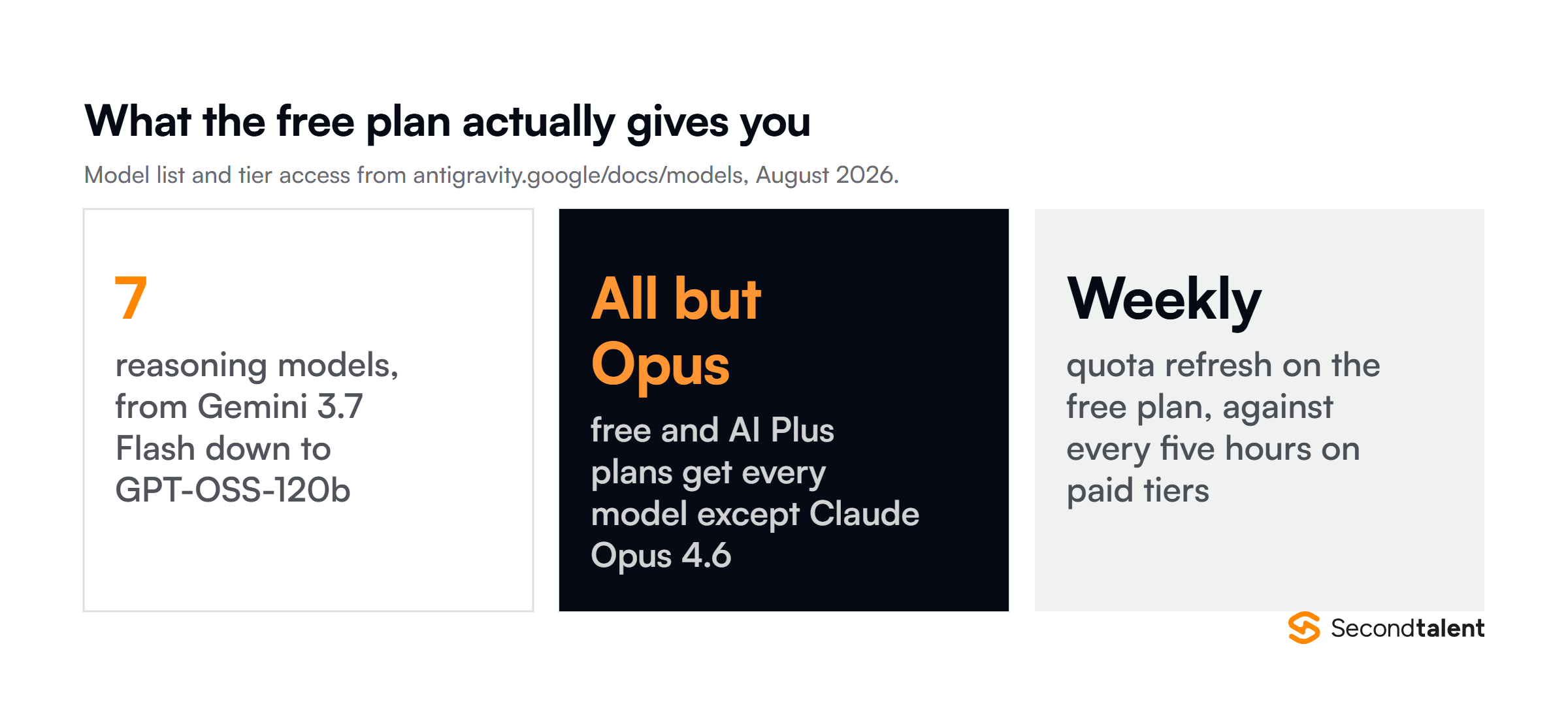
The current reasoning line-up runs to seven: Gemini 3.7 Flash, 3.6 Flash and 3.5 Flash, Gemini 3.1 Pro, Claude Sonnet 4.6 (thinking), Claude Opus 4.6 (thinking), and GPT-OSS-120b. Nano Banana 2 handles image generation for mockups and diagrams.
Your choice of reasoning model is sticky between messages inside a conversation, so switching is a deliberate act rather than something that drifts.
This flexibility allows you to choose the best model for specific tasks, perhaps Gemini 3 for complex system architecture, Claude for detailed documentation, and GPT-OSS for rapid prototyping.
2. Artifact-Based Communication
Instead of simply showing code changes, Antigravity agents communicate through detailed artifacts, structured summaries of what they’ve built, why they made specific decisions, and what trade-offs they considered.
These artifacts serve as living documentation, making it easier for teams to understand code written by AI agents. For business leaders hiring remote developers, this transparency is invaluable for code reviews and knowledge transfer.
3. Browser-Native Testing
The Chrome extension integration allows agents to interact with web applications just like human testers would: clicking buttons, filling forms, navigating pages, and verifying functionality.
This means agents can catch UI/UX issues that traditional static analysis might miss. The browser becomes both a preview tool and a testing environment, reducing the feedback loop between development and QA.
4. What the Free Plan Actually Includes
The free plan gets every reasoning model except Claude Opus 4.6 and Opus 4.6 (thinking), which are paid-tier only. No credit card, no trial clock.
The catch is the reset cadence, not the model list. Paid tiers top up every five hours; the free plan refreshes weekly. Antigravity shows you both counters in the app, and on a free account the weekly one is the number that matters.
Plan a heavy build session around it rather than discovering it mid-sprint.
That is still a real free tier for startups, indie developers, and anyone evaluating agentic tooling without a purchase order.
Antigravity vs. The Competition: How Does It Stack Up?
| Feature | Google Antigravity | Cursor | Windsurf | GitHub Copilot |
|---|---|---|---|---|
| Pricing | Free (public preview) | $20/month Pro $40/month Business | Acquired by Cognition | $10/month Individual $19/month Business |
| Autonomous Agents | Yes, multi-agent support | Yes, Agent feature | Yes (legacy) | Limited to suggestions |
| AI Models | Gemini 3, Claude 4.5, GPT-OSS | GPT-4, Claude 3.5, custom | Proprietary | GPT-4, GPT-4o |
| Browser Integration | Deep Chrome integration | No native integration | Limited | No |
| Self-Validation | Built-in code validation | Manual verification | Limited | No |
| Market Position | New entrant (Nov 2025) | Market leader $29.3B valuation | Acquired | Established player |
| Best For | Complex autonomous tasks | Professional teams | N/A | Code suggestions |
The competitive landscape is fascinating. Cursor crossed $1 billion in annualized revenue and achieved a $29.3 billion valuation in November 2025, the same month Google launched Antigravity.
Interestingly, Google participated as an investor in Cursor’s Series D funding round, meaning Google is both competing with and investing in Cursor simultaneously.
This hedging strategy suggests Google sees the AI IDE market as critically important regardless of which platform dominates.
Advanced Tips and Troubleshooting
Optimizing Agent Performance
Be specific with prompts: Instead of “build a login system,” try “build a JWT-based authentication system with email/password login, password reset via email, session management with Redis, and rate limiting to prevent brute force attacks.”
The more context you provide, the better agents perform.
Break complex projects into phases: While agents can handle multi-step tasks, extremely complex projects benefit from phased prompts. Build the backend API first, then the frontend, then integrations.
This gives you checkpoints to review and adjust direction if needed.
Leverage artifacts for team communication: Share agent-generated artifacts with your team during code reviews. They provide context that raw code commits don’t, explaining the reasoning behind architectural decisions.
For distributed teams or when working with remote developers, this documentation is invaluable.
Common Installation Issues and Fixes
Issue: “Unable to verify developer” on macOS
Solution: Go to System Settings > Privacy & Security, scroll down to find the blocked application, and click “Open Anyway.” This is standard for newly released macOS applications.
Issue: Windows Defender blocks installation
Solution: Click “More info” on the SmartScreen warning, then “Run anyway.”
You can also add an exception in Windows Security > Virus & threat protection > Manage settings > Add or remove exclusions.
Issue: Linux installation fails with dependency errors
Solution: Ensure your system meets the minimum glibc (>= 2.28) and glibcxx (>= 3.4.25) requirements. On Ubuntu/Debian, run sudo apt update && sudo apt upgrade before installing.
For older distributions, consider upgrading your OS.
Issue: Google Account authentication keeps failing
Solution: Clear your browser cache and cookies, then try again. If you’re in a corporate environment, check if your IT department has restrictions on Google OAuth apps.
You may need to request approval for Antigravity specifically.
Learning Resources and Community
Google has created several resources to help developers get the most from Antigravity:
- Official Documentation: Comprehensive guides available at
antigravity.google/docscovering installation, features, and best practices - Video Tutorials: A 14-minute “Learn the basics” walkthrough by product engineer Kevin Hou (formerly of Windsurf) demonstrates building a complete application
- Developer Blog: Google’s Developer Blog publishes regular updates on new features, use cases, and tips
- Community Forums: Active discussions on Reddit (r/AntigravityIDE) and Discord provide peer support and troubleshooting
- GitHub Examples: Sample projects demonstrating various use cases from simple websites to complex microservices architectures
The community is rapidly growing, with developers sharing prompts, workflows, and creative applications. Following these resources helps you stay current as Google adds features and refines capabilities based on user feedback.
Security and Privacy Considerations
When using AI-powered development tools, security and privacy are paramount. Antigravity processes your code through Google’s servers to enable agent functionality, which raises important questions for enterprise users.
Data handling: Review Google’s terms of service and privacy policy specifically for Antigravity. Understand what data is stored, how long it’s retained, and whether it’s used for model training.
Many enterprises require explicit opt-out from training data usage.
Proprietary code protection: Avoid using Antigravity for extremely sensitive proprietary algorithms or security-critical code until you’ve verified data handling policies with your legal and security teams.
Consider using local development for high-security components and Antigravity for less sensitive work.
Access controls: If using Google Workspace accounts, ensure proper access controls and audit logging are configured. IT administrators can monitor Antigravity usage and enforce policies through workspace management tools.
Conclusion:
Install is still the easy part: 10 minutes from download to your first agent-generated commit, on a free plan with seven models behind it.
The harder question is which of the five downloads fits how your team already works, and that is worth five minutes before anyone hits install.
Download Antigravity today at antigravity.google/download and start experimenting.
One thing I would flag before you roll this out past yourself. The version numbers above move fast, and half of what I read about Antigravity online still describes the November 2025 build.
Check the download page against your own notes every couple of months, because this post will go stale too.
Ready to build a world-class development team that leverages cutting-edge AI tools? Hire vetted remote developers with Second Talent to access top-tier software engineers, full-stack developers, and AI specialists who understand both traditional development and AI-augmented workflows.
Our rigorous vetting process ensures you work with professionals who can architect solutions, guide AI agents effectively, and deliver production-ready code faster.



![Programming Languages by Usage Statistics. Top 15 Programming Languages by Usage Statistics [2026], by Second Talent.](https://www.secondtalent.com/wp-content/uploads/2026/09/top-programming-usage-statistics-featured-v2-768x403.jpg)