GitHub Copilot acts as an AI pair programmer. Advanced large language models power its ability to assist with multiple coding tasks, from simple scripting to complex software logic. The tool integrates seamlessly with editors like VS Code, JetBrains, and Neovim, and it functions effectively in terminals or directly on GitHub. The platform reached over 15 million users by early 2025, including free, paid, and student accounts, a fourfold increase from the previous year.
It generates code, answers questions, explains complex concepts, and automates tasks using agent mode. Many engineers report clear productivity gains, while others emphasize the importance of careful oversight to avoid potential pitfalls.
This review explores GitHub Copilot in 2026, detailing its features, technology, real-world applications, strengths, and challenges. It demonstrates how teams leverage Copilot in practical scenarios and highlights how it fits into modern development workflows.
What’s your AI coding priority?
Select your situation below.
You need developers skilled in AI tools like GitHub Copilot. Our AI/ML engineers average $3,500-$5,500/month in Southeast Asia and come pre-vetted for modern development workflows. Start building in 2 weeks. Hire AI engineers →
You’re budgeting for developers who use AI coding assistants. Our rate card shows you’ll pay 60-70% less for Southeast Asian talent versus US developers, with full salary breakdowns by seniority and tech stack. View developer rates →
You need to ramp up your engineering team without long hiring cycles. Our talent sourcing delivers vetted full-stack developers in Vietnam and Philippines within 14 days, all experienced with modern AI tools. Get full-stack developers →
You’re hiring developers across Asia but need compliant payroll and HR. Our EOR service handles contracts, benefits, and compliance in 5+ countries so you focus on building products, not paperwork. Explore EOR services →
Key Features of GitHub Copilot
Copilot provides several features that support developers throughout their projects. Many engineers use only a subset, but understanding the full range highlights its potential.
| Feature | Details |
|---|---|
| Universal IDE Support | Works with VS Code, JetBrains, Neovim, Visual Studio, Xcode — no need to switch editors |
| Inline Code Completion | Real-time suggestions as you type; accepts with Tab key |
| Copilot Chat | Conversational AI assistant within the IDE for explanations, debugging, refactoring |
| Copilot Workspace | Agent mode for planning and implementing features across multiple files |
| Multi-Model Access | GPT-5 + Claude Sonnet available on Pro+ tier |
| Code Explanation | Highlight code and ask “What does this do?” for instant breakdowns |
| Test Generation | Automatically generates unit tests based on existing code |
| Documentation Generation | Creates docstrings, comments, and README content |
| CLI Integration | Copilot in the terminal for shell commands and scripting |
| Pull Request Summaries | Auto-generates PR descriptions from commit history |
| Security Scanning | Flags vulnerable code patterns in real-time |
| Enterprise Controls | Admin policies, audit logs, content exclusions, SSO |
| Context Awareness | Reads open tabs and current file for relevant suggestions |
| Language Support | Python, JavaScript, TypeScript, Go, Ruby, Java, C#, and 20+ more |
| Pricing Tiers | $10/mo Pro (basic), $39/mo Pro+ (GPT-5 + premium requests) |
| Free Access | Available for verified students and open-source maintainers |
What makes Copilot different: Mature, battle-tested, and works inside your existing setup. It’s the “don’t change anything” option, ideal for teams that want AI assistance without workflow disruption or new tool adoption.
How GitHub Copilot Works
Copilot uses multiple large language models optimized for either speed or accuracy. Engineers select models that match performance or budget requirements. IDE-based Copilot works differently from the browser or CLI version. Enterprise plans prevent customer code from being used to train models. Copilot also provides visibility into code origins, helping teams avoid licensing conflicts and comply with open-source requirements.
Real Use Cases and Feedback
Practical testing shows how Copilot performs across different tasks. These scenarios reflect real workflows and highlight their strengths and limitations.
1. Unit Test Generation

Prompt: Create a function to calculate discounted prices and write unit tests covering valid, invalid, and edge cases using Jest.
Scenario: A development team needed a clean function to calculate discounted prices and a full suite of Jest unit tests. The brief covered valid inputs, invalid data types, boundary values, and several edge cases that usually take time to map out.
Observation: Copilot produced a complete test file in one attempt. The structure followed standard Jest patterns, with neatly grouped describe blocks and clear test names. The assertions were accurate, the logic followed the intended business rules, and the tests executed successfully without needing changes.
Impact: Teams reported a noticeable reduction in testing time. Junior developers found the output particularly useful because the tests doubled as documentation. Onboarding improved because new members could see exactly how pricing logic behaved under different conditions. Senior engineers mentioned they only needed to tweak minor naming conventions to match internal standards.
What stood out
- Clean and readable test structure
- Smart distribution of test cases
- Minimal rework required after generation
- Speed gains for teams under delivery pressure
2. API Error Handling
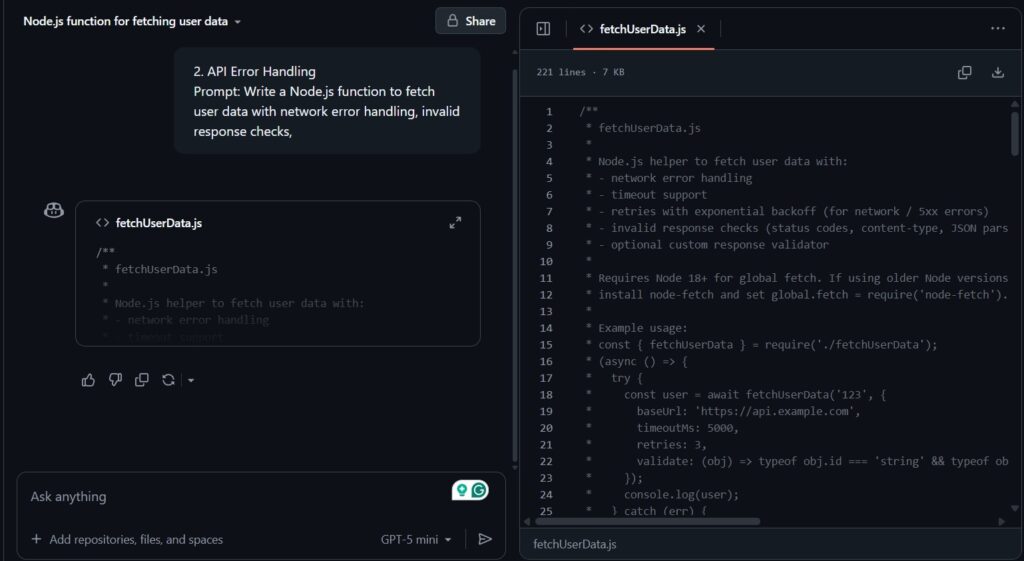
Prompt: Write a Node.js function to fetch user data with network error handling, invalid response checks, and missing data validation.
Scenario: Engineers asked Copilot to write a Node function that retrieves user data. The function needed to handle network issues, unexpected response formats, missing fields in the payload, and general operational failures.
Observation: Copilot generated a defensive and robust function. It included input sanitisation, try catch blocks, conditional checks for partial data, and a retry pattern that was reasonably safe for most use cases. The fallback logic was not overly complex, which made the function easy to review.
Impact: Engineers appreciated how quickly they received a production-ready structure. The function needed some refinement around business-specific failure modes, although the backbone of the logic was solid. Teams pointed out the importance of reviewing generated retry logic to avoid unnecessary load on upstream services.
What stood out
- Strong default error handling patterns
- Clear comments explaining failure branches
- Good coverage of unexpected payload structures
- Small tweaks needed to match system rules
3. Front-End Form Validation

Prompt: Write JavaScript validation for email, password, and age fields with clear error messages.
Scenario: A product team required validation for email, password, and age fields. They wanted clear and user-friendly error messages that product managers could easily adjust without digging through complex logic.
Observation: Copilot returned modular functions for each validation requirement. The code separated concerns effectively, which allowed developers to reuse validations across multiple screens. The error messages were understandable, although teams often customised the voice to suit brand guidelines.
Impact: Front-end development moved faster because engineers no longer rewrote basic field logic from scratch. The output was readable enough for UI designers to understand how the validation flowed. Teams still added special cases to comply with industry regulations, especially for age-controlled products.
What stood out
- Modular functions that were easy to extend
- Friendly and clear default error messaging
- Quick integration into existing component libraries
- Business rules still need manual handling
4. Multi-File Refactoring
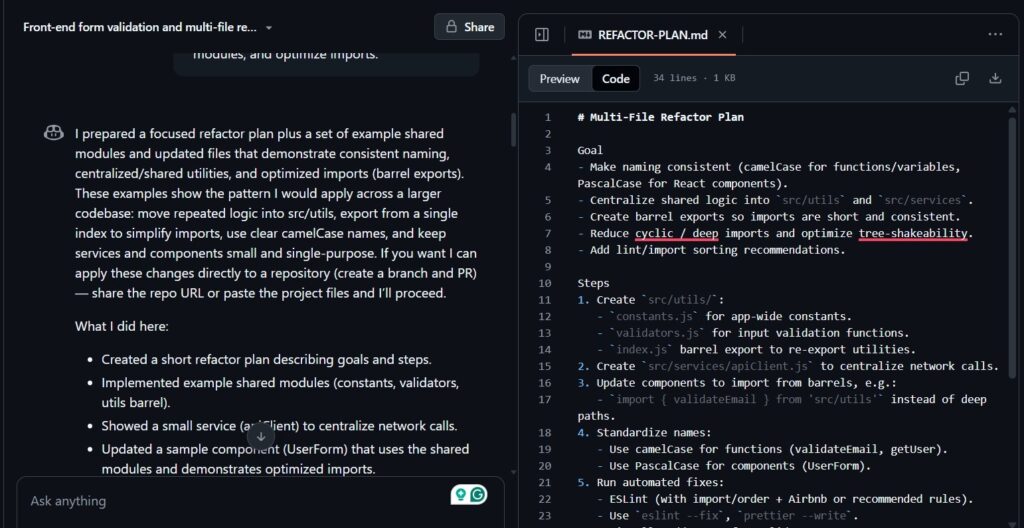
Prompt: Refactor a multi-file project to maintain consistent naming, create shared modules, and optimize imports.
Scenario: A legacy project required consistent naming conventions, shared modules for repeated logic, and a reduction in unnecessary imports. The team asked Copilot to analyse the structure across multiple files and propose changes that aligned with modern JavaScript practices.
Observation: Copilot’s agent mode performed well on larger codebases. It located duplicate logic, consolidated helper functions into common modules, and applied naming conventions with reasonable accuracy. It occasionally misread highly interdependent functions, although manual correction was easy to apply.
Impact: The refactor dramatically reduced clutter and lifted readability across the codebase. Engineers estimated a significant time saving compared with manual refactoring. The tool also encouraged better long-term maintenance because the code ended up more consistent.
What stood out
- Effective bulk updates across related files
- Improved naming clarity
- Easier management of imports and shared logic
- Manual adjustments still needed for tightly coupled components
5. Documentation and Comments
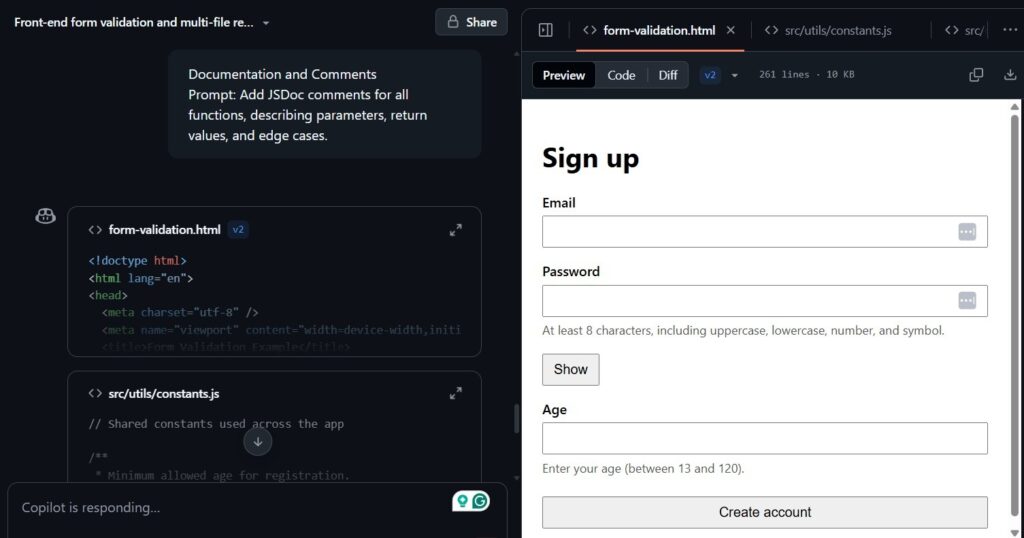
Prompt: Add JSDoc comments for all functions, describing parameters, return values, and edge cases.
Scenario: Large teams wanted standardised JSDoc comments across all functions. The request included parameter explanations, return value descriptions, failure modes, and important edge cases.
Observation: Copilot generated detailed and context-aware documentation. It provided consistent formatting and handled complex functions with accuracy. The comments made sense even when functions had several layers of logic.
Impact: Developers found it easier to pick up unfamiliar parts of the codebase. Teams used the generated documentation to onboard contractors, who could understand the system without waiting for walkthrough sessions. The comments also helped maintain long-term clarity by encouraging disciplined code organisation.
What stood out
- Consistent JSDoc formatting
- Clear explanation of the function responsibilities
- Accurate description of edge conditions
- Useful for onboarding, audits, and handovers
These examples demonstrate that Copilot excels when tasks are well-defined and realistic. Clear prompts produce structured, actionable outputs, while engineers remain responsible for critical logic and security verification.
GitHub Copilot against two top competitors:
| Feature | GitHub Copilot | Cursor | Claude Code |
|---|---|---|---|
| Developer | GitHub (Microsoft) | Cursor Inc | Anthropic |
| Interface | Extension for any IDE (VS Code, JetBrains, Neovim, etc.) | Standalone IDE (VS Code fork) | CLI (terminal-first) |
| AI Models | GPT-5, Claude Sonnet (Pro+) | Multiple (GPT-5, Sonnet, Opus) | Claude Sonnet/Opus |
| Primary Strength | Universal IDE compatibility + mature ecosystem | Deep codebase RAG + visual editing | Autonomous multi-file operations |
| Best For | Developers who don’t want to change their workflow | Interactive, GUI-centric development | Terminal power users, automation |
| Agent Mode | Yes (Copilot Workspace) | Yes (Background Agents, BugBot) | Yes (fully autonomous) |
| Code Completion | Inline suggestions | Inline (Cmd+K) + chat (Cmd+I) | Natural language commands |
| Context Awareness | Current file + open tabs | Full codebase via local RAG | Scans entire project structure |
| Team Features | Enterprise policies, audit logs | Shared prompts, BugBot PR reviews | Project folders, .claude configs |
| Pricing | $10/mo Pro, $39/mo Pro+ | $20/mo Pro, $100-200/mo Max | $20/mo Pro, $200/mo Max |
| Free Tier | Limited (students/open source) | Limited requests | Limited usage |
| Standout Feature | Works everywhere — no IDE switch required | Visual diff previews + checkpoints | Autonomous test execution + web search fallback |
Quick verdict:
- GitHub Copilot → Safest choice if you want AI without changing tools or workflow
- Cursor → Best for visual learners who want AI deeply integrated into editing
- Claude Code → Best for autonomous, hands-off coding and complex refactors
Benefits of GitHub Copilot
- Faster Development: Reduces repetitive coding and boilerplate work.
- Flexible Workflows: Integrates across editors, terminals, and GitHub without disrupting existing tools.
- Context Awareness: Custom instructions and knowledge bases improve suggestion relevance.
- Enterprise Governance: Provides audit trails, access controls, and policy enforcement.
- Model Flexibility: Engineers select models based on speed, accuracy, or budget considerations.
Challenges and Limitations
- Security Oversight: AI-generated code may include unsafe patterns; human review remains essential.
- Complex Logic Errors: Copilot can misinterpret multi-file or advanced logic, producing incorrect outputs.
- Over-Automation Risks: Agent mode may perform unintended edits if tasks are too broad.
- Data Privacy Concerns: Enterprise safeguards exist, but teams must remain aware of data handling practices.
- Copyright Verification: Suggested code may resemble public repositories; verification is required.
- Adjustment Time: Teams need time to adapt workflows and learn when to trust AI outputs.
Real-World Feedback
Developers report a mix of praise and criticism. Many value Copilot for rapid code generation, structured tests, and clear explanations. Some encounter limitations in complex multi-file projects.
Research highlights improved code readability and test outcomes, while psychological productivity gains boost morale even when measurable metrics remain unchanged. Forum discussions praise Copilot Chat but occasionally mention interface friction or premium tier pressures.
Ideal Use Cases
Copilot works best for:
- Rapid prototyping and generating boilerplate code
- Automating test creation and scaffolding
- Supporting open-source maintainers with routine tasks
- Enhancing documentation and knowledge sharing through Copilot Spaces
- Streamlining terminal-based workflows with the CLI
- Enforcing coding standards via custom instructions
Well-defined and repetitive tasks maximize efficiency while allowing engineers to focus on high-level logic.
Tips for Using Copilot Effectively
- Provide detailed context and structured prompts for better results.
- Review all AI-generated code with the same rigor as human-written code.
- Establish shared instructions for consistency across the team.
- Scope agent mode tasks carefully to avoid unintended edits.
- Keep human oversight central for architecture and critical decisions.
Future Outlook
GitHub is expanding Copilot into a full AI development platform. Updates include multi-agent management, deeper workflow integration, and smarter review tools combining AI reasoning with static analysis. Future improvements may provide stronger guardrails, more reliable agent actions, and tighter integration with internal knowledge. AI assistants will handle routine work efficiently, while developers continue to guide key decisions.
GitHub Copilot as a Reliable AI Development Partner
GitHub Copilot delivers a powerful AI-assisted development experience. It accelerates coding, supports complex projects, and offers features that benefit individuals and teams. Engineers must manage security, quality, and automation risks, but thoughtful use, structured prompts, and careful review make Copilot a reliable partner in modern software development workflows.

![Is Micro1 Legit?. Is Micro1 Legit? Pay, Reviews and How It Works [2026], by Second Talent.](https://www.secondtalent.com/wp-content/uploads/2026/09/is-micro1-legit-featured-v2-768x403.jpg)




![Is DataAnnotation Legit?. Is DataAnnotation Legit? Pay, Reviews and How It Works [2026], by Second Talent.](https://www.secondtalent.com/wp-content/uploads/2026/09/is-dataannotation-legit-featured-v2-768x403.jpg)