
TL;DR: ClickHouse interviews test MergeTree internals, sorting key design, materialized views, and how replication and inserts behave at scale. Candidates should know the 2025 and 2026 changes: a production-ready JSON type, SQL UPDATE, and async inserts turned on by default.
ClickHouse 26.2, released on February 26, 2026, turned on asynchronous inserts and insert deduplication by default. For years the first rule of ClickHouse was "batch your inserts on the client".
That rule now has a server-side default behind it, and interviewers ask candidates to explain both. The core questions, about parts, merges and the sparse primary index, have not changed.
- 1The latest stable release is 26.9 (September 21, 2026), and the current long-term support release is 26.8 LTS.
- 2ClickHouse ships a new version every month, with an LTS in March and August.
- 3The primary key is a sparse index with one entry per 8,192 rows by default. It does not enforce uniqueness.
- 4Since 24.12, the default join algorithm list prefers
parallel_hash, so "never join in ClickHouse" is out of date.
Storage and MergeTree
1. Why is ClickHouse fast for analytical queries?
It reads only the columns a query needs, reads them compressed, and processes them in blocks with vectorized code. It also skips most of the data before reading it, using the sparse primary index and skip indexes.
Columns of one type compress well, often much better than rows, so less data comes off disk. Queries run in parallel across CPU cores, and across shards in a cluster.
The trade-off is that single-row lookups and frequent small updates are slow compared with an OLTP database. ClickHouse is built for scans and aggregates over many rows.
2. What is a data part, and why do merges matter?
Each insert into a MergeTree table writes a new, immutable part: a directory of sorted, compressed column files. Background merges combine small parts into larger ones.
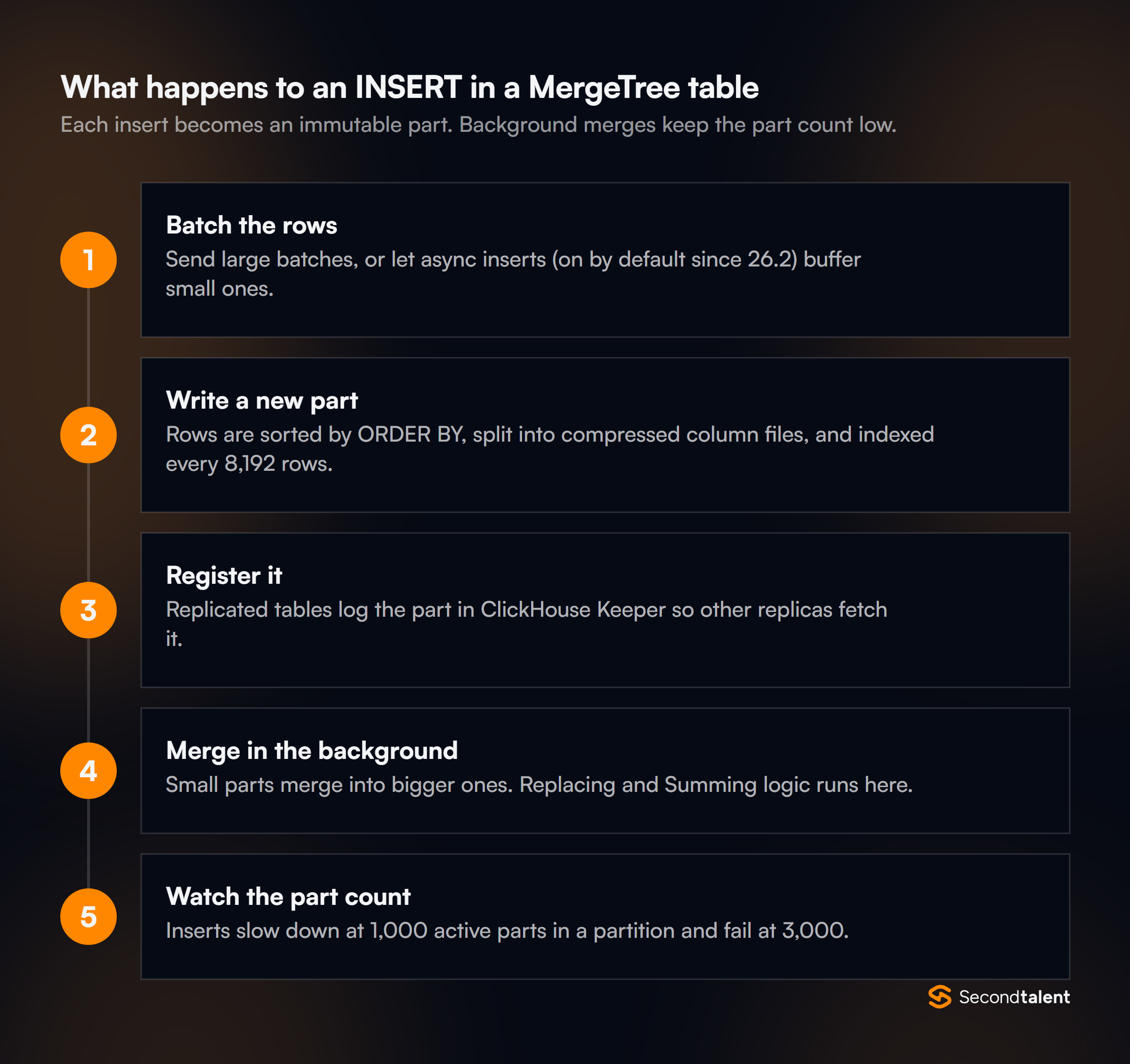
Merges keep reads fast, because a query has to open every active part. They are also where engine logic runs, such as replacing or summing rows. If inserts create parts faster than merges combine them, ClickHouse pushes back.
With the default settings, inserts slow down once a partition has 1,000 active parts and fail at 3,000 with a "Too many parts" error. The usual cause is many tiny inserts, or a PARTITION BY that is too fine.
3. How is the primary key different from a primary key in PostgreSQL?
In ClickHouse the primary key is a sparse index, not a uniqueness constraint. Two rows can share the same key.
The index stores one entry, or "mark", per granule of rows (index_granularity, 8,192 by default). A query filter on the leading key columns lets ClickHouse pick the granules that might match and skip the rest.
The index is small enough to stay in memory even for billions of rows. The sparse primary index guide walks through it. If PRIMARY KEY is not set, it equals ORDER BY. If it is set, it must be a prefix of ORDER BY.
4. How do you choose the ORDER BY key?
Start with the columns most queries filter on, and order them from low to high cardinality. A logs table might use ORDER BY (service, level, toStartOfHour(ts), ts).
Low-cardinality columns first create long runs of equal values. That helps both granule skipping and compression. A high-cardinality column such as a UUID first makes the rest of the key useless for skipping.
Since the sort key is fixed when the table is created, a strong candidate asks about the query patterns before picking it.
For a second access pattern, a projection or a second table fed by a materialized view is better than a compromise key.
CREATE TABLE logs
(
    ts DateTime64(3),
    service LowCardinality(String),
    level LowCardinality(String),
    message String
)
ENGINE = MergeTree
PARTITION BY toYYYYMM(ts)
ORDER BY (service, level, toStartOfHour(ts), ts)
TTL toDateTime(ts) + INTERVAL 30 DAY;
5. What is PARTITION BY for?
Data management, not speed. Partitions let you drop, move, or expire whole chunks of data cheaply, such as a month of logs.
Partition pruning can help queries a little, but the sort key does most of that work. Too many partitions is a common mistake.
Parts never merge across partitions, so a daily partition on a table with years of data, or a partition per customer, multiplies the part count. Monthly partitions are a common default for time-series data.
6. Which MergeTree engine would you pick, and why?
Plain MergeTree for append-only data. The variants change what happens to rows with the same sorting key during merges.
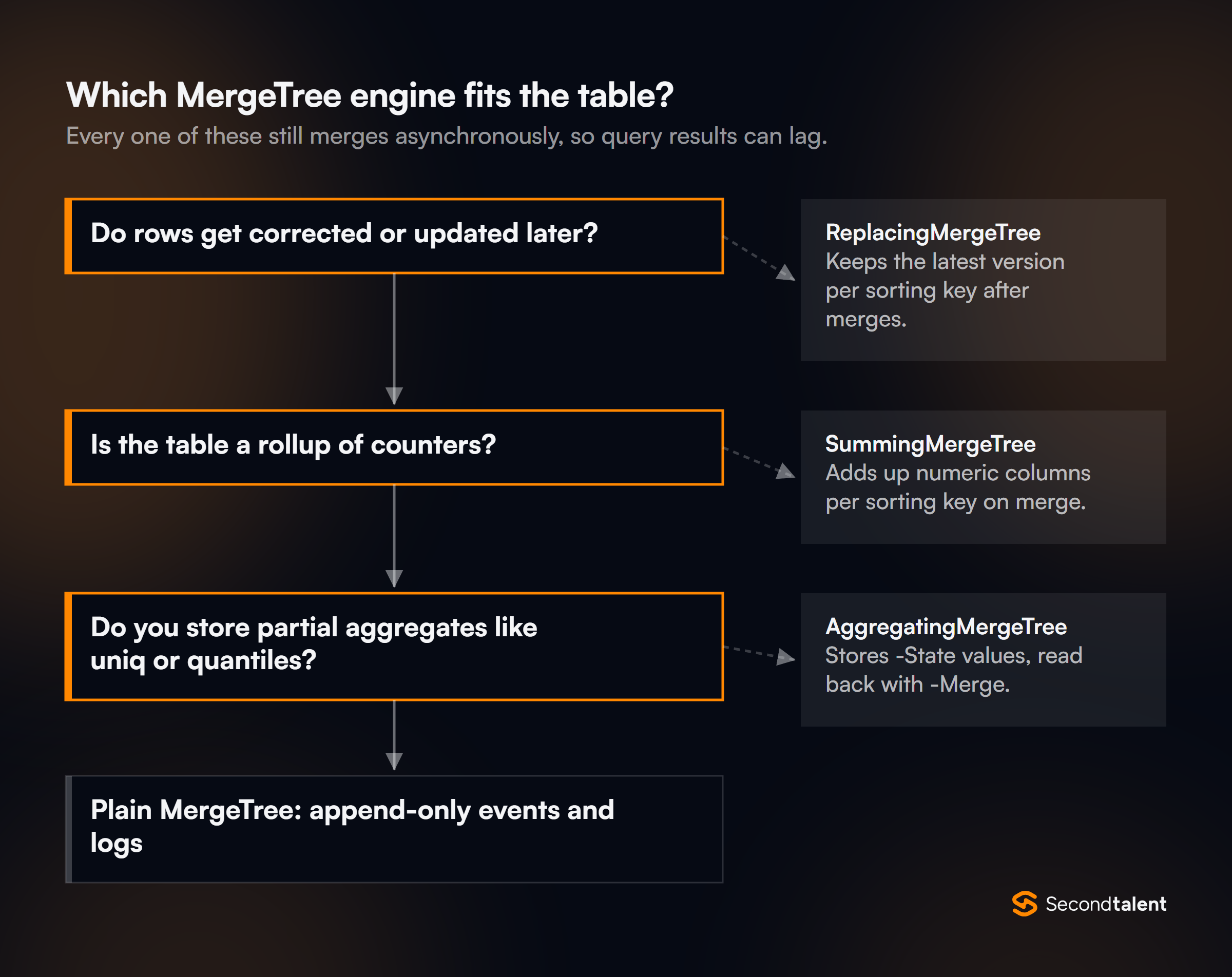
- ReplacingMergeTree: keeps one row per sorting key, the highest version if a version column is set.
- SummingMergeTree: adds up numeric columns for rows with the same key.
- AggregatingMergeTree: merges stored aggregate states, usually filled by a materialized view.
- CollapsingMergeTree and VersionedCollapsingMergeTree: cancel rows using a sign column.
All of them act only during merges, which happen at unknown times. Queries must still aggregate or use FINAL to get exact results. Each has a Replicated form for clusters. See the MergeTree docs.
7. How do ReplacingMergeTree and FINAL work together?
ReplacingMergeTree removes duplicates only when parts merge, so a query can still see several versions of a row. FINAL tells the query to apply the replacing logic while reading.
FINAL used to be slow. It now reads with several threads (max_final_threads). Since 26.2, ClickHouse also avoids merging across partitions on its own when the partition key allows it. It still costs more than a plain read.
Alternatives include argMax(value, version) grouped by key, or a query that tolerates duplicates. The ReplacingMergeTree docs cover the is_deleted column for soft deletes.
Data Modeling
8. When should you use LowCardinality?
For string columns with a limited set of values, such as country codes, status or service names. It stores a dictionary of the distinct values and keeps small integer positions in the column.
That shrinks the data and speeds up filters and GROUP BY on the column. A common rule of thumb is under about 10,000 distinct values. For high-cardinality strings, such as URLs or user IDs, it adds overhead instead of saving it.
9. How do incremental materialized views work?
An incremental materialized view is an insert trigger. When a block is inserted into the source table, the view's SELECT runs on that block only, and the result goes into a target table.
CREATE MATERIALIZED VIEW daily_errors_mv TO daily_errors AS
SELECT toDate(ts) AS day, service, countState() AS errors
FROM logs
WHERE level = 'error'
GROUP BY day, service;
Three points separate strong answers. The view never sees the rest of the source table, so a join inside it reads the other table at insert time only. Updates and deletes on the source are not passed on.
And the target is usually an AggregatingMergeTree or SummingMergeTree, read with countMerge() or sum(), because each insert adds new partial rows. The incremental view docs show the pattern.
10. What are projections, and when do they beat a materialized view?
A projection is a hidden copy of a table's data, sorted differently or pre-aggregated, stored inside each part. The optimizer uses it automatically when it fits the query.
- Stored inside each part of the table
- Picked by the optimizer; queries do not change
- Best for a second sort order or a simple rollup
- Writes to a separate target table
- Queries read the target by name
- Best for transforms, own engine or own TTL
Projections suit a second sort order on the same table, because they stay consistent with the base data and need no query changes. Materialized views suit transformations, joins at insert time, or a target with its own engine and retention.
Both add write and storage cost. See the projections docs.
11. Should you denormalize or join?
Denormalize the hot paths, and join where the data changes or the right side is small. The old advice to never join is outdated.
Since 24.12, the default join algorithm list is direct,parallel_hash,hash, so hash joins build their table in parallel. Runtime join filters became the default in 26.2, and join reordering has improved across 2025 and 2026.
Wide denormalized tables still win for the main dashboards. But for slowly changing dimensions, a dictionary or a join is simpler than rewriting billions of fact rows.
Queries and Tuning
12. What does PREWHERE do, and do you need to write it?
PREWHERE reads the filter columns first and then reads the other columns only for matching granules. You rarely need to write it: optimize_move_to_prewhere is on by default and moves suitable conditions from WHERE automatically.
Writing it by hand helps in edge cases, such as when the optimizer picks the wrong column. The PREWHERE docs describe the rules. A candidate who says "always add PREWHERE" learned from old material.
13. What are data skipping indexes?
Secondary indexes that store a small summary per block of granules, so queries can skip blocks that cannot match. They help filters on columns outside the sort key.
Types include minmax, set, bloom_filter and n-gram or token Bloom filters. The text index, generally available since 26.2, is the newer choice for full-text search. Skip indexes only pay off when matching values cluster in some blocks.
If every block holds a match, the index costs time and saves nothing. Check with EXPLAIN indexes = 1.
14. How do you find out why a query is slow?
Start with EXPLAIN indexes = 1 to see how many parts and granules the primary key and skip indexes remove. Then check system.query_log for rows read, bytes read, memory and duration.
The usual findings are a filter that does not use the sort key, a join with a large right side, or a GROUP BY on a high-cardinality key that spills memory. system.parts shows part counts per partition, and system.merges shows merges in progress.
Comparing read_rows with the result size is the quickest sanity check.
15. When do you need GLOBAL IN or GLOBAL JOIN?
When the right side of an IN or JOIN is itself a distributed table. Without GLOBAL, each shard runs the subquery again against the whole cluster, which multiplies the work.
With GLOBAL, the initiating node runs the subquery once and sends the result to every shard as a temporary table. That only works if the result is small.
For large right sides, the better fix is to co-locate data by sharding both tables on the join key.
Replication and Clusters
16. How does ReplicatedMergeTree replicate data?
Every replica accepts inserts. The replica that receives an insert writes the part locally and records it in a shared log in ClickHouse Keeper. The other replicas read the log and fetch the part.
There is no single leader for writes. Merges and mutations are also recorded in the log, so replicas end up with the same parts. ClickHouse Keeper is ClickHouse's own Raft-based coordination service, and it speaks the ZooKeeper protocol.
Keeper holds metadata only, never table data.
17. How does insert deduplication work?
ClickHouse hashes each inserted block and remembers recent hashes. If the same block arrives again, for example after a client retry, it is skipped.
For replicated tables, the hashes live in Keeper. The default window has been 10,000 blocks since 25.9, limited to the last hour since 25.10.
Since 26.2, deduplication is on for all inserts by default, including async inserts and dependent materialized views. It only works if the retry sends the same rows in the same order. So a client should retry the same batch, not rebuild it.
18. What does a Distributed table do?
A Distributed table stores nothing. It routes queries to the local tables on each shard and merges the partial results on the node that received the query.
For inserts, it picks a shard with the sharding key and forwards the rows, by default in the background. Many teams insert straight into the local tables instead, to avoid a second copy step and to control batching.
Choose the sharding key so related rows land together, which makes joins and GROUP BY local. See the Distributed engine docs.
19. How do you change data that is already stored?
Pick the lightest tool that works. From heaviest to lightest:
ALTER TABLE ... UPDATEorDELETE: mutations that rewrite every affected part in the background. Fine for rare bulk fixes.- Lightweight
DELETE FROM: marks rows as deleted at once. Merges remove them later. - Lightweight
UPDATE: writes small patch parts, added in 25.7 (see question 24). - Design around it: ReplacingMergeTree with a version column, or TTL for expiry.
Frequent single-row updates suggest a workload that belongs in an OLTP database, with ClickHouse fed from it.
20. How should an application insert data?
In large batches rather than row by row, or through async inserts. Each synchronous insert creates at least one part, so thousands of tiny inserts mean thousands of parts to merge.
With async inserts, the server buffers small inserts and writes them as one part. Since 26.2 this is on by default, and by default the client waits until the data is flushed, so an acknowledged insert is stored.
Setting wait_for_async_insert = 0 returns sooner but can lose data on a crash. See the async inserts guide.
21. How do TTLs work?
A TTL expression deletes or moves rows or columns once a time condition is met. It runs during merges, not on a timer.
Table TTLs can delete rows (TTL ts + INTERVAL 30 DAY), move them to another disk or volume (TO VOLUME 'cold'), or roll them up with GROUP BY. Because TTL runs during merges, expired data can linger until a merge happens.
With a partition aligned to the TTL, ttl_only_drop_parts drops whole parts, which is much cheaper.
What Changed Recently
UPDATE added22. What changed about inserts in ClickHouse 26.2?
Async inserts and insert deduplication became the defaults. The settings change history in the ClickHouse source records async_insert moving from off to on in 26.2.
Before that release, and deduplication was on for plain synchronous inserts but off for async inserts and materialized views.
The 2026 changelog lists the deduplication change as backward incompatible: clusters that had turned deduplication off must now set it explicitly. The same release made runtime join filters the default.
For interviews, the point is that the "too many parts" problem from tiny inserts is now partly handled by the server. Client-side batching is still the most efficient path.
23. Is the JSON type ready for production?
Yes. The 25.3 LTS release, on March 20, 2025, declared the JSON data type production-ready, along with the Dynamic and Variant types it builds on.
Per the 2025 changelog, this replaced the older experimental Object('json') type. The JSON type docs explain how each path is stored as its own column, up to a limit set by max_dynamic_paths.
Frequent paths are then as fast to query as normal columns. A good answer still declares known, heavily queried fields as typed columns.
24. How do lightweight updates work?
A standard SQL UPDATE ... SET ... WHERE writes small "patch parts" with only the changed values, instead of rewriting whole parts. Reads apply the patches on the fly, and merges fold them in later.
The feature arrived in 25.7 (July 24, 2025) and was promoted from experimental to beta in 25.8 LTS. The 26.8 LTS release moved patch parts to a new sorted on-disk format that caps the memory needed to apply them.
Lightweight updates suit occasional corrections. Heavy update traffic still slows reads, which is why 25.8 added a max_uncompressed_bytes_in_patches limit. See the UPDATE docs.
25. What are refreshable materialized views?
Views that rerun their whole query on a schedule, such as REFRESH EVERY 1 HOUR, and replace or append to the target table. They became production-ready in 24.10, per the 2024 changelog.
They fill the gap left by incremental views. A refreshable view can join large tables, see updates and deletes, and compute results that need the full dataset. The cost is freshness and the work of recomputing.
An APPEND mode, added in 24.9, adds rows instead of replacing the table. See the refreshable view docs.
Signs of a Strong Answer
- They ask about query patterns before choosing
ORDER BY, and explain granule skipping with numbers. - They know ReplacingMergeTree deduplicates only on merge, and have a plan for reading correct results.
- They describe a materialized view as an insert trigger, and know it misses updates and other tables.
- They have fixed a "Too many parts" error and can name its causes.
- They use
EXPLAIN indexes = 1andsystem.query_lograther than guessing. - They know that async inserts and deduplication are on by default since 26.2.
Hiring ClickHouse Engineers
ClickHouse experience usually sits with data engineers who run analytics at scale. Second Talent matches companies with pre-vetted data engineers and back-end engineers from Asia, screened with questions like these.
Tell us the stack and we send a shortlist within 24 hours. Start hiring, or see our Kafka and PostgreSQL interview guides.
Ready to hire? Hire Data Engineers: vetted AI-native talent, with first profiles in 24 hours.