
TL;DR: PostgreSQL interviews in 2026 test MVCC and VACUUM, reading EXPLAIN plans, index choice, lock-safe schema changes and multi-tenant design. The current release is PostgreSQL 18 (18.6), which added asynchronous I/O, B-tree skip scan and uuidv7(), and PostgreSQL 14 reaches end of life on November 12, 2026.
PostgreSQL 18 turned on data checksums by default for new clusters, and pg_upgrade refuses to upgrade between clusters whose checksum settings differ.
A team that upgrades an old non-checksum cluster has to pass --no-data-checksums to initdb or plan a different route.
Details like that separate candidates who have run Postgres in production from those who have only queried it, and they run through every question below.
- 1PostgreSQL 19 reached Beta 4 on September 24, 2026; production answers should still target 17 or 18.
- 2Since PostgreSQL 18, EXPLAIN ANALYZE prints buffer counts by default, so candidates no longer need to remember to add
BUFFERS. - 3MD5 password authentication is deprecated in 18 and will be removed in a future release; SCRAM is the replacement.
- 4PgBouncer has supported prepared statements in transaction pooling mode since 1.21, which removes the most common reason teams avoided it.
Queries and Indexes
1. How do you read an EXPLAIN ANALYZE plan?
Read it from the innermost node outward, and compare the planner's estimated rows with the actual rows on each node.
A large gap between the two is the usual root cause of a bad plan, because every choice above that node (join method, join order, sort strategy) was made on the wrong number.
- cost=0.43..8.45: startup cost and total cost in the planner's arbitrary units. Useful for comparing plans, not for predicting milliseconds.
- actual time=0.02..0.03: milliseconds to the first row and to the last row, per loop.
- loops=5000: how many times the node ran. Multiply the per-loop time and rows by it; a cheap inner index scan repeated 5,000 times in a nested loop is often the slow part.
- Buffers: shared hit=120 read=8400: pages found in shared buffers versus read from the OS or disk.
EXPLAIN (ANALYZE, BUFFERS)
SELECT * FROM orders WHERE customer_id = 42 AND status = 'open';
EXPLAIN ANALYZE executes the statement, so wrap an UPDATE or DELETE in a transaction and roll it back. The Using EXPLAIN chapter walks through every field.
2. Which index type fits which query?
B-tree is the default and handles equality, ranges, sorting and LIKE 'prefix%'. The others exist for data a B-tree cannot order.
| Type | Use it for | Trade-off |
|---|---|---|
| B-tree | =, <, >, BETWEEN, ORDER BY, unique constraints | The only type that enforces uniqueness |
| Hash | Equality only | Rarely beats B-tree in practice |
| GIN | JSONB containment, arrays, full-text search, trigrams | Fast lookups, slower writes; parallel builds since 18 |
| GiST | Ranges, geometry, nearest-neighbour, exclusion constraints | Lossy for some types, so rows are rechecked |
| SP-GiST | Non-balanced partitions: quadtrees, IP ranges, phone prefixes | Narrow set of use cases |
| BRIN | Huge append-only tables where values follow physical order, such as timestamps | Tiny, but useless if rows are not correlated with their position on disk |
A strong answer ties the type to the operator class: a GIN index on jsonb with jsonb_path_ops supports @> but not the key-exists operator ?. See Index Types.
3. What does an index-only scan need to work?
Every column the query reads must be in the index, and the heap pages must be marked all-visible in the visibility map. The second condition is the one candidates miss.
PostgreSQL stores visibility information in the table, not the index, so for a page not marked all-visible the executor still visits the heap to check each row. The plan shows this as Heap Fetches.
VACUUM sets the all-visible bits, which is why an index-only scan on a table that autovacuum neglects can be as slow as a plain index scan. INCLUDE columns add payload to a B-tree without making them part of the key:
CREATE INDEX ON orders (customer_id) INCLUDE (total, created_at);4. When do you use a partial index or an expression index?
A partial index covers only the rows matching a WHERE clause. It suits queries that always target a small slice of a big table, such as unprocessed jobs or soft-deleted rows you never read:
CREATE INDEX ON jobs (run_at) WHERE status = 'pending';
CREATE UNIQUE INDEX ON users (email) WHERE deleted_at IS NULL;
The second line is a common interview follow-up: a partial unique index lets a deleted account's email be reused. An expression index stores the result of a function, so CREATE INDEX ON users (lower(email)) serves WHERE lower(email) = $1.
The query must use the same expression, or the planner cannot match it.
5. How do you add an index to a busy table without blocking writes?
Use CREATE INDEX CONCURRENTLY. A plain CREATE INDEX takes a lock that blocks inserts, updates and deletes for the whole build.
The concurrent version scans the table twice and waits for older transactions to finish, so it takes longer but lets writes continue.
Three details to know: it cannot run inside a transaction block, so migration tools must run it outside one; if it fails it leaves an INVALID index that still slows writes and must be dropped; and REINDEX CONCURRENTLY rebuilds a bloated index the same way.
See CREATE INDEX.
6. Why would the planner choose a sequential scan when an index exists?
Usually because it estimates that the scan is cheaper, and it is often right. If a filter matches a large share of the table, reading pages in order beats thousands of random index lookups.
When the choice is wrong, the cause is one of a few things:
- Stale or thin statistics. Run
ANALYZE, or raise the statistics target on a skewed column. Correlated columns may needCREATE STATISTICS. - The predicate does not match the index: a function on the column, a type mismatch such as comparing a
bigintto anumericparameter, or a leading wildcard inLIKE. - Cost settings tuned for spinning disks. The default
random_page_costof 4 assumes random reads are four times dearer than sequential ones; on SSDs many teams lower it.
Disabling scans with SET enable_seqscan = off is a diagnostic to see the alternative plan and its real cost, never a fix.
7. How do you find the queries worth optimizing?
Rank queries by total time, not by the slowest single run.
The pg_stat_statements extension groups statements by normalized shape and records calls, total and mean time, rows and buffer usage, so a 5 ms query called two million times an hour shows up above a 3-second report that runs once.
SELECT query, calls, total_exec_time, mean_exec_time
FROM pg_stat_statements
ORDER BY total_exec_time DESC
LIMIT 10;
For the plans themselves, auto_explain logs the plan of any statement slower than a threshold, which catches plans that only go bad with production parameters. See pg_stat_statements.
MVCC and VACUUM
8. How does MVCC work in PostgreSQL?
Every row version (tuple) carries the ID of the transaction that created it, xmin, and of the one that deleted or replaced it, xmax. An UPDATE never changes a row in place: it writes a new version and sets xmax on the old one.
Each query reads with a snapshot and sees only the versions committed before that snapshot, so readers never block writers and writers never block readers.
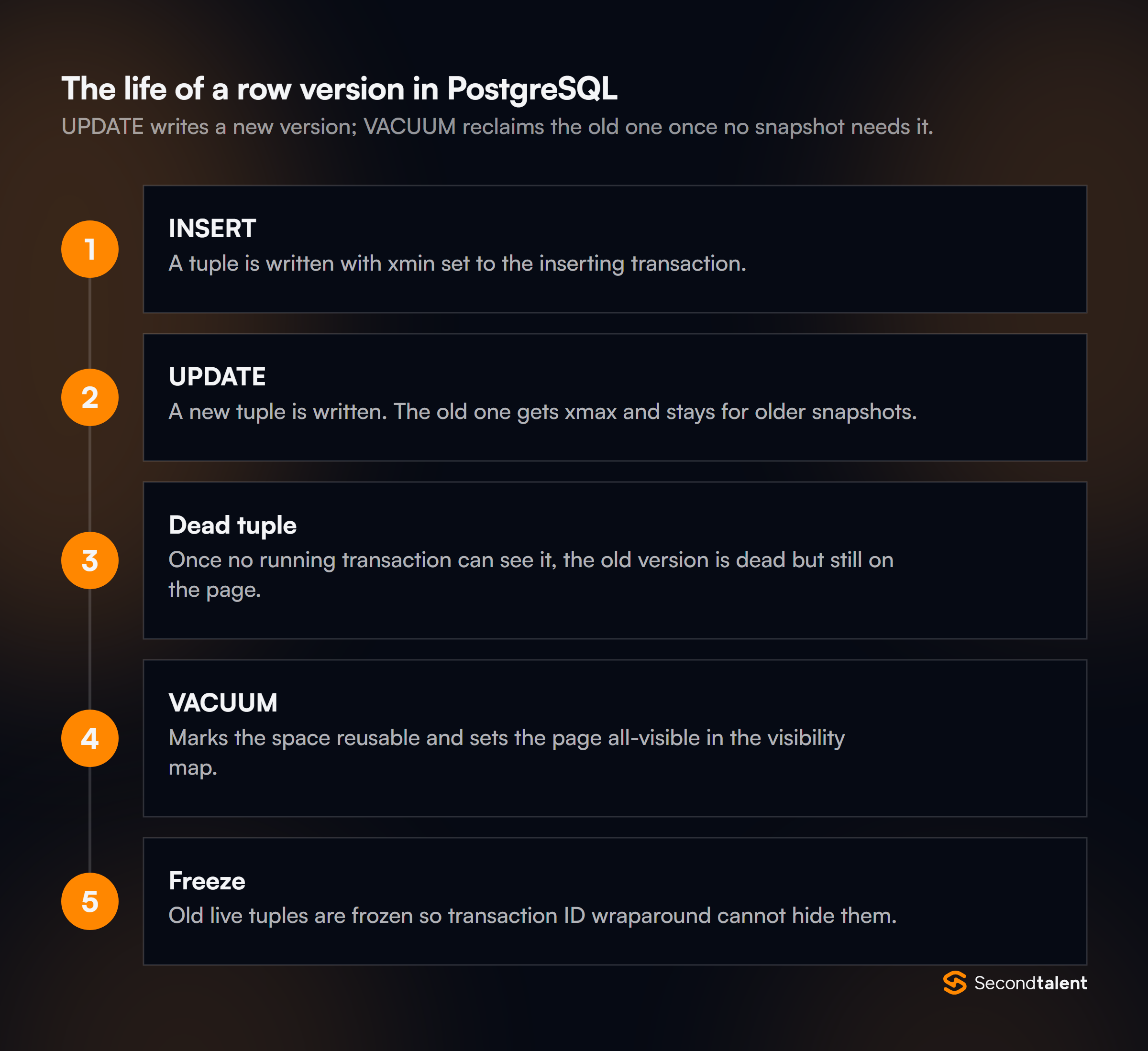
The cost is that old versions stay in the table until no running transaction can see them.
That cleanup is VACUUM's job, and it is why PostgreSQL's MVCC differs from MySQL's InnoDB, which keeps old versions in a separate undo log (compare our MySQL interview guide). See the MVCC introduction.
9. What does VACUUM do, and how is VACUUM FULL different?
Plain VACUUM marks the space of dead tuples as reusable, updates the visibility map and freezes old transaction IDs. It runs alongside normal reads and writes, and autovacuum triggers it once a table's dead tuples pass a threshold.
It rarely shrinks the file on disk; it makes room inside it.
VACUUM FULL rewrites the whole table into a new file and returns space to the operating system, but it holds an ACCESS EXCLUSIVE lock for the duration, blocking even reads.
On a large production table, teams use the pg_repack extension instead, which rebuilds online. For a table with steady churn, tuning autovacuum per table (for example a lower autovacuum_vacuum_scale_factor) beats repeated full rewrites.
See Routine Vacuuming.
10. What is transaction ID wraparound, and how do you prevent it?
Transaction IDs are 32-bit counters compared in a circle, so a row about two billion transactions old would suddenly look like it came from the future and vanish from queries.
PostgreSQL prevents that by freezing old tuples during VACUUM, marking them visible to everyone regardless of their xmin.
Autovacuum forces an anti-wraparound vacuum when a table's oldest unfrozen ID passes autovacuum_freeze_max_age, 200 million transactions by default, even if autovacuum is disabled for that table.
If freezing still falls behind, the server eventually refuses new transactions to protect the data. Monitoring age(datfrozenxid) per database, and alerting well before the limit, is the practical answer.
11. Why do update-heavy tables bloat, and what is a HOT update?
Each update leaves a dead tuple behind, and each new version normally needs a new entry in every index on the table.
A heap-only tuple (HOT) update avoids the index work: if no indexed column changed and the new version fits in free space on the old version's page, PostgreSQL chains it from the old version and skips the index writes entirely.
Two design habits raise the HOT ratio: do not index columns that change on every update (a last_seen_at timestamp, for example), and lower fillfactor on hot tables so pages keep free space for new versions. n_tup_hot_upd in pg_stat_user_tables shows the ratio.
12. What stops VACUUM from removing dead tuples?
Anything that holds back the oldest snapshot the server must preserve, called the xmin horizon.
VACUUM can only remove versions that no transaction could still need, so one old snapshot pins every dead tuple created after it, in every table.
- A long-running query or a session left
idle in transaction. Setidle_in_transaction_session_timeout. - A replication slot whose consumer has stopped: an abandoned logical slot also keeps WAL on disk until the volume fills.
- A hot standby with
hot_standby_feedback = onrunning long reports. - Forgotten prepared transactions from two-phase commit.
Candidates who have debugged real bloat will name pg_stat_activity, pg_replication_slots and pg_prepared_xacts as the three places to look.
Transactions and Locks
13. How do the isolation levels behave in PostgreSQL?
The default is Read Committed: each statement takes a fresh snapshot. Repeatable Read takes one snapshot for the whole transaction, and in PostgreSQL it also prevents phantom reads, which the SQL standard allows at that level.
Read Uncommitted behaves like Read Committed; PostgreSQL never shows dirty reads.
Serializable uses Serializable Snapshot Isolation. It does not lock more; it watches for read/write dependency patterns that could produce a result no serial order would, and aborts one transaction with SQLSTATE 40001.
The application must retry on that error, and a candidate who says so has used it. See Transaction Isolation.
14. Which row lock should a SELECT take before an update?
Usually FOR NO KEY UPDATE or FOR UPDATE, with the difference in what they block. FOR UPDATE also blocks FOR KEY SHARE, the lock that foreign key checks take, so inserting child rows that reference the parent will wait.
FOR NO KEY UPDATE, which a plain UPDATE of non-key columns takes anyway, lets those inserts proceed.
Two modifiers change the waiting behaviour: NOWAIT errors immediately if the row is locked, and SKIP LOCKED skips it, which is how several workers claim different rows from the same queue table without blocking each other.
See Explicit Locking.
15. Why can a fast ALTER TABLE take down production?
Because of the lock queue, not the ALTER itself. Most ALTER TABLE forms need an ACCESS EXCLUSIVE lock. If a long query holds any lock on the table, the ALTER waits, and every new query on that table queues behind the waiting ALTER.
A statement that would take 5 milliseconds can stall all traffic to the table for as long as the old query runs.
SET lock_timeout = '3s';
ALTER TABLE orders ADD COLUMN notes text;
Setting lock_timeout in the migration makes the ALTER give up and retry instead of building a queue. Strong candidates mention this before being asked.
SELECT pid, pg_blocking_pids(pid), wait_event_type, query FROM pg_stat_activity shows which session each waiting query is stuck behind; the ALTER will usually be the one blocked and blocking at once.16. How do you change the schema of a large table safely?
Split every change into steps that each take a short lock, and never rewrite the table in one statement.
- Add a column: since PostgreSQL 11, adding a column with a constant default is a catalog change with no table rewrite. A volatile default such as
random()still rewrites. - Add a constraint: create it
NOT VALID(instant, enforced for new rows), then runVALIDATE CONSTRAINT, which takes a weaker lock that allows reads and writes. - Backfill: update in batches of a few thousand rows with commits in between, so VACUUM keeps up and replicas do not lag.
- Rename or change a type: add a new column, dual-write, backfill, switch reads, then drop the old one.
The ALTER TABLE reference lists the lock level of every subcommand.
17. How does PostgreSQL detect and resolve deadlocks?
A session that has waited on a lock for deadlock_timeout (1 second by default) runs a check for a cycle in the wait graph. If it finds one, it aborts one transaction with a deadlock error and the others proceed.
The check is deferred because most waits resolve on their own and cycle detection is expensive.
Prevention is the application's job: lock rows in a consistent order, for example by sorting IDs before a multi-row SELECT ... FOR UPDATE, and keep transactions short.
The server log records both statements involved, which is where to start.
Schema and Tenants
18. How would you design PostgreSQL for a SaaS app with thousands of tenants?
For thousands of tenants, the default is one shared schema with a tenant_id column on every tenant-owned table, leading every index and enforced by row-level security.
Schema-per-tenant and database-per-tenant give stronger isolation but stop scaling operationally long before the data does: every extra schema or database multiplies catalog size, migration time and, for separate databases, connection pools.
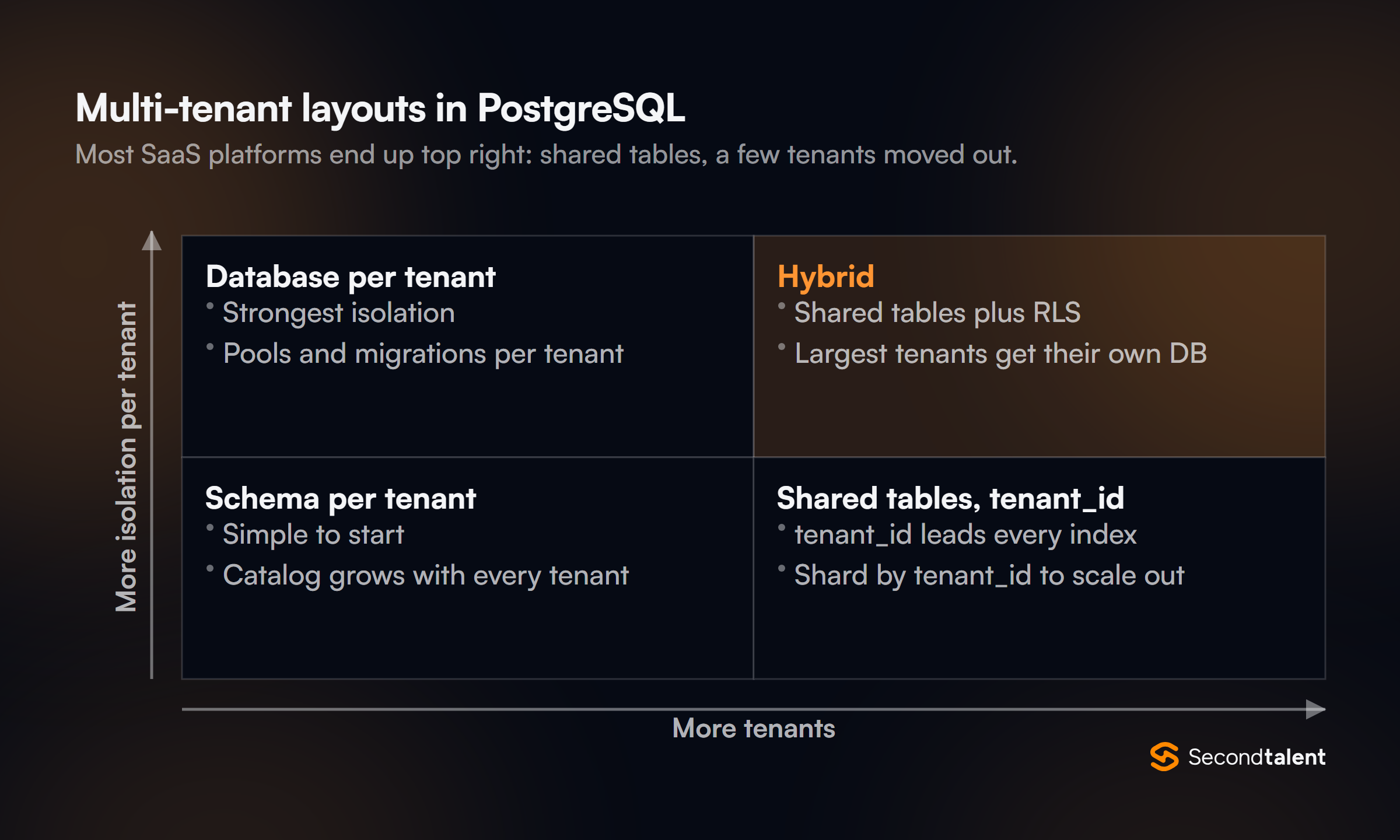
The shared model scales out by sharding on tenant_id, keeping each tenant's rows on one node so joins stay local; the Citus extension does this inside PostgreSQL.
Most mature platforms end up hybrid: small tenants share tables, and the few largest or most regulated tenants get a dedicated database.
A candidate should also raise the noisy-neighbour problem, and how per-tenant rate limits or pooling protect the shared cluster.
19. How does row-level security work, and where does it catch people out?
Row-level security (RLS) adds a policy predicate to every query on a table.
With RLS enabled and a policy such as tenant_id = current_setting('app.tenant_id')::bigint, a query that forgets its WHERE tenant_id = ... clause still returns only the current tenant's rows.
ALTER TABLE invoices ENABLE ROW LEVEL SECURITY;
CREATE POLICY tenant_isolation ON invoices
  USING (tenant_id = current_setting('app.tenant_id')::bigint);
The traps: superusers and roles with BYPASSRLS skip policies, and so does the table owner unless you also run FORCE ROW LEVEL SECURITY, so the application must not connect as the owner.
With a transaction-mode pooler the setting must be applied with SET LOCAL inside each transaction, or it leaks to the next client. Complex policy expressions also run for every row, so keep them indexable. See Row Security Policies.
20. When should you use JSONB, and how do you index it?
Use jsonb for attributes that vary per row and are read as a unit, such as integration payloads or user settings.
Keep anything you filter, join or constrain on in real columns: the planner has no statistics inside a JSON document, and foreign keys and NOT NULL cannot reach into one.
- A GIN index with the default
jsonb_opssupports containment (@>) and key-exists operators. jsonb_path_opssupports only containment and JSON path matching, but is smaller and faster for it.- A B-tree expression index on
(data->>'sku')is best when queries always test one key.
PostgreSQL 17 added JSON_TABLE, which turns JSON into rows and columns in the FROM clause.
21. When is declarative partitioning worth it?
When the table is large and most queries, or the retention policy, align with the partition key.
The two real wins are partition pruning, where the planner skips partitions a query cannot touch, and cheap data removal: dropping or detaching a month's partition replaces a DELETE of millions of rows and the VACUUM work that follows it.
It does not speed up queries that ignore the key; those now scan every partition. Primary keys and unique constraints must include the partition key, and thousands of partitions slow planning.
ALTER TABLE ... DETACH PARTITION ... CONCURRENTLY, available since PostgreSQL 14, removes a partition without blocking queries on the parent. See Table Partitioning.
22. Which primary key type: bigint identity, random UUID or UUIDv7?
bigint GENERATED ALWAYS AS IDENTITY is the smallest and fastest, and it is right when IDs are created only by the database and may be exposed.
Random UUIDs (v4) can be generated anywhere, but their randomness scatters inserts across the whole B-tree, so a large table's index pages keep falling out of cache and fragment.
UUIDv7 puts a timestamp in the high bits, so new keys land at the end of the index like a sequence while staying globally unique. PostgreSQL 18 generates them natively with uuidv7(), and adds uuidv4() as an alias for gen_random_uuid().
The trade-off to mention: a v7 key reveals its creation time.
Scaling and Replication
23. Why does PostgreSQL need a connection pooler, and what breaks in transaction mode?
Each connection is a separate server process with its own memory, so thousands of mostly idle connections from app servers and serverless functions waste RAM and add contention.
PgBouncer in transaction mode lends a server connection to a client only for the length of a transaction, so a few dozen server connections can serve thousands of clients.
What breaks is anything tied to a session: SET without LOCAL, session-level advisory locks, LISTEN, and temporary tables that outlive a transaction.
Prepared statements used to be on that list; PgBouncer 1.21 added protocol-level prepared statement support, and 1.24 turned it on by default with max_prepared_statements = 200.
24. What is the difference between physical and logical replication?
Physical (streaming) replication ships WAL records and produces a byte-for-byte copy of the whole cluster. The standby can serve read-only queries, must run the same major version, and cannot hold extra tables or indexes of its own.
Logical replication decodes WAL into row changes and applies them with publications and subscriptions.
- Whole cluster, byte for byte
- Same major version only
- Read-only standby, the usual failover target
- Selected tables, row changes
- Works across major versions
- No DDL, no sequence values
The missing DDL and sequence values are why a logical cutover needs a schema sync and a sequence reset.
PostgreSQL 17 added failover control for logical slots, and 18 logs write conflicts and defaults new subscriptions to parallel streaming. See Logical Replication.
25. How do synchronous replication and synchronous_commit trade safety for latency?
With asynchronous replication, the default, the primary confirms a commit once its own WAL is flushed; a crash can lose whatever the standby had not received.
With synchronous_standby_names set, the primary waits for standbys, and synchronous_commit controls how far it waits:
remote_write: the standby has received the WAL and handed it to its OS.on: the standby has flushed it to disk.remote_apply: the standby has replayed it, so a read there sees the write.
synchronous_commit can be set per transaction, so a payment can wait for a standby while a click log commits locally with off.
A candidate should also know that with one synchronous standby and FIRST 1, losing that standby blocks commits, which is why quorum settings such as ANY 1 (s1, s2) exist.
26. How do you upgrade to a new major version with minimal downtime?
Two routes. pg_upgrade rewrites the system catalogs and, with --link, hard-links the data files instead of copying them, so even a multi-terabyte cluster upgrades in minutes of downtime.
Logical replication gets close to zero: build a new cluster on the new version, replicate into it, then switch the application over.
PostgreSQL 18 made the first route less painful: pg_upgrade now keeps planner statistics, so the new cluster does not run on empty statistics until ANALYZE finishes, and a new --swap mode moves directories instead of copying or linking files.
Always rehearse on a copy, and check extensions: each must exist in a compatible version for the new server.
What Changed Recently
JSON_TABLEuuidv7(), OAuth27. What did PostgreSQL 18 change about I/O and query speed?
It added an asynchronous I/O subsystem.
Instead of relying on operating system readahead, PostgreSQL can issue several reads at once for sequential scans, bitmap heap scans and VACUUM; the release announcement reports gains of up to 3 times in some benchmarks.
The io_method setting selects worker (the default), io_uring on Linux builds that support it, or sync for the old behaviour.
The same release added skip scan: a multicolumn B-tree index on (region, created_at) can now serve WHERE created_at > $1 without a condition on region, by probing each distinct region value.
It works best when the skipped leading column has few distinct values. PostgreSQL 18 can also turn some OR conditions into index lookups and build GIN indexes in parallel.
28. Which PostgreSQL 18 features change how developers write SQL?
- Virtual generated columns are computed at read time and are now the default kind; add
STOREDto keep the old behaviour. - OLD and NEW in RETURNING for
INSERT,UPDATE,DELETEandMERGE, so an update can return before and after values in one round trip. - Temporal constraints:
WITHOUT OVERLAPSon primary keys and unique constraints, andPERIODon foreign keys, for data valid over time ranges. uuidv7()for time-ordered keys (question 22).
UPDATE accounts SET balance = balance - 50
WHERE id = 7
RETURNING old.balance AS before, new.balance AS after;
The full list is in the PostgreSQL 18 release notes.
29. Which PostgreSQL 18 changes can break an upgrade?
The release notes list several incompatibilities; four come up in practice:
- Data checksums are on by default in
initdb, andpg_upgradeneeds matching settings, so upgrading a non-checksum cluster means initializing the new one with--no-data-checksums. - MD5 passwords are deprecated;
CREATE ROLEandALTER ROLEnow warn when setting one. Move to SCRAM before a future release removes MD5. - Full-text search and pg_trgm indexes may need a
REINDEXafterpg_upgrade, because full-text search now uses the cluster's default collation provider instead of always using libc. - VACUUM and ANALYZE now process inheritance children of a parent table; use the new
ONLYoption for the old behaviour.
PostgreSQL 18 also introduced version 3.2 of the wire protocol, the first new version since 7.4 in 2003, though libpq still defaults to 3.0 while drivers and poolers catch up.
30. Which PostgreSQL versions are still supported, and what should a new project run?
A new project should start on PostgreSQL 18, currently 18.6.
The project supports each major version for five years; per the versioning policy, 14 through 18 are supported today, 13 stopped receiving fixes on November 13, 2025, and 14 does the same on November 12, 2026.
A team on 14 therefore has weeks, not months, to plan its upgrade. PostgreSQL 19 is in beta (Beta 4 shipped on September 24, 2026); testing an application against it is reasonable, running production on it is not.
Minor releases ship quarterly and contain only fixes, so "we skip minor updates" is a red flag in an interview.
Signs of a Strong Answer
- They compare estimated and actual rows in a plan before suggesting any index.
- They name the xmin horizon (long transactions, idle sessions, stale replication slots) when asked about bloat.
- They put
lock_timeoutandCREATE INDEX CONCURRENTLYin migrations without prompting. - They know the table owner bypasses row-level security unless it is forced.
- They can say which 18 upgrade trap (checksums, MD5, collation reindex) would hit their own cluster.
- They retry serialization failures in application code rather than treating them as bugs.
Hiring PostgreSQL Developers
Second Talent places pre-vetted back-end engineers and data engineers from Asia who work with PostgreSQL daily, screened with questions like these.
For budgets, see the cost to hire a database administrator and the cost to hire a backend developer.
Tell us the role and we send a shortlist within 24 hours. Related guides: Redis and ClickHouse.