TL;DR: ML system design interviews test whether a candidate can take a model from a notebook to a service that stays correct under real traffic: data and features, training pipelines, serving, and monitoring. In 2026, expect LLM serving and RAG questions next to the classic recommendation and fraud designs, and know that TorchServe is no longer maintained.
TorchServe, the PyTorch model server that many older ML system design answers still name, is now archived on GitHub, and its README says it gets no more updates or security patches.
Meanwhile vLLM made its V1 engine the default in March 2025, and Kubernetes made Dynamic Resource Allocation for GPUs generally available in v1.34.
The questions below cover the full loop, from problem framing to drift monitoring, with the LLM-era changes in their own section.
- 1Google's "Hidden Technical Debt in Machine Learning Systems" (NIPS 2015) still frames the interview: the model is a small box inside a large system of data, config and monitoring.
- 2The vLLM paper reports 2 to 4 times the throughput of earlier LLM servers at the same latency, mostly from paging the KV cache.
- 3AWS gives Spot Instances a two-minute interruption notice, which sets how often a training job on spot GPUs must checkpoint.
- 4EU AI Act rules for general-purpose AI models have applied since August 2, 2025, so model documentation is now a design requirement for some teams.
Framing the Problem
1. How should you structure a 45-minute ML system design answer?
Spend the first five minutes on requirements, then walk the system in the order data flows through it.
A structure that works: clarify the goal and constraints, define the ML objective and metrics, design data and labels, design features, pick a model and training setup, design serving, then cover monitoring and iteration.
Interviewers mark candidates down for jumping straight to a model architecture. The model is usually the least interesting part of the answer.
Keep a running list of open questions on the whiteboard and come back to them before time runs out.
2. How do you turn a business goal into an ML objective and metrics?
Name three metrics at different levels and say how they connect. The business metric is what the company cares about (revenue per session, fraud losses). The online metric is what an A/B test measures (click-through rate, conversion).
The offline metric is what you can compute on held-out data before shipping (NDCG, AUC, precision at a fixed recall).
A strong answer admits the offline metric is a proxy. A ranking model can gain AUC and still lose revenue if it learns to promote cheap items.
Add guardrail metrics such as latency, complaint rate or diversity, and say which one would block a launch.
3. When should you not use machine learning at all?
When a rule or a heuristic gets close enough, when there is no reliable label, or when mistakes are too costly to accept from a probabilistic system without a human in the loop.
Always propose a non-ML baseline first, such as "most popular items in this category" for recommendations or a threshold rule for fraud.
The baseline does two jobs. It sets the bar the model must beat to justify its running cost, and it becomes the fallback when the model service fails.
Sculley and colleagues' technical debt paper is the standard reference for why ML adds cost that plain code does not.
4. How do you size an ML serving system on the whiteboard?
Start from peak requests per second and the latency budget, then work backward.
If the product needs a response in 200 ms at the 99th percentile and the network plus business logic takes 80 ms, the model path gets about 120 ms, including feature lookups.
Then estimate cost per prediction. If one GPU replica handles 400 requests per second at that latency and peak traffic is 6,000, you need 15 replicas plus headroom for a zone failure. Say the assumptions out loud.
Interviewers care more about the method than the exact numbers.
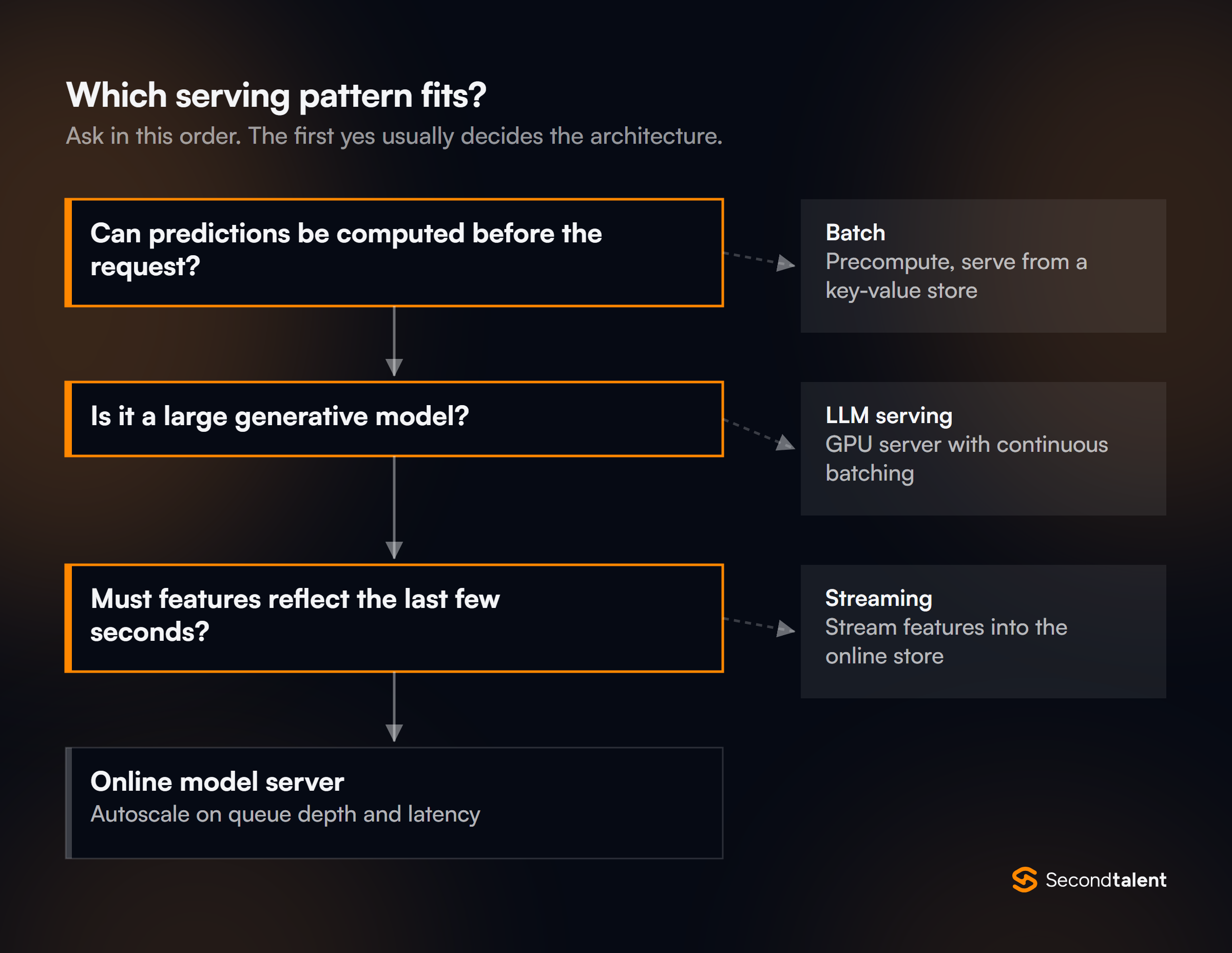
5. Batch prediction or online prediction: how do you choose?
Use batch prediction when you can compute outputs before anyone asks for them, and online prediction when the input only exists at request time.
Nightly product recommendations for every user can be precomputed and stored in a key-value store. A fraud score for a card payment cannot, because the transaction did not exist a second ago.
Batch is cheaper and simpler to operate, but it wastes compute on users who never return and it reacts slowly to new behavior. Many production systems mix both: precompute candidates in batch, then rerank them online with fresh context.
Data and Features
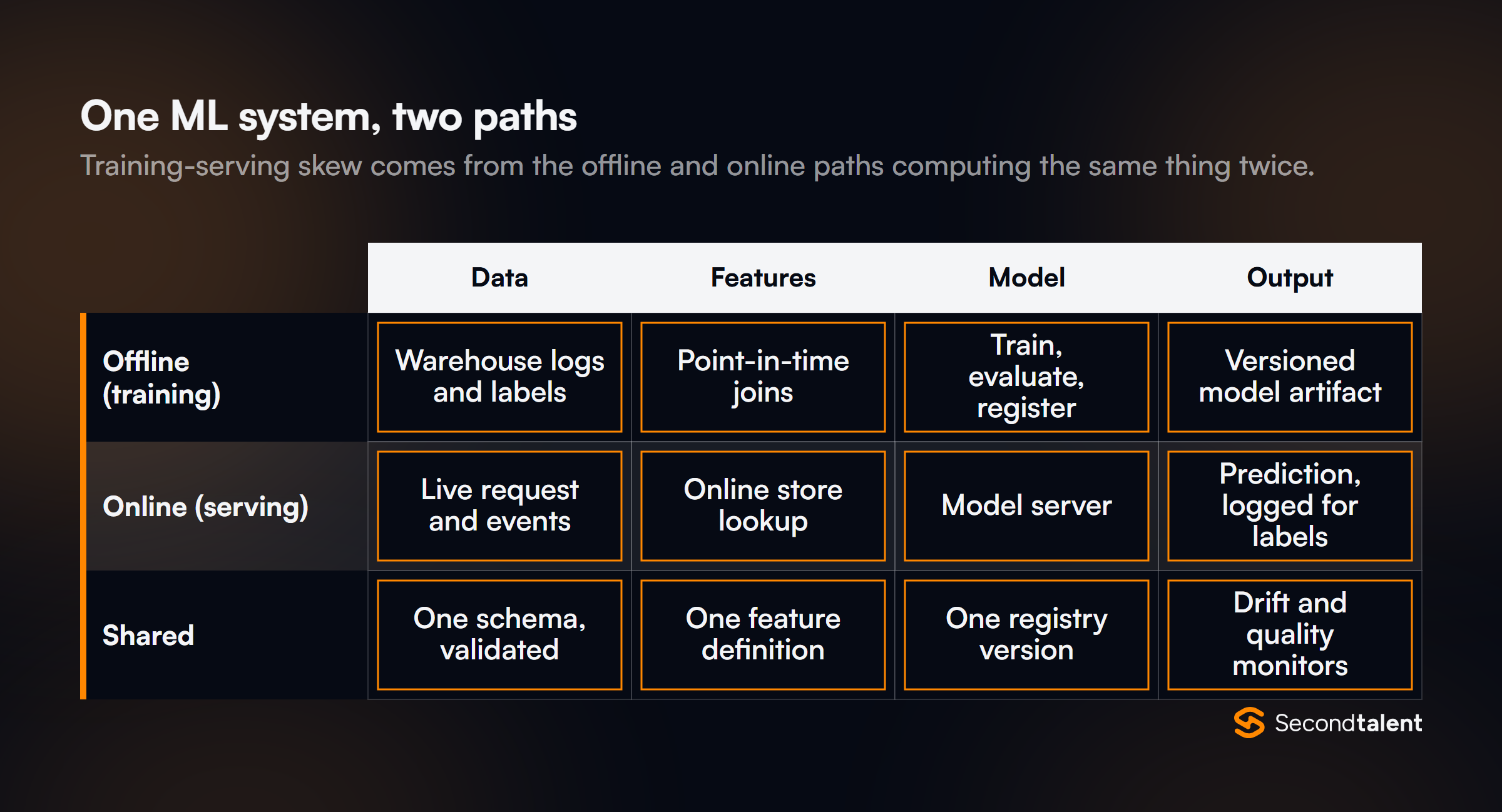
6. What is training-serving skew, and how do you prevent it?
Training-serving skew is when the model sees different inputs in production than it saw in training, so offline accuracy does not carry over.
The usual cause is two code paths: a SQL or Spark job computes features for training, and a separate service reimplements them for serving.
Prevent it with one feature definition used by both paths, a feature store or shared library that materializes it, and logging of the exact features used at serving time.
Those logged features become the next training set, which removes the gap entirely for new data.
7. Design a feature store that serves both training and inference.
A feature store has an offline store, an online store, and a registry that keeps them consistent. The offline store sits on the warehouse or lake and holds full feature history for training.
The online store (Redis, DynamoDB, Bigtable or similar) holds only the latest value per entity for millisecond lookups. The registry records each feature's definition, owner, source and freshness target.
Materialization jobs push values from offline to online on a schedule, and streaming jobs update fast-changing features directly. Open-source Feast follows this split.
The detail interviewers probe is point-in-time correctness in the offline store, covered next.
8. What is a point-in-time join, and why does it matter?
A point-in-time join attaches to each training example the feature values that were known at that example's timestamp, not the latest values.
Without it, a model trained to predict churn can see a "days since last login" feature computed after the user already churned. That is label leakage, and it produces great offline metrics and a useless model.
import pandas as pd

# labels: one row per (user_id, event_time, label)
# feats:  one row per (user_id, feature_time, sessions_7d)
labels = labels.sort_values("event_time")
feats = feats.sort_values("feature_time")

train = pd.merge_asof(
    labels, feats,
    left_on="event_time", right_on="feature_time",
    by="user_id", direction="backward",   # only values known at or before the event
)
At warehouse scale the same logic runs as a windowed join in SQL or Spark, and feature stores generate it for you.
9. How do you get labels, and what do you do when they arrive late?
Say where each label comes from and how long it takes to arrive. Click labels arrive in seconds, purchase labels in days, and fraud chargebacks can take weeks.
Delayed labels mean you cannot measure live accuracy right away, and a naive training job will treat not-yet-labeled examples as negatives.
Fixes include waiting out a label window before an example enters training, using faster proxy labels with a known correlation to the real one, and human review queues for high-value cases.
For implicit feedback, discuss negative sampling: an item the user never saw is not a negative.
10. How do you validate data before it reaches training or serving?
Check schema, ranges, null rates and distributions at every boundary where data enters the system, and fail the pipeline rather than train on bad data. A schema check catches a column that changed from cents to dollars.
A distribution check catches an upstream job that silently started emitting zeros.
Keep the expectations in version control next to the feature definitions. At serving time, validate the request too, and route inputs the model has never seen to a fallback instead of returning a confident wrong answer.
Training Pipelines
11. Design a training pipeline that retrains a model every day.
Break it into steps that each produce a versioned output: extract a data snapshot, validate it, build features with point-in-time joins, train, evaluate against the current production model, and register the candidate if it wins.
An orchestrator such as Airflow, Kubeflow Pipelines or a managed equivalent runs the steps and retries failures.
The key property is reproducibility. Every registered model should point to its data snapshot, code commit, feature versions and hyperparameters, so anyone can rebuild it and explain a bad prediction months later.
12. When do you use data parallelism versus model parallelism?
Use data parallelism when the model fits on one GPU: each GPU holds a copy, processes a different slice of the batch, and gradients are averaged.
Use model parallelism when it does not fit: split layers across devices (pipeline parallelism) or split individual weight matrices (tensor parallelism).
Sharded data parallelism, such as PyTorch FSDP or DeepSpeed ZeRO, sits in between. It splits parameters, gradients and optimizer state across GPUs so each holds only a shard, which lets far larger models train with data-parallel code.
Candidates should mention that communication, not compute, is often the limit.
13. How do you train on spot or preemptible GPUs without losing work?
Checkpoint often enough that losing the time since the last checkpoint is acceptable, and make the job resume on its own.
AWS sends a Spot interruption notice two minutes before it stops an instance, so a watcher can trigger a final checkpoint when the notice arrives.
def train(total_steps, ckpt_every=500):
    state = load_latest_checkpoint()          # model, optimizer, scheduler, data cursor, RNG
    for step in range(state.step, total_steps):
        loss = train_step(next(state.loader))
        if step % ckpt_every == 0 or preemption_notice():
            save_checkpoint(state, step)      # write to object storage, then mark as latest
            if preemption_notice():
                return                        # the scheduler restarts the job elsewhere
Save the optimizer state and the data loader position, not only the weights, or a resumed run trains on the same examples twice. Write the checkpoint fully before marking it as latest, so a half-written file never becomes the restart point.
14. How does a model get from the registry to production?
Through gates, not a manual copy.
A candidate is registered with its metrics, passes automated checks (offline metrics beat production, latency and size within limits, no fairness regression on key slices), then goes to shadow or canary traffic before full rollout.
Each stage transition is recorded in the model registry, and rollback means pointing the serving alias back to the previous version.
Strong candidates also version the preprocessing code with the model, since a new model with old preprocessing is a common cause of silent failure.
Serving and Latency
15. Design a low-latency inference service.
Put a thin API layer in front of a model server, fetch features in parallel from the online store, and set a strict timeout on every call with a fallback answer.
Keep models warm: loading a multi-gigabyte model on the first request causes long cold starts, so preload on startup and pass readiness checks only once the model is in memory.
Scale on the signal that tracks user pain, which is usually queue depth or p99 latency, not CPU. GPU servers can sit at low CPU while requests pile up in the queue.
16. How does dynamic batching improve throughput, and what does it cost?
Dynamic batching holds incoming requests for a few milliseconds and runs them through the model together, which uses the GPU far better than one request at a time.
The cost is added latency for the first request in each batch, so you cap both the batch size and the maximum wait.
For LLMs, continuous batching goes further: new requests join the running batch at each generation step instead of waiting for the whole batch to finish.
That matters because output lengths vary widely, and a static batch waits for its longest answer.
17. How do you roll out a new model safely?
In stages. Shadow mode sends a copy of live traffic to the new model and logs its outputs without using them, which catches crashes, latency problems and odd score distributions. A canary then serves a small share of real users.
An A/B test with enough traffic decides whether the new model actually improves the online metric.
- Users see no change
- Catches crashes and latency
- Cannot measure user response
- A small share of users
- Limits damage from a bad model
- Too little traffic for small effects
- Randomized, sized for power
- Measures the online metric
- Takes days to weeks
18. Why do large recommendation and search systems use two stages?
Because scoring millions of items with a heavy model for every request is too slow.
The first stage, retrieval, uses a cheap method such as approximate nearest neighbor search over embeddings to pull a few hundred to a few thousand candidates.
The second stage, ranking, scores only those candidates with a richer model that uses many features.
Many systems add a final reranking step for business rules, diversity and deduplication. Each stage has its own metric: recall for retrieval, precision or NDCG for ranking.
19. What caching and fallbacks belong in an ML serving path?
Cache what repeats: embeddings for popular items, feature values with a known freshness window, and full responses for anonymous or popular queries. Every cache needs an expiry tied to how fast the underlying data changes.
For fallbacks, define the answer the system returns when the model or a feature lookup times out, such as a popularity list, the last good prediction, or a rule-based score.
Log every fallback, because a rising fallback rate is often the first sign of trouble.
Monitoring and Drift
20. How do you detect model degradation before labels arrive?
Watch the inputs and outputs. Compare live feature distributions and prediction score distributions against the training data with a statistic such as population stability index or a KL divergence, and alert on large shifts.
A sudden change in the share of predictions above a threshold is a cheap, strong signal.
Separate data drift (the inputs changed) from concept drift (the relationship between inputs and label changed). You can see data drift right away. Concept drift usually shows up only when delayed labels arrive, so plan for both.
21. What should an ML service dashboard show?
Four layers. System health: latency percentiles, error rate, throughput and GPU memory. Data health: null rates, schema violations and feature freshness. Model health: score distributions, drift metrics and fallback rate.
Business health: the online metric the model was built to move, split by important segments.
Accuracy alone is not enough, and neither is an average. A model can hold its overall accuracy while failing badly for new users or one country, so track key slices.
22. What is a feedback loop, and how do you break a harmful one?
A feedback loop happens when the model's outputs shape its future training data. A recommender that only shows popular items only collects clicks on popular items, so the next model learns that only popular items get clicked.
The technical debt paper calls out these hidden loops as a major risk.
Break them with exploration: show a small, randomized share of items outside the model's top picks, and log the probability of each item being shown so training can correct for it.
Holdout groups that never see the model also give an unbiased baseline.
Classic Design Questions
23. Design a product recommendation system for 10,000 requests per second under 100 ms.
Use two stages. Precompute user and item embeddings in batch, retrieve a few hundred candidates with an approximate nearest neighbor index, then rank them online with a model that uses session features from a streaming pipeline.
Cache results for anonymous users and popular pages.
Split the latency budget explicitly: about 20 ms for feature lookups, 20 ms for retrieval, 40 ms for ranking and the rest for the network.
Handle cold start with popularity and content features for new users and new items, and plan the fallback for when ranking times out.
24. Design a real-time fraud detection system for card payments.
The model must score each payment inside the authorization window, so the path is: payment event, streaming feature lookups (spend in the last hour, new device, distance from last payment), a fast model such as gradient-boosted trees, then a decision of approve, decline or step-up verification.
The hard parts are class imbalance, delayed chargeback labels and adversaries who adapt.
Cover them with cost-weighted thresholds tuned to fraud loss versus declined good customers, a label window before training, analyst review queues that create fast labels, and frequent retraining.
Rules still sit next to the model for known attack patterns.
25. Design a retrieval-augmented generation (RAG) system over company documents.
Ingest documents, split them into chunks, embed each chunk and store it in a vector index with metadata such as source, date and access rights.
At query time, retrieve the top chunks (often combining vector and keyword search), rerank them, and pass the best few to the LLM with instructions to answer only from them and cite sources.
Strong answers cover what weak ones skip: filtering by the user's permissions before retrieval, re-indexing when documents change, an evaluation set of real questions with expected answers, and measuring retrieval quality separately from answer quality.
When the answer is wrong, you need to know whether retrieval or generation failed.
What Changed Recently
26. Why is LLM serving different from classic model serving?
Because generation is sequential and memory-bound. Each output token needs a pass through the model, and the attention key-value (KV) cache for every active request grows with its length.
GPU memory, not compute, usually limits how many requests you can serve at once.
The vLLM paper addressed this with PagedAttention, which stores the KV cache in fixed-size blocks like virtual memory pages, and reports 2 to 4 times the throughput of earlier systems at the same latency. vLLM 0.8.0 then made its rewritten V1 engine the default.
Candidates should also know speculative decoding, where a small draft model proposes tokens the large model verifies, which its authors measured at 2 to 3 times faster with identical outputs.
27. TorchServe is no longer maintained. What do you serve PyTorch models with now?
The TorchServe repository is archived, and its README says there are no planned updates, bug fixes or security patches. Its last release was v0.12.0 in September 2024.
An answer that still proposes TorchServe for a new system is out of date.
Current choices depend on the model. For LLMs, vLLM or another server with continuous batching.
For general models, NVIDIA Triton Inference Server (which serves PyTorch, ONNX and TensorRT models with dynamic batching), Ray Serve, or KServe on Kubernetes as the control layer.
A simple model can also run in a plain FastAPI service behind an autoscaler. The good answer names the trade-off, not a favorite tool.
28. How do Kubernetes changes affect GPU scheduling and inference routing?
Two changes matter. Dynamic Resource Allocation graduated to GA in Kubernetes v1.34, giving a richer way than the old device plugin count to request and share GPUs and other accelerators.
And the Gateway API Inference Extension adds an InferencePool resource and model-aware routing, so a gateway can send each request to the model server replica with the most free capacity rather than using round robin.
Round robin works poorly for LLMs, because one replica can be stuck on long generations while another is idle. Candidates who mention load balancing on queue length or KV cache use show real serving experience.
29. How do you evaluate and monitor an LLM application in production?
Trace every request end to end (prompt, retrieved context, tool calls, output, latency and token cost), keep a versioned evaluation set, and score outputs with a mix of automated checks, LLM-as-judge graders calibrated against human labels, and human review of samples.
Run the evaluation set on every prompt or model change, the same way unit tests run on code.
Tooling caught up in 2025. MLflow 3, released in June 2025, added tracing, a LoggedModel entity and links between traces, prompts and evaluation results.
The interview point is the method, though: without a fixed evaluation set, "the new prompt seems better" is not evidence.
30. Design an AI agent that can take actions in company systems.
Treat the LLM as an untrusted planner and put the controls in the system around it.
Expose each capability as a narrow tool with a schema, authenticate as the end user rather than a shared service account, require confirmation for actions that write or spend money, and log every tool call.
Limit steps and cost per task so a loop cannot run away.
The Model Context Protocol has become a common way to connect agents to tools and data, and Anthropic donated it to the Linux Foundation's Agentic AI Foundation on December 9, 2025.
Strong candidates also raise prompt injection: text in a retrieved document or email must never be able to trigger a tool call on its own.
For teams that build or ship general-purpose models in the EU, the AI Act timeline adds documentation duties from August 2, 2025.
Signs of a Strong Answer
- They ask about latency, scale and label availability before naming a model.
- They propose a non-ML baseline and use it as the fallback.
- They explain how the same feature is computed for training and serving, and where point-in-time joins happen.
- They give a rollout plan with shadow, canary and a sized A/B test, plus a rollback path.
- They separate data drift from concept drift, and say what they can see before labels arrive.
- For LLM systems, they talk about KV cache memory, evaluation sets and tool permissions, not only prompts.
Hiring ML Engineers
Second Talent matches companies with pre-vetted machine learning engineers and LLM engineers across Asia. See rates in our ML engineer cost guide and MLOps engineer cost guide.
Tell us about the role and we send a shortlist within 24 hours. For modelling and theory questions, see our machine learning engineer interview guide.