
TL;DR: Kafka interviews in 2026 test KRaft controllers, replication and the ISR, producer and consumer settings, and exactly-once processing. Candidates should know that Kafka 4.0 removed ZooKeeper completely, and that the current release line is 4.3.
Apache Kafka 4.0, released on March 18, 2025, was the first major release to run entirely without ZooKeeper. Every cluster on 4.x stores its metadata in a Raft log run by KRaft controllers.
So the old question "what does ZooKeeper do?" is now "how does the controller quorum work, and how do you run it?".
- 1The latest release as of September 2026 is Kafka 4.3.1, out on June 25, 2026.
- 2Producers have defaulted to
acks=allwith idempotence on since Kafka 3.0. Many older guides still say the default isacks=1. - 3Kafka 4.0 changed the producer's
linger.msdefault from 0 to 5. - 4Share groups, Kafka's queue feature, became production-ready in Kafka 4.2.
KRaft and Controllers
1. What does the KRaft controller quorum do?
The controllers own the cluster's metadata. They store it in a single-partition internal topic, __cluster_metadata, and replicate it with the Raft consensus protocol.
Metadata here means topics, partitions, leaders, the ISR, configs and ACLs.
One controller is the Raft leader, which makes it the active controller. The others are hot standbys: they already hold the full metadata log in memory. Brokers are observers.
They fetch the metadata log from the active controller and apply each change, much like a consumer reads a topic.
A majority of controllers must be alive. The KRaft operations docs say that to survive N failures you need 2N + 1 controllers. So 3 controllers survive 1 failure, and 5 survive 2.
2. Why did Kafka replace ZooKeeper with KRaft?
To have one system instead of two, and to treat metadata as an event log. With ZooKeeper, operators ran and secured a second distributed system. A newly elected controller also had to load all state from ZooKeeper before it could act.
In KRaft, the standby controllers are already caught up, so failover is quick. Brokers receive metadata as a stream of small changes rather than full updates. Security, monitoring and tooling are all Kafka's own.
Since Kafka 4.0, KRaft is the only mode.
3. What do the process.roles values mean?
process.roles decides what a node does. broker serves client traffic, controller joins the metadata quorum, and broker,controller does both. A node that does both is a "combined" server.
Combined mode is fine for development. The docs say to avoid it in critical environments. In combined mode you cannot roll or scale controllers apart from brokers, and a busy broker can slow the controller.
A good production answer is 3 or 5 dedicated controllers with their own disks.
process.roles=controller
node.id=1
listeners=CONTROLLER://controller1.example.com:9093
controller.listener.names=CONTROLLER
controller.quorum.bootstrap.servers=controller1.example.com:9093,controller2.example.com:9093,controller3.example.com:9093
4. What is the difference between a static and a dynamic controller quorum?
A static quorum lists every controller in controller.quorum.voters, and that list is fixed. A dynamic quorum, from KIP-853, lets you add and remove controllers while the cluster runs.
It uses controller.quorum.bootstrap.servers instead, which works like a client's bootstrap.servers.
- Set with
controller.quorum.voters kraft.versionis 0 or absent- Changing a controller host means editing every node
- Set with
controller.quorum.bootstrap.servers kraft.versionis 1 or higheradd-controllerandremove-controllerat runtime
You check which one you have with kafka-features.sh --bootstrap-controller localhost:9093 describe. The type is set when the storage is formatted. Kafka 3.9 introduced dynamic quorums for new clusters.
Per the KRaft docs, Kafka 4.1 added the upgrade from static to dynamic: raise kraft.version to 1, then swap the config key on every node.
5. How do you bootstrap a new KRaft cluster?
You format every node's storage by hand with kafka-storage.sh, using one shared cluster ID. Kafka no longer formats empty directories on its own.
The docs explain why: if most controllers started with empty logs, a leader could be elected with committed data missing.
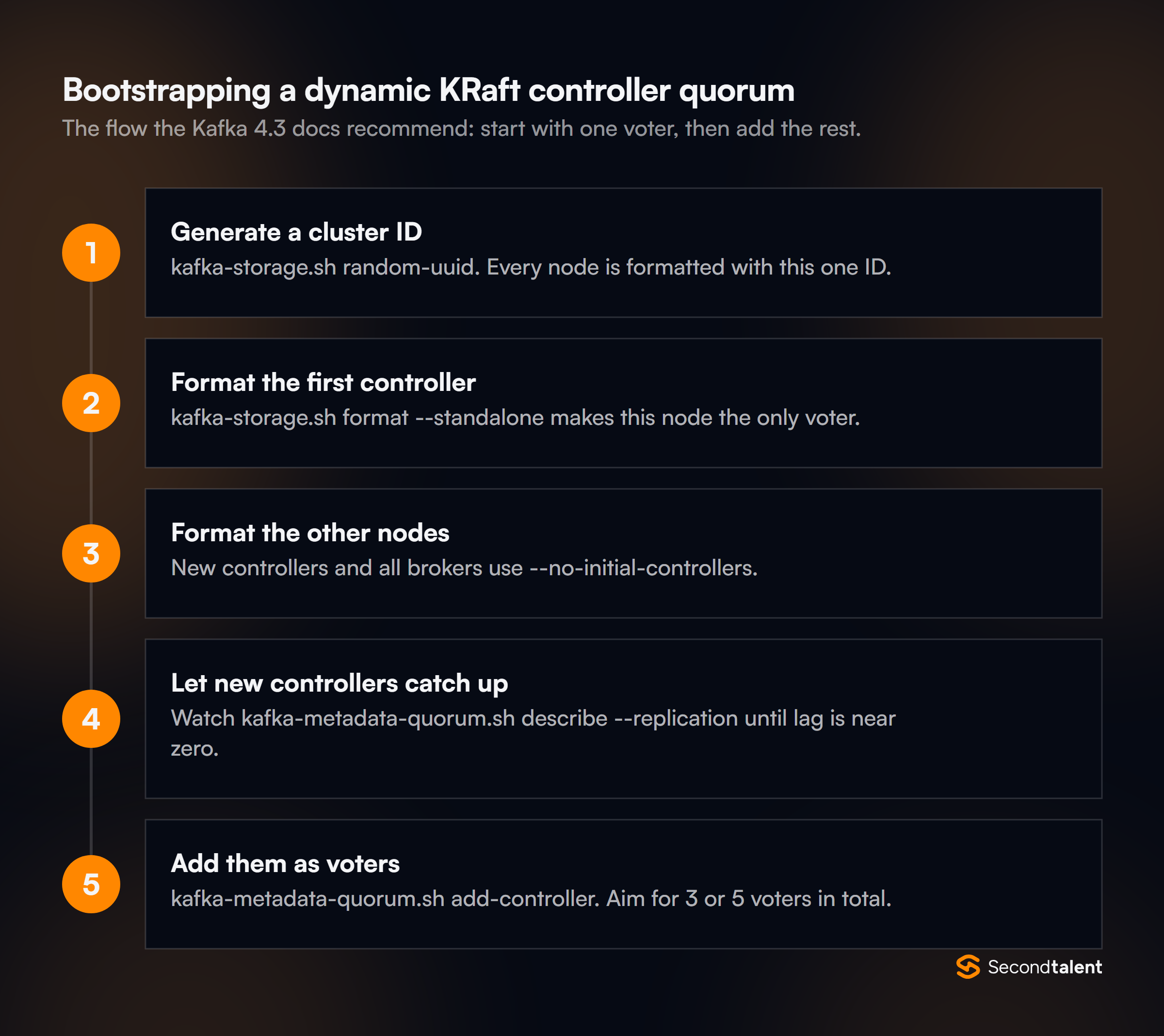
The recommended path starts with one voter and adds the rest:
bin/kafka-storage.sh random-uuid
bin/kafka-storage.sh format --cluster-id <CLUSTER_ID> --standalone \
  --config config/controller.properties
# every other controller and every broker:
bin/kafka-storage.sh format --cluster-id <CLUSTER_ID> \
  --config config/server.properties --no-initial-controllers
You can also start with all voters at once using --initial-controllers. That flag lists each controller's ID, host, port and directory ID, and the value must be the same on every controller.
Storage and Replication
6. How does Kafka store a partition on disk?
Each partition is a directory of log segments. A segment is a .log file of record batches plus an offset index and a time index. Only the newest segment takes writes.
When it reaches log.segment.bytes (1 GiB by default) or its time limit, Kafka rolls a new one.
Retention works on whole segments. Kafka deletes a closed segment once all of it is past retention.ms or the partition exceeds retention.bytes. Deleting a file is far cheaper than removing single records.
It also means a partition can keep data a little longer than the retention setting.
7. What is the ISR, and how does it work with min.insync.replicas?
The ISR (in-sync replicas) is the set of replicas that are caught up with the leader. A follower drops out if it has not fetched up to the leader's log end within replica.lag.time.max.ms, which is 30 seconds by default.
With acks=all, the leader waits for every replica in the ISR before it acknowledges a write. min.insync.replicas sets how small the ISR may get.
If the ISR is smaller, the write fails with NotEnoughReplicas rather than being stored on too few copies. The broker default is 1. The usual production setup is a replication factor of 3 with min.insync.replicas=2.
That survives one broker down with no loss of acknowledged writes.
8. What happens when a partition leader fails?
The active controller picks a new leader, normally from the ISR, and bumps the partition's leader epoch. It writes the change to the metadata log, and brokers and clients move to the new leader.
The leader epoch is what protects data. A former leader that comes back with a stale epoch is rejected. Followers use the epoch to cut off any records the old leader wrote that were never committed.
If no in-sync replica is left, unclean.leader.election.enable (false by default) decides whether an out-of-sync replica may lead. Allowing it trades data loss for availability.
9. What is log compaction, and when do you use it?
Compaction keeps at least the latest record for each key and removes older records with the same key. You turn it on per topic with cleanup.policy=compact. A record with a null value is a tombstone.
It deletes the key after delete.retention.ms.
Use it when the topic holds current state rather than a history. Examples are change data capture tables, user settings, Kafka Streams changelogs and the __consumer_offsets topic. Compaction never reorders records, and offsets never change.
It only leaves gaps. The design docs cover the cleaner in detail.
10. What is tiered storage?
Tiered storage moves older, closed segments to remote storage such as an object store. Only recent data stays on broker disks. It became production-ready in Kafka 3.9.
You enable it on the broker with remote.log.storage.system.enable=true and per topic with remote.storage.enable=true. local.retention.ms then controls how long segments stay on local disk, while retention.ms still sets the total.
The benefit is cheaper long retention, and faster broker replacement, because a new broker copies less data.
Producers and Consumers
11. What does the producer acks setting control?
acks sets how many replicas must have a write before the producer counts it as sent. The default is all.
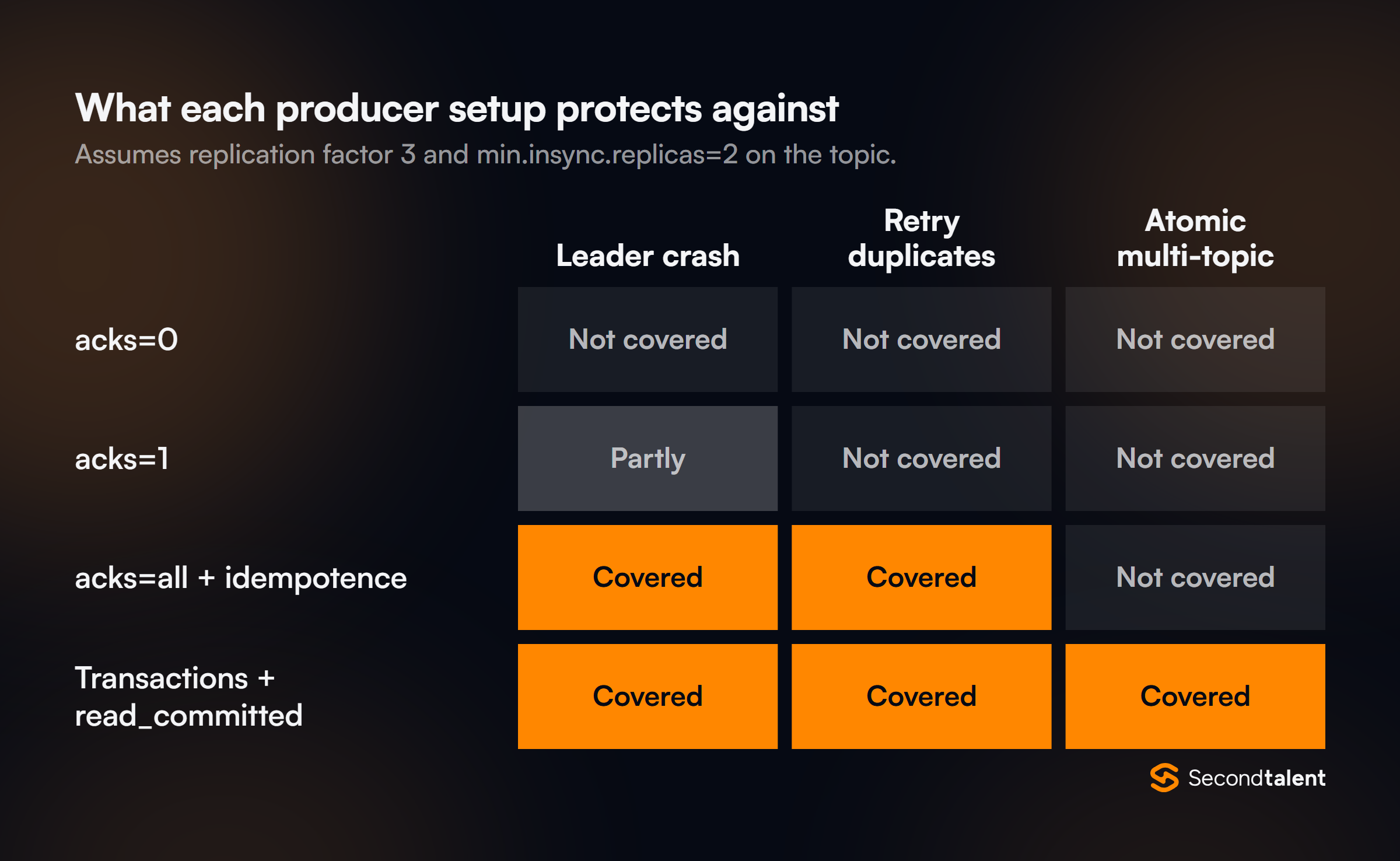
acks=0: the producer does not wait. Fastest, and writes can be lost silently.acks=1: the leader alone confirms. A write is lost if the leader dies before followers copy it.acks=all(or-1): every ISR member confirms. Combined withmin.insync.replicas, this is the durable choice.
The default moved from 1 to all in Kafka 3.0, per the 3.0 upgrade notes. A candidate who says the default is acks=1 learned from an old source.
true by hand. Services still on those client versions should set it explicitly.12. How does the idempotent producer prevent duplicates?
The broker gives each producer a producer ID. The producer numbers every batch per partition. If a retry arrives with a sequence number the broker has already written, the broker drops it.
So a network timeout followed by a retry does not create a duplicate.
Idempotence is on by default. It needs acks=all, retries above 0 and max.in.flight.requests.per.connection of 5 or less, and order is kept within those limits.
If you set a conflicting value without enabling idempotence yourself, it is quietly turned off. If you enable it and set a conflicting value, the producer throws a ConfigException. Idempotence covers one producer session only.
It does not stop your code from sending the same event twice.
13. How does the producer choose a partition?
If a record has a key, the default partitioner hashes the key and takes it modulo the partition count, so one key always lands on one partition. That is what gives per-key ordering.
If there is no key, the producer uses a "sticky" partition. It fills a batch for one partition, then moves on once about batch.size bytes have gone there. This builds bigger batches than plain round robin.
A custom partitioner is rarely needed. When a candidate wants one, ask whether a better key would do the same job.
14. How do batching and compression work together?
The producer groups records for the same partition into batches, and compression applies to a whole batch. Bigger batches therefore compress better.
Two settings shape the batch. batch.size (16,384 bytes by default) is the size target. linger.ms is how long to wait for more records. Its default changed from 0 to 5 in Kafka 4.0.
The docs note that larger batches often give similar or lower latency despite the wait. compression.type defaults to none, and lz4 and zstd are common choices. For high throughput, raise both batch settings and turn on compression.
For the lowest latency, keep linger.ms small. Do not lower acks to save time unless losing data is acceptable.
15. How does a classic consumer group rebalance work?
When a member joins, leaves or misses its session timeout, the group coordinator starts a rebalance. With the classic protocol, one consumer runs the assignor and the coordinator hands out the result.
With an eager assignor, every member gives up all partitions first, so the whole group stops. The cooperative sticky assignor only moves the partitions that must change, over two short rounds.
The default list is [RangeAssignor, CooperativeStickyAssignor], which allows a move to cooperative with one rolling restart. Static membership (group.instance.id) stops a quick restart from causing a rebalance.
Kafka 4.0 made a new server-side protocol generally available; question 26 covers it.
16. How should a consumer commit offsets?
Commit after the records are processed, not before. That gives at-least-once delivery. A crash then means some records are processed again, so processing should be idempotent.
Auto-commit is on by default (enable.auto.commit=true, every 5 seconds). It commits the offsets from earlier polls during later poll() calls. That is safe for simple loops that finish each batch before polling again.
Code that hands records to other threads should disable it and call commitSync() or commitAsync() itself. A common pattern is commitAsync() in the loop and one commitSync() on shutdown or when partitions are revoked.
17. What happens when you add partitions to a topic?
You can add partitions with kafka-topics.sh --alter --partitions, but you cannot remove them. Keyed data also moves: the key-to-partition mapping uses the partition count, so many keys now land on a different partition.
Old records for a key stay in the old partition and new ones go to the new partition. Ordering per key is broken across that boundary. Stateful consumers may also see a key's state split.
That is why teams size partitions up front for expected peak load, and treat an increase as a migration.
Delivery Guarantees
18. What are at-most-once, at-least-once and exactly-once delivery?
They describe what can go wrong when something fails. At-most-once can lose records but never repeats them. At-least-once never loses records but may repeat them. Exactly-once means every record's effect appears once.
Consumers get at-most-once by committing before processing, and at-least-once by committing after. Exactly-once in Kafka applies to read-process-write flows that stay inside Kafka, using transactions.
Once a side effect leaves Kafka, such as a database write or an email, you need idempotent writes or deduplication on that side too.
19. How do Kafka transactions give exactly-once processing?
A transactional producer writes output records and the consumer's offsets in one atomic step. Either both become visible or neither does.
producer.initTransactions();
while (running) {
  ConsumerRecords<String, String> records = consumer.poll(Duration.ofMillis(200));
  producer.beginTransaction();
  for (var r : records) producer.send(transform(r));
  producer.sendOffsetsToTransaction(offsets(records), consumer.groupMetadata());
  producer.commitTransaction();
}
A transaction coordinator on one broker tracks each transaction in the internal __transaction_state topic. On commit it writes markers into every partition the transaction touched.
Downstream consumers must set isolation.level=read_committed. The default is read_uncommitted, which also returns records from aborted transactions. Kafka Streams does all of this for you with processing.guarantee=exactly_once_v2.
20. What is a zombie producer, and how does Kafka fence it?
A zombie is an old instance that still runs after a replacement took over, for example after a long GC pause. Kafka fences it with epochs.
When a producer calls initTransactions() with a transactional.id, the coordinator raises that ID's producer epoch and aborts any open transaction. Writes from the older epoch are rejected with a fencing error.
Passing consumer.groupMetadata() to sendOffsetsToTransaction adds group-level fencing too. That lets many producers share work without a fixed transactional.id per partition.
21. How do you handle a poison pill message?
Catch the failure, send the record to a dead letter topic with the error details, and move on. Otherwise one bad record blocks its whole partition, because the consumer retries it forever.
Split errors into two kinds. Transient ones, such as a timeout calling another service, deserve a retry with backoff. Permanent ones, such as a record that cannot be deserialized, go straight to the dead letter topic.
Add headers with the source topic, partition, offset and exception. Someone can then inspect and replay them later. Kafka Streams has dead letter queue support in its exception handlers since 4.2.
Streams and Connect
22. What is the difference between a KStream and a KTable?
A KStream is a sequence of independent events. A KTable is the latest value per key, where each new record updates the previous one.
They are two views of the same data. Aggregating a stream, such as counting clicks per user, produces a table. Every change to a table can be read as a stream of updates with toStream().
A GlobalKTable copies a whole topic to every instance. It suits small lookup data you join against without repartitioning.
23. How do Kafka Streams state stores survive a crash?
Each state store, RocksDB by default, is backed by a compacted changelog topic. Every update to the store is also written there. If an instance dies, another one rebuilds the store by replaying the changelog.
Replaying a large store can take a long time. Standby replicas (num.standby.replicas) keep warm copies on other instances, so failover skips most of the restore. Candidates should know that state is split by partition.
That is why the input topics of a join must be co-partitioned.
24. What window types does Kafka Streams support?
Four, for aggregations:
- Tumbling: fixed size with no overlap, such as counts per minute. Each record falls in one window.
- Hopping: fixed size that advance by a smaller step, so windows overlap and a record can fall in several.
- Sliding: defined by a maximum time difference between records. A window exists for each distinct set of records within that gap.
- Session: per key, closed after a period of inactivity. Their size varies with user activity.
Stream-stream joins use JoinWindows, which match records whose timestamps are within a set distance. Grace periods decide how long a window accepts late records before its result is final.
25. What is Kafka Connect, and when is it better than custom code?
Kafka Connect is a framework for moving data between Kafka and other systems through reusable connectors. Source connectors bring data in, and sink connectors write it out.
It runs as a cluster of workers in distributed mode. Workers store connector configs, offsets and status in Kafka topics and spread tasks across themselves.
Converters handle serialization, and single message transforms make small per-record changes.
Use Connect when a maintained connector exists for the system. Write custom code when the logic is business-specific. Since 4.1, Connect can run several versions of the same plugin, which makes upgrades safer.
What Changed Recently
26. What is the new consumer rebalance protocol from KIP-848?
It moves group management to the broker and makes rebalances incremental. There is no longer a global barrier where every consumer stops. The Kafka 4.0 announcement made it generally available.
The broker side is on by default. Consumers opt in with group.protocol=consumer, because the client default is still classic. The broker then owns the heartbeat interval, the session timeout and the assignor, which is uniform or range.
So session.timeout.ms, heartbeat.interval.ms and partition.assignment.strategy no longer apply on the client. A group can move from classic to the new protocol with a rolling restart.
The protocol docs plan to make it the client default in Kafka 5.0.
27. How do you upgrade a ZooKeeper cluster to Kafka 4.x?
Through a bridge release. Kafka 4.0 and later cannot run in ZooKeeper mode and cannot migrate from it. Per the 3.9 announcement, the path is:
- Upgrade the cluster to Kafka 3.9.
- Run the ZooKeeper to KRaft migration on 3.9.
- Upgrade to Kafka 4.x.
Check the other 4.0 breaking changes too. Brokers, Connect and tools need Java 17, while clients and Streams need Java 11. Old protocol versions were removed, so brokers must be 2.1 or newer before you upgrade clients to 4.0.
Message formats v0 and v1 are also gone.
28. What are share groups, and how are they different from consumer groups?
Share groups let many consumers read the same partition at once and acknowledge each record on its own. That gives Kafka queue-like behavior. The Kafka 4.2 announcement declared them production-ready.
In a consumer group, each partition belongs to one member, so parallelism is capped by the partition count. In a share group, records are handed out with a time-limited lock, 30 seconds by default.
A consumer can accept, release or reject each one, and 4.2 added RENEW to extend a lock during long work. Kafka counts deliveries. After 5 attempts by default, it gives up on the record.
The trade-off is ordering: a share group does not keep per-partition order.
29. What are Eligible Leader Replicas?
Eligible Leader Replicas (ELR, KIP-966) are replicas outside the ISR that are still known to hold all data up to the high watermark. They are safe to elect as leader.
ELR arrived as a preview in 4.0. The ELR docs say it is on by default for new clusters from 4.1. On older clusters you turn it on with eligible.leader.replicas.version=1.
The controller picks a leader from the ISR first, then from the ELR, and only then falls back to the last known leader. With ELR on, min.insync.replicas must be set at the cluster level, not per broker.
30. What changed for Kafka Streams in 4.1 and 4.2?
Two things matter most. Streams got its own broker-side rebalance protocol, KIP-1071, and gained dead letter queues. The rebalance protocol arrived in early access in Kafka 4.1. It reached GA in 4.2 with a limited feature set.
It builds on KIP-848, so the broker assigns tasks and creates internal topics.
KIP-1034 in 4.2 lets exception handlers send failed records to a dead letter queue topic, with the raw source bytes. Kafka 4.2 also added anchored wall-clock punctuation for jobs that must run at set times.
Kafka 4.3 then deprecated the streams-scala module, with removal planned for 5.0.
Signs of a Strong Answer
- They describe the controller quorum as a Raft log with a leader and standbys, and size it as 2N + 1, without mentioning ZooKeeper as current.
- They pair
acks=allwithmin.insync.replicas=2and replication factor 3, and can say what each failure costs. - They know the current producer defaults: idempotence on,
acks=all,linger.ms=5. - They say where exactly-once stops, at the first side effect outside Kafka, and how they make that side idempotent.
- They pick a partition key from the ordering the business needs, and treat adding partitions as a migration.
- They have used
kafka-metadata-quorum.shorkafka-consumer-groups.sh --describeto debug a real incident.
Hiring Kafka Engineers
Kafka skills usually sit with data and back-end engineers. Second Talent matches companies with pre-vetted data engineers and Java developers from Asia, screened with questions like these.
Tell us the stack and we send a shortlist within 24 hours. Start hiring, or see our event-driven architecture and ClickHouse interview guides.