Artificial intelligence has evolved far beyond simple code suggestions. In 2026, AI can reason, plan, and execute tasks across complex codebases, acting as a collaborative partner rather than just a helper. Amp, or AmpCode, embodies this new paradigm.
It does more than autocomplete lines of code, it actively participates in development workflows, reduces repetitive work, and accelerates decision-making.

This review explores Amp’s architecture, memory system, editor, and CLI integrations, task automation, collaboration features, security measures, and real-world performance.
What’s your AI development priority?
Select your situation below.
Tools like Amp are powerful, but you need skilled developers to maximize them. Our AI/ML engineers in Southeast Asia cost 60-70% less than US rates while delivering enterprise-grade work. They’re experienced with autonomous coding agents and modern AI workflows. Hire AI engineers →
Planning your AI development budget? Our 2026 rate card shows real salaries for AI/ML engineers across Vietnam, Philippines, and Indonesia. You’ll see mid-level AI developers range from $2,500-$4,500/month versus $12,000+ in the US. View developer rates →
AI tools work best with strong full-stack developers who understand both frontend and backend. Our Southeast Asian full-stack engineers integrate AI agents like Amp into your existing workflows while maintaining your codebase quality and security standards. Hire full-stack devs →
Deploying autonomous AI agents requires robust DevOps and security. Our DevOps engineers in Asia set up compliant CI/CD pipelines, manage cloud infrastructure, and ensure your AI tools meet enterprise security standards at 65% lower cost. Find DevOps engineers →
Key Features:
| Feature | Details |
|---|---|
| Multi-Model Support | Claude Opus 4.5 (default), Gemini 3, GPT-5 — automatically uses best model for each task |
| Subagents | Spin up parallel agents to tackle multiple files/tasks simultaneously (e.g., “Use 3 subagents to convert these CSS files to Tailwind”) |
| Unconstrained Tokens | No artificial limits on token usage — uses what’s needed for quality results |
| Oracle Mode | Dedicated reasoning mode for architecture reviews and design suggestions |
| Thread Sharing | Public profiles and shareable threads — see how others solve problems (ampcode.com/@username) |
| Team Leaderboards | Track adoption and reuse workflows across your dev team |
| Dual Interface | Works as VS Code extension or standalone CLI — your choice |
| Amp Tab | Free autocomplete engine that knows recent changes and compiler errors |
| Handoff System | Replaced compaction — cleanly transfer context between threads without lossy summaries |
| Custom Commands | Create reusable prompts via Markdown files or executables in .agents/commands/ |
| AGENTS.md Support | Guide Amp on project-specific build steps, test commands, and common pitfalls |
| Free Tier | Ad-supported mode with no training opt-in required — viable for real work |
| Smart Mode | Paid tier with zero data sharing — suitable for proprietary/client code |
What Sets Amp Apart From Traditional Coding Tools?
Amp functions as a semi-autonomous collaborator rather than a simple assistant. Unlike most coding tools that suggest code snippets, Amp can:
- Plan multi-step workflows across multiple files
- Execute edits autonomously while maintaining project context
- Remember coding patterns across sessions
What makes Amp different: The combination of unconstrained token usage, subagent parallelization, and team-oriented features (thread sharing, leaderboards) sets it apart from solo-focused tools like Claude Code or IDE-centric options like Cursor.
Developers retain control and can intervene at any stage. Amp dynamically selects the most suitable model depending on task complexity, ensuring efficiency without sacrificing reasoning depth.
How Amp Retains Knowledge Across Projects
Persistent threads act as living memory for your projects. They track:
- Project architecture and file structures
- Coding conventions and style preferences
- Library usage and dependencies
- Historical technical decisions
- Testing strategies and CI/CD configurations
Developers can guide Amp with.AGENT.md files, which encode rules and constraints. Sub-agents handle specialized tasks and report back to the main thread, consolidating knowledge to prevent repeated explanations.
Example: During a large-scale refactor, Amp remembered naming conventions, test structures, and API usage, generating consistent changes and significantly reducing errors.
Read: GitHub Copilot Review 2026: AI Developer Assistant Insights
How Amp Selects the Right Model for the Task
Amp leverages a multi-model architecture:
- Sonnet: Handles reasoning-heavy tasks requiring multi-step logic
- GPT-5: Manages natural language interpretation and code generation
- Oracle models: Validate critical operations and ensure accuracy
This approach allows Amp to balance reasoning depth, speed, and resource consumption. Complex logic tasks use robust models, while simpler tasks run on faster, more cost-efficient alternatives.
Editor and Terminal Integration
Amp fits into your existing workflow. Developers can work with:
- VS Code: Full in-editor support for invoking tasks, managing threads, and performing multi-file edits
- JetBrains IDEs: CLI integration enables IntelliJ, WebStorm, PyCharm, and others to run Amp without leaving familiar environments
- Neovim and terminal workflows: Full terminal UI provides command-line control over tasks and threads
This flexibility ensures Amp complements existing developer environments rather than replacing them.
Task Automation and Sub-Agent Orchestration
Amp excels in task automation. Developers can define workflows for:
- Multi-file refactoring
- Bug detection and resolution
- Test generation and execution
- Dependency updates
- Documentation creation
Sub-agents execute parallel tasks and report results back to the main thread. Thread commands maintain structure, predictability, and provide an audit trail.
Example: Updating an authentication module across a large monorepo. One sub-agent handles code changes, another updates tests, and a third generates documentation. Amp consolidates outputs seamlessly.
Step-by-Step Example: Refactoring With Amp in the CLI
- Start a new thread:
amp thread start auth-refactor

- Assign sub-agents:

amp agent assign auth-refactor update-auth-logic
amp agent assign auth-refactor update-tests
amp agent assign auth-refactor update-docs
- Monitor progress:

amp thread status auth-refactor
- Review consolidated results:

amp thread review auth-refactor
This workflow enables multiple agents to operate in parallel while maintaining oversight and consistency.
Enhancing Editor Workflows
Within VS Code, developers can invoke Amp using Ctrl+Shift+A. This interface allows:
- Multi-file edits
- Real-time reasoning inspection
- Sub-agent task assignment
- Sharing threads with teammates
Shared threads enhance collaboration by providing teams with insight into agent reasoning and decision-making.
Why Amp’s Memory Matters
Persistent memory tracks coding conventions, library usage, architectural decisions, and testing patterns.
Case Study: In a microservices project, Amp retained API response structures. When updating three services simultaneously, consistency was maintained across endpoints, cutting integration errors by 40% compared to manual refactoring.
Automating Workflows With the TypeScript SDK
Amp’s TypeScript SDK lets developers:
- Invoke agent tasks programmatically
- Stream input/output for automation
- Integrate workflows into CI/CD pipelines
- Build custom automation tools
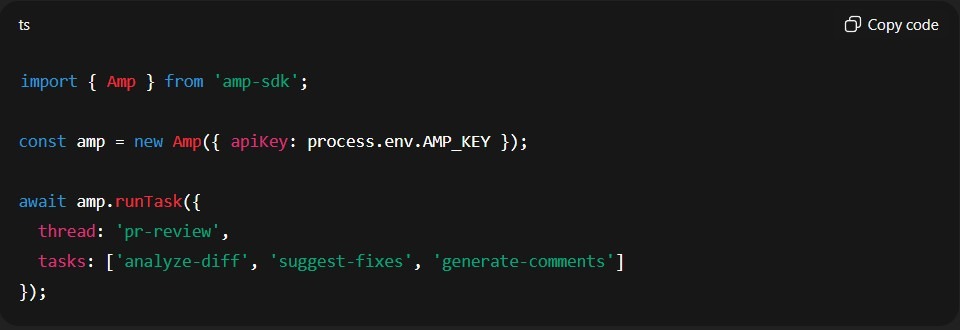
Example: Automating Pull Request Reviews
import { Amp } from ‘amp-sdk’;
const amp = new Amp({ apiKey: process.env.AMP_KEY });
await amp.runTask({
thread: ‘pr-review’,
tasks: [‘analyze-diff’, ‘suggest-fixes’, ‘generate-comments’]
});
This enables teams to embed Amp in pipelines for complex review and refactoring workflows.
Comparison of Amp Code against two top competitors:
| Feature | Amp Code | Claude Code | Cursor |
|---|---|---|---|
| Developer | Sourcegraph (now independent) | Anthropic | Cursor Inc |
| Interface | CLI + VS Code extension | CLI (terminal-first) | Full IDE (VS Code fork) |
| AI Models | Claude Opus 4.5, Gemini 3, GPT-5 (multi-model) | Claude Sonnet/Opus | Multiple (Sonnet, GPT-5, etc.) |
| Key Strength | Unconstrained tokens + subagents for parallel tasks | Autonomous multi-file operations + deep codebase reasoning | RAG-powered context retrieval + interactive in-editor assistance |
| Team Features | Thread sharing, public profiles, leaderboards | Project folders, .claude configs | Background agents, BugBot PR reviews |
| Context Window | Up to 200k tokens | Large (model-dependent) | Enhanced via local RAG |
| Best For | Agentic workflows, team collaboration, complex autonomous tasks | Large refactors, automation, headless/CLI-first developers | Interactive coding, visual diff review, GUI-centric workflows |
| Pricing | Free (ad-supported) or Smart Mode (paid) | Part of Claude Pro ($20) / Max ($200) | $20/mo Pro, $100-200/mo Max |
| Standout Feature | Subagents parallelize work (e.g., 3 agents converting files simultaneously) | Web search fallback when stuck + autonomous test execution | Inline completions (Cmd+K) + visual checkpoints |
Quick verdict:
- Amp → Best for teams wanting shared context and maximum model flexibility
- Claude Code → Best for solo devs who live in the terminal and want full autonomy
- Cursor → Best for devs who prefer a traditional IDE experience with AI integrated
Security and Compliance
Amp meets enterprise-grade standards:
- SOC 2 Type II and ISO 27001 certifications
- Zero-data retention options
- Secret redaction for sensitive inputs
- GDPR and CCPA compliance
These safeguards make Amp suitable for regulated industries and sensitive codebases.
Real-World Performance and Limitations
- Credit Usage: Multi-step tasks consume significant credits; premium models often required
- CLI Performance: Lag occurs with long threads or large repos
- Resource Use: CPU and RAM spikes during multi-agent workflows
- Free Mode: Limited context, best for small projects or experimentation
Practical Use Cases
Amp shines in:
- Large-scale refactoring
- Complex debugging
- Automated test generation
- Documentation automation
- Team onboarding and knowledge retention
In a 200,000-line JavaScript monorepo, Amp automated utility module refactors and test generation in parallel, reducing task time by over 50% while minimizing integration bugs.
Strengths and Advantages
- Autonomous reasoning
- Multi-step workflow execution
- Persistent, shareable memory
- Flexible CLI and editor integration
- Enterprise-grade security
- SDK-driven automation
- Sub-agent orchestration
Limitations and Considerations
- High credit consumption on complex tasks
- CLI performance under heavy loads
- Free mode constraints
- Requires disciplined thread and sub-agent management
- Lack of BYOK support for enterprise-hosted models
Advanced Workflows
- Multi-agent orchestration for complex projects
- Context-aware automation to maintain coding standards
- Shared knowledge ensures uniform quality and reduces errors
Enterprise Adoption
- Hardware and resource requirements must be planned
- Track credit allocation and usage
- Train teams to manage threads and sub-agents efficiently
- Integrate Amp into CI/CD pipelines for automated testing, review, and deployment
Final Verdict: Amp as a Developer Partner
Amp redefines AI in software development. Its reasoning, persistent memory, and sub-agent orchestration elevate productivity, consistency, and collaboration. Credit consumption and workflow discipline require attention, but the benefits outweigh the effort for teams ready to embrace autonomy.
Amp demonstrates the future of AI-assisted coding: agents that don’t just suggest code, they actively shape how software is built.


![Is Micro1 Legit?. Is Micro1 Legit? Pay, Reviews and How It Works [2026], by Second Talent.](https://www.secondtalent.com/wp-content/uploads/2026/09/is-micro1-legit-featured-v2-768x403.jpg)