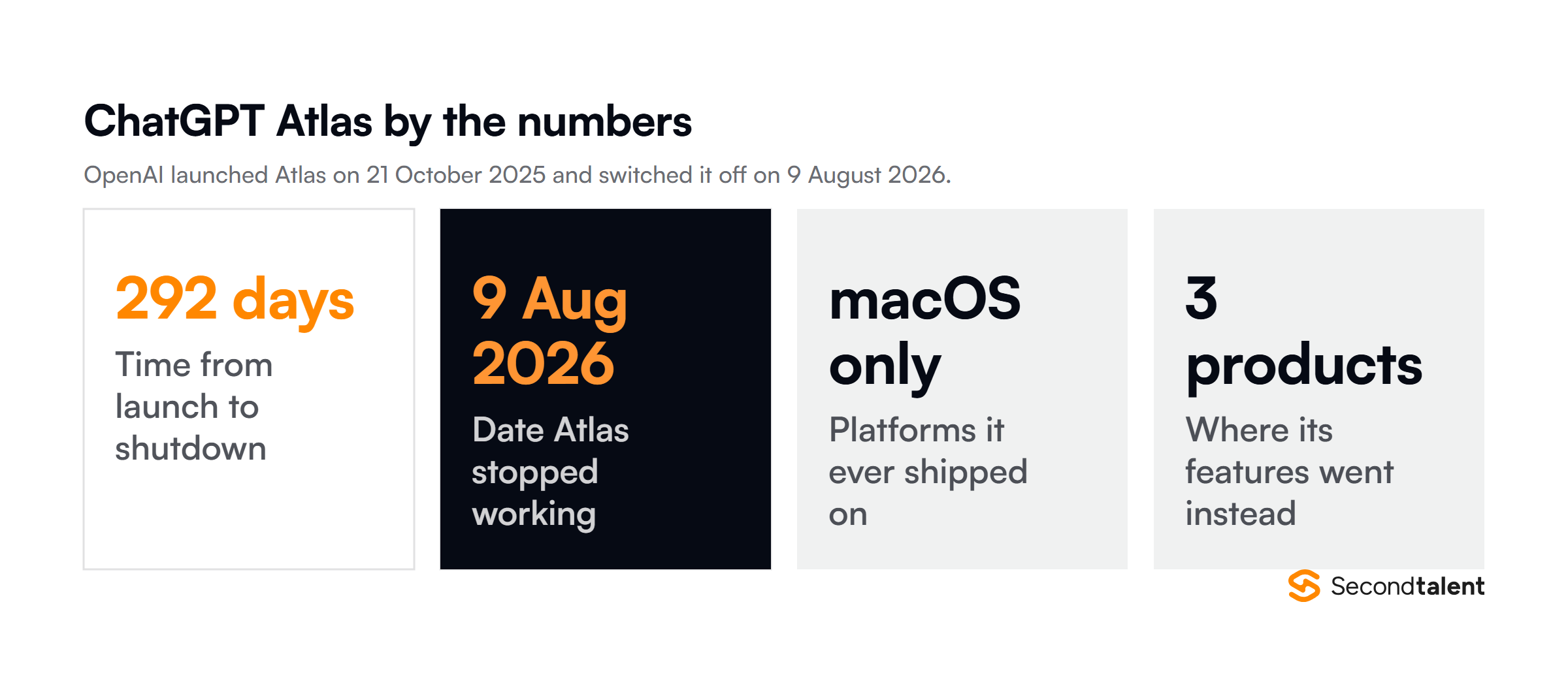
TL;DR: ChatGPT Atlas is discontinued. OpenAI switched the browser off on 9 August 2026, 292 days after launching it, and folded its capabilities into ChatGPT and Codex instead. Atlas only ever shipped on macOS.
If you used it, your bookmarks needed exporting before the cutoff, and the replacement today is the ChatGPT extension for Chrome plus the browser mode inside the ChatGPT desktop app.
This page used to be a review of a live product. It is now a record of what happened to it, because the question people arrive with has changed from “should I install Atlas” to “where did Atlas go, and what do I use now.”
The short version is that OpenAI decided the browser was the wrong container for the idea. The features survived. The application did not.
Five things that decide this topic
- Atlas stopped working on 9 August 2026. There is no version still running.
- It lasted 292 days, from 21 October 2025 to shutdown.
- It never left macOS. The promised Windows, iOS and Android builds never shipped.
- The features moved into the ChatGPT Chrome extension, the ChatGPT desktop app and Codex.
- Bookmarks had to be exported manually. Open tabs, history and logins did not transfer.
What happened to ChatGPT Atlas?
OpenAI discontinued it. Atlas stopped working on 9 August 2026, and OpenAI moved its browser based agentic capabilities into ChatGPT and Codex rather than keeping a separate browser alive.
OpenAI framed this as evolution rather than failure, and on the product logic it has a case. Everything Atlas did well was a ChatGPT feature wearing a browser costume.
Once the same page awareness could run as a Chrome extension, maintaining a whole Chromium fork stopped paying for itself.
The company’s own note on evolving Atlas into ChatGPT is the authoritative source on the change, and the shutdown was covered independently by MacRumors and Tech Edition.
The timeline, launch to shutdown
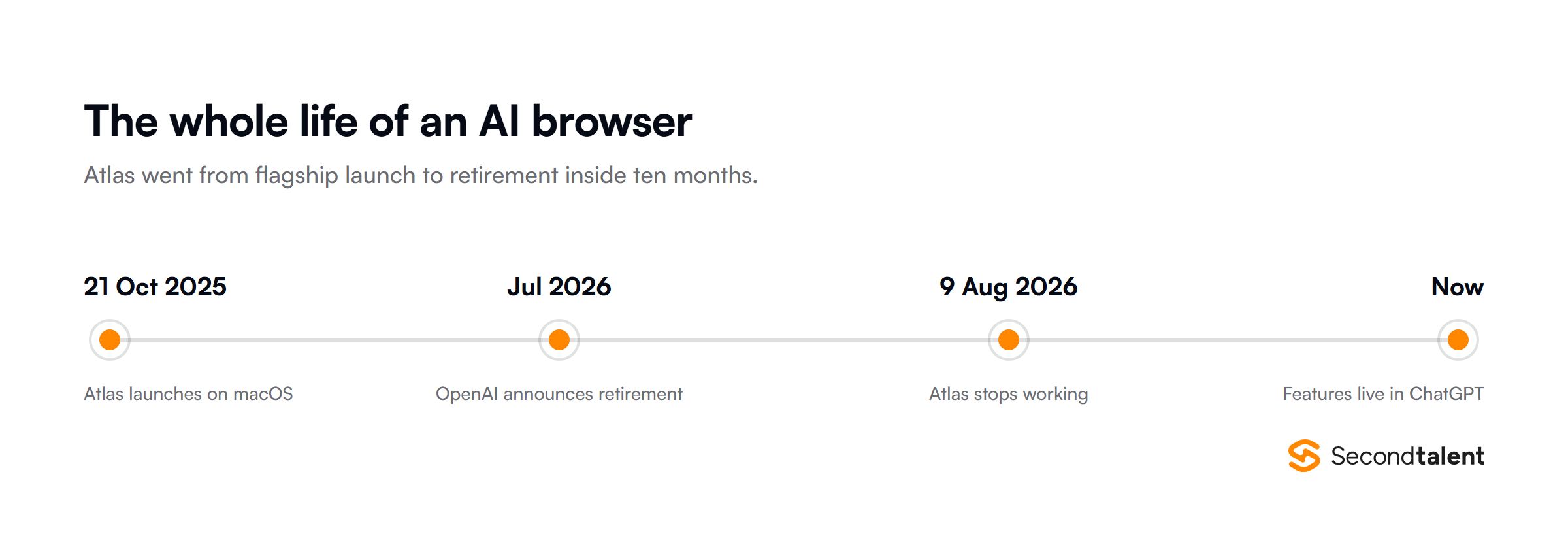
Atlas launched on 21 October 2025 as a Chromium based desktop browser with ChatGPT built into a sidebar, available worldwide on macOS to Free, Plus, Pro and Go users.
TechCrunch covered the launch the same day, and OpenAI published its own introduction to ChatGPT Atlas.
OpenAI announced the retirement in July 2026 and shut the product down on 9 August. That is 292 days of life for what was, at launch, treated as a serious challenge to Chrome.
Why OpenAI retired it
OpenAI has not published a detailed post mortem, so the honest answer is that we know what the company did and can only read the reasoning from the product decisions around it. Three things are visible from the outside.
It never got past one platform
Atlas shipped on macOS and stayed there. Windows, iOS and Android were promised at launch and none of them arrived, not even as public betas. A browser that cannot follow you between your laptop and your phone is not competing with Chrome.
It is competing with your second browser.
A browser is an expensive wrapper
Maintaining a Chromium fork means owning the update treadmill, the security patching, the extension compatibility and the sync infrastructure, all before you build anything that makes your browser different.
An extension gets the same page context for a fraction of that cost.
Switching browsers is the hardest ask in software
Bookmarks, saved logins, extensions and muscle memory all live in the browser you already use.
Asking someone to move all of it for an assistant they can get as an extension is a steep trade, and Atlas needed people to make that trade before it could show them the benefit.
Where the features actually went
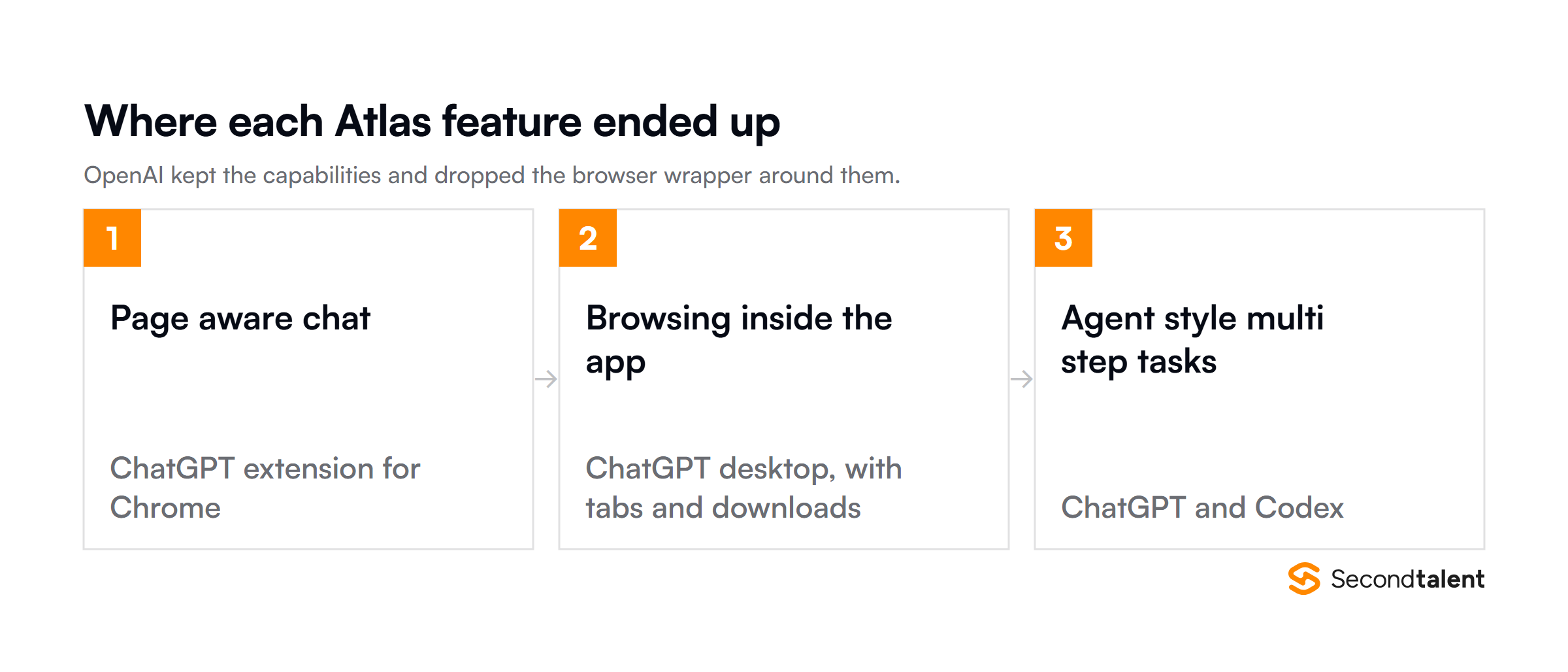
Nothing Atlas did was deleted. It was redistributed:
- Page aware chat now runs as a ChatGPT extension in Chrome, reading the tab you are on without you moving browsers.
- Browsing inside the assistant moved into the ChatGPT desktop app, which gained multiple tabs, downloads, better navigation and account logins.
- Agent style multi step tasks continue in ChatGPT and in Codex for engineering work.
If you liked what Atlas did, you can still have almost all of it. You just keep your existing browser while you do.
What Atlas got right, for the record
It is worth keeping the good parts on the record, because they are the parts that survived into the products people now use.

The sidebar was the strongest idea. Having an assistant that could already see the page removed the copy and paste step that makes most AI research workflows tedious.
Asking a question about the document in front of you, without describing the document first, is a genuine improvement and it is exactly what the Chrome extension now does.

Agent mode was the more ambitious bet and the less finished one. It could carry out multi step tasks, and it could also lose the thread on anything involving logins, payment walls or pages that changed under it.
That capability moved to ChatGPT and Codex, where it has more room to mature without a browser release cycle attached.
If you still have Atlas data
The export window has closed. OpenAI told users to export bookmarks as an HTML file before 9 August 2026 so they could be imported into another browser. Open tabs and browsing history were not transferred, and active login sessions could not move between browsers. If you never exported, that data is not recoverable from a browser that no longer runs.
Anything you saved into ChatGPT itself, including conversations and memory, is unaffected. That lived in your OpenAI account, not in the browser.
The privacy question, answered by the shutdown
The main objection to Atlas at launch was the browsing memory feature, which let ChatGPT remember the pages you visited. Handing an AI company a view of your entire browsing history was a real trade, and plenty of people declined it.
The shutdown settled that question in an unexpected way. Data held in the browser died with the browser: history and open tabs went when the application stopped running.
Data held in your OpenAI account did not, so saved conversations and memory are still there, still yours to review or delete.
That split is the part worth keeping. When you give a product your data, you are making two separate bets: one on the company, and one on the specific application.
Atlas showed those can end very differently, and you rarely get to choose which half survives.
What to use instead
The closest replacement is the one OpenAI built. Beyond that, the AI browsing category did not die with Atlas.
| Option | What it gives you | Best if |
|---|---|---|
| ChatGPT extension for Chrome | The Atlas sidebar experience without changing browsers | You wanted Atlas for page aware chat |
| ChatGPT desktop app | Browsing inside the assistant, with tabs and downloads | You start tasks in ChatGPT rather than in a browser |
| Perplexity Comet | A standalone AI browser, still shipping | You specifically want the browser form factor |
| Dia | AI browsing from the Browser Company | You liked Arc and want its successor |
| Codex | Agentic execution aimed at engineering work | Your use case was automation, not reading |
One caution worth carrying forward from Atlas: pick the option that costs you least if it is discontinued. An extension you can remove is a smaller bet than a browser you migrate your working life into.
What Atlas says about the AI browser bet
AI browsing did not fail. The browser was a distribution strategy pretending to be a product.
OpenAI wanted the default position Chrome holds, and building a browser looked like the route to it. That route cost more than the position was worth, and an extension reached the same users without asking any of them to switch.
The pattern to watch: when a capability can ship as a feature inside software people already run, the standalone app version of that capability tends to lose. Atlas is a clean example, and it is worth remembering the next time a category is described as needing its own dedicated application.
For teams building with AI, the practical read is about dependency. Atlas was a first party product from the best funded company in the field, and it still went away with about a month of notice.
Anything built on a single vendor’s application layer carries that risk. It is a good argument for keeping integrations at the API level, where the contract is more stable.
What this means if you are building with AI
Tools in this category will keep churning. The skill that holds its value is not fluency in any one product, it is the judgement to wire AI into a workflow without betting the workflow on a single application that might not exist next year.
That is what we test for when we vet engineers.
AI tool fluency is assessed during vetting rather than assumed from a CV, because a candidate who lists six AI tools and a candidate who can reason about which layer to depend on are not the same hire.
If you are staffing this kind of work, our AI and machine learning engineers and agentic AI specialists are the two profiles that come up most.
On cost, the picture varies more by market than by seniority. Our developer rate card breaks down current rates, and teams hiring in Asia usually compare engineers in Vietnam against engineers in the Philippines before deciding.
If the work is infrastructure heavy rather than model heavy, DevOps engineers are usually the better first hire, and our employer of record service covers the employment side once you have picked someone.
Hiring for AI work? Tell us what you are building and we will match you with vetted engineers in about 24 hours.
Frequently asked questions
Is ChatGPT Atlas discontinued?
Yes. OpenAI discontinued ChatGPT Atlas and the browser stopped working on 9 August 2026. There is no supported version still available.
Why did OpenAI shut down Atlas?
OpenAI moved the browser’s agentic capabilities into ChatGPT and Codex instead of maintaining a standalone browser. Atlas had also never shipped beyond macOS, despite Windows, iOS and Android being promised at launch.
How long did ChatGPT Atlas last?
292 days. It launched on 21 October 2025 and stopped working on 9 August 2026.
What replaced ChatGPT Atlas?
The ChatGPT extension for Google Chrome and the browser mode inside the ChatGPT desktop app, which gained multi tab support, downloads, improved navigation and account logins. Agentic tasks continue in ChatGPT and Codex.
Can I get my Atlas bookmarks back?
Only if you exported them before 9 August 2026. OpenAI asked users to save bookmarks as an HTML file for import elsewhere. Open tabs, history and logins were never transferable, and the browser no longer runs.
Are AI browsers dead?
No. Perplexity Comet and Dia are both still shipping. What Atlas showed is that the browser is an expensive way to deliver AI assistance when an extension reaches the same people without asking them to switch.



![Is Micro1 Legit?. Is Micro1 Legit? Pay, Reviews and How It Works [2026], by Second Talent.](https://www.secondtalent.com/wp-content/uploads/2026/09/is-micro1-legit-featured-v2-768x403.jpg)