Top 30 React Native Interview Questions and Answers [2026]
October 10, 2026
13 min read
TL;DR: React Native interviews in 2026 test the New Architecture (JSI, Fabric, Turbo Native Modules), list and animation performance, Expo tooling and over-the-air updates. React Native 0.87 is the current stable release, the legacy architecture cannot be turned on since 0.82, and Hermes V1 has been the default engine since 0.84.
React Native 0.82, released on October 8, 2025, was the first version that runs only on the New Architecture: setting newArchEnabled=false is ignored. Interview questions about "the bridge" now describe code that no longer ships.
In June 2026 the repository moved from the facebook GitHub organization to the react organization, as React Native moved to the React Foundation. Expo SDK 57 shipped on June 30, 2026 with React Native 0.86.
Key takeaways
1React Native 0.87 raised the minimums to Node.js 22, Android Gradle Plugin 9 and Kotlin 2.0.
2Reanimated 4 works only on the New Architecture; version 3 is no longer actively maintained.
3Microsoft retired App Center, the hosted home of CodePush, on March 31, 2025.
4The React Native docs recommend starting new apps with a framework, and name Expo.
Architecture
1. How does React Native turn JavaScript into a native UI?
Your components run in a JavaScript engine, Hermes by default, and describe a tree of host components such as View and Text.
The renderer, written in C++, turns that tree into real platform views: UIView on iOS and android.view.View on Android. Nothing runs in a WebView.
Work happens on several threads: JavaScript on the JS thread, native view updates on the main (UI) thread, and layout, computed by the Yoga engine, on whichever thread the renderer schedules it.
A candidate should be able to say which thread a slow piece of code blocks, because that decides whether the app drops frames or only lags input.
2. What is JSI, and what did it replace?
The JavaScript Interface is a C++ API that lets JavaScript hold references to C++ objects and call their methods directly, synchronously if needed.
It replaced the old bridge, which serialized every call to JSON and sent it asynchronously across a queue.
That serialization was the bottleneck behind janky gestures and slow startup in older apps.
With JSI, a native module method call costs about as much as a function call, and libraries such as Reanimated and MMKV can run code on other threads with shared memory.
3. What are Turbo Native Modules and Codegen?
A Turbo Native Module is a native module built on JSI and loaded lazily, the first time JavaScript uses it, instead of all at startup.
You declare its interface as a typed TypeScript spec, and Codegen generates the C++ glue and the native interfaces you implement in Kotlin, Swift or Objective-C.
Because the spec is typed, a mismatch between JavaScript and native code fails at build time. The Turbo Native Modules guide walks through the full setup.
4. Walk through Fabric's render pipeline.
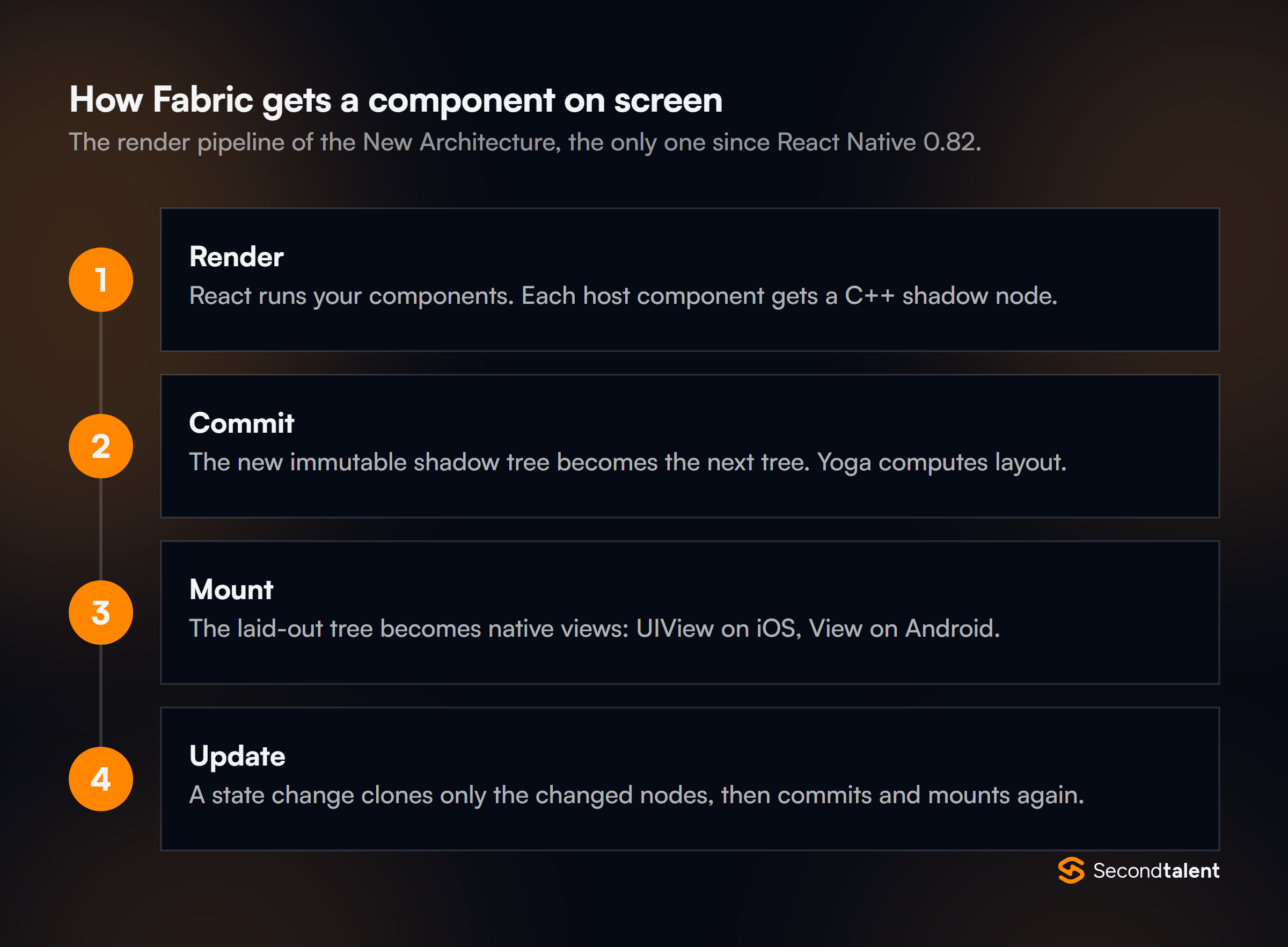
Fabric, the New Architecture renderer, works in three phases, per the render pipeline docs. In Render, React runs your components and the renderer creates a C++ shadow node for each host component.
In Commit, the new shadow tree is promoted and Yoga computes layout. In Mount, the laid-out tree becomes native views.
The shadow tree is immutable, so an update clones the changed nodes into a new tree instead of mutating the old one.
That makes it safe to compute a tree on one thread and mount it on another, which is what allows React's concurrent features to work in React Native.
5. Why does Hermes start apps faster?
Hermes compiles JavaScript to bytecode at build time, so the device skips parsing and compiling the bundle at launch. It has been the default engine since React Native 0.70 and was designed for mobile memory limits.
Since 0.84, the default is Hermes V1, a newer compiler and VM that Meta says improves execution speed and memory use with no configuration change.
Debugging goes through React Native DevTools, which connects to Hermes over the Chrome DevTools Protocol.
UI and Performance
6. How do you make a long FlatList scroll smoothly?
Give every item a stable keyExtractor, wrap the row component in React.memo, and pass stable callbacks so rows do not re-render when the parent does. If rows have a fixed height, getItemLayout lets the list skip measuring them.
Then tune the virtualization window: windowSize sets how many screens of content stay mounted, and initialNumToRender and maxToRenderPerBatch trade first paint against blank areas during fast scrolls.
Heavy images need caching and correct sizes. For very large or complex feeds, teams switch to a recycling list library, and a strong candidate can explain why recycling beats mounting and unmounting rows.
7. How does styling differ from CSS on the web?
Styles are JavaScript objects with camelCase properties, created with StyleSheet.create, and they do not cascade: a Text inherits only from a parent Text.
Every view uses Flexbox, with flexDirection defaulting to column rather than row, and sizes are density-independent pixels without units.
There are no selectors, so variants come from composing style arrays, [styles.button, disabled && styles.disabled]. React Native 0.85 removed StyleSheet.absoluteFillObject; StyleSheet.absoluteFill covers the same case.
8. How do you write platform-specific code?
Three ways, from smallest to largest: Platform.OS checks inline, Platform.select({ ios: ..., android: ... }) for values, and platform file extensions such as Button.ios.tsx and Button.android.tsx, which Metro picks automatically.
Platform files suit components whose behavior differs, such as a date picker. For small differences, inline checks keep the logic in one place.
A candidate who has shipped both platforms will name real differences: Android's hardware back button, keyboard behavior and permission flows.
9. How do you handle safe areas and edge-to-edge layouts?
Use react-native-safe-area-context: SafeAreaProvider at the root and useSafeAreaInsets() or its SafeAreaView where needed.
React Native 0.81 deprecated the built-in SafeAreaView, which only worked on iOS and does not support Android edge-to-edge.
Edge-to-edge matters because Android 16 removed the opt-out for apps that target it, so content draws behind the status and navigation bars on both platforms.
React Native 0.86 fixed several edge-to-edge bugs, including KeyboardAvoidingView on Android 15 and later.
10. When do you use Animated with the native driver, and when Reanimated?
Animated with useNativeDriver: true sends the animation to the native side once and runs it on the UI thread, so a busy JS thread cannot make it stutter. It covers timing and spring animations of transforms and opacity.
React Native 0.85 added an experimental animation backend that also lets the native driver animate layout props such as width.
Reanimated runs animation logic as worklets on the UI thread, which suits gesture-driven animations that must react every frame, such as a bottom sheet following a finger. According to its docs, Reanimated 4 requires the New Architecture.
Animated + native driver
Built into React Native
Animation described once, run on the UI thread
Timing and spring on transforms and opacity
Reanimated 4
Library from Software Mansion
Your code runs on the UI thread as worklets
Gesture-driven animations; New Architecture only
State and Navigation
11. React Navigation or Expo Router?
React Navigation configures stacks, tabs and drawers in code and gives native stack transitions through react-native-screens.
Expo Router is built on React Navigation and derives the routes from files in the app directory, as Next.js does on the web.
File-based routes give every screen a URL automatically, which makes deep links and web support close to free. Code-based configuration gives finer control over complex nested navigators.
Either answer is fine if the candidate can explain how deep links reach a screen in their app.
12. How do you manage state in a React Native app?
Split it by kind. Server data, such as lists fetched from an API, belongs in a cache library such as TanStack Query, which handles loading states, retries and refetching when the app returns to the foreground.
UI state stays local with useState. Only true app-wide client state, such as the signed-in user or theme, needs a global store.
The trap with React context as a store is that every consumer re-renders when any part of the value changes.
Splitting contexts or using a store with selectors, such as Zustand or Redux Toolkit, avoids re-rendering a whole tab of screens on each keystroke.
13. Where do you store tokens and other sensitive data?
In the platform's secure storage: the iOS Keychain and Android Keystore-backed storage, through a library such as expo-secure-store. AsyncStorage writes unencrypted data to disk and suits preferences and cached content only.
Anything in the JavaScript bundle can be read by unpacking the app, including API keys in environment variables that were inlined at build time. Secrets that grant real access stay on a server.
14. How do you find why a screen re-renders too often?
Record a session in the React Native DevTools profiler, which shows each commit, the components that rendered and why. "Highlight updates when components render" gives a quick visual check.
The usual causes are new object or function props on every render, which defeat React.memo; a context value that changes too often; and state kept too high in the tree.
Fix the cause with useMemo, useCallback or by moving state down, not by wrapping every component in memo.
Tooling and Delivery
15. What does Expo add, and does it limit native code?
Expo is a framework on top of React Native: a set of native modules, Expo Router, a dev client, and cloud build and update services (EAS).
Continuous Native Generation means the ios and android folders are generated by npx expo prebuild from app.json and config plugins, rather than edited by hand.
It does not limit native code. Custom native code goes in a local module, written with the Expo Modules API in Swift and Kotlin, or in a config plugin that edits the generated projects.
The old idea that Expo means "no native modules" dates from the Expo Go-only days.
16. How do over-the-air updates work, and what can they change?
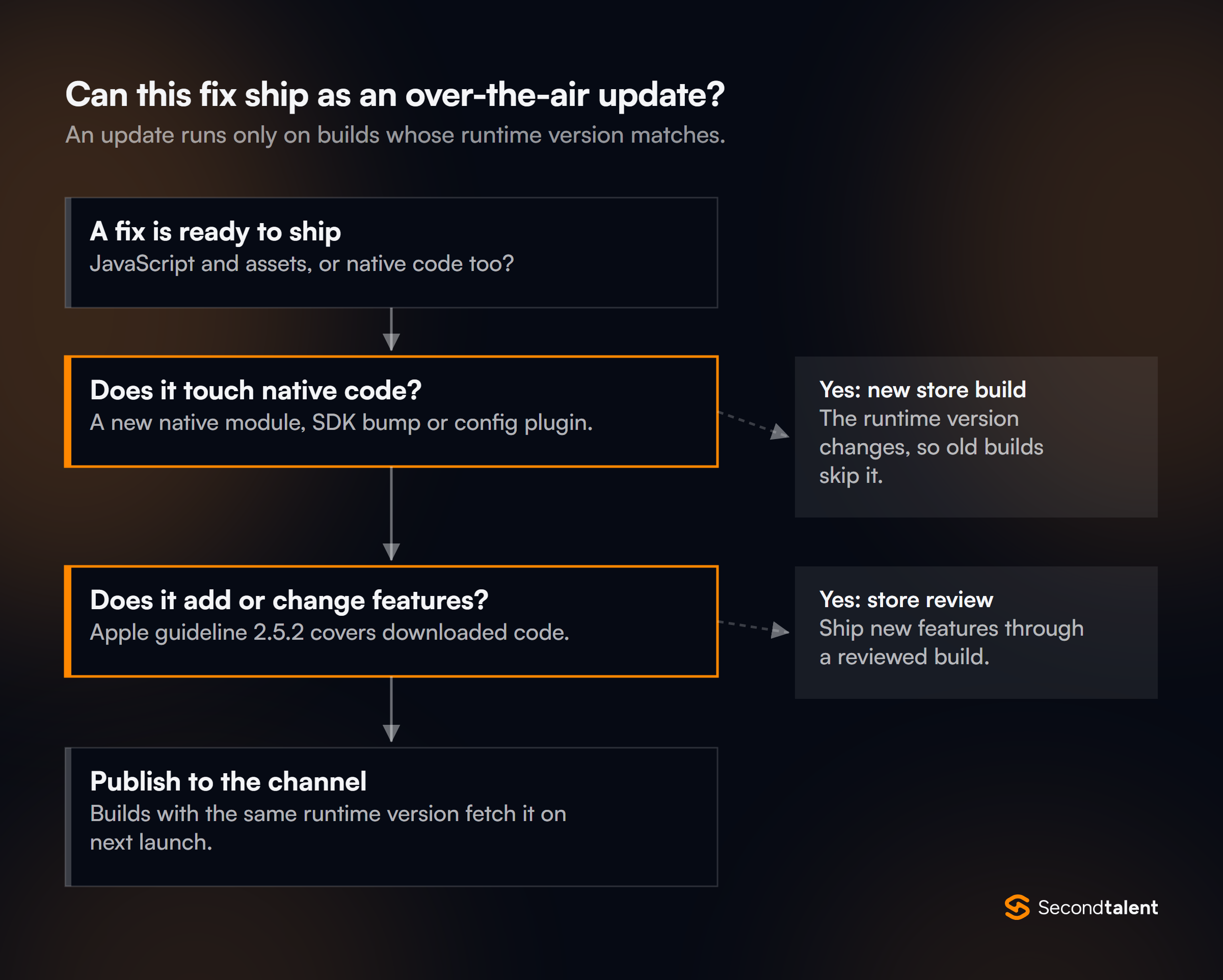
An OTA update replaces the JavaScript bundle and assets; the native binary stays the same. EAS Update tags each build with a runtime version, and a published update reaches only builds with the same runtime version, per the Expo docs.
Any native change needs a new store build.
Store rules apply too. Apple's App Review Guideline 2.5.2 bars apps from downloading code that introduces or changes features, so teams keep OTA updates to fixes and send features through review.
Runtime version, not app version. Two builds can share version 2.3.0 and still differ in native code. The runtime version is what tells an update which builds it can run on, so bump it with every native change.
17. How do you debug a React Native app today?
With React Native DevTools, the debugger introduced in 0.76 and based on Chrome DevTools: breakpoints, console, network inspection, the React component tree and the profiler.
Native crashes still need Xcode and Android Studio, with their own logs and debuggers.
Flipper is the wrong answer now: React Native 0.74 removed the Flipper integration from new projects. Since 0.85, several tools, such as DevTools, VS Code and AI agents, can connect to the same app at once.
18. How do you test a React Native app?
Unit and component tests: Jest with React Native Testing Library, which queries by visible text and accessibility labels. Since 0.85 the Jest preset lives in @react-native/jest-preset instead of react-native.
End-to-end tests: Detox or Maestro, run on simulators and emulators in CI.
Native code: XCTest and JUnit for custom modules.
Mock native modules at the boundary, not the components that use them, so tests exercise real rendering.
19. How do you upgrade React Native versions?
One minor version at a time, reading each release's breaking changes. For a project without Expo, the Upgrade Helper shows the diff of template files, such as build.gradle, Podfile and AppDelegate, between two versions.
With Expo, upgrading the SDK with npx expo install expo@latest --fix moves React Native and compatible library versions together.
The slow part is usually third-party libraries with native code. Checking their support for the target version before starting saves a half-finished upgrade.
20. When would you write a native module, and how?
When no maintained library covers a platform API, when a hot path needs native speed, or when the app must reuse an existing native SDK.
Options are a Turbo Native Module with a Codegen spec, or the Expo Modules API, which lets you write the module in Swift and Kotlin with less boilerplate and works in bare React Native apps too.
Senior candidates talk about threading (which queue the native method runs on), type conversion at the boundary, and emitting events back to JavaScript without leaking listeners.
21. How do you make a React Native app start faster?
Measure time to first render on a release build on a low-end Android device.
Then shrink the work before the first screen: lazy-load screens and heavy modules, defer SDK initialization, and avoid large synchronous reads from storage at startup.
Hermes bytecode already removes parse time. Turbo Native Modules load on first use, so a module imported but not called on the first screen no longer costs startup time. Inline requires in Metro delay evaluating modules until they are used.
22. How do you catch and report errors?
JavaScript render errors are caught by error boundaries, which show a fallback screen instead of a blank app. Errors outside rendering, such as in event handlers and promises, need a global handler.
A crash-reporting SDK such as Sentry or Firebase Crashlytics captures both JavaScript errors and native crashes, symbolicated with uploaded source maps and dSYMs.
Without source maps uploaded for every release and every OTA update, JavaScript stack traces point at minified bundle lines and are close to useless.
23. How do deep links reach a screen?
The operating system opens the app with a URL: a custom scheme, or a verified https link (universal links on iOS, App Links on Android).
The navigation library maps the URL path to a screen and its params: React Navigation through a linking config, Expo Router automatically from the file structure.
Test the cold-start case separately from the app-already-open case, and handle links that need a signed-in user by storing the target and navigating after login.
24. How do you share code between React Native and a React web app?
Share logic, not components: API clients, validation, state stores and hooks can live in a shared package in a monorepo. UI components differ because the primitives differ (View versus div).
When the team wants shared UI too, React Native for Web renders React Native components to the DOM, and Expo supports web targets with it.
The trade-off is web output that looks like a mobile app, which suits internal tools better than marketing sites.
What Changed Recently
Mar 31, 2025
App Center retired, taking hosted CodePush with it
Oct 8, 2025
0.82: New Architecture only
Dec 10, 2025
0.83: React 19.2, first release with no user-facing breaking changes
Feb 11, 2026
0.84: Hermes V1 and precompiled iOS binaries by default
Aug 11, 2026
0.87: Strict TypeScript API by default
25. What does "New Architecture only" in 0.82 mean for an older app?
From 0.82, newArchEnabled=false on Android and RCT_NEW_ARCH_ENABLED=0 on iOS are ignored, per the 0.82 release post. React Native 0.81 and Expo SDK 54 are the last versions where the legacy architecture can be enabled.
The team's advice is to migrate on 0.81 first, fix what breaks, and then upgrade. Interop layers keep many old-style libraries working. A library that blocks migration has to be updated or replaced.
Releases since 0.84 have started removing legacy architecture code.
26. What changed in 0.84?
According to the 0.84 release post, Hermes V1 became the default engine on iOS and Android, with no migration for apps already on Hermes. iOS builds now download precompiled React Native core binaries during pod install instead of compiling it from source on every clean build.
The minimum Node.js version became 22.
Opting out of Hermes V1 means building React Native from source, which also turns off the precompiled binaries, so few teams will.
27. What is the Strict TypeScript API in 0.87?
React Native's public JavaScript API now ships types generated from its source code instead of hand-written definitions, and it covers only what react-native exports from its root.
Deep imports such as react-native/Libraries/... are now type errors, and refs have dedicated types such as TextInputInstance.
The 0.87 announcement says an opt-out through a tsconfig custom condition lasts through 0.88, and the legacy types are due to be removed in the release after. The same release adds experimental Swift Package Manager support for iOS.
28. Why did Expo SDK 57 ship only a React Native upgrade?
The React Native team now aims for a release with no user-facing breaking changes about every second version; 0.83 and 0.86 were the first two.
Expo's SDK 57 post describes it as a small release that brings React Native 0.86, testing a cadence of quick non-breaking SDKs between larger ones.
SDK 58 is in beta, built for iOS 27 and on the React Native 0.88 release candidate. For hiring, this means candidates may be one or two versions behind the latest without being out of date.
29. What replaced CodePush?
Microsoft retired Visual Studio App Center, which hosted CodePush, on March 31, 2025, per its retirement notice. Microsoft published a standalone CodePush server that teams can host themselves.
Most teams moved to EAS Update, which also works in bare React Native apps, or to a self-hosted server. The concepts carry over: channels or deployments, rollbacks, and matching the update to a compatible native build.
30. What do Activity and useEffectEvent from React 19.2 do in React Native?
React Native 0.83 shipped React 19.2. <Activity mode="hidden"> hides a subtree, unmounts its effects and defers its updates, but keeps its state, so a hidden tab returns with its scroll position and inputs intact.
useEffectEvent separates the "event" part of an effect from its dependencies. An effect can call the latest callback without re-running when that callback changes.
The 0.83 release post notes that this pattern is why many developers disabled the dependency lint rule.
Signs of a Strong Answer
They describe the New Architecture in terms of JSI, Fabric and Turbo Native Modules, and treat the bridge as history.
They say which thread a slow piece of code blocks and how that shows up for the user.
They know their app's runtime version policy and what forces a new store build.
They profile before memoizing, and can show a re-render they fixed.
They have written or patched native code in Swift or Kotlin, not only JavaScript.
They know the React Native and Expo SDK versions their last app shipped on and what the next upgrade breaks.