Skip to content

Top 30 iOS Developer Interview Questions and Answers [2026]

October 11, 2026 13 min read
iOS Developer interview guide by Second Talent
TL;DR: iOS interviews in 2026 test SwiftUI state and identity, UIKit interop, the scene life cycle, persistence and background work, and whether a candidate has shipped through the App Store. iOS 27 and Xcode 27 shipped on September 14, 2026, and apps built with the iOS 27 SDK must use the UIScene life cycle or they fail to launch.

Apple has required apps uploaded to App Store Connect to be built with Xcode 26 and the iOS 26 SDK since April 28, 2026, which moved every updated app onto the Liquid Glass design unless it set a compatibility key.

Xcode 27 removes that key's effect: an app built with the iOS 27 SDK can no longer opt out. Interviews now probe SwiftUI and UIKit together, because most production apps mix both.

Key takeaways
  1. 1Xcode 27 includes Swift 6.4 and supports on-device debugging on iOS 17 and later.
  2. 2Apps built with the iOS 27 SDK must include a launch screen key in Info.plist or App Review rejects them.
  3. 3Observation, SwiftData and @Bindable all need iOS 17, now the practical floor for new SwiftUI code.
  4. 4iOS 26 added BGContinuedProcessingTask, for work a person starts in the foreground that can finish in the background.

SwiftUI

1. How does SwiftUI decide which views to update?

With Observation (iOS 17 and later), a view depends on exactly the properties its body reads. Mark a model class @Observable, read model.title in a view, and only a change to title re-runs that view's body.

Changes to properties the view never reads do nothing.

The older ObservableObject protocol worked per object: any @Published change invalidated every view observing the object. Apple's guide to managing model data covers the migration.

A candidate who can explain why a list of 1,000 rows got faster after moving to @Observable understands the model.

2. When do you use @State, @Binding, @Bindable and a plain property?

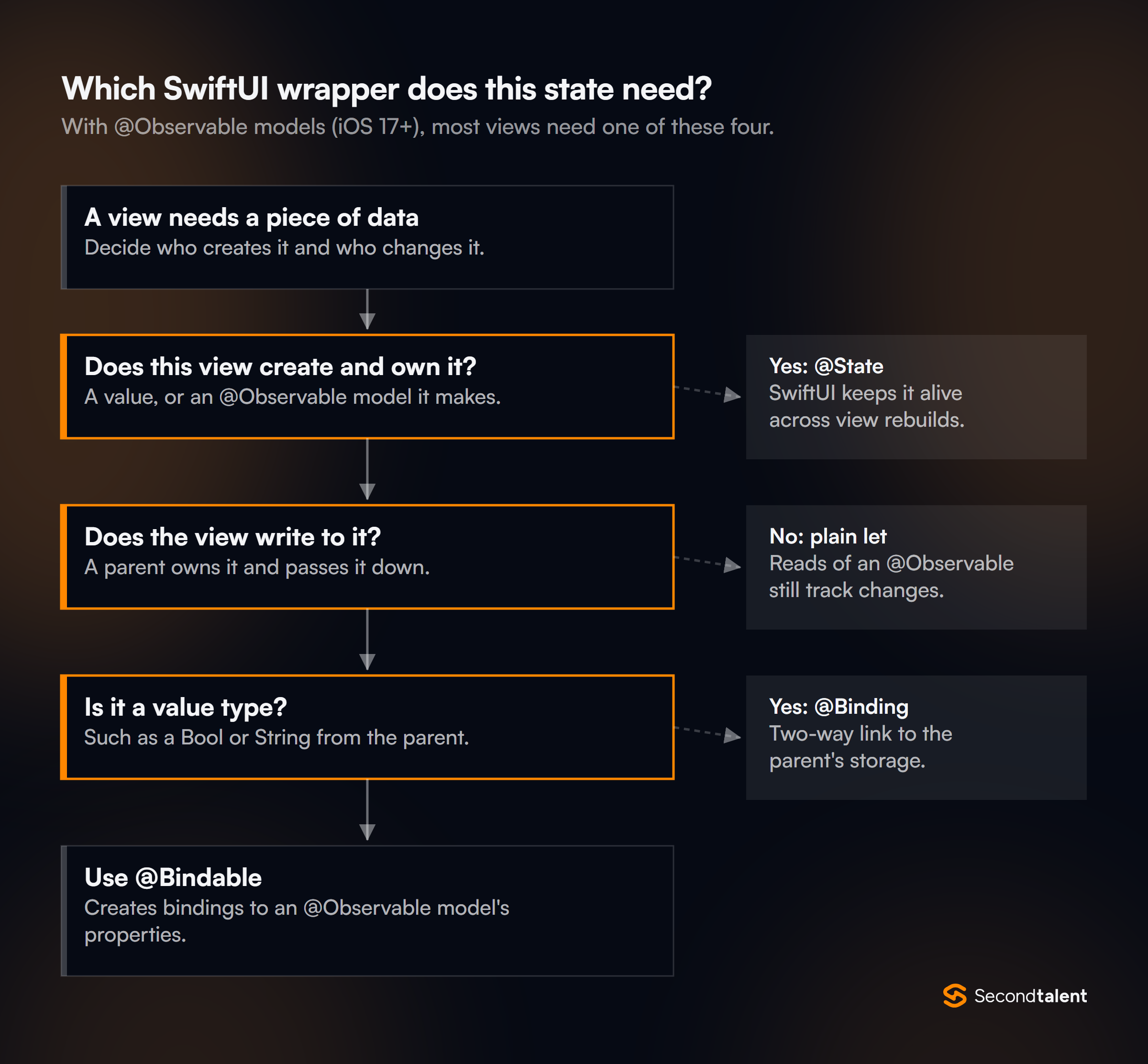
Decide by ownership. The view that creates a value or model owns it with @State. A child that only reads an @Observable model takes it as a plain let, and reads are still tracked. A child that edits a parent's value type gets a @Binding.

A child that needs bindings into an @Observable model, for example to drive a TextField, wraps it in @Bindable.

Flowchart for choosing SwiftUI state: @State if the view creates and owns the data, a plain let if it only reads, @Binding for a parent's value type, and @Bindable for an @Observable model it edits.

Shared app-wide objects go in the environment with .environment(model) and are read with @Environment(Model.self). @StateObject and @ObservedObject remain for ObservableObject code.

3. What is view identity, and why does it matter?

SwiftUI tracks each view by identity to decide whether to keep its state, animate it or destroy it.

Structural identity comes from a view's position in the hierarchy; explicit identity comes from id, such as the Identifiable id in a ForEach.

Two bugs follow from this. An if/else that returns the same view in both branches creates two identities, so toggling it resets state and plays a transition instead of animating in place; a modifier with a condition keeps one identity.

And a ForEach keyed by array index loses row state when items are inserted. AnyView erases the type information SwiftUI uses for structural identity, which is why it should be rare.

4. What is the difference between .task and .onAppear?

.task starts an async task when the view appears and cancels it when the view disappears. .onAppear runs a synchronous closure, and any Task started inside it keeps running after the view is gone.

.task(id: query) {
    results = await search(query)   // restarts when query changes
}

The id: variant cancels and restarts the task when the value changes, which gives debounced search without Combine.

5. How does NavigationStack handle navigation and deep links?

NavigationStack (iOS 16 and later) drives navigation from data. Links push values, navigationDestination(for:) maps each value type to a view, and the stack's path is a binding you own.

@State private var path = NavigationPath()

NavigationStack(path: $path) {
    ProductList()
        .navigationDestination(for: Product.self) { ProductDetail(product: $0) }
}
// Deep link: path.append(product)

Because the path is data, a deep link becomes an append, popping to root is path.removeLast(path.count), and a Codable path can be saved and restored. NavigationView is deprecated.

6. How do you use UIKit inside SwiftUI and SwiftUI inside UIKit?

Wrap a UIKit view in UIViewRepresentable (or a controller in UIViewControllerRepresentable): makeUIView creates it once, updateUIView pushes new SwiftUI state into it, and a Coordinator receives delegate callbacks.

In the other direction, UIHostingController(rootView:) embeds SwiftUI in a UIKit screen, and UIHostingConfiguration (iOS 16 and later) renders SwiftUI inside collection and table view cells.

Migrating screen by screen through these two bridges is how most large apps adopted SwiftUI.

UIKit

7. Walk through the view controller life cycle.

loadView creates the view, viewDidLoad runs once for one-time setup, then each appearance calls viewWillAppear, viewIsAppearing, viewDidAppear, and on the way out viewWillDisappear and viewDidDisappear.

viewIsAppearing(_:) is the one candidates often miss. According to the UIKit docs, it runs after the view is in the hierarchy and laid out, with accurate geometry and trait collections, and it is available back to iOS 13.

That makes it the right place for layout-dependent setup that used to be hacked into viewWillAppear.

8. How do content hugging and compression resistance work in Auto Layout?

Both apply to views with an intrinsic content size, such as labels and buttons. Content hugging priority resists growing larger than the content; compression resistance priority resists shrinking smaller than it.

When a label and a text field sit side by side in a row that is too wide, the view with the lower hugging priority stretches. When the row is too narrow, the view with the lower compression resistance gets truncated.

Ambiguous layout warnings usually mean two views have equal priorities and Auto Layout has no rule to choose.

9. Why use a diffable data source?

UICollectionViewDiffableDataSource takes a snapshot of section and item identifiers and computes the inserts, deletes and moves itself.

The classic crash, "invalid number of items", came from index path updates that disagreed with the data, and a snapshot makes that impossible.

Item identifiers should be stable IDs, not whole models. To refresh a changed item, call reconfigureItems (iOS 15 and later), which updates the existing cell in place instead of replacing it the way reloadItems does.

10. What happens if you update UI from a background thread?

UIKit is not thread-safe, and touching views off the main thread produces flicker, stale layouts or crashes that are hard to reproduce. Xcode's Main Thread Checker reports these calls at run time in debug builds.

With Swift concurrency, UIKit and SwiftUI types are @MainActor, so in the Swift 6 language mode the compiler rejects the call before it runs. Code that must hop back uses await MainActor.run { } or a @MainActor function.

App Life Cycle

11. What states does a scene move through?

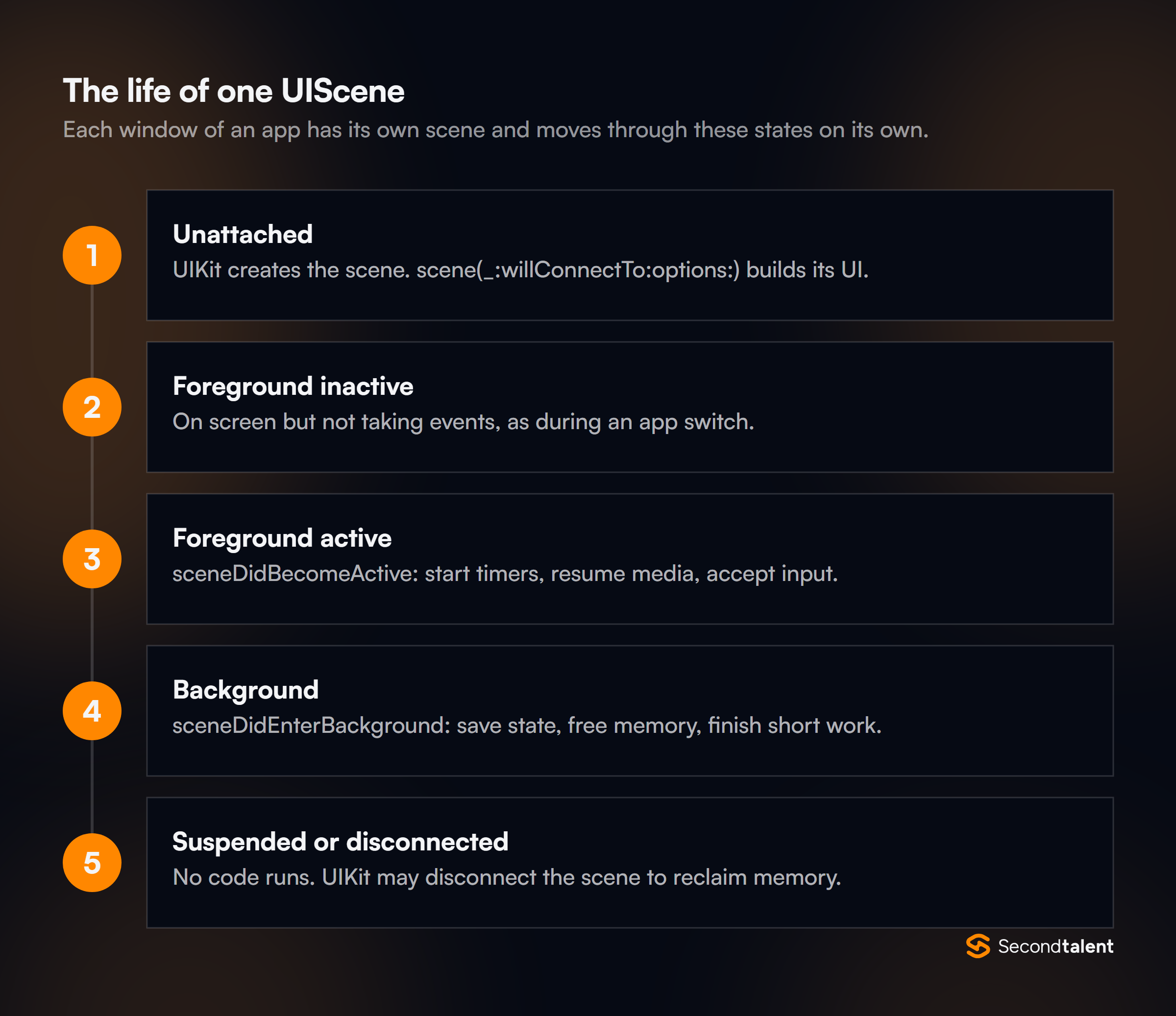
Each scene, one window of your app, moves through unattached, foreground inactive, foreground active, background and suspended on its own. Two windows of the same app on an iPad can be in different states.

Five states of a UIScene: unattached, foreground inactive, foreground active, background, then suspended or disconnected, with the delegate callback and the work to do in each.

The scene delegate gets the per-window events; the app delegate still handles app-wide ones such as launch and push registration.

Per Apple's life cycle guide, UIKit can disconnect a background or suspended scene at any time to reclaim memory, so state that matters must be saved on the way to the background, not on disconnect.

In SwiftUI, read @Environment(\.scenePhase) for the same transitions.

12. How do you run work in the background on iOS?

Pick the API by the kind of work:

  • BGAppRefreshTask: short refreshes the system schedules based on how often the person uses the app.
  • BGProcessingTask: minutes-long maintenance. The docs say it runs only while the device is idle and is terminated when the person starts using it.
  • A background URLSession: uploads and downloads that continue after the app is suspended or killed.
  • BGContinuedProcessingTask (iOS 26 and later): work the person started, such as an export, that can continue with visible progress.

All BGTaskScheduler tasks need an expiration handler, and none run at an exact time.

13. What is the difference between universal links and custom URL schemes?

A universal link is an ordinary https URL that opens the app when it is installed and the website when it is not.

The app declares the domain in its Associated Domains entitlement, and the site proves ownership with an apple-app-site-association file.

A custom scheme such as myapp:// has no ownership check, so any app can register the same scheme, and it fails with an error when the app is missing.

Universal links are the right default; schemes remain useful for app-to-app callbacks such as OAuth redirects.

Custom URL scheme
  • myapp://item/42
  • No ownership check: any app can claim it
  • Fails when the app is not installed
Universal link
  • https://example.com/item/42
  • Domain verified through apple-app-site-association
  • Falls back to the website

14. How do you find and fix a memory leak?

Run the app, exercise the screen a few times, then open Xcode's Memory Graph Debugger. Leaked objects are flagged, and the graph shows the retain cycle holding them. Instruments' Leaks and Allocations templates show growth over time.

A quick check in code: put a log or breakpoint in deinit and confirm it fires when a screen is dismissed. The usual cause is a closure stored by the object that captures self strongly, such as a notification observer or a timer.

Data and Networking

15. When would you choose SwiftData over Core Data?

SwiftData (iOS 17 and later) defines models in Swift code with the @Model macro, queries them in SwiftUI with @Query, and integrates with Observation. It stores data in the same SQLite format Core Data uses.

Core Data still wins when the app supports iOS 16 or earlier, needs features SwiftData does not expose, or has a large existing model with custom migrations. Both can share one store during a gradual migration.

A strong answer names a concrete limit the candidate hit, rather than calling one framework better.

16. How do you use Core Data safely across threads?

Managed objects belong to the context that created them. Use the main-queue context for UI, create a private-queue context with newBackgroundContext() for imports, and run all work inside perform.

Pass NSManagedObjectID values between contexts, never the objects.

The iOS 26 SDK made this rule visible to the compiler: its release notes say NSManagedObject is now marked non-Sendable and the perform family requires Sendable closures, so violations surface as Swift 6 warnings.

17. Where should an app store tokens and other secrets?

In the Keychain. UserDefaults is a plain property list in the app container and is included in unencrypted backups.

The Keychain encrypts items and lets you choose when they are readable, such as kSecAttrAccessibleAfterFirstUnlockThisDeviceOnly, which also keeps the item off other devices.

A secret compiled into the binary, such as a third-party API key, can be extracted by anyone with the IPA. Keys that grant real access belong on your server, with the app calling your API instead.

18. How does a modern networking layer look with URLSession?

A small client with async methods: build a URLRequest, call try await session.data(for:), check the HTTPURLResponse status code, and decode with JSONDecoder. Cancellation is free: canceling the calling task cancels the request.

Senior candidates add a protocol or injected session for tests, a single place for auth token refresh that serializes concurrent 401 retries (an actor fits), and URLCache settings that respect the server's cache headers.

19. What does App Transport Security enforce?

ATS blocks plain http connections and requires TLS 1.2 or later with forward-secrecy cipher suites for connections made through URLSession.

Exceptions go in Info.plist under NSAppTransportSecurity, per domain, and App Review may ask why they are needed.

The iOS 27 release notes extend similar TLS requirements to system processes that handle device management and app installation, which matters to teams shipping enterprise apps through MDM.

Testing and Shipping

20. How do you make a view model testable?

Inject its dependencies. A view model that creates its own URLSession or reads Date() directly cannot be tested; one that receives a ProductLoading protocol and a clock can be given fakes.

Keep the view model free of UIKit and SwiftUI imports, so tests run without a simulator UI. Swift Testing's @Test and #expect work alongside XCTest in the same target, and UI tests still use XCTest's XCUIApplication.

21. How do you make an app launch faster?

Measure cold launch with the App Launch template in Instruments, on a real device, in a release build.

Then move work out of the launch path: defer SDK setup that is not needed for the first screen, avoid synchronous disk and network access in application(_:didFinishLaunchingWithOptions:), and reduce the number of dynamic frameworks loaded at startup.

Xcode Organizer shows launch time from real users, which catches regressions that a developer's fast device hides.

22. Explain certificates, provisioning profiles and entitlements.

A signing certificate proves who built the app. A provisioning profile ties together the app ID, the certificate, the allowed devices (for development and ad hoc builds) and the entitlements.

Entitlements, such as push notifications or Associated Domains, are capabilities the profile must allow and the app must request.

Most signing errors come from a mismatch between those three. Automatic signing in Xcode handles single developers; teams usually manage certificates in CI with App Store Connect API keys.

23. What is a privacy manifest?

PrivacyInfo.xcprivacy declares the data an app or SDK collects and the reasons it uses certain APIs, such as UserDefaults or file timestamps.

Apple has required approved reasons for those APIs in uploads since May 1, 2024, per its upcoming requirements page.

Third-party SDKs ship their own manifests, and Xcode merges them into a privacy report. A candidate who has fixed a rejection for a missing reason code has shipped recently.

24. How does TestFlight fit into a release?

Internal testers, up to 100 members of the App Store Connect team, get builds as soon as processing finishes. External testers need a Beta App Review for the first build of a version.

Per Apple's TestFlight overview, external groups can hold up to 10,000 testers, and a build stays testable for 90 days.

A typical pipeline builds and uploads from CI on every merge to main, sends it to internal testers, promotes a chosen build to external testers, and submits the same binary for review so what was tested is what ships.

What Changed Recently

Sep 2025
iOS 26 and Xcode 26: Liquid Glass, Swift 6.2, BGContinuedProcessingTask
Apr 28, 2026
App Store Connect requires the Xcode 26 and iOS 26 SDK for uploads
Sep 9, 2026
Uploads must target iOS 13 or later
Sep 14, 2026
iOS 27 and Xcode 27: scene life cycle required, new @State, Swift 6.4
Built with, not running on. Most of these rules apply when an app is built with the new SDK. The same binary built with Xcode 26 keeps its old behavior on an iOS 27 device, which is why teams see them when they upgrade Xcode, not when users upgrade iOS.

25. What does an app need to do for Liquid Glass?

Apps built with the iOS 26 SDK that use standard SwiftUI, UIKit or AppKit controls pick up Liquid Glass automatically, according to Apple's adoption guide.

The work is in custom UI: custom bars and backgrounds that fight the new material, and hard-coded colors behind controls.

The UIDesignRequiresCompatibility Info.plist key let iOS 26 apps keep the old look while they adjusted.

Its documentation now says the system ignores the key when you build for iOS 27 or later, so that escape hatch closes with the next SDK update.

26. Why will an older UIKit app fail to launch when built with the iOS 27 SDK?

Because it has not adopted the scene-based life cycle. The iOS 27 release notes state that apps built with the latest SDK must adopt it or they fail to launch. Apple warned in TN3187 that this would come in the release after iOS 26.

The migration: add UIApplicationSceneManifest to Info.plist, create a UIWindowSceneDelegate, and move window setup and foreground/background handling out of the app delegate.

Only scene life cycle adoption is required, not multiple-window support.

27. What changed about @State in Xcode 27?

Before Xcode 27, @State private var model = Model() ran Model.init() every time the parent rebuilt the view struct, even though SwiftUI kept only the first instance.

The iOS 27 release notes describe a new @State, implemented as a macro, that evaluates the initial value once. It back-deploys to iOS 17-aligned releases.

It is largely source compatible, but some code stops compiling: a @State given an initial value and also assigned in init, a struct that relied on the synthesized private memberwise initializer, and @State combined with another wrapper or macro.

A candidate who has upgraded to Xcode 27 will have seen one of these errors.

28. Which App Store upload requirements changed in 2026?

Three, per Apple's requirements page and the iOS 27 notes:

  • Since April 28, 2026, uploads must be built with Xcode 26 or later and an OS 26 SDK.
  • Since September 9, 2026, iOS and iPadOS apps must target iOS 13 or later.
  • Apps built with the iOS 27 SDK must declare a launch screen with UILaunchScreen, UILaunchStoryboardName or a related key, or they are rejected once the App Store accepts iOS 27 SDK builds.

29. What is BGContinuedProcessingTask?

A background task type added in iOS 26 for work a person starts in the foreground, such as exporting a video, that should keep going if they leave the app. The system shows its progress in a Live Activity, where the person can cancel it.

The app must report progress: under resource pressure the system stops tasks that show little or none first.

It fills the gap between a background URLSession, which only covers transfers, and BGProcessingTask, which waits for an idle device. The iOS 27 notes add a separate entitlement for using the Neural Engine from this kind of background work.

30. How do SwiftUI document apps change in iOS 27?

The iOS 27 SDK deprecates FileDocument and ReferenceFileDocument in favor of ReadableDocument, WritableDocument and Document, which read and write asynchronously, report progress and see the document's URL.

The release notes also show how approachable concurrency affects API design: the new reading and writing requirements are declared @concurrent, because under main-actor-by-default settings an unannotated nonisolated async method would run on the main actor.

The language side of that rule is covered in our Swift interview questions.

Signs of a Strong Answer

  • They explain SwiftUI bugs in terms of identity and ownership, not "SwiftUI is buggy".
  • They know which of their app's APIs need iOS 17 and what the deployment target costs in users.
  • They have migrated at least one screen between UIKit and SwiftUI and can name what broke.
  • They save state on the way to the background, not on termination, and can say why.
  • They reach for the Memory Graph Debugger and Instruments before guessing.
  • They can describe a recent App Review rejection and how they fixed it.

Hiring iOS Developers

Second Talent places pre-vetted iOS developers from Asia who have shipped SwiftUI and UIKit apps, screened with questions like these.

For budgets by country, see our iOS developer cost guide, and for legacy code, the Objective-C interview guide.

Tell us about the app and we send a shortlist.

Ready to hire? Hire iOS Developers: vetted AI-native talent, with first profiles in 24 hours.

Get developers who ship with AI agents. Starts at $25/Hour.

Start Hiring $0 cost until you hire