TL;DR: Docker interviews in 2026 test Dockerfile design, the build cache, what a container really is on Linux, networking and storage, Compose, and container security. Candidates should know that Docker Engine 29 makes the containerd image store the default on fresh installs and removed Docker Content Trust from the CLI.
Docker Engine 29.0, released on November 10, 2025, switched fresh installs to the containerd image store and deprecated cgroup v1. The current release is 29.8.1, from September 15, 2026.
Most interviews still turn on the basics: a lean multi-stage build, why a container ignores SIGTERM, and when a volume beats a bind mount.
- 1Docker Engine 28.0 (February 19, 2025) blocked remote hosts from reaching containers directly on their published ports.
- 2cgroup v1 support continues until at least May 2029, but Docker says to move to cgroup v2 now.
- 3Docker Hardened Images became free and Apache 2.0 licensed on December 17, 2025.
- 4The Compose file's top-level
versionfield is obsolete; Compose ignores it and prints a warning.
Images and Dockerfiles
1. What is a multi-stage build, and why use one?
A multi-stage build uses several FROM stages in one Dockerfile and copies only the finished output into the final stage. The compilers, dev dependencies and source files stay behind in the build stage.
FROM golang:1.25 AS build
WORKDIR /src
COPY go.mod go.sum ./
RUN go mod download
COPY . .
RUN CGO_ENABLED=0 go build -o /app ./cmd/api

FROM gcr.io/distroless/static-debian12
COPY --from=build /app /app
USER nonroot
ENTRYPOINT ["/app"]
The final image holds one binary, so it is smaller, pulls faster and has far fewer packages to patch. BuildKit also builds stages that do not depend on each other in parallel. See the multi-stage build docs.
2. How does the build cache work, and how do you keep it effective?
Each instruction produces a layer, and Docker reuses a cached layer when the instruction and its inputs are unchanged. Once one layer changes, every layer after it rebuilds.
So order instructions from least to most often changed. Copy the dependency manifest, install dependencies, and only then copy the source code. A code change then reuses the expensive install layer.
Cache mounts go further: RUN --mount=type=cache,target=/root/.npm npm ci keeps the package manager's download cache between builds without putting it in the image.
In CI, export the cache to a registry or the CI cache so fresh runners can reuse it. The build cache docs cover both.
3. What is the difference between COPY and ADD?
COPY copies files from the build context; ADD can also fetch URLs and Git repositories and unpack local tar archives. Prefer COPY unless you need one of those extras.
ADD's auto-extraction surprises people, because a .tar.gz gets unpacked when they expected it copied as-is. For remote files, ADD --checksum=sha256:... verifies the download, which a plain curl in a RUN step does not do by default.
4. What is the difference between CMD and ENTRYPOINT?
ENTRYPOINT sets the executable, and CMD sets its default arguments, which docker run image args replaces. Used together, the image behaves like a command with default flags.
ENTRYPOINT ["/usr/local/bin/api"]
CMD ["--port", "8080"]
Use the exec form, a JSON array, for both. The shell form wraps the process in /bin/sh -c, so the shell becomes PID 1 and your app never receives SIGTERM from docker stop.
It then gets killed after the grace period instead of shutting down cleanly.
5. How do you pick a base image?
Pick the smallest image that still runs your app, from a publisher that patches it quickly. The main options:
- Debian slim or Ubuntu: glibc, a package manager, easy to debug. A safe default.
- Alpine: very small, but uses musl libc, which can break or slow some prebuilt binaries and Python wheels.
- Distroless or hardened images: only the runtime, no shell or package manager, so fewer CVEs and less for an attacker to use.
- scratch: empty, for static binaries.
Pin the base by digest in production, and rebuild often so security fixes flow in.
6. How do you make an image smaller?
Remove what the app does not need at runtime, in the same layer that added it. Deleting a file in a later layer does not shrink the image, because the earlier layer still contains it.
RUN apt-get update \
 && apt-get install -y --no-install-recommends ca-certificates \
 && rm -rf /var/lib/apt/lists/*
Also use multi-stage builds, a .dockerignore that excludes .git, node_modules and test data, and a smaller base image. docker history shows which layer holds the weight.
7. How do you use a secret during a build without leaking it into the image?
Use a BuildKit secret mount. The secret is available to one RUN step as a file and is never written to a layer or the image history.
# Dockerfile
RUN --mount=type=secret,id=npmrc,target=/root/.npmrc npm ci

# build command
docker build --secret id=npmrc,src=$HOME/.npmrc .
ARG and ENV are the wrong tools: their values end up in the image metadata, where docker history or docker inspect can read them. See the build secrets docs.
8. How do you build one image for both amd64 and arm64?
Use docker buildx build --platform linux/amd64,linux/arm64, which produces one image index that points to a variant per platform. Each machine pulls the variant that matches it.
Builds for a foreign platform run under QEMU emulation, which is slow for compile-heavy work.
Faster options are native builder nodes for each architecture, or cross-compiling in the build stage with the BUILDPLATFORM and TARGETPLATFORM arguments. Storing multi-platform images locally needs the containerd image store (question 27).
See the multi-platform docs.
How Containers Work
9. How do namespaces and cgroups make a container?
A container is an ordinary Linux process with a restricted view (namespaces) and restricted resources (cgroups). There is no separate kernel, which is the key difference from a virtual machine.
Namespaces give the process its own process IDs, network stack, mount points, hostname and, optionally, user IDs. cgroups cap its memory, CPU and I/O, so --memory 512m turns into a cgroup limit, and exceeding it gets the process killed by the kernel.
Because all containers share the host kernel, a kernel bug can break isolation, which is why untrusted code often runs in gVisor or microVMs instead.
10. What happens when you run docker run?
The CLI sends an API request to the Docker daemon, which hands the work to containerd and a low-level runtime, usually runc. Knowing the chain helps in debugging, because each part logs and fails differently.
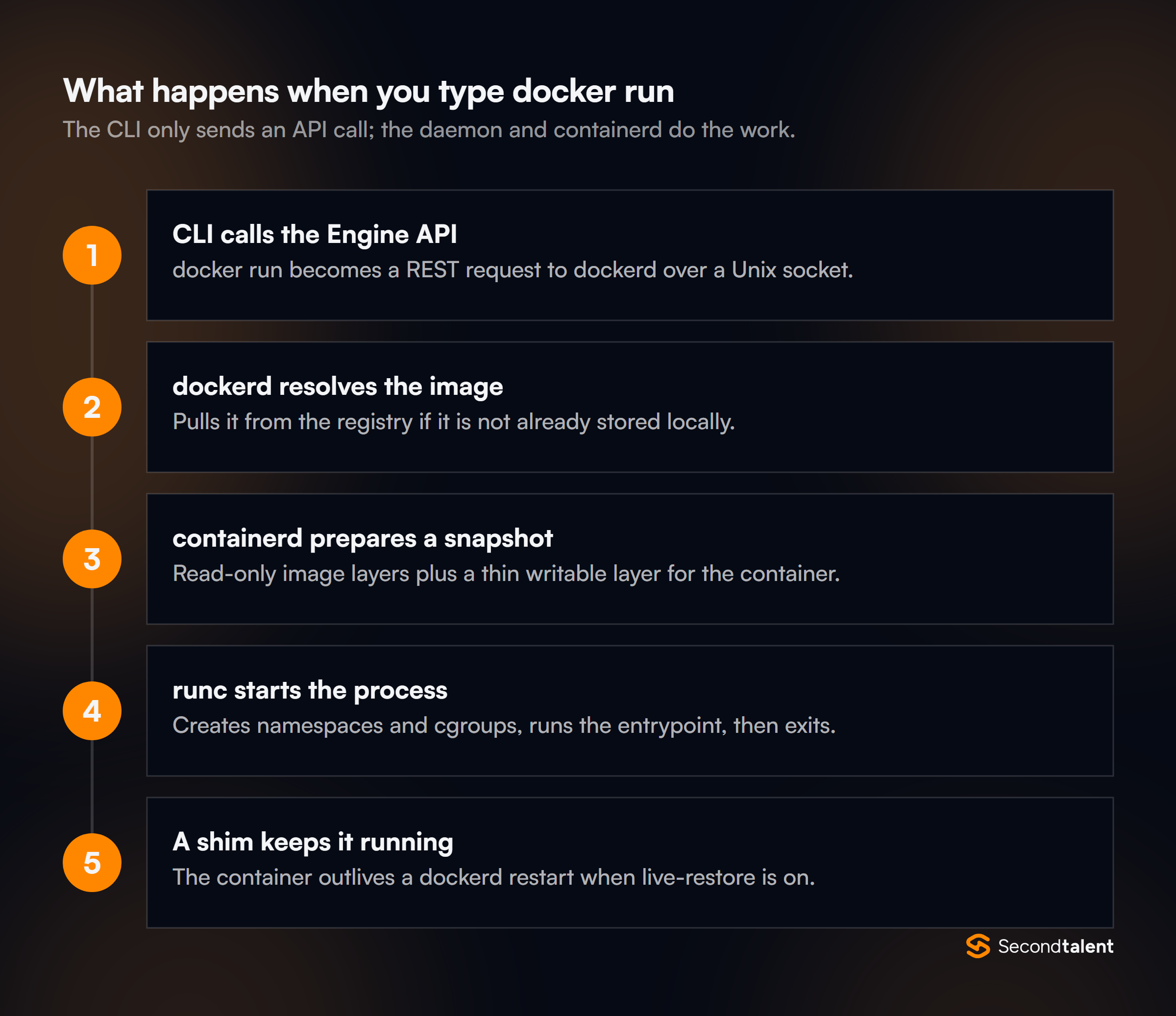
runc creates the namespaces and cgroups, starts your process and exits. A small shim process stays behind as the container's parent. With live restore enabled, containers keep running while dockerd restarts or upgrades.
11. How do image layers and copy-on-write work?
An image is a stack of read-only layers, and a container adds one thin writable layer on top. A union filesystem such as OverlayFS merges them into one view.
When a container changes a file from a lower layer, the file is first copied up into the writable layer, then changed. That is why many containers from one image start fast and share disk.
It is also why write-heavy data, such as a database's files, belongs in a volume, not the container layer: copy-up is slow, and the writable layer is deleted with the container.
12. Why does a container sometimes ignore docker stop?
Because the process running as PID 1 does not handle SIGTERM. The kernel does not apply default signal actions to PID 1, so unless the app installs a handler, the signal does nothing. After 10 seconds, docker stop sends SIGKILL.
The fixes: use the exec form of ENTRYPOINT so your app is PID 1, handle SIGTERM in the app, or run with --init. That adds a tiny init process that forwards signals and reaps zombie child processes.
Networking
13. Which network drivers does Docker offer?
The common ones are bridge, host, none, overlay and macvlan. bridge is the default: a private network on one host, with published ports for outside access. host shares the host's network stack, which removes isolation and NAT overhead. none gives the container only a loopback interface.
overlay spans several hosts for Swarm services. macvlan gives a container its own MAC address on the physical network, which some legacy or network-monitoring apps need.
14. Why can containers find each other by name on one network but not another?
Name resolution works only on user-defined networks. The bridge network docs state that containers on the default bridge "can only access each other by IP addresses", unless you use the legacy --link option.
docker network create app
docker run -d --name db --network app postgres:18
docker run -d --name api --network app -e DB_HOST=db my-api
On a user-defined network, Docker's embedded DNS server resolves db to the container's IP. Compose creates such a network for each project, which is why service names work there.
15. What is the difference between EXPOSE and publishing a port?
EXPOSE only documents which port the app listens on; -p actually opens it on the host. -p 8080:80 maps host port 8080 to container port 80 through firewall rules that Docker manages.
By default, -p 8080:80 binds on all host interfaces. It can bypass a host firewall such as UFW, because Docker's rules run first. Bind to localhost with -p 127.0.0.1:8080:80 when only the host should reach it.
Storage
16. Compare volumes, bind mounts and tmpfs mounts.
Volumes are storage that Docker manages, bind mounts map a host path into the container, and tmpfs mounts live only in memory. Use volumes for data the app owns, such as a database's files.
They survive container removal, work the same on every host, and can be backed up with Docker commands.
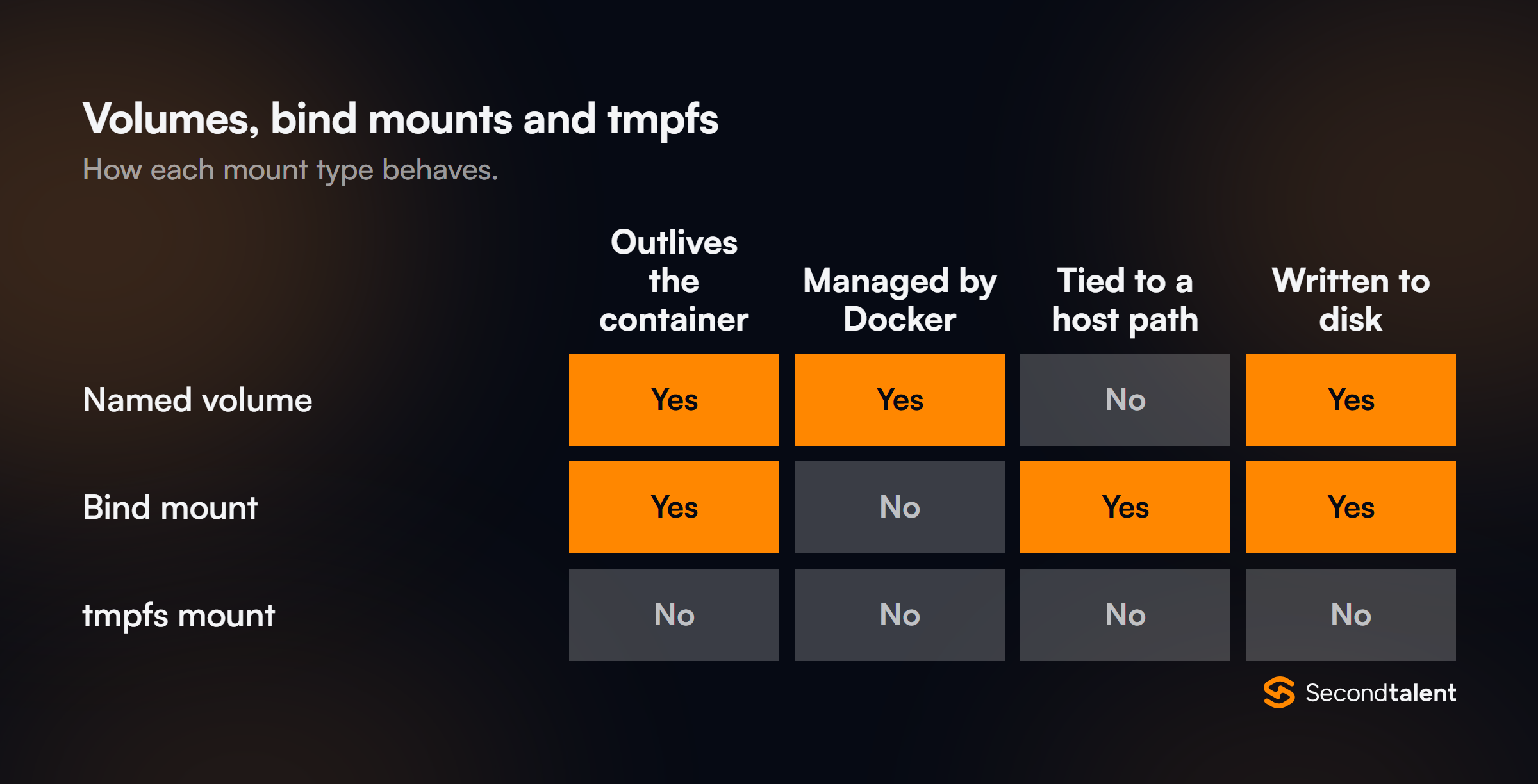
Use bind mounts in development, so code changes on the host show up in the container, and to pass in host config files. Use tmpfs for scratch files or sensitive data that should never touch disk. See the storage overview.
17. Which commands free up disk space, and what does each remove?
docker system prune removes stopped containers, unused networks, dangling images and unused build cache. It leaves volumes alone unless you add --volumes, and -a also removes every image not used by a container, not just dangling ones.
docker image prune: dangling images, the untagged leftovers of rebuilds.docker volume prune: unused volumes. Check first; this is data.docker builder prune: build cache, often the biggest item.docker system df: shows what uses space before you delete anything.
The prune reference lists the filters, such as --filter "until=24h".
Docker Compose
18. How do you make a service wait until its database is ready?
Give the database a healthcheck and use depends_on with condition: service_healthy. Plain depends_on only orders container start-up; it does not wait for the database to accept connections.
services:
  db:
    image: postgres:18
    healthcheck:
      test: ["CMD", "pg_isready", "-U", "postgres"]
      interval: 5s
      retries: 10
  api:
    build: .
    depends_on:
      db:
        condition: service_healthy
The app should still retry its connection. A database can restart later, and Compose will not stop the app when that happens.
19. How do you manage different Compose settings per environment?
Keep one base file and layer overrides on top. compose.override.yaml is merged automatically, which suits local development settings such as bind mounts and debug ports.
For other environments, pass files explicitly: docker compose -f compose.yaml -f compose.prod.yaml up. See the merge docs.
Profiles switch optional services on and off, such as an admin UI or a test mail server, with --profile tools. A .env file next to the Compose file supplies values for ${VAR} substitution, like image tags.
20. What happens when you scale a Compose service?
docker compose up --scale web=3 starts three containers for web, and Docker's DNS returns all three IPs for the name web. Other services then reach them by round-robin DNS, which is not real load balancing.
Scaling fails if the service publishes a fixed host port such as 8080:80, because only one container can bind it. Put a reverse proxy in front, or publish only a container port and let Docker pick host ports.
For real multi-host scaling, use Kubernetes or Swarm.
Container Security
21. Why run containers as a non-root user?
Because root in a container is root on the host kernel, limited only by namespaces and capabilities. If an attacker breaks out through a kernel or runtime bug, they arrive as root.
RUN groupadd -r app && useradd -r -g app app
USER app
A non-root user also stops the process from changing system files inside the container. Many official and hardened images already set a non-root user, and ports below 1024 can be avoided by listening on 8080.
22. What is rootless mode?
Rootless mode runs the Docker daemon itself, and all its containers, as an unprivileged user. Container root is then mapped to that user on the host through user namespaces.
A container escape lands as that ordinary user, not root. The trade-offs, per the rootless docs, include limits on some networking and storage features and on binding low ports.
It differs from the USER instruction, which changes the user inside the container but leaves the daemon running as root.
- The app runs as non-root inside the container
- The daemon still runs as root
- One line per image
- The daemon and all containers run as a normal user
- An escape lands as that user
- Some networking and storage limits
23. How do you lock down a running container further?
Remove every privilege the app does not use. Per the Docker security docs, Docker already "drops all capabilities except those needed". You can go further:
docker run --cap-drop ALL --cap-add NET_BIND_SERVICE \
  --read-only --tmpfs /tmp \
  --security-opt no-new-privileges \
  --memory 512m --pids-limit 200 my-api
Never use --privileged or mount /var/run/docker.sock into an app container. Access to the socket is the same as root on the host.
24. How do you find vulnerabilities in images?
Scan images in CI and again on a schedule, since new CVEs appear for images that have not changed. Docker Scout, Trivy and Grype compare the packages in an image against vulnerability databases.
Fail the build only on high or critical issues with a fix available, or the team will learn to ignore the scanner. Keep an SBOM with each image so a newly published CVE can be matched to running images without a rescan.
A smaller base image does more to cut findings than any scanner.
25. How should a container receive runtime secrets?
As files mounted at runtime from a secrets manager, not as baked-in values. Environment variables are common but leak easily: docker inspect shows them, crash reports dump them, and child processes inherit them.
Swarm and Compose mount secrets under /run/secrets/. Kubernetes mounts Secrets as files or env vars. In the cloud, the platform's secret manager plus a workload identity is best, so no long-lived secret exists at all.
Whatever the source, never put secrets in the image.
What Changed Recently
26. What did Docker Engine 28 change about published ports?
It closed paths that let other machines reach containers in ways users did not expect. The Engine 28 release notes list a fix for a security issue "allowing remote hosts to connect directly to a container on its published ports".
They also note that direct routed access to container ports not published with --publish is now blocked.
Engine 28 also moved most of Docker's iptables rules out of the filter FORWARD chain, so other tools can add their own rules after Docker's, and it now needs ipset support in the kernel.
Setups that relied on reaching container IPs directly from another host need an explicit published port or a routed network design.
27. What is the containerd image store, and does an upgrade turn it on?
It stores images and container filesystems in containerd's snapshotters instead of Docker's classic storage drivers such as overlay2. Engine 29 made it the default for fresh installs only.
Per the containerd store docs, an upgraded daemon keeps its legacy storage driver until you enable "containerd-snapshotter": true in daemon.json.
The store adds local multi-platform images, images with attestations such as SBOMs and provenance, and Wasm workloads. Check which one you run with docker info -f '{{ .DriverStatus }}'.
Images stored under the old driver are not visible after switching, so plan a re-pull.
28. Docker Content Trust was removed from the CLI. How do you sign images now?
With Sigstore's cosign or Notation, which store signatures as artifacts next to the image in the registry. The Engine 29 release notes say "Docker Content Trust was removed from the Docker CLI". It can still be built as a separate plugin.
Verification moves to deploy time. A Kubernetes admission policy, for example, rejects images whose signature does not match the expected CI identity. Signing is only half the job: something must check the signature before the image runs.
29. What does the cgroup v1 deprecation mean for teams?
Hosts still on cgroup v1 need a plan to move to cgroup v2. Engine 29 deprecated v1, and the release notes say support "continues until at least May 2029, but migrate to cgroup v2 as soon as possible."
Most current distributions boot with cgroup v2 already. The risk sits in older hosts and in tools that read cgroup v1 paths directly, such as old monitoring agents or JVMs too old to detect v2 memory limits.
Those can misread a container's memory limit and size their heap wrongly.
30. What are Docker Hardened Images?
They are minimal base images built by Docker on Debian and Alpine, with a full SBOM and SLSA Build Level 3 provenance.
They became free and Apache 2.0 licensed on December 17, 2025, per Docker's announcement, which counts over 1,000 hardened images and Helm charts in the catalog.
Docker describes them as a "distroless runtime" that shrinks the attack surface. A paid Enterprise tier adds customization and faster CVE patching commitments.
In an interview, the useful point is the trade-off: fewer packages means fewer CVEs, but debugging needs a separate dev variant or an ephemeral debug container.
Signs of a Strong Answer
- They write the exec form of
ENTRYPOINTand can explain the PID 1 signal problem. - They order Dockerfile steps for the cache and use secret mounts, never
ARG, for build credentials. - They describe a container as a process with namespaces and cgroups, not a small VM.
- They know the default bridge has no name resolution and that published ports can bypass the host firewall.
- They use healthchecks with
depends_onand still write retry logic in the app. - They treat
docker.sockand--privilegedas root on the host.
Hiring Docker Engineers
Engineers who containerize and run services well in production are in demand, and many strong ones work remotely from Asia. Second Talent matches companies with pre-vetted DevOps engineers, screened with questions like these.
Tell us the stack and we send a shortlist within 24 hours. Start hiring, or see our Kubernetes and CI/CD interview guides.