Jump to Category
Compute (App Service, Functions, Containers)
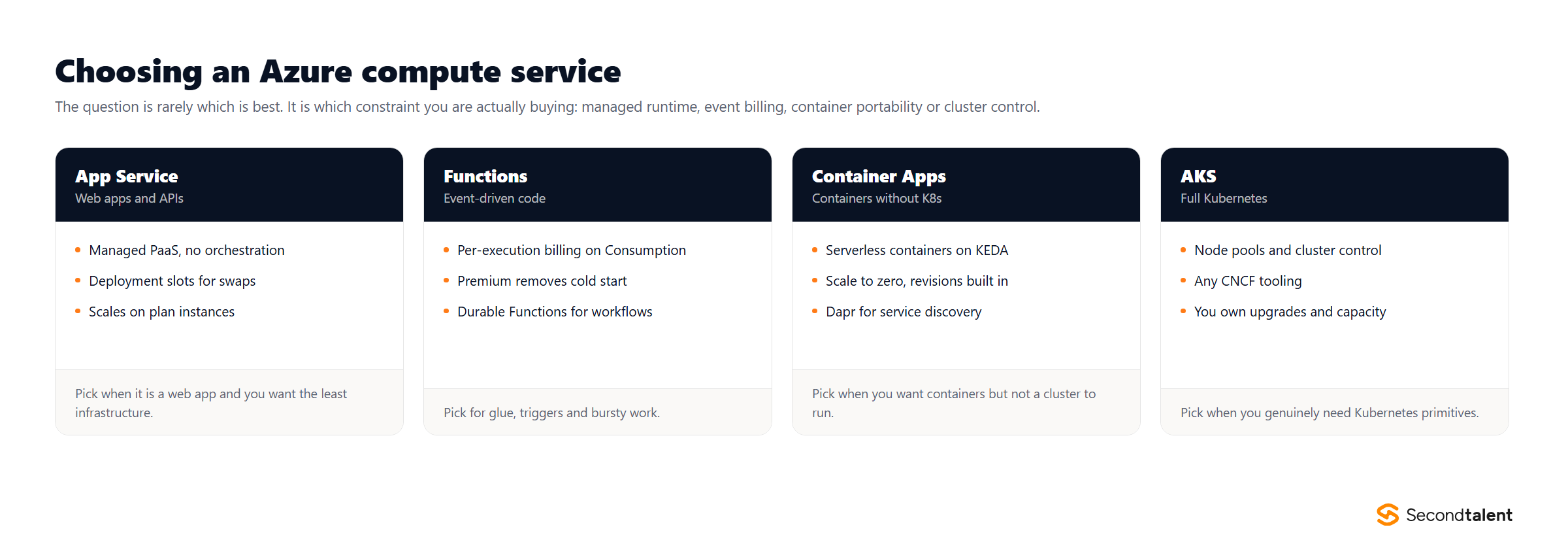
1. Compare Azure Kubernetes Service (AKS), Azure Container Apps, and App Service for deploying a containerized application.
- App Service: A fully managed PaaS for web apps. It’s the simplest option for deploying a container. Choose it for straightforward web applications or APIs that don’t need complex orchestration.
- Azure Container Apps (ACA): A serverless container service built on Kubernetes. It abstracts away the complexity of Kubernetes while providing features like scale-to-zero, Dapr integration, and event-driven scaling. Choose it for microservices when you want more control than App Service but don’t want to manage a full Kubernetes cluster.
- Azure Kubernetes Service (AKS): A fully managed Kubernetes service. It provides the most power, flexibility, and control over your container orchestration. Choose it when you need the full Kubernetes API, have complex networking or stateful workloads, or want portability across clouds.
2. What are Azure Functions Durable Functions? Describe two orchestration patterns they enable.
Durable Functions is an extension for Azure Functions that allows you to write stateful, long-running workflows in a serverless environment. It manages state, checkpoints, and restarts for you.
Two common patterns are:
- Function Chaining: Executing a sequence of functions in a specific order. The output of one function is passed as the input to the next, and the orchestrator waits for each function to complete before calling the next one.
- Fan-out/Fan-in: Executing multiple functions in parallel (`fan-out`) and then waiting for all of them to finish before performing an aggregation on their results (`fan-in`).
Other patterns include async HTTP APIs, monitoring, and human interaction.
Read the Durable Functions overview.3. What are App Service Deployment Slots and what are they used for?
Deployment slots are live, running instances of your app, each with its own hostname. The primary “production” slot is where your live app runs. You can create additional slots, such as a “staging” slot.
They are used for **zero-downtime deployments**. You deploy your new code to the staging slot, warm it up, and run tests. Once you are confident, you perform a “swap” operation. Azure instantly swaps the virtual IP addresses of the two slots. The staging slot becomes the new production, and the old production becomes the new staging. This happens with no downtime and allows for instant rollbacks by simply swapping back.
4. Compare the hosting plans for Azure Functions: Consumption, Premium, and App Service Plan.
- Consumption Plan: Fully serverless. You pay only for the time your code runs. It scales automatically, including scaling to zero. Prone to cold starts.
- Premium Plan: Provides pre-warmed instances to eliminate cold starts and offers more powerful hardware. It also includes features like VNet integration. You pay for the pre-warmed instances and for executions when scaling beyond them.
- App Service Plan (Dedicated): Runs your functions on the same dedicated VMs as your App Service apps. Choose this if you have existing, underutilized App Service Plans. It does not scale automatically beyond the plan’s capacity.
5. What is the difference between an Availability Set and an Availability Zone in Azure?
- An Availability Set is a logical grouping of VMs within a single datacenter to protect against hardware failures. It distributes your VMs across different “fault domains” (racks with independent power/networking) and “update domains” (groups of VMs that are rebooted together for maintenance). It protects against failures within a datacenter.
- An Availability Zone is a physically separate datacenter within an Azure region, with its own independent power, cooling, and networking. Deploying VMs across multiple Availability Zones protects your application from an entire datacenter failure.
6. What is Workload Identity in AKS?
Workload Identity is the recommended way for pods running in an AKS cluster to authenticate with Azure services. It allows you to bind a Kubernetes service account to a Microsoft Entra ID (formerly Azure AD) identity (like a Managed Identity). Pods using that Kubernetes service account can then acquire a token from Entra ID and use it to securely access other Azure resources (like Key Vault or Storage) without needing to manage secrets like connection strings or keys.
Databases & Caching
7. Explain the five consistency levels in Azure Cosmos DB.
Cosmos DB offers a spectrum of consistency levels, allowing you to trade off consistency for performance and availability.
- Strong: Provides linearizability. Reads are guaranteed to return the most recently committed version of an item. This offers the highest consistency but the highest latency.
- Bounded Staleness: Reads might lag behind writes by a configured amount of time or number of versions. Provides a predictable level of staleness.
- Session: The default level. Within a single client session, reads are guaranteed to be monotonic, read-your-own-writes, and write-follows-reads. This is the most popular level as it provides predictable behavior for a user’s session.
- Consistent Prefix: Guarantees that reads never see out-of-order writes.
- Eventual: The weakest level. Reads may see stale data, and there are no ordering guarantees. This offers the highest performance and availability.
8. What is a partition key in Cosmos DB and how does it impact performance and cost?
A **partition key** is an item property used to distribute data across multiple physical partitions in a Cosmos DB container. Cosmos DB uses a hash of the partition key to route data.
It’s the most critical design choice. A good partition key has high cardinality and distributes requests evenly. A poor partition key leads to “hot partitions,” causing throttling and performance bottlenecks. All queries are most efficient when they can be targeted to a single logical partition by including the partition key in the filter. Cross-partition queries are possible but consume more Request Units (RUs) and are less scalable.
9. What are Request Units (RUs) in Cosmos DB?
A **Request Unit (RU)** is the currency of throughput in Cosmos DB, abstracting away system resources like CPU, IOPS, and memory. Every database operation, whether a read, a write or a query, consumes a certain number of RUs. You provision throughput in RUs per second on a container or database. If your requests exceed the provisioned RUs, they will be rate-limited (throttled). Understanding and monitoring RU consumption is key to managing performance and cost.
10. Compare the DTU and vCore purchasing models for Azure SQL Database.
- DTU (Database Transaction Unit): A bundled measure of compute, memory, and I/O resources. It’s a simpler, pre-configured model, good for applications with predictable workloads where you don’t need fine-grained control over resources.
- vCore (Virtual Core): Allows you to choose the number of virtual cores, the amount of memory, and the amount and speed of storage independently. This model provides greater transparency and control and is better for migrating on-premises SQL Server workloads. It also allows you to use Azure Hybrid Benefit for cost savings.
11. What are Azure SQL Elastic Pools?
An Elastic Pool is a collection of databases that share a pre-configured set of resources (DTUs or vCores). It’s a cost-effective solution for managing multiple databases with variable and unpredictable usage patterns. Instead of provisioning capacity for each database individually, you provision it for the pool. If one database is idle, another can use the available resources. This is ideal for SaaS applications where each customer might have their own database.
12. What are the different access tiers for Azure Blob Storage?
- Hot: Optimized for storing data that is accessed frequently. Highest storage costs, lowest access costs.
- Cool: Optimized for storing data that is infrequently accessed and stored for at least 30 days. Lower storage costs, higher access costs than Hot.
- Archive: Optimized for storing data that is rarely accessed and stored for at least 180 days, with flexible latency requirements (on the order of hours). Lowest storage costs, highest access costs.
Networking & API Management
13. Compare Application Gateway, Azure Front Door, and Azure Load Balancer.
- Azure Load Balancer: A Layer 4 (TCP/UDP) load balancer. It distributes traffic within a virtual network or regionally. It operates based on IP addresses and ports, not on HTTP content.
- Application Gateway: A Layer 7 (HTTP/S) load balancer and Web Application Firewall (WAF). It can route traffic based on URL paths, hostnames, and other HTTP attributes. It operates within a single region.
- Azure Front Door: A global Layer 7 load balancer and content delivery network (CDN). It routes traffic to the fastest and most available backend across multiple regions, providing global failover and DDoS protection. It operates at the edge of Microsoft’s global network.
14. What is the difference between VNet Integration and a Private Endpoint for an App Service?
- VNet Integration: Allows your App Service to make *outbound* calls to resources inside a virtual network. The App Service itself is still publicly accessible, but it can reach internal services like a database in a private subnet.
- Private Endpoint: Exposes your App Service on a private IP address *within* your virtual network. This makes the App Service itself a private resource, accessible only from within your VNet (or peered networks). It’s used to secure inbound traffic to your app.
15. What is the purpose of Azure API Management (APIM)?
APIM is a fully managed service that acts as a gateway or facade for your backend APIs. It provides a central place to:
- Secure APIs: Enforce authentication, authorization, rate limiting, and quotas.
- Publish APIs: Provide a developer portal with documentation and API definitions.
- Transform APIs: Modify requests and responses on the fly using policies (e.g., converting XML to JSON).
- Monitor and Analyze: Get insights into API usage and health.
16. What are Network Security Groups (NSGs)?
An NSG is a basic stateful firewall used to filter network traffic to and from Azure resources in a virtual network. It contains a list of security rules that allow or deny traffic based on a 5-tuple: source IP, source port, destination IP, destination port, and protocol. NSGs can be associated with either subnets or individual network interfaces.
Messaging & Event-Driven Architecture
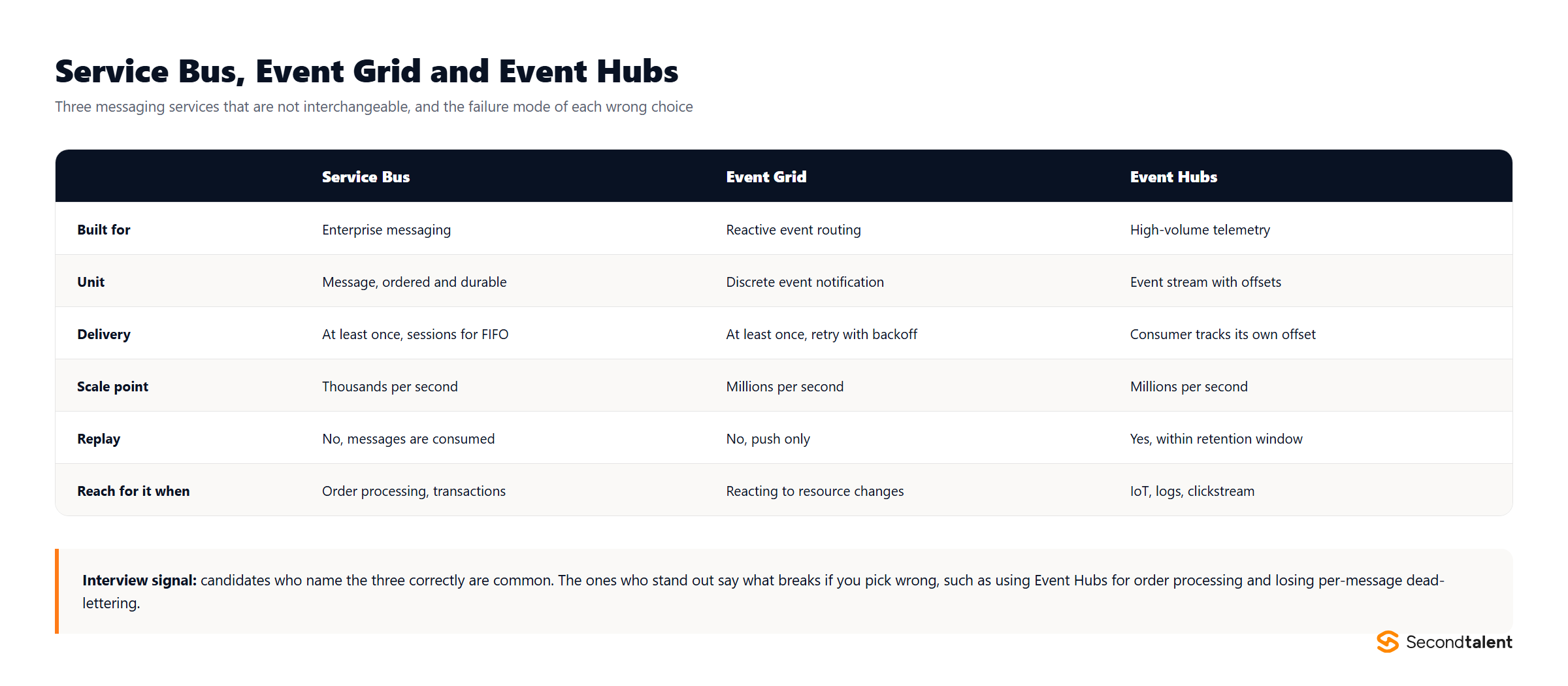
17. Compare Azure Service Bus, Event Grid, and Event Hubs.
- Service Bus: A traditional enterprise message broker designed for high-value, transactional messaging. It provides features like queues, topics/subscriptions, sessions, dead-lettering, and guaranteed ordering (with sessions). It’s for decoupling applications and reliable message-based communication.
- Event Grid: A reactive event routing service. It’s designed to react to events happening within Azure (e.g., a blob created) or from custom sources and route them to handlers. It’s for building reactive, event-driven applications.
- Event Hubs: A big data streaming platform designed for ingesting massive volumes of events or telemetry data (millions per second). It provides a partitioned consumer model similar to Kafka, allowing for high-throughput stream processing.
18. What are Service Bus sessions and what problem do they solve?
Sessions provide a way to process a sequence of related messages in a guaranteed first-in, first-out (FIFO) order. A session allows a consumer to acquire an exclusive lock on all messages that have the same session ID.
This solves the problem of processing related messages concurrently but in order. For example, in a financial system, you could process all transactions for a specific user account (`session_id = user_id`) sequentially to avoid race conditions, while still processing transactions for different users in parallel.
Read the documentation on Message Sessions.19. What is the “competing consumers” pattern?
The competing consumers pattern is a model for scaling message processing. You have a single queue and multiple consumer instances listening to that same queue. When a message arrives, only one of the consumers can successfully receive and process it. This allows you to scale out the processing of messages horizontally by simply adding more consumer instances. This is the default behavior for an Azure Service Bus Queue or an SQS queue.
20. How does a Service Bus Topic differ from a Queue?
A **Queue** uses a simple first-in, first-out model where each message is consumed by a single consumer. A **Topic** uses a publish/subscribe model. Messages are sent to a topic, and the topic then forwards copies of the message to one or more **subscriptions**. Each subscription acts like a virtual queue, and you can define filtering rules so that a subscription only receives a subset of the messages sent to the topic. This enables the fan-out pattern.
Security, Identity & Access
21. What are Managed Identities and how do they improve security?
Managed Identities provide an Azure resource (like a VM or App Service) with an automatically managed identity in Microsoft Entra ID. This identity can then be granted access to other Azure resources (like Key Vault or Storage) using Azure RBAC.
They improve security by eliminating the need for developers to manage credentials (like connection strings or service principal secrets) in their code or configuration. The application can acquire an access token using its managed identity, removing the risk of leaked credentials.
There are two types: **System-Assigned** (tied to the lifecycle of one resource) and **User-Assigned** (a standalone resource that can be assigned to multiple Azure resources).
Read the Managed Identities overview.22. What is the purpose of Azure Key Vault?
Azure Key Vault is a secure cloud service for storing and managing secrets, keys, and certificates. Its purpose is to centralize your application’s secrets, providing secure storage with hardware security modules (HSMs), fine-grained access control, and auditing capabilities. Applications can securely retrieve secrets at runtime using a Managed Identity, avoiding the insecure practice of storing them in configuration files or source code.
23. What is a Private Endpoint?
A Private Endpoint is a network interface that uses a private IP address from your virtual network to connect you privately and securely to an Azure PaaS service (like Azure Storage, SQL Database, or Cosmos DB). It effectively brings the service into your VNet, ensuring that traffic between your VNet and the service travels only over the Microsoft backbone network, never over the public internet. This is a key component for securing PaaS services.
24. What are App Registrations and Enterprise Applications in Entra ID?
- An **App Registration** is the global representation of your application. It’s the “template” or “definition” from which service principals are created. You register your app once.
- An **Enterprise Application** (or Service Principal) is the local instance or representation of your application within a specific tenant. This is the object to which you assign permissions (via RBAC) or user access in that tenant.
25. What is Conditional Access?
Conditional Access is a feature of Microsoft Entra ID that acts as a policy engine for access control. It allows you to enforce access policies based on a set of signals, such as the user’s location, the device they are using (is it compliant?), the application they are trying to access, and real-time risk detection. Based on these signals, you can enforce controls like requiring Multi-Factor Authentication (MFA), blocking access, or limiting the session.
Architecture, Operations & DevOps
26. What are the five pillars of the Azure Well-Architected Framework?
The Azure Well-Architected Framework is a set of guiding tenets for building high-quality solutions on Azure. The five pillars are:
- Cost Optimization: Managing costs to maximize the value delivered.
- Operational Excellence: The operations processes that keep a system running in production.
- Performance Efficiency: The ability of a system to adapt to changes in load.
- Reliability: The ability of a system to recover from failures and continue to function.
- Security: Protecting applications and data from threats.
27. Compare ARM templates, Bicep, and Terraform for Infrastructure as Code.
- ARM Templates: The native, declarative IaC for Azure, using JSON. They can be very verbose and complex to author by hand.
- Bicep: A domain-specific language (DSL) that provides a much cleaner, more readable syntax for authoring Azure infrastructure. A Bicep file transpiles into a standard ARM template, so it’s a first-class abstraction. It is the recommended IaC approach for Azure-only environments.
- Terraform: An open-source, cloud-agnostic IaC tool from HashiCorp. It is more popular and has a larger ecosystem than ARM/Bicep. It’s the best choice for multi-cloud or hybrid-cloud environments.
28. What is Application Insights and what kind of information does it provide?
Application Insights is an Application Performance Management (APM) service in Azure Monitor. You integrate it into your application via an SDK. It provides deep insights into your application’s performance and usage, including:
- Request rates, response times, and failure rates.
- Dependency tracking (e.g., calls to databases or external APIs).
- Performance counters and live metrics.
- Exception tracking and analysis.
- Distributed tracing and application maps.
29. What is the “strangler fig” pattern for modernizing a legacy application?
The strangler fig pattern is an architectural approach for incrementally migrating a monolithic legacy system. Instead of a “big bang” rewrite, you gradually build new functionality as microservices around the old system. You then use a facade or proxy (like Azure API Management) to intercept requests, routing them to the new service if the functionality has been migrated, or passing them through to the old monolith if not. Over time, the new system “strangles” the old one until the monolith can be decommissioned.
30. How would you design a cost-effective, multi-environment setup (Dev, Staging, Prod) in Azure?
A cost-effective setup would involve:
- Dev/Test Subscriptions: Use special Dev/Test subscriptions which offer discounted rates on many services.
- Resource Groups: Use separate resource groups for each environment for clear separation and cost tracking.
- IaC: Use Bicep or Terraform with parameterized templates to deploy consistent environments with different SKU sizes for each.
- Lower Tiers for Non-Prod: Use cheaper App Service plans (e.g., Basic), smaller database tiers, and the Consumption plan for Azure Functions in Dev/Staging.
- Automation: Implement scripts to automatically shut down non-production environments outside of business hours to save costs.
AI on Azure
31. What is Microsoft Foundry, and what was it called before?
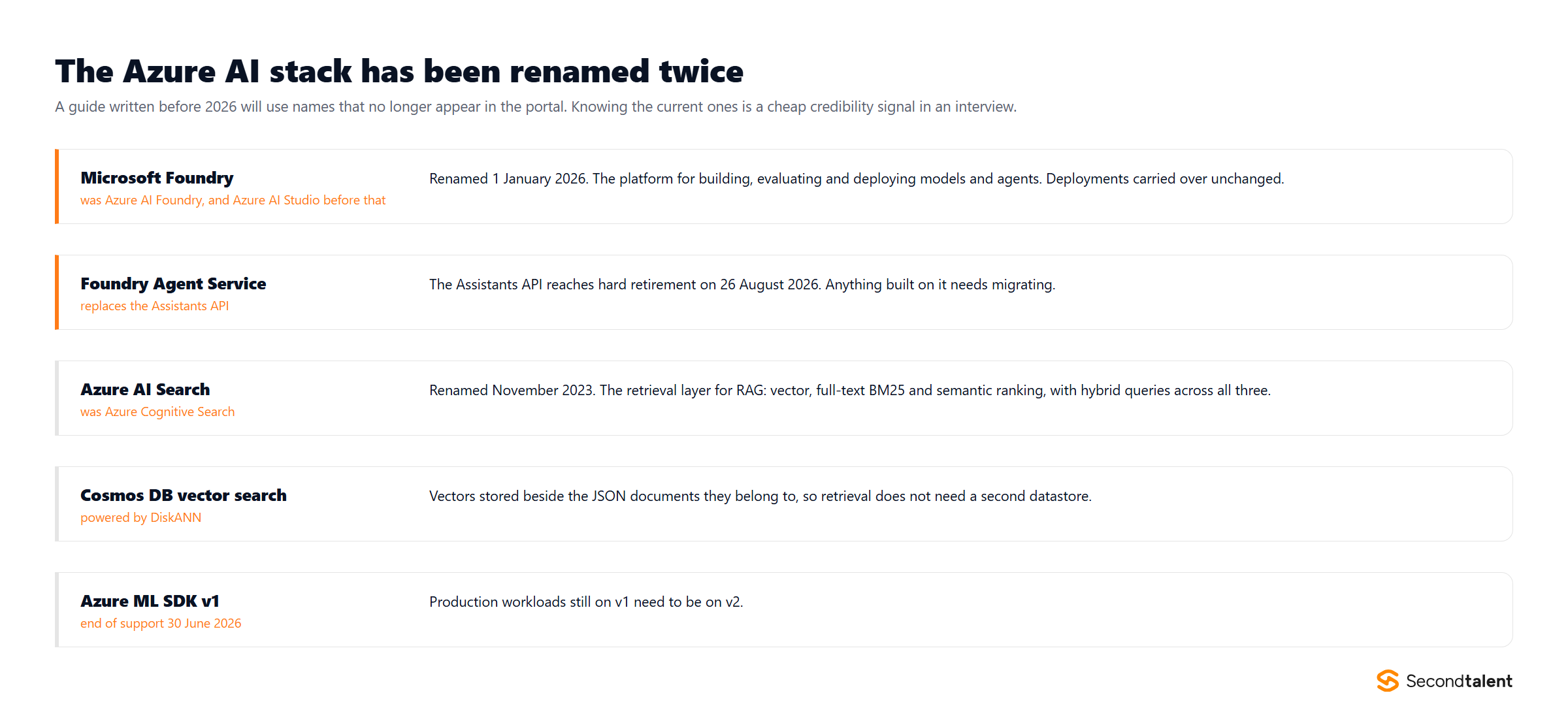
Microsoft Foundry is the platform for building, evaluating and deploying models and agents on Azure. The naming history matters because it dates any material you read: it launched as Azure AI Studio, was renamed Azure AI Foundry, and became Microsoft Foundry on 1 January 2026. The drop of “Azure” from the name was deliberate, positioning it as a Microsoft-wide product rather than an Azure-only service, in the same way Azure Active Directory became Microsoft Entra ID.
Existing deployments carried over unchanged, so this is a naming change rather than a migration. A candidate still saying “Azure AI Studio” is not wrong about the technology, but it tells you when they last worked with it.
32. The Assistants API is retiring. What replaces it, and what does migration involve?
The Assistants API reaches hard retirement on 26 August 2026 and is replaced by the Foundry Agent Service. Anything built on Assistants needs to move, and this is the kind of date an interviewer will use to see whether a candidate tracks the platform or only the code they wrote.
The migration is not purely mechanical. Agent Service changes how tools, threads and state are modelled, so the work is mapping your existing assistant definitions, tool registrations and conversation state onto the new primitives rather than swapping an SDK import.
33. How would you build retrieval augmented generation on Azure, and where do the vectors live?
There are two credible homes for the vectors and the right answer depends on where the source data already is.
Azure AI Search (renamed from Azure Cognitive Search in November 2023) is the retrieval layer when content is spread across sources. It supports vector search, full-text BM25 and semantic ranking, and can run all three in a single hybrid query, which in practice beats pure vector search on recall for keyword-heavy corpora.
Azure Cosmos DB vector search, backed by DiskANN, stores vectors alongside the JSON documents they describe. If the data already lives in Cosmos DB, this avoids running a second datastore and keeps the embedding next to the record it belongs to, which removes a class of synchronisation bug.
The answer that shows judgement names the tradeoff: a dedicated search service if retrieval quality across mixed sources is the problem, the database if operational simplicity and consistency matter more.
34. How should an application authenticate to Azure OpenAI and other AI services?
With a managed identity and Entra ID role assignments, not an API key. This is the same answer as for Key Vault or Storage, and the reasoning carries over: keys have to be stored, rotated and revoked, and they leak through configuration, logs and client-side code.
The AI-specific wrinkle is that many quickstarts and tutorials still use key authentication because it is shorter to demonstrate. Teams copy that into production. A strong candidate flags the difference between a sample and a deployment, and knows that role-based access also gives per-identity audit trails, which key auth cannot.
35. How do you control cost on a token-billed AI workload?
Token billing breaks the intuitions built on per-instance pricing, because cost scales with input length and output length rather than with uptime. The levers are: cap output with max token settings, keep prompts short by retrieving fewer and better chunks rather than more, cache responses for repeated queries, and route by difficulty so a small model handles the easy majority and a large model handles the rest.
Provisioned throughput is the other half of the answer. It trades per-token billing for reserved capacity, which becomes cheaper past a predictable volume and also removes the noisy-neighbour latency variance of shared capacity. Knowing roughly where that crossover sits for your traffic is the difference between an architect and someone who has only prototyped.
36. What does observability look like for an LLM feature, and how does it differ from a normal service?
The usual signals still apply: latency, error rate, throughput. What is new is that a request can succeed by every conventional measure and still be wrong, so you need to capture the inputs and outputs to judge quality at all.
That creates a tension worth naming in an interview: prompts and completions frequently contain personal or confidential data, so logging them wholesale turns your telemetry store into a data-protection problem. The workable pattern is sampling, redaction before capture, and shorter retention on that data than on ordinary logs. Track token counts per request as a first-class metric too, because it is both your cost driver and an early signal that prompts are drifting longer.
One operational note: querying Application Insights data now requires the Entra ID based path, with the older route retiring on 30 September 2026.
37. How do you stop a model regression from reaching production?
Treat the prompt and the model version as deployable artifacts under the same discipline as code. A model upgrade, a prompt edit and a retrieval change can each alter output quality without any test failing, because there is no exception to catch.
The practical answer is an evaluation set: a fixed collection of representative inputs with expected characteristics, scored automatically on each change, run in CI before release. Combine that with staged rollout so a regression reaches a fraction of traffic first. Candidates who have actually shipped an LLM feature reach for this quickly; those who have not tend to describe manual spot checking, which does not survive contact with a model version bump.
38. How do you keep AI traffic off the public internet?
The same primitives already covered for data services apply here: Private Endpoints put the AI service on your virtual network with a private IP, and public network access is then disabled on the resource so the only route in is through the VNet.
The detail people miss is DNS. A Private Endpoint requires a private DNS zone so the service hostname resolves to the private address from inside the network. Get this wrong and traffic silently keeps taking the public path while everyone believes it is private, which is exactly the sort of thing an interviewer probes to see whether someone has configured it or only read about it.
39. Where does content safety fit in an AI feature?
On both sides of the model call. Filtering only user input catches prompt-level abuse but not a model that produces something harmful from an innocuous request, and filtering only output leaves the input path open. Azure AI Content Safety provides categorised severity scoring for text and images at both points.
The architectural question underneath is what happens on a block, and it is a product decision rather than a technical one: fail closed with a message, degrade to a canned response, or escalate to human review. A candidate who has only wired the API up will describe the call. One who has run it in production will describe the fallback and the false-positive rate.
40. Which Azure deprecations should a developer be tracking right now?
Naming three or four current ones signals that a candidate follows the platform rather than only their own backlog. As of August 2026: the Assistants API hard-retires on 26 August 2026 in favour of Foundry Agent Service; Azure Machine Learning SDK v1 left support on 30 June 2026 and production workloads need to be on v2; querying Application Insights moves to the Entra ID based path by 30 September 2026; and Azure Spring Apps is on a published retirement path.
The broader point is process, not trivia. Azure publishes a retirement calendar, and mature teams review it on a schedule instead of discovering a deadline from an email. That is the answer worth giving.