Research work isn’t just about reading books or digging through endless papers; it’s about working smarter with AI. Today’s best research tools can summarise complex studies, map out entire fields, fact-check with citations, and even translate feedback across languages.
In this roundup, we will see the 5 best AI models for researchers that are changing how students, academics, and professionals work.
These tools from ChatGPT-5’s multimodal power to Scispace’s PDF expertise, Consensus’s evidence-based answers, Perplexity’s smart Q&A, and Connected Papers’ visual mapping saves time, boost accuracy, and spark new ideas for every kind of researcher.
What’s your research challenge right now?
Select your situation below.
Looking to hire AI engineers who can implement these models in your research workflow? Our AI specialists in Southeast Asia start at $3,500/month and can integrate ChatGPT-5, Perplexity, and custom ML pipelines into your projects. Hire AI engineers →
Your research team needs more hands to implement these AI tools at scale. We source data engineers and ML specialists across Vietnam, Philippines, and Singapore who can operationalize models like Consensus and Scispace for your organization. Source research talent →
Running advanced AI models requires solid backend architecture. Your research platform needs engineers who can handle API integrations, data pipelines, and model deployment. Our backend developers in Asia average $4,200/month with ML experience. Hire backend developers →
These AI models generate massive datasets that need proper ETL pipelines and warehousing. Our data engineers specialize in building research-grade infrastructure for academic and commercial teams, starting at $3,800/month in Southeast Asia. Find data engineers →
How we selected the AI models
Not every AI tool is built with researchers in mind, so we focused on models that actually solve real academic problems. Our selection looked at four key factors: usefulness in research workflows (like literature reviews, data handling, and citations), accuracy and reliability (avoiding guesswork by grounding outputs in real sources), ease of access (simple setup, affordable pricing, and web-based availability), and range of use cases across disciplines.
The five tools chosen here, ChatGPT-5, Scispace, Consensus, Perplexity AI, and Connected Papers, stood out as the most practical, trusted, and versatile helpers for modern researchers.
Quick Comparison of the best AI models for researchers
| AI Tool | Best At | What’s Not So Great | Price |
| ChatGPT-5 (OpenAI) | Great all-around helper, works with text, images, data, and even code. | Some of the best features are only in paid plans. | Free (limited), Paid plans available |
| Scispace | Best for reading research papers, making citations, and running reviews. | Sometimes gives only surface-level summaries, not deep details. | Free, Premium starts at ₹700/month |
| Consensus | Best for quick answers backed by real research papers. | Only works with academic studies, not regular websites. | Free, Premium $6.99/month |
| Perplexity AI | Best for asking big questions and getting answers with sources. | Paid version has more features; it can give too much info at once. | Free, Pro $20/month |
| Connected Papers | Best for making a visual map of related research papers. | Free plan limits graphs; it doesn’t summarise the text of papers. | Free (5 graphs/month), Paid from $3/month |
Top 5 AI models for researchers
1. ChatGPT-5 (OpenAI) – Best for Multimodal Research
ChatGPT-5 is OpenAI’s newest and most advanced large language model, released in 2025. It builds on GPT-4o’s multimodal capabilities but offers faster reasoning, better accuracy in math/science, improved multilingual support, and higher reliability across research tasks. It processes text, code, images, and structured data, making it a versatile assistant for researchers across disciplines.
Core features
- Advanced Literature Analysis: Processes long documents, highlights themes, gaps, and trends.
- Multimodal Input (Text + Image + Data): Interprets charts, tables, and diagrams along with research text.
- Research-Oriented Outputs: Generates summaries, structured reviews, and formatted citations.
- Improved Reasoning: Performs well in math, logic, and structured datasets.
- Multilingual Efficiency: Handles 20+ languages with compressed tokenisation (cheaper and faster).
Best use cases
- Automating Literature Reviews
Scenario: A PhD student in environmental science needs to summarise dozens of abstracts on climate policy before writing a review paper.
Prompt:
“Carbon taxes in Europe reduced emissions but raised energy prices.
Renewable subsidies in Asia boosted solar adoption but strained public budgets.
Mixed policy frameworks in Africa led to uneven climate outcomes.
Summarise the following abstracts into a structured literature review.
Include: key findings, common themes, policy gaps, and suggested areas for future research.”
Output:

As researchers, we find this response very effective. It moves beyond simple summarization into critical comparison, highlighting trade-offs, equity issues, and institutional weaknesses across regions. The discussion-style synthesis reads like a journal draft, providing both nuanced analysis and clear directions for future research in climate policy.
- Chart + Text Interpretation
Scenario: A policy researcher is analysing renewable energy adoption trends, combining text data from reports with adoption-rate charts.
Prompt:
Chart: Renewable Energy Adoption Rates (2015–2023) (Solar vs. Wind).

Text: “Solar microgrids in rural areas reduce outages but financing remains a challenge.”
Interpret this chart on renewable energy adoption (2015–2023) alongside the given text.
Identify insights, challenges, and possible policy directions.
Output:

It explains the chart and text in a clear way. It shows that solar energy is growing faster than wind because it works well in rural areas. It also points out real problems like money, fairness, and weak grids. The suggested policies feel practical and easy to understand.
- Qualitative Data Coding
Scenario: A sociology researcher collects interviews on remote work experiences and wants to categorise recurring themes.
Prompt:
“Remote work saved me travel time.
Internet outages disrupted my tasks.
I missed social bonding with colleagues.
Flexible hours helped with childcare.”
Categorise these responses into themes with counts.
Provide a short interpretation of the results.
Output:

It organises the feedback into simple themes, shows counts, and even adds a chart for quick comparison. We like that it highlights both the benefits and challenges of remote work. The explanation is balanced and makes the results easy to understand.
- Multilingual Analysis
Scenario: A global education researcher is analysing survey feedback collected from different countries. The responses are in multiple languages, and the researcher needs quick translation plus classification into themes.
Prompt:
Spanish: “Las clases en línea me ayudaron a aprender a mi propio ritmo.”
French: “Les problèmes techniques rendaient les cours en ligne difficiles.”
Arabic: “التعلم عبر الإنترنت وفر لي المال ولكنه جعلني أشعر بالعزلة.”
Chinese: “在线课程给了我更多时间陪伴家人。”
German: “Online-Kurse waren flexibel, aber ich manquais d’interaction sociale.”
Translate the following survey responses into English.
Then, categorise them as advantages or challenges of online learning, and give a short interpretation of the overall feedback.
Output:

It provides a structured analysis that is useful for cross-cultural research. By translating and categorising multilingual inputs, it reveals consistent themes: flexibility, cost savings, and improved work–life balance as advantages; technical issues, isolation, and reduced social interaction as challenges. This synthesis is valuable for identifying global patterns in online learning experiences.
Additional use cases
- Code + Data Debugging: Researchers working with Python, R, or MATLAB can use GPT-5 to debug scripts or explain dataset errors, saving hours of trial-and-error.
- Grant Proposal Drafting: Helps academics outline research proposals with structured objectives, methodology, and potential impact aligned to funding criteria.
- Cross-Disciplinary Idea Generation: Can connect concepts across fields (e.g., economics + climate science) to suggest new angles for interdisciplinary studies.
- Workflow tip: When you’re scanning PDFs or building a literature review, first summarize research papers to understand complex information faster with Canva. Use the concise gist to prioritise which sections to run through Scispace’s Chat with PDFs, and send key claims to Consensus or Perplexity for source-backed verification.
Accessibility and Setup:
Direct Access (No Setup Needed): You can use ChatGPT-5 directly in the ChatGPT web app by selecting GPT-5 in the model dropdown. It is also available in the official ChatGPT desktop app for macOS.
For Developers (API Access): Researchers who want to integrate ChatGPT-5 into their workflow (e.g., automate literature reviews or run batch analyses) can use the OpenAI API.
Quick Install (Python):
pip install openai
Basic Example:
from openai import OpenAI
client = OpenAI()
response = client.chat.completions.create(
model=”gpt-5″,
messages=[
{“role”: “system”, “content”: “You are a research assistant.”},
{“role”: “user”, “content”: “Summarize the key findings of three climate policy abstracts.”}
]
)
print(response.choices[0].message.content)
Hardware Requirements:
- Web app requires only a browser.
- API runs in the cloud, so no high-end computer is needed.
- No GPU setup or local installation is required (unlike open-source models).
Pricing and plans (one liner)
- Free Plan: Up to 10 GPT-5 messages every 5 hours, plus 1 enhanced “Thinking” response per day.
- Plus Plan: Up to 160 GPT-5 messages every 3 hours, with 3,000 “Thinking” responses available weekly.
- Team & Pro Plans: Full, unlimited access to GPT-5 (usage monitored with safety guardrails).
2. Scispace (Formerly Typeset) – Best for Research Paper Summarization & Workflow Automation
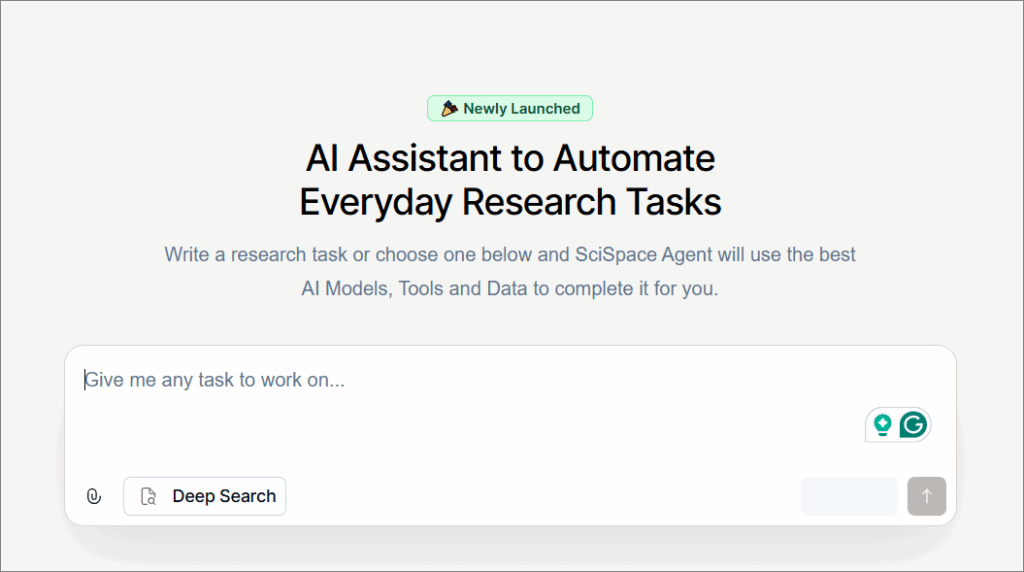
Scispace is an AI-powered research assistant designed specifically for academics. Unlike general-purpose chatbots, it integrates directly with research workflows: reading PDFs, running systematic literature reviews, generating citations, paraphrasing, and even analysing datasets. It acts as a one-stop AI agent for researchers who want to go from paper discovery to manuscript writing more efficiently.
Core features
- Chat with PDFs: Upload a research paper and ask questions directly in natural language. Scispace will highlight relevant sections and provide plain-language explanations.
- Systematic Literature Review Automation: Run PRISMA-ready reviews by searching across ArXiv, PubMed, and Google Scholar, with extracted data tables and summaries.
- AI Writing Tools: Includes a paraphraser, an AI writer, a topic finder, and a citation generator, all geared for academic writing.
- Data Handling: Extracts structured data from PDFs or tables and can generate charts or visualisations from the results.
- Research Output Creation: Can produce manuscripts, posters, PowerPoints, LaTeX docs, or interactive apps from your research data, reducing formatting and drafting time.
- Integrated Sources: Searches multiple research databases (PubMed, ArXiv, ClinicalTrials.gov, Google Patents, Grants.gov) in one place.
Best use cases
- Systematic Literature Review
Scenario: A public health researcher is preparing a systematic review on air pollution and asthma in children.
Prompt:
“Study A (2019): PM2.5 exposure in urban areas increased asthma risk by 31% in children under 12.
Study B (2020): Long-term NO2 exposure linked to reduced lung function in adolescents.
Study C (2022): Ozone levels showed mixed results; evidence was stronger in industrial regions.”
Run a systematic review on air pollution and asthma in children.
Extract study year, pollutant type, population, findings, and limitations in a structured table.
Output:

- Citation & Reference Management
Scenario: A graduate student writing a thesis on climate migration uploads a research article PDF into Scispace to auto-generate a citation.

This use case shows how Scispace’s Citation Generator saves researchers valuable time by automatically formatting accurate citations from uploaded papers or DOIs. Instead of manually writing references, users get instant APA or other styles, along with in-text citations, making academic writing faster, consistent, and more reliable across projects.
- Extract Data from Research Reports
Scenario: A global health researcher is analysing the WHO’s Joint External Evaluation of the International Health Regulations (2005) core capacities of Gambia. Instead of manually copying numbers and tables from the 70+ page report, they want to automatically extract structured data (scores, indicators, and priority actions) into a clean, analyzable format.
The extraction in SciSpace gives a concise TLDR highlighting Gambia’s health regulation challenges, strengths, and needs for coordination. It successfully captures key points like legal gaps, lab capacity, and immunisation. However, the output is broad and misses deeper numerical insights that researchers might need for comparative or data-driven analysis.
- Find Research Topics
Scenario: A PhD student in public policy is preparing their dissertation proposal and needs to identify emerging research gaps in climate policy and renewable energy. Instead of browsing hundreds of papers manually, they want a tool to surface themes, trends, and underexplored areas.
The “Find Topics” feature is useful for quickly identifying emerging themes and research gaps. It organises broad queries into focused sub-topics, helping researchers refine questions and uncover interdisciplinary angles. While insightful, its suggestions may need validation against full-text papers for depth and accuracy before academic use.
Additional use cases:
- Plagiarism & Paraphrasing Aid: Provides rewording of technical sections to avoid plagiarism while maintaining academic accuracy.
- Manuscript Formatting: Converts raw drafts into LaTeX, APA/MLA formatted documents, or even PowerPoint posters in minutes.
- Dataset Annotation: Beyond extraction, it can label and annotate tables or charts from PDFs, making them ready for statistical analysis.
Accessibility and Setup:
- SciSpace is a web-based platform accessible at https://typeset.io (formerly Typeset).
- Researchers only need to sign up with an email; no coding, libraries, or hardware setup required.
- Works entirely in the browser with options to upload PDFs, extract data, run reviews, generate citations, and explore topics.
- Chrome extension and mobile app available for added convenience.
Pricing and plans
SciSpace offers a free Basic plan, Premium at ₹700/month (billed annually), Advanced at ₹3500/month, Teams from ₹600/user/month, and custom Enterprise plans for institutions.
3. Consensus – Evidence-based answers from research papers

Consensus is an AI-powered search engine designed specifically for scientific literature. It searches over 200 million academic papers (from Semantic Scholar, OpenAlex, PubMed, and its own crawls) and generates evidence-backed summaries with direct citations. Unlike chatbots, it does not hallucinate sources; every claim is tied to a real paper.
Core features
- Evidence-Based Answers: Consensus retrieves only peer-reviewed studies, so every result is grounded in real science instead of speculation.
- Consensus Statements: It synthesises findings from multiple papers into a single, plain-English takeaway (e.g., “Yes, creatine improves cognition in healthy adults”), saving hours of manual reading.
- Linked Citations
Each summary comes with direct references so researchers can trace claims back to the original papers instantly. - Advanced Filtering: Users can refine results by study type (RCTs, meta-analyses), publication year, sample size, or journal ranking, ensuring precision and credibility.
- AI-Powered Summaries: Complex findings are rewritten into accessible, jargon-free language, making it easier for students, non-specialists, and interdisciplinary researchers.
- Cross-Disciplinary Coverage: Consensus spans medicine, psychology, nutrition, economics, AI/ML, and environmental science, making it a versatile research assistant across domains.
Best use cases
- Quick Evidence Review for Research Questions
Scenario: A public health researcher wants to know: “Does long-term air pollution exposure increase asthma risk in children?”
The Consensus response is impressive. It clearly shows 94% agreement across 16 studies that air pollution significantly raises childhood asthma risk, especially with early-life PM2.5 and NO₂ exposure. The inclusion of hazard ratios, sensitive periods, and mechanisms adds depth, while linked studies make the evidence transparent and easy to verify.
- Validating Research Proposals
Scenario: A PhD student is preparing a dissertation proposal on AI in healthcare diagnostics. Before committing, they want to see whether the idea is still fresh or if it has already been heavily researched.
The Consensus response shows that AI improves diagnostic accuracy, particularly in image-heavy fields like pathology and radiology, but it isn’t consistently better than expert doctors. The meter reflects balanced evidence (44% Yes, 44% Possibly). It highlights AI’s value as an assistive tool, while stressing study bias and real-world limitations.
- Comparative Evidence Synthesis
Scenario: A clinical psychology researcher is preparing a review on therapies for depression. They want to quickly compare the effectiveness of Cognitive Behavioural Therapy (CBT) versus Psychoanalysis without manually digging through hundreds of papers.
It shows that CBT and psychoanalysis are equally effective in reducing depression symptoms, supported by multiple trials and meta-analyses. Psychoanalysis may provide deeper long-term personality change, while CBT is shorter, structured, and widely accessible. This balanced evidence helps clinicians match therapy choice to patient goals and preferences.
Additional use cases:
- Policy Impact Evidence: Quickly finds peer-reviewed evidence on policy effectiveness (e.g., “Does sugar tax reduce obesity?”), useful for policymakers.
- Longitudinal Evidence Tracking: Researchers can compare findings over decades to see how scientific consensus evolves on a topic.
- Meta-Analysis Scoping: Before running a meta-analysis, Consensus can identify all relevant trials and indicate where evidence is strong vs. weak.
Accessibility and Setup:
- Consensus is accessible via https://consensus.app as a web platform, no coding or local setup required.
- For developers and advanced users, it also offers an API:
curl –request GET \
–url https://api.consensus.app/v1/quick_search \
–header ‘accept: application/json’ \
–header ‘x-api-key: YOUR_API_KEY’
- Researchers can filter searches by publication year, study type (e.g., RCTs), sample size, or journal quality, making it more precise than generic AI tools.
Pricing and plans
Consensus offers a free plan with limited searches, while the Premium plan starts at $6.99/month with unlimited searches and up to 100 Deep Searches.
4. Perplexity AI – Best for Research-Oriented Q&A with Citations

Perplexity AI is an AI-powered search assistant that blends web search with large language models. Unlike traditional search engines, it provides direct answers with citations, making it reliable for academic exploration. Researchers can use it to summarise content, explore topics in depth, check facts, or analyse documents.
Core features
- Cited Answers for Every Query: Unlike most AI tools, Perplexity always shows linked references so that researchers can fact-check and trust the information.
- Two Search Modes (Quick vs. Pro): Quick Search gives fast summaries, while Pro Search asks clarifying questions and refines results for deeper, more tailored insights.
- Ask Questions About Your Files: Researchers can upload PDFs, notes, or datasets and query them directly, turning static documents into interactive knowledge.
- Spaces & Threads for Organisation: Save your searches into projects, collaborate with peers, and manage privacy settings to keep work private or shareable.
- Cross-Domain Versatility: Whether it’s academic literature, policy documents, or breaking news, Perplexity adapts its results to give both breadth and depth of sources.
Best use cases
- Exploratory Topic Research
Scenario: A graduate student in environmental science is starting a thesis on climate migration, but isn’t sure where to begin.
Prompt:
“What are the main factors driving climate-induced migration in Africa?”
Output:
Perplexity delivers a comprehensive overview of climate-driven migration in Africa. It explains how drought, floods, crop failures, and livelihood loss combine with poverty and conflict to intensify displacement. The response is balanced, connecting environmental hazards with socio-economic pressures, giving researchers a nuanced understanding of the issue.
- Fact-Checking & Evidence Gathering
Scenario: A public health researcher wants to verify a common claim about the impact of air pollution on children’s health. Instead of searching multiple databases manually, they use Perplexity to check evidence directly with citations.
Prompt:
“Does long-term exposure to PM2.5 increase asthma risk in children?”
Output:
It is thorough and evidence-driven. It explains not just the association between PM2.5 and childhood asthma but also critical exposure windows, biological mechanisms, and dose–response patterns. The inclusion of cohort studies, meta-analyses, and WHO data makes it a strong resource for researchers seeking verified insights.
Additional use cases:
- Multi-Source News Validation: Verifies scientific claims across peer-reviewed studies, policy documents, and real-time news for well-rounded evidence.
- Explaining Methodologies: Summarises study designs (e.g., RCT vs. cohort study) so researchers can quickly assess reliability.
- Collaborative Knowledge Spaces: Teams can share curated threads and citations, creating a mini knowledge hub for ongoing projects.
Accessibility and Setup:
- Platform Access: Researchers can use Perplexity directly via its web platform, no installation or coding required.
- Mobile Access: Official apps are available on iOS and Android for on-the-go research.
- Browser Integration: Perplexity can also be added as a Chrome/Edge extension for quick in-browser queries.
- API Access: Developers and advanced researchers can use the Perplexity API for custom workflows or data integration.
- Setup Requirements:
- Web and mobile apps run entirely in the cloud, no special hardware needed.
- API usage requires a standard Python environment.
Quick Install for API (Python):
pip install perplexityai
Pricing and plans
Perplexity offers a Pro plan at $20/month ($16.67 annually) with expanded features, and a Max plan at $200/month with full access to advanced models, labs, and priority support.
5. Connected Papers – Best for Visual Literature Mapping
Connected Papers is an AI-powered visual tool for exploring academic literature. Instead of showing a long list of search results, it generates an interactive graph of related papers based on citations and semantic similarity. Researchers can use it to get an overview of a new field, track emerging works, or build a complete bibliography.
Core features
- Visual Graph of Research Fields: Generates a network graph where each node is a paper and edges represent conceptual or citation-based connections.
- Prior Works View: Highlights earlier influential or “ancestor” papers, giving researchers the foundational context of a field.
- Derivative Works View: Surfaces newer or state-of-the-art works, including reviews and recent breakthroughs.
- Bibliography Builder: Helps students and researchers expand their reference list by suggesting missing but highly relevant papers.
- Cross-Disciplinary Coverage: Built on the Semantic Scholar database with hundreds of millions of papers across all fields, from AI to biology to philosophy.
Best use cases
- Get a Visual Overview of a Field
Scenario: A PhD student in computer science wants to explore the evolution of transformer models in NLP.
This Connected Papers output gives researchers a structured visual overview of the field. By mapping “Attention Is All You Need” against related works, it highlights influential predecessors and newer derivatives. The interactive graph makes it easy to see clusters, track research evolution, and identify missing or underexplored areas.
- Identify Essential and Recent Works
Scenario: A researcher in machine learning for chemistry wants to ensure they capture the most relevant and influential recent studies while preparing a literature review on Graph Neural Networks (GNNs).
Prompt:
“Graph Neural Networks for Molecular Property Prediction”
Output:
This response is highly valuable for researchers checking coverage in a fast-moving field. By centring a GNN paper for molecular property prediction, it maps influential predecessors and emerging works. The clear list of prior and derivative studies ensures researchers can verify they have included essential and recent publications in their review.
Additional use cases:
- Trend Spotting in Niche Fields: Identifies clusters of research that are gaining momentum, helping researchers spot upcoming trends early.
- Gap Detection: By looking at “empty spots” in a graph, researchers can see underexplored connections, useful for framing novel research questions.
- Teaching & Mentoring Tool: Professors can use it to visually introduce students to a field’s foundational and emerging works.
Accessibility and Setup:
- Platform Access: Researchers can use Connected Papers directly via its web platform, no installation or coding required.
- Input Options: Papers can be searched by title, DOI, arXiv ID, or keywords, and the system automatically generates an interactive graph.
- Browser Integration: Connected Papers runs entirely in the browser; no desktop or mobile app is currently required.
Setup Requirements:
- Fully cloud-based, works on any modern browser, no special hardware needed.
- No coding or installation of external libraries required.
Quick Start (Web):
- Visit connectedpapers.com
- Paste a paper title or DOI
- Click Build a Graph to generate related works
Pricing and plans:
Connected Papers offers a Free plan with 5 graphs/month, an Academic plan at $3/month (billed annually) with unlimited graphs for personal and nonprofit use, and a Business plan at $10/month (billed annually) with unlimited graphs for industry use.
Final words
AI is quickly becoming a real helper for researchers, not just a fancy tool. The five models we explored each have their own strengths.
ChatGPT-5 works well for all kinds of tasks, Scispace makes reading and citing papers easier, Consensus gives clear answers backed by real studies, Perplexity AI helps you ask big questions with sources, and Connected Papers shows how ideas are linked.
These tools don’t replace deep thinking, but they take away the heavy lifting, save time, and make research more enjoyable. They help researchers focus on what matters most, new insights and discoveries, when used wisely.
FAQs
What are AI tools for researchers?
AI tools for researchers are software powered by artificial intelligence that help with tasks like summarising studies, analysing data, generating citations, and mapping research papers. They save time and make research easier.
Why should researchers use AI in 2026?
AI helps researchers work faster by handling repetitive tasks, checking large volumes of information, and giving evidence-backed insights. This means more time can be spent on analysis and critical thinking.
Are AI research tools accurate?
Most trusted AI tools, like Consensus or Scispace, use peer-reviewed sources. Still, researchers should always cross-check results and not rely 100% on AI outputs.
Do AI tools for research cost money?
Many AI tools offer free versions with limited features. Paid plans are usually affordable, starting from around $3–$20 per month, depending on the platform.
Who can benefit from AI research tools?
Students, PhD scholars, professors, policymakers, and professionals across fields can all use AI to simplify research, explore topics faster, and get reliable insights.

![Singapore AI Companies Leading Southeast Asia. Top 10 Singapore AI Companies Leading Southeast Asia [2026], by Second Talent.](https://www.secondtalent.com/wp-content/uploads/2026/09/singapore-ai-companies-featured-v2-768x403.jpg)
![AI Recruiting Tools. Top 7 AI Recruiting Tools in 2026 [Tried & Tested], by Second Talent.](https://www.secondtalent.com/wp-content/uploads/2026/09/top-ai-recruiting-tools-featured-v2-768x403.jpg)