Top 30 Playwright Interview Questions and Answers [2026]
October 14, 2026
14 min read
TL;DR: Playwright interviews in 2026 test auto-waiting, role-based locators, fixtures, authentication with a setup project, and how a candidate debugs a flaky test from a trace. Candidates should know Playwright 1.63 (September 4, 2026), and that component testing moved to a stories model in 1.62.
Playwright 1.63 added test locks. Tests that share a lock name never run at the same time, even across files, workers and projects. The rest of the suite stays parallel.
It gives interviewers a new answer to probe on an old question: how do you share one test account without making the suite serial?
Key takeaways
1Playwright 1.63 bundles Chromium 153, Firefox 155 and WebKit 26.6, and since 1.57 its Chromium downloads are Chrome for Testing builds.
2The default test timeout is 30 seconds and the default assertion timeout is 5 seconds; failing tests are not retried unless you set retries.
3Page#accessibility was removed in 1.57; the docs point to @axe-core/playwright for automated accessibility checks.
4The @playwright/experimental-ct-react and -ct-vue packages stopped receiving updates in 1.63; the Svelte package was removed in 1.59.
Core Concepts
1. What is Playwright, and what does it run tests against?
Playwright is Microsoft's open-source browser automation library and test runner. One API drives Chromium, Firefox and WebKit. It runs headless or headed on Windows, Linux and macOS.
The library exists for JavaScript and TypeScript, Python, Java and .NET. The full test runner is the Node.js package @playwright/test, with fixtures, projects, sharding, the HTML report and traces.
Each Playwright release pins specific browser builds, installed with npx playwright install.
Version 1.63 ships Chromium 153, Firefox 155 and WebKit 26.6, and was also tested against stable Chrome 153 and Edge 153, which you can target with the channel option.
A strong candidate knows that WebKit on Linux is not Safari on a Mac, and treats a WebKit pass as a strong signal rather than proof. See the 1.63 release notes.
2. How does auto-waiting work?
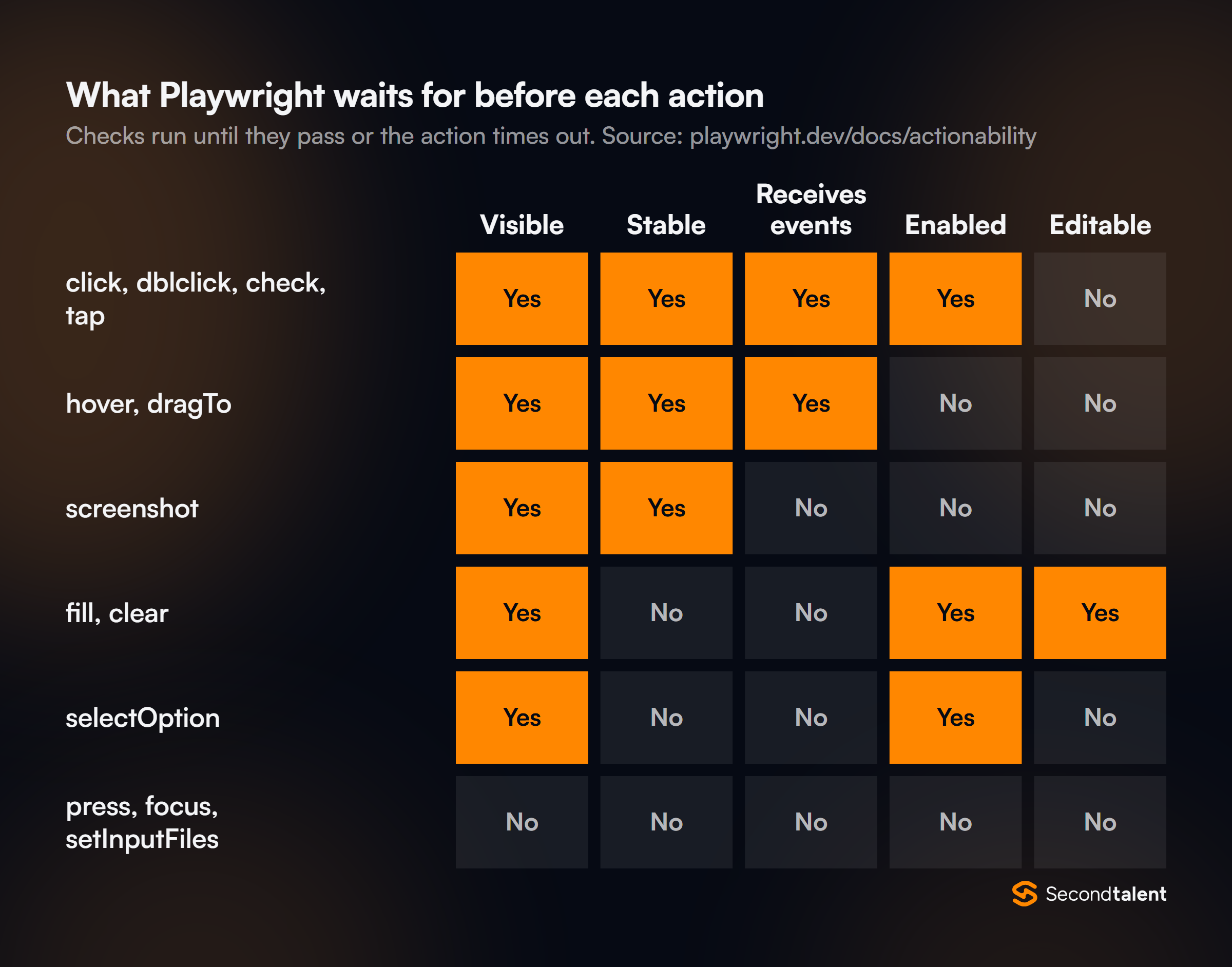
Before an action, Playwright runs a set of actionability checks and waits until all of them pass or the action times out. For click(), the locator must resolve to one element.
That element must be visible, stable (same bounding box for two animation frames), enabled, and able to receive events (no overlay would catch the click).
The checks differ by action: fill() waits for visible, enabled and editable but not for stability, and press(), focus() and setInputFiles() run no checks at all. force: true skips the non-essential checks, which is a code-review flag, not a fix.
3. What is a web-first assertion, and why does it matter?
A web-first assertion such as await expect(locator).toBeVisible() retries until the condition holds or the expect timeout ends.
A manual check such as expect(await locator.isVisible()).toBe(true) reads the state once and fails if the page is a few milliseconds behind.
// Flaky: one snapshot of the DOM
expect(await page.getByText('Saved').isVisible()).toBe(true);

// Retries until visible or 5 seconds pass
await expect(page.getByText('Saved')).toBeVisible();
A candidate who writes the first form in a live exercise usually also reaches for waitForTimeout() when it fails. That habit is the most common source of slow, flaky suites.
4. Which timeouts exist, and what are the defaults?
The test timeout is 30 seconds and covers the test body, fixture setup and beforeEach hooks. Fixture teardown and afterEach get a separate timeout of the same length. The expect timeout is 5 seconds per assertion.
Actions and navigations have no timeout of their own by default, so they are bounded by the test timeout unless you set actionTimeout or navigationTimeout.
test.slow() triples the test timeout, and test.setTimeout() sets it for one test. See Timeouts.
5. What is a browser context, and how does it isolate tests?
A browser context is an incognito-like profile inside one browser process, with its own cookies, local storage, session storage and cache.
Playwright Test creates a new context for every test and hands the test a fresh page inside it, so no state leaks between tests even when they share a browser.
Contexts are cheap, which is why Playwright starts clean instead of cleaning up after each test. They also let one test open two contexts to act as two users, for example a buyer and a seller in the same chat. See Isolation.
6. How does Playwright compare with Cypress and Selenium?
The honest answer is about architecture and team fit. Playwright runs outside the browser and drives it over a protocol. One test can open several tabs, contexts and origins. Cypress runs its test code inside the browser.
Its own trade-offs page lists multiple browsers open at once as a permanent limitation and points to a plugin for multi-tab work.
Cypress
Test code runs inside the browser
Chrome-family and Firefox, WebKit experimental
One browser open at a time; multi-tab work needs a plugin
Playwright
Test code runs in Node.js, outside the browser
Chromium, Firefox and WebKit as first-class targets
Several tabs, contexts and origins in one test
The old claim that Cypress only supports Chromium is wrong: its cross-browser guide covers Chrome-family browsers and Firefox, with WebKit experimental. Selenium drives browsers through W3C WebDriver and the newer WebDriver BiDi.
It fits teams that write Java, C#, Python or Ruby tests against a Selenium Grid. A good candidate picks based on the team's language and existing grid, not on benchmark claims.
Locators
7. Which locators do you reach for first?
getByRole first, then getByLabel, getByPlaceholder and getByText, and getByTestId when there is no user-facing hook.
The best practices guide recommends user-facing attributes because they survive refactors that change class names and DOM structure.
A role locator also tests accessibility. If getByRole('button', { name: 'Place order' }) cannot find the element, a screen reader user may not find it either. CSS and XPath chains tied to layout are the answer to probe.
8. What does "locators are strict" mean?
Any action or assertion that needs a single element throws a strict mode violation when the locator matches more than one. Playwright does not pick the first match for you.
// Two "Save" buttons on the page: throws "strict mode violation"
await page.getByRole('button', { name: 'Save' }).click();

// Scope it instead of using .first()
await page.getByRole('dialog').getByRole('button', { name: 'Save' }).click();
first(), last() and nth() opt out of strictness. The docs advise against them: when the page changes, the test clicks something else and still passes. A strong candidate narrows the locator instead.
9. How do you target one row in a list, or only visible elements?
Chain and filter. locator.filter({ hasText }) and filter({ has }) narrow a set by text or by a child locator. Every getBy* method also works on a locator, so queries nest.
locator.visible() is new in 1.63 and is the recommended replacement for :visible in CSS selectors. To count or assert over a list, use toHaveCount() or toHaveText([...]), which retry, instead of looping over all().
10. How do locators handle iframes and shadow DOM?
Shadow DOM needs nothing special: all locators pierce open shadow roots by default. The exceptions are XPath, which does not pierce them, and closed-mode shadow roots, which are not supported.
Iframes need frameLocator(), for example page.frameLocator('#payment').getByLabel('Card number'). In 1.63, page.frameLocator() called with no selector searches every frame in the page.
It throws if the rest of the locator matches in more than one frame. See Locators.
Test Design
11. What is a fixture, and why use one instead of beforeEach?
A fixture is a named value a test asks for in its arguments, such as page, context or request. Custom fixtures come from test.extend(): the code before await use(value) is setup, the code after it is teardown.
Fixtures beat hooks for four reasons. They are on demand: a test that does not ask for todoPage never builds it. They compose, they are typed, and they keep setup and teardown together.
Hooks share state through outer let variables, which breaks down once files grow. See Fixtures.
12. When do you use a worker-scoped or an automatic fixture?
A worker-scoped fixture, declared with { scope: 'worker' }, is set up once per worker process and shared by every test that worker runs.
Use it for expensive things that tests can share without interfering: a test account per worker, a seeded database schema, a started server. It gets its own timeout, equal to the test timeout by default.
An automatic fixture, declared with { auto: true }, runs for every test even when no test names it. The docs' example attaches server logs to the report only when a test fails, by checking testInfo.status after use().
13. How do you avoid logging in through the UI in every test?
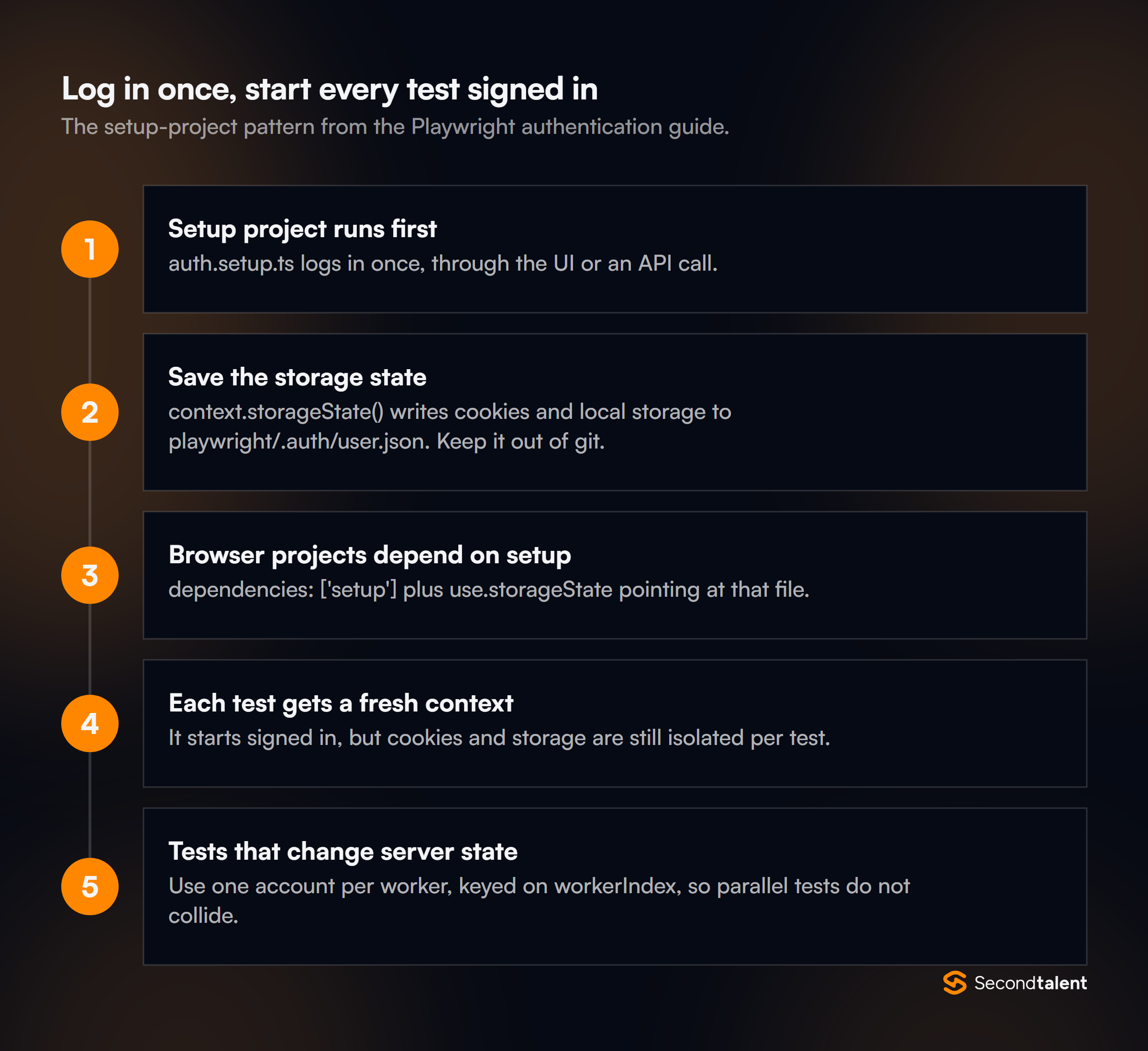
Log in once in a setup project, save the browser state to a file, and point the test projects at it. Each test still gets its own fresh context, but that context starts with the saved cookies and local storage.
The state file holds live session cookies, so it goes in .gitignore. When tests change server-side state, the authentication guide recommends one account per worker instead of one shared account, keyed on workerIndex.
UI mode skips setup. The authentication guide notes that UI mode does not run the setup project by default, so a stale state file shows up there first. Rerun auth.setup.ts by hand when the session expires.
14. What are projects and project dependencies?
A project is a named group of tests with its own settings: a browser and device, a base URL, a storage state, a test directory.
The same tests run once per project, which is how one suite covers Chromium, Firefox, WebKit and a mobile viewport.
dependencies makes one project run before another, and is now the recommended form of global setup: unlike a globalSetup file, a setup project shows up in the HTML report, records traces and can use fixtures. --no-deps skips dependencies when you rerun one project locally.
15. How do you structure page objects in Playwright?
A page object is a class that takes a Page, holds locators as fields and exposes user-level methods such as addToCart(name).
Tests call those methods and keep the assertions themselves, so a failure still points at the expectation that broke.
The Playwright-specific part is to deliver page objects through fixtures (see question 11) rather than constructing them in every test.
Probe for over-abstraction: a page object that wraps every single click in a method, or hides assertions, makes the test harder to read than the raw locators.
16. How do you mock a backend call?
page.route() intercepts matching requests. The handler can fulfill() with a fake response, continue() with changed headers, abort() the request, or fetch() the real response and modify it.
Register routes before navigation, or the first request slips through. context.route() applies the mock to every page in the context, including popups.
A strong candidate also keeps a few unmocked end-to-end tests, because a suite that mocks every call cannot catch a broken API contract. See Mock APIs.
17. When would you replay traffic from a HAR file?
When a page makes many API calls and hand-writing each mock is not practical.
Record once with page.routeFromHAR(file, { update: true }), edit the recorded JSON if needed, then run with update: false so Playwright serves matching responses from the file.
The trade-off is staleness: a HAR recorded months ago keeps passing after the real API changes. Teams that use HAR replay re-record on a schedule. Since 1.60, tracing.startHar() also records a HAR as part of tracing.
18. How do you test an API with Playwright?
Use the built-in request fixture, an APIRequestContext that respects baseURL and extraHTTPHeaders from the config. It sends HTTP requests from Node.js with no browser involved.
The better use is inside UI tests: create data through the API in a fixture, then test only the screen that matters. That turns a 40-second test that clicks through three forms into one that loads a single page. See API testing.
19. How do you test code that depends on the current time?
With the Clock API, page.clock, added in 1.45. setFixedTime() makes Date.now() and new Date() return a fixed value; install() fakes timers as well, so a test can fastForward(), runFor() or pauseAt().
await page.clock.install();
await page.goto('/dashboard');
await page.clock.fastForward('05:00');
await expect(page.getByText('You were signed out')).toBeVisible();
This is how you test a five-minute inactivity logout in under a second. The Clock docs recommend setFixedTime first and install only when timers must advance.
CI and Flaky Tests
20. How does Playwright run tests in parallel?
It starts several worker processes, each with its own browser.
By default, test files run in parallel and tests inside one file run in order in the same worker. fullyParallel: true runs individual tests in parallel too, and workers caps the process count.
Workers cannot talk to each other, and a worker is shut down after any test failure so the next test starts clean. test.describe.configure({ mode: 'serial' }) exists for dependent tests, and the parallelism docs state that serial mode is not recommended.
21. How do you split a suite across CI machines?
Shard it with --shard=1/4 through --shard=4/4 on four jobs. With fullyParallel: true, tests are balanced one by one across shards; without it, whole files are assigned, so uneven file sizes leave some shards idle.
// playwright.config.ts
reporter: process.env.CI ? 'blob' : 'html',

# after all shards finish
npx playwright merge-reports --reporter html ./all-blob-reports
Each shard writes a blob report, and a final job merges them into one HTML report. A candidate who has run sharding in CI mentions the merge step; one who has only read about it usually does not. See Sharding.
22. How do retries work, and how should a team treat flaky tests?
Retries are off by default. With retries: 2, a failed test reruns in a fresh worker, and the report marks it "flaky" if it passes on a retry.
Since 1.52, failOnFlakyTests fails the whole run when any test is flaky, and 1.62 added retryStrategy: 'isolated', which runs all retries at the end, one by one in a single worker.
Retries are a detector, not a cure. A good answer: keep one or two retries in CI, record a trace on the first retry, and track flaky tests as bugs with an owner.
Isolated retries also help separate a test that is flaky on its own from one that only fails under parallel load. See Retries.
23. A test fails only in CI. How do you debug it?
Open the trace.
With trace: 'on-first-retry' (or 'retain-on-failure' when retries are off), a failed test produces a trace.zip with a DOM snapshot before and after every action, the network log, console output and the source line of each step. npx playwright show-trace trace.zip or trace.playwright.dev opens it without rerunning anything.
The usual findings: a response that arrived later on the slower CI machine, an animation that was still running, test data another worker changed, or a viewport and font difference. trace: 'on' for every test is not recommended by the trace viewer docs because it is heavy.
Locally, --ui and --debug cover the same ground interactively.
24. How do visual comparisons work, and why do they break across machines?
await expect(page).toHaveScreenshot() compares against a golden image, writing it on the first run.
The snapshot name includes the browser and platform, for example example-test-1-chromium-darwin.png, because fonts and rendering differ by OS. A baseline made on a Mac will not match a Linux CI runner.
The fix is to generate and compare baselines in the same environment, usually the CI image or its Docker equivalent, and update them with --update-snapshots. maxDiffPixels and threshold absorb antialiasing noise, and mask hides dynamic regions.
Since 1.62, naming a snapshot .webp stores it as lossless WebP, which shrinks the repository. See Visual comparisons.
25. What is an aria snapshot, and where does accessibility testing fit?
An aria snapshot is a YAML description of the accessibility tree: roles, names and states. toMatchAriaSnapshot(), added in 1.49, asserts the structure a screen reader sees, which is sturdier than asserting on markup.
1.63: test locks, locator.visible(), cross-frame locators
26. How does component testing work now?
Since 1.62, a component test mounts a story rather than JSX written inline. A story is a small wrapper that renders the component in one scenario, with its props, mock data and providers.
A gallery page, served by your own dev server, renders stories on request. The built-in mount fixture navigates there and returns a locator scoped to the story.
test('click should expand', async ({ mount }) => {
  const component = await mount('components/Expandable/Stateful');
  await component.getByRole('button').click();
  await expect(component.getByTestId('expanded')).toHaveValue('true');
});
The old @playwright/experimental-ct-react, -ct-react17 and -ct-vue packages, which the previous version of this guide told you to install, stopped receiving updates in 1.63. The component testing docs include a migration guide.
The design point to hear: Playwright no longer bundles components itself, so your own aliases, plugins and CSS apply.
27. What did Playwright remove in 2025 and 2026 that older suites still use?
Four removals break old code on upgrade:
page.accessibility (removed in 1.57 after three years deprecated): use @axe-core/playwright or aria snapshots.
_react and _vue selector engines and the :light suffix (1.58): use role and test-id locators.
The devtools launch option (1.58): pass args: ['--auto-open-devtools-for-tabs'].
videosPath and videoSize context options (1.60): use recordVideo.
Also from 1.57, Playwright downloads Chrome for Testing builds instead of plain Chromium, extended to Linux arm64 in 1.63.
The release notes expect no functional change, but a candidate who has upgraded a large suite will say to watch screenshot baselines after browser bumps.
28. What are Playwright Test Agents?
Playwright 1.56 added three agent definitions for coding assistants. The planner explores the app and writes a Markdown test plan. The generator turns the plan into Playwright tests.
The healer runs the suite and repairs failing tests. npx playwright init-agents --loop=claude (or vscode, opencode) writes the definitions, and the agents docs say to regenerate them after each Playwright upgrade.
The question to ask back: how do you review what the healer changed? A healer that fixes a test by loosening an assertion hides a real bug.
Strong candidates treat agent output like any other pull request, and check that a "healed" test still fails when the feature is broken.
29. How do you keep tests that share one resource from colliding, without making the suite serial?
Use a test lock, new in 1.63. Tests that declare the same lock name never run at the same time, even across files, workers and projects. Every other test keeps running in parallel.
test('update user settings', { lock: 'user-settings' }, async ({ page }) => {
  // never overlaps another test holding 'user-settings'
});
Before locks, the options were serial mode, a single worker, or one account per worker. Locks are the narrow tool when the shared thing is global, such as a feature flag or a third-party sandbox.
The docs add a catch: in the default and serial modes, a lock on one test is held for that whole file.
30. What do await using and AbortSignal change in Playwright code?
Since 1.59, many Playwright APIs return async disposables. await using removes a route, init script or page when the block ends, even if an assertion throws.
Since 1.62, most actions, waits and web-first assertions accept a signal option to cancel them.
{
  await using route = await page.route('**/api/**', r => r.abort());
  await page.goto('/offline');
  await expect(page.getByText('You are offline')).toBeVisible();
}
// the route is gone here
Passing a signal does not disable the default timeout; the 1.62 notes say to pass timeout: 0 for that.
A candidate who knows both is reading release notes, which matters for a tool that shipped eight minor versions between October 2025 and September 2026.
Signs of a Strong Answer
They name the actionability checks for the action in question and never use waitForTimeout() as a fix.
They scope a locator to make it unique instead of adding .first() to silence a strict mode violation.
They create test data through the request fixture and reserve UI steps for the screen under test.
They explain why a screenshot baseline from a laptop fails on a Linux runner, and where they generate baselines.
They open a trace first when a test fails only in CI, and can say which panel answered the question last time.
They know the component testing and removed-API changes from 1.57 to 1.63 and have a migration plan for an old suite.
Hiring Playwright Engineers
Playwright work usually sits with QA automation engineers and front-end developers who own their tests. Second Talent matches companies with pre-vetted QA automation engineers and front-end developers, screened with questions like these.