Top 30 Firebase Interview Questions and Answers [2026]
October 13, 2026
12 min read
TL;DR: Firebase interviews in 2026 test Firestore data modeling and billing, security rules, Cloud Functions (2nd gen) and Auth tokens. Candidates should know that Firestore now has an Enterprise edition with MongoDB compatibility and GA pipeline queries, and that Data Connect was renamed Firebase SQL Connect on April 22, 2026.
Firebase is retiring products at a pace interviewers now ask about: Dynamic Links shut down on August 25, 2025, Firebase Studio closes on March 22, 2027, and Firebase Extensions, deprecated in July 2026, sunsets on March 31, 2027.
A candidate whose architecture depends on any of them has a migration to plan. The core that interviews still turn on, Firestore, security rules, Auth and Cloud Functions, is unaffected.
2firebase-functions 7.0 removed functions.config(); configuration now goes through params and Secret Manager.
3A Firestore query with an offset is billed one read per skipped document, so offset pagination gets more expensive with every page.
42nd gen Cloud Functions handle up to 1,000 concurrent requests per instance; 1st gen handles one.
Firestore Modeling
1. Which Firebase database would you choose for a new app?
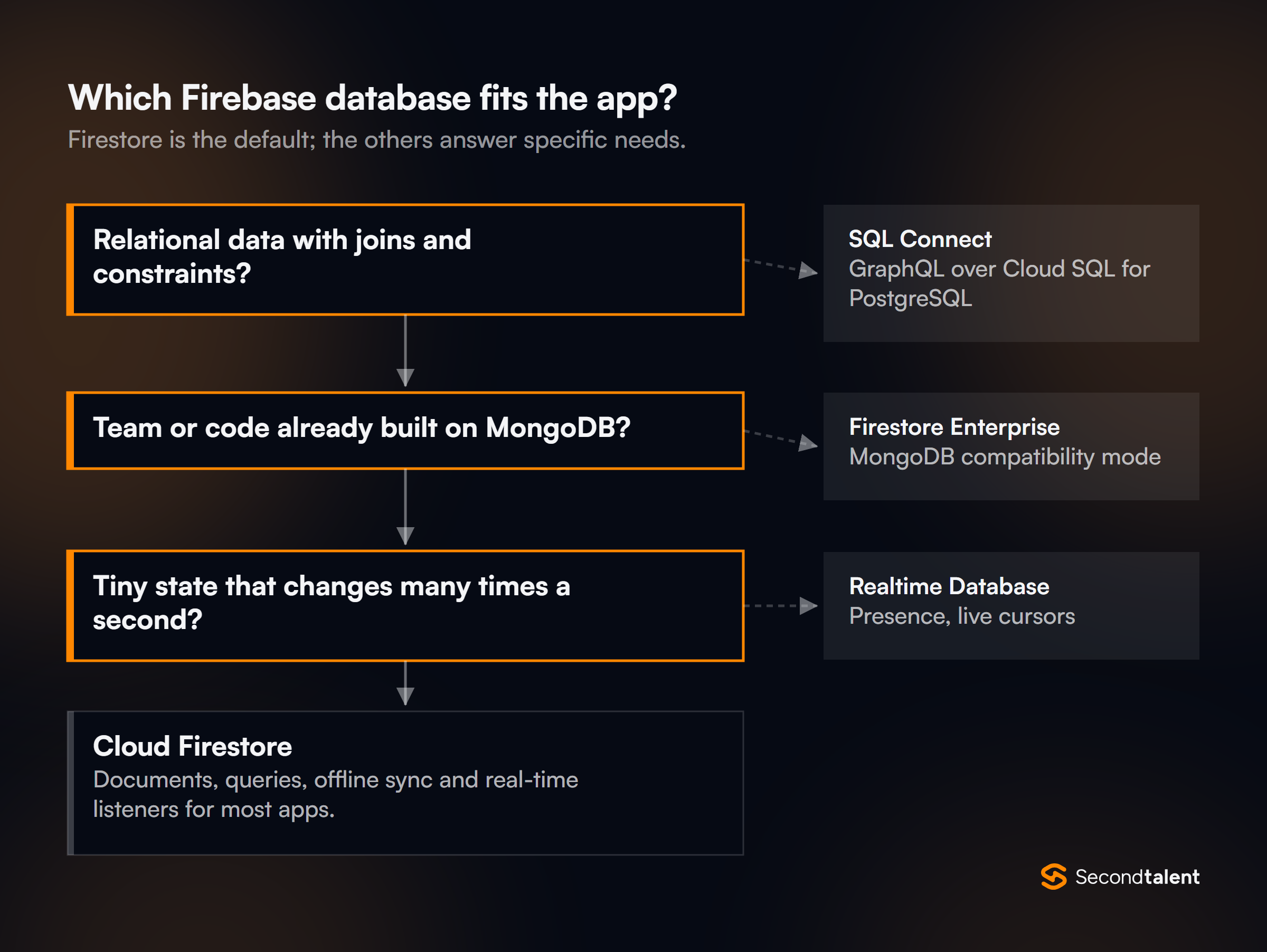
Cloud Firestore for most apps: documents and collections, rich queries, offline support and real-time listeners.
Realtime Database only for small, very frequently changing shared state, such as presence or a live cursor, where its single JSON tree, low latency and billing by storage and downloaded data (not per document read) suit it.
Firebase SQL Connect when the data is relational and needs joins and constraints, because it runs on Cloud SQL for PostgreSQL.
Firestore itself now comes in two editions. Standard is the classic Firestore. Enterprise, added in August 2025, has a newer query engine, higher limits, pipeline queries and an optional MongoDB-compatible mode (question 26).
A team with existing MongoDB code or skills can use MongoDB drivers against it.
2. How does Firestore's data model work, and what are its limits?
Data lives in documents, which hold typed fields and are grouped in collections; a document can own subcollections, nested up to 100 levels deep.
A query reads from one collection (or, with a collection group query, every collection with the same ID) and never automatically includes subcollections.
The limits that shape designs, from the quotas page: a document can be at most 1 MiB, a request at most 10 MiB, and each document at most 40,000 index entries.
A user document that accumulates an ever-growing array of activity will hit the first limit, which is why lists that grow belong in a subcollection.
3. Why do Firestore apps denormalize, and how do you keep the copies in sync?
Firestore Standard has no server-side joins, so a screen that shows posts with author names either reads each author separately or stores the name on each post.
Most apps copy the few fields they display, because reads are billed per document and a feed that needs 20 extra reads per page costs 21 times as much.
Copies need an owner. The usual pattern is a Cloud Function triggered on the source document (onDocumentUpdated on users/{uid}) that updates every copy in batched writes.
The trade-offs to name: updates are eventually consistent, a popular user's rename fans out to thousands of writes, and fields that change often should not be copied at all.
4. When do you need a composite index, and what can indexes cost you?
Firestore indexes every field automatically for single-field queries. A composite index is needed when a query combines conditions on several fields, or a filter on one field with an orderBy on another.
The SDK error for a missing index includes a link that creates it, and teams keep indexes in firestore.indexes.json so they deploy with the code.
Indexes have limits too.
A field whose value increases steadily, such as a timestamp, caps writes to the collection at 500 per second while it is indexed, per the best practices; exempting it from indexing removes the cap if you never query on it.
Large maps and arrays you never query should also be exempted, to stay under the 40,000 index entries per document.
5. What can a Firestore query do, and what can it not?
A Standard query filters and sorts one collection or collection group. It supports in and array-contains-any with up to 30 values, or() filters, and range and inequality filters on multiple fields.
It returns whole documents or aggregations (count(), sum(), average()), and supports k-nearest-neighbor vector search with findNearest.
It cannot join collections, run full-text search or group results.
Apps pair Firestore with a search service for text, or, on the Enterprise edition, use pipeline operations, which add joins through subqueries, text and geospatial search and more stages (question 27).
6. How do you paginate a Firestore query?
With query cursors: order the query, keep the last document snapshot of a page, and ask for the next page with startAfter(lastDoc) and limit(). The cost of each page is the documents it returns.
const next = query(collection(db, "posts"),
  orderBy("createdAt", "desc"),
  startAfter(lastVisible),
  limit(20));
Firestore does support offset(), which older guides deny, but the pricing page charges one read for each skipped document: an offset of 10 that returns 1 document costs 11 reads. Page 50 of a 20-item list costs 1,000 reads.
7. What is the difference between a transaction and a batched write?
A batched write applies a set of writes atomically without reading anything first. A transaction reads documents, then writes based on what it read; if any document it read changes before the commit, the transaction retries.
Details a senior candidate knows: in the mobile and web SDKs, transactions fail when the client is offline, while batched writes are queued. All reads in a transaction must come before its writes.
A transaction has a 270-second time limit with a 60-second idle expiry.
Many older answers cite a limit of 500 writes per batch; the current quotas page lists no per-batch document count, only the 10 MiB request size and 500 field transformations per document.
8. How do you handle a counter that many users update at once?
Do not put a high-traffic counter in one document.
Firestore's own distributed counters guide notes that a single counter shard can be incremented about once per second, so a like count on a viral post becomes a contention hotspot and writes start failing.
The fix is a distributed counter: N shard documents, each write increments a random shard with increment(1), and reads sum the shards.
For counts that are read rarely, a count() aggregation query over the underlying documents avoids storing a counter at all; it bills one read per batch of up to 1,000 index entries scanned.
9. How are real-time listeners billed?
A listener is charged a read for every document in the initial result, then a read each time a document in the result is added or updated, and when a document leaves the result because it changed. Deleted documents are not charged.
The reconnection rule. With offline persistence enabled, a listener disconnected for more than 30 minutes is charged as if it were a brand-new query when it reconnects, per the Firestore pricing page.
Persistence is on by default on Android and Apple platforms and off by default on the web. A dashboard left open on a flaky mobile connection can therefore re-read its whole result set many times a day.
Security Rules
10. What does "rules are not filters" mean?
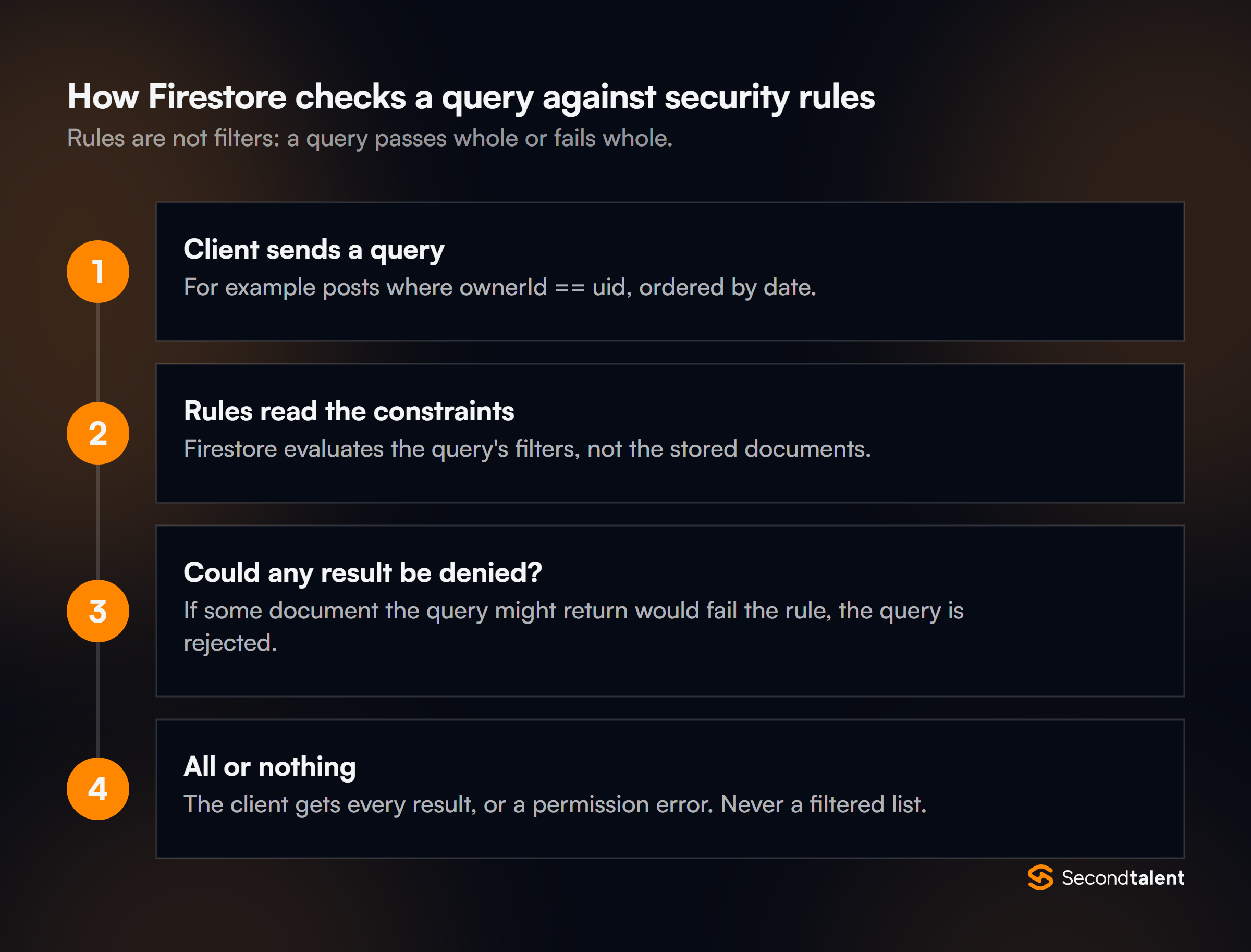
Security rules decide whether a whole query is allowed; they never remove documents from its results.
Firestore checks the query's constraints against the rules and rejects the query if any document it could return would be denied, even if no such document exists.
So a rule allow read: if resource.data.ownerId == request.auth.uid requires the client query to include where("ownerId", "==", uid). Without it, the query fails with a permission error, not an empty list. See Securely query data.
11. How do you let users read and write only their own data?
Key the data by user ID and compare the path to the authenticated user:
rules_version = '2';
service cloud.firestore {
  match /databases/{database}/documents {
    match /users/{userId}/{document=**} {
      allow read, write: if request.auth != null
                         && request.auth.uid == userId;
    }
  }
}
The recursive wildcard {document=**} extends the rule to the user's subcollections.
The request.auth != null check is explicit about signed-out users, and the rule should be paired with write validation (question 13) so a user cannot store arbitrary data in their own space.
12. How do you implement roles with custom claims?
Set claims such as { role: "admin" } on a user from trusted server code with the Admin SDK's setCustomUserClaims, and check request.auth.token.role in rules. Clients cannot set claims, which is what makes them safe.
Two limits matter. The claims payload must not exceed 1,000 bytes, so claims hold roles, not permission lists.
And claims reach the client only when its ID token refreshes, which happens up to an hour later unless the app forces a refresh with getIdToken(true).
For many roles per user, or roles per project, store memberships in documents and read them in rules instead. See custom claims.
13. How do you validate the data a client writes?
Check request.resource.data, the document as it would be after the write, in the rule. Restrict the fields, check types and bounds, and protect fields the client must not change:
allow update: if request.resource.data.keys()
                   .hasOnly(["title", "body", "updatedAt"])
              && request.resource.data.title is string
              && request.resource.data.title.size() <= 120
              && request.resource.data.updatedAt == request.time;
Rules are the only server-side validation for writes that come straight from clients, so anything the UI enforces must also be enforced here.
14. What do get() and exists() cost in rules?
Each call to get() or exists() that reads another document is billed as a document read, and a request can make at most 10 such calls for single-document requests and queries, or 20 for transactions, batched writes and multi-document reads.
Choose exists() when you only need to know a document is there; it is not cheaper, but it states the intent.
An older version of this guide claimed exists() was "more secure" than get(); rule evaluations do not leak data either way.
The real cost is at scale: a rule that calls get() on a membership document for every document a query returns adds billed reads to every list screen, which is why frequently checked roles often move into custom claims.
15. How do you test security rules?
Run them against the Firestore emulator with the @firebase/rules-unit-testing library, which creates authenticated and unauthenticated test contexts and asserts that operations succeed or fail:
const alice = testEnv.authenticatedContext("alice");
await assertSucceeds(getDoc(doc(alice.firestore(), "users/alice")));
await assertFails(getDoc(doc(alice.firestore(), "users/bob")));
Each rule should have tests for the allowed case and at least one denied case, run in CI on every change to firestore.rules. A rules change deployed without tests is the most common way Firebase apps leak data.
16. What does App Check protect, and what does it not?
App Check attests that a request comes from your genuine app on a genuine device, using Play Integrity, App Attest or reCAPTCHA Enterprise, and lets Firestore, Storage, Functions and other backends reject requests without a valid token.
It stops scripts that copy your public config and call your backends directly.
It is not authentication or authorization: a legitimate app with a malicious signed-in user still passes, so rules still decide what each user may do. The App Check docs say it prevents some but not all abuse.
Since July 2026, setting up Firebase AI Logic in the console enforces App Check automatically, because an unprotected Gemini endpoint is an open bill.
Authentication
17. How do Firebase Auth tokens work?
Sign-in returns an ID token, a JWT that lasts one hour, and a refresh token the SDK uses to get new ID tokens.
Clients send the ID token to your backend, which verifies it with the Admin SDK's verifyIdToken; rules receive it as request.auth.
Refresh tokens do not expire on a timer; they end when the user is deleted or disabled, changes their password or email, or when revokeRefreshTokens is called.
Revocation does not invalidate an ID token already issued, so sensitive endpoints call verifyIdToken(token, true) to check revocation, at the cost of an extra lookup. See Manage user sessions.
18. What are blocking functions?
Blocking functions run your code during sign-up or sign-in and can reject it or modify the user: beforeUserCreated can block disposable email domains or restrict sign-up to a company domain, and beforeUserSignedIn can deny banned users or add session claims.
The function must respond within 7 seconds or the client's sign-in fails, so it should not call slow external services. For work that can happen after sign-up, such as creating a profile document, a non-blocking trigger is the better fit.
19. What changed between 1st gen and 2nd gen Cloud Functions?
2nd gen functions run on Cloud Run and Eventarc, and since firebase-functions 6.0 they are the default when code does not name a version. The version comparison lists the differences:
1st gen
1 request per instance
Up to 9 minutes per request
Up to 8 GB RAM, 2 vCPU
2nd gen
Up to 1,000 requests per instance
Up to 60 minutes for HTTP, 9 for events
Up to 16 GiB RAM, 4 vCPU
Concurrency is the change with consequences: one instance now serves many requests at once, so global mutable state that was safe in 1st gen becomes a race condition.
20. Why must event-triggered functions be idempotent?
Cloud Functions delivers each event at least once, so a function can run twice for the same Firestore write or Pub/Sub message. Retries are off by default: a failed invocation drops the event.
With retries enabled, a failing function is retried with backoff for up to 24 hours on 2nd gen (7 days on 1st gen).
Make handlers idempotent by recording the event ID in a transaction with the side effect, or by making the write naturally repeatable (set a field to a value rather than increment it).
Enable retries only once the function is idempotent and exits cleanly on non-retryable errors, or a bad event will retry for a day. See Retry event-driven functions.
21. When do you use a callable function instead of an HTTPS function?
Use a callable function (onCall) when your own app calls the function through a Firebase SDK.
The SDK sends the user's ID token and the App Check token, and the function receives them already verified in request.auth and request.app; setting enforceAppCheck: true rejects calls without a valid token.
Use an HTTPS function (onRequest) for webhooks, third-party callers and anything that must speak plain HTTP, and verify tokens and handle CORS yourself.
22. How do you handle configuration and secrets?
Use the params API: defineString and defineInt for configuration, and defineSecret for values stored in Cloud Secret Manager, which a function receives only if it declares the secret.
The older functions.config() API was deprecated in firebase-functions 6.0 and removed in 7.0.0 (November 10, 2025), so code that still uses it breaks on upgrade.
23. How do you reduce cold starts?
Keep instances warm with minInstances on latency-sensitive functions, accepting that idle instances are billed.
Use concurrency on 2nd gen so one warm instance absorbs bursts instead of starting many.
Load less at startup: import heavy libraries inside the handler that needs them, and split unrelated functions so each deploy bundle stays small.
Reuse clients: create database and API clients in global scope so warm invocations reuse them.
24. How do you test Firebase code locally and in CI?
With the Emulator Suite: firebase emulators:start runs Auth, Firestore, Realtime Database, Storage, Functions, Pub/Sub and SQL Connect locally, and the SDKs connect to them with connectFirestoreEmulator and similar calls. firebase emulators:exec "npm test" starts the emulators, runs the tests and shuts them down, which is the usual CI step.
Emulator data can be exported and imported to seed tests. Candidates should also know what the emulators do not reproduce: production quotas, index build times and billing.
25. How do you keep a Firebase bill under control?
Design for reads, which dominate most Firestore bills: denormalize so each screen reads few documents, paginate with cursors not offsets, detach listeners when a screen closes, and cache on the client.
Watch usage per collection in the console and set budget alerts.
Standard Google Cloud budgets only send alerts; they do not stop spending. Google Cloud now also offers spend cap budgets, in preview and for supported services only, per the billing documentation.
A runaway loop, such as a function that writes to the document that triggers it, is the classic surprise bill, and it is prevented in code, not in billing.
What Changed Recently
Aug 25, 2025
Dynamic Links shut down
Aug 26, 2025
Firestore Enterprise edition with MongoDB compatibility
Nov 10, 2025
firebase-functions 7.0 removes functions.config()
Apr 20, 2026
Firestore pipeline operations GA
Apr 22, 2026
Data Connect renamed Firebase SQL Connect
Jun 10, 2026
Admin Node.js SDK 14 requires Node.js 22
26. What is Firestore with MongoDB compatibility?
A mode of the Firestore Enterprise edition that accepts MongoDB drivers and the MongoDB query language, backed by Firestore's serverless storage and replication.
It arrived with the Enterprise edition on August 26, 2025, per the Firebase release notes, and has gained $lookup support, change streams, text and geospatial search, and a 16 MiB document limit to match MongoDB.
It is compatible, not identical: the overview lists supported features, and a candidate migrating a MongoDB app should check the operators it uses against that list.
For interviews, the useful answer is when you would choose it: a team with MongoDB skills that wants a serverless database inside a Firebase or Google Cloud project.
27. What are Firestore pipeline operations?
A second query interface on the Enterprise edition, generally available since April 20, 2026.
A pipeline is a sequence of stages, similar to a MongoDB aggregation, including filters, sorts, aggregations, distinct, unnest, findNearest, text and geospatial search, and joins through subqueries.
Output stages can also update or delete the matched documents.
The distinction to explain: Standard edition queries are fast because every query is served by an index and costs what it returns.
On the Enterprise edition, the pipelines overview says indexes are optional and single-field indexes are not created automatically, so a query without a matching index scans the whole collection.
The cost model changes, and query plans need the same attention as in any other database.
28. What is Firebase SQL Connect?
Firebase's relational database service, called Data Connect until April 22, 2026, when Firebase renamed it without changing its APIs.
You define a schema and the queries and mutations your app may run in GraphQL; SQL Connect runs them against Cloud SQL for PostgreSQL and generates typed SDKs for web and mobile clients.
Because clients can only run the operations you defined, each with its own auth rule, there is no open query surface to secure the way Firestore rules secure one. It suits apps with relational data, reporting and joins.
Since firebase-functions 7.0, onMutationExecuted() triggers functions on its mutations. See the SQL Connect docs.
29. Which Firebase products are being retired, and what replaces them?
Dynamic Links: shut down on August 25, 2025. Links stopped resolving; apps moved to platform deep links (Android App Links, iOS Universal Links) or other providers. See the Dynamic Links FAQ.
Firebase Studio: sunset on March 22, 2027; Firebase points users to Google AI Studio or Google Antigravity.
Firebase Extensions: deprecated on July 20, 2026 and sunset on March 31, 2027.
Firebase ML: shuts down on June 15, 2027; Firebase AI Logic or the Cloud Vision API directly replace its cloud features.
All four dates come from the Firebase release notes. A candidate maintaining an app that uses an extension, such as one that resizes images or syncs to a search index, should have a plan to move that logic into their own Cloud Functions.
30. Which SDK and runtime changes affect existing Firebase projects?
JavaScript SDK 12 (July 17, 2025) requires Node.js 20 or later and targets ES2020.
firebase-functions 6.0 made 2nd gen the default import; 1st gen code without an explicit version import fails to deploy. 7.0 removed functions.config(), added ES module support and requires Node.js 18 or later.
Admin Node.js SDK 14.0 (June 10, 2026) requires Node.js 22 or later, after 13.x deprecated Node.js 18 and then 20.
Cloud Functions runtimes: Node.js 22 and 20 are supported and 18 is deprecated; Node.js 14 and 16 were decommissioned in early 2025, per Manage functions.
The practical interview question behind this list: can the candidate upgrade a two-year-old Firebase project without breaking deploys, and in what order.
Signs of a Strong Answer
They estimate reads per screen before choosing a data model, and know offsets and reconnecting listeners are billed.
They explain that a query fails, not filters, when it lacks the constraint the rules check.
They validate writes in rules with request.resource.data and test rules in the emulator in CI.
They make event handlers idempotent before enabling retries.
They know claims arrive only on token refresh and force one after changing a role.
They can say whether their project uses Dynamic Links, Extensions or Studio, and the migration date for each.