
TL;DR: Advanced Node.js interviews in 2026 test the event loop and its thread pool, backpressure, cancellation, graceful shutdown and the permission model. Candidates should know that Node.js 24 is the Active LTS line, Node.js 26 becomes LTS on October 28, 2026, and TypeScript type stripping has been stable since 24.12.
Node.js 26.0.0 shipped on May 5, 2026 with the Temporal date API switched on by default, and it is the last release line under the old odd and even schedule. From Node.js 27, every major becomes an LTS release.
Senior interviews still turn on older ground: what runs on the main thread, what runs in libuv's pool, and what a process does on SIGTERM.
- 1Current releases as of September 2026: Node.js 26.10.0 (Current), 24.21.0 (Active LTS) and 22.23.3 (Maintenance LTS). Node.js 20 reached end of life on April 30, 2026.
- 2In an ES module, promise callbacks run before
process.nextTickcallbacks queued in the same tick. In CommonJS the order is reversed. - 3
require()of an ES module stopped being experimental in Node.js 25.4, and it still throwsERR_REQUIRE_ASYNC_MODULEwhen the module graph uses top-levelawait. - 4Node.js 26.3 raised the default
Buffer.poolSizefrom 8 KiB to 64 KiB, which changes how much memory a retained small buffer can pin.
Event Loop and Async
1. Walk through the phases of the Node.js event loop.
Each turn of the loop runs six phases in a fixed order: timers (expired setTimeout and setInterval callbacks), pending callbacks (some deferred system errors), idle and prepare (internal), poll (new I/O events and their callbacks), check (setImmediate callbacks) and close callbacks (such as a socket's 'close' event).
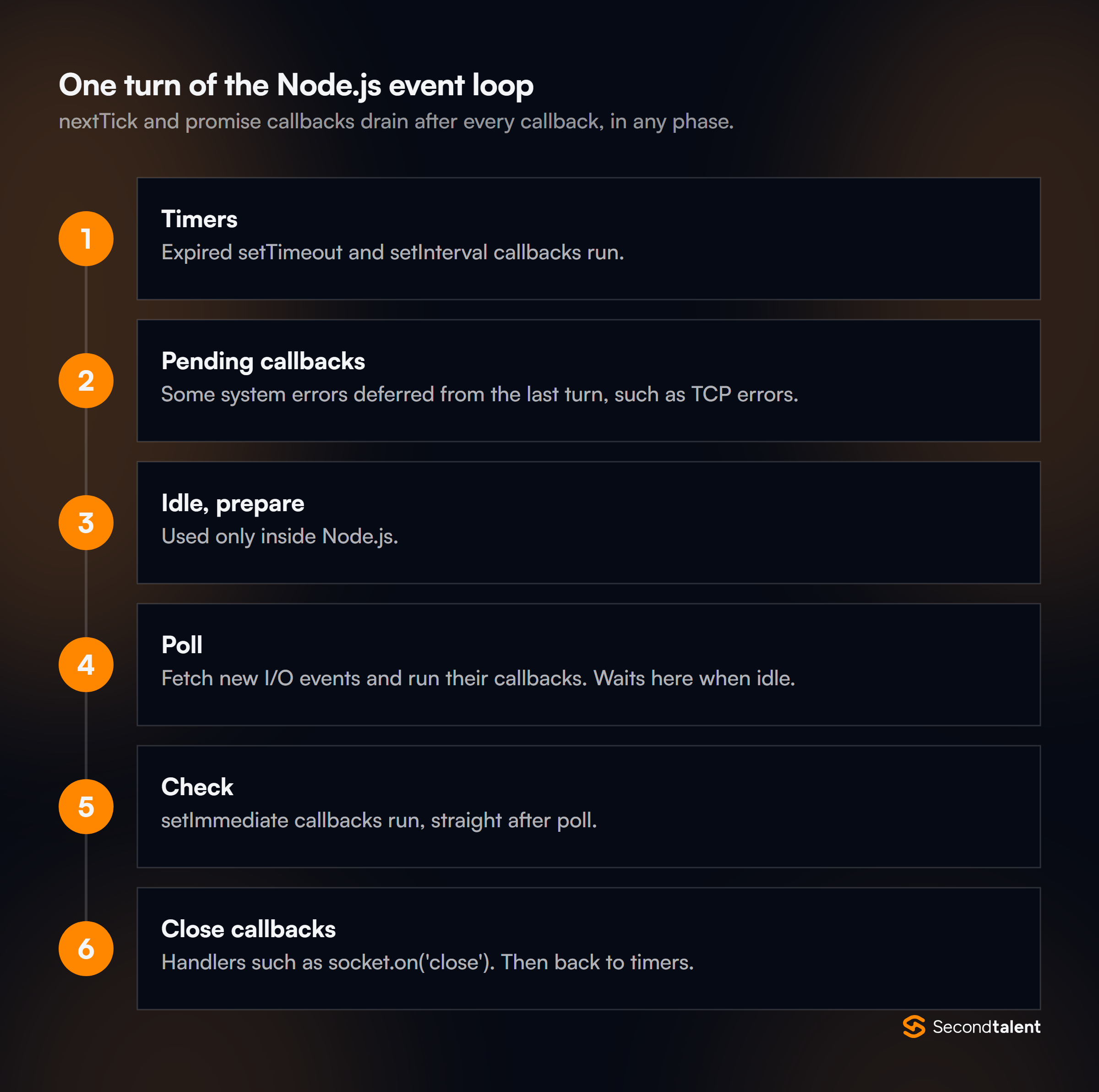
Between callbacks, Node drains two queues that belong to no phase: the process.nextTick queue and the promise microtask queue.
The poll phase is where the process waits when there is nothing else to do; it blocks for I/O until the nearest timer is due. The Node.js event loop guide covers each phase.
A candidate who can explain why a recursive process.nextTick starves I/O, while a recursive setImmediate does not, understands the model rather than the diagram.
2. In what order does this code print, and does the module format change it?
setTimeout(() => console.log('timeout'), 0);
setImmediate(() => console.log('immediate'));
Promise.resolve().then(() => console.log('promise'));
process.nextTick(() => console.log('nextTick'));
queueMicrotask(() => console.log('microtask'));
console.log('sync');
As a CommonJS file on Node.js 26 it prints sync, nextTick, promise, microtask, then timeout and immediate. Saved as .mjs, it prints sync, promise, microtask, nextTick.
An ES module body is evaluated as part of a promise job, so the microtask queue drains before Node gets to the nextTick queue.
The last two lines are a trap. Called from the main module, the order of setTimeout(fn, 0) and setImmediate depends on how long the process took to reach the loop, so it can change between runs.
Inside an I/O callback, setImmediate always runs first, because the check phase comes straight after poll.
3. Which Node.js APIs use the libuv thread pool, and why does its size matter?
According to the Node.js CLI docs, the pool runs every asynchronous fs call except the watchers, async crypto such as crypto.pbkdf2(), crypto.scrypt() and crypto.randomBytes(), dns.lookup() and asynchronous zlib.
Network sockets do not use it; they rely on the operating system's own async I/O.
The pool has 4 threads by default. Four slow password hashes can therefore stall every file read and every dns.lookup() behind them, which shows up as unrelated requests getting slow.
The fix is either UV_THREADPOOL_SIZE, set before the process starts (setting it from code is not guaranteed to work), or moving the heavy work off the pool entirely.
4. How do you detect that the event loop is blocked in production?
Measure event loop delay directly. perf_hooks.monitorEventLoopDelay() returns a histogram of how late the loop runs, in nanoseconds, and performance.eventLoopUtilization() reports the share of time the loop was busy rather than idle.
import { monitorEventLoopDelay } from 'node:perf_hooks';

const delay = monitorEventLoopDelay({ resolution: 20 });
delay.enable();

setInterval(() => {
  metrics.gauge('event_loop_delay_p99_ms', delay.percentile(99) / 1e6);
  delay.reset();
}, 10_000).unref();
A test run with one 200 ms synchronous loop reported a p99 of about 230 ms, so the signal is hard to miss.
High delay with modest CPU points at a single long synchronous task: a large JSON.parse, a regular expression with catastrophic backtracking or a sync crypto call.
Utilization near 1.0 with steady delay means the process is simply saturated and needs more instances. The perf_hooks docs list both APIs.
5. What happens to an unhandled promise rejection?
Since Node.js 15 the default --unhandled-rejections mode is throw: Node emits 'unhandledRejection', and if no handler is registered, the rejection is raised as an uncaught exception and the process exits.
Before 15 it only printed a warning, which is why older codebases are full of silently swallowed failures.
A strong answer adds that the right fix is to await or return every promise, and that a global 'unhandledRejection' handler should log and exit rather than keep serving. The flag's modes are in the CLI reference.
6. How do you run 10,000 async calls without overwhelming the service you are calling?
Limit concurrency. Promise.all(items.map(call)) starts all 10,000 requests at once, which exhausts sockets and triggers rate limits downstream. A small worker pool keeps a fixed number in flight:
async function mapLimit(items, limit, fn) {
  const results = new Array(items.length);
  let next = 0;
  async function worker() {
    while (next < items.length) {
      const i = next++;
      results[i] = await fn(items[i], i);
    }
  }
  await Promise.all(Array.from({ length: Math.min(limit, items.length) }, worker));
  return results;
}
Run against 50 items with a limit of 5, the peak concurrency measured exactly 5.
The follow-up is failure handling: Promise.all rejects on the first error but does not cancel the calls still running, so a production version passes an AbortSignal to fn or collects results with Promise.allSettled.
Streams and Memory
7. What is backpressure, and why prefer pipeline() over pipe()?
Backpressure is the signal a slow consumer sends to a fast producer. writable.write() returns false once the internal buffer passes highWaterMark; the producer should stop and wait for 'drain'.
Code that ignores the return value keeps buffering in memory until the process runs out.
pipe() handles backpressure but not errors: the stream docs warn that if the readable side errors, the destination is not closed, and each stream must be cleaned up by hand. pipeline() destroys every stream when any of them fails and returns a promise:
import { pipeline } from 'node:stream/promises';
import { createReadStream, createWriteStream } from 'node:fs';
import { createGzip } from 'node:zlib';

await pipeline(
  createReadStream('access.log'),
  createGzip(),
  createWriteStream('access.log.gz'),
);
8. Where should CPU-heavy work run in a Node.js service?
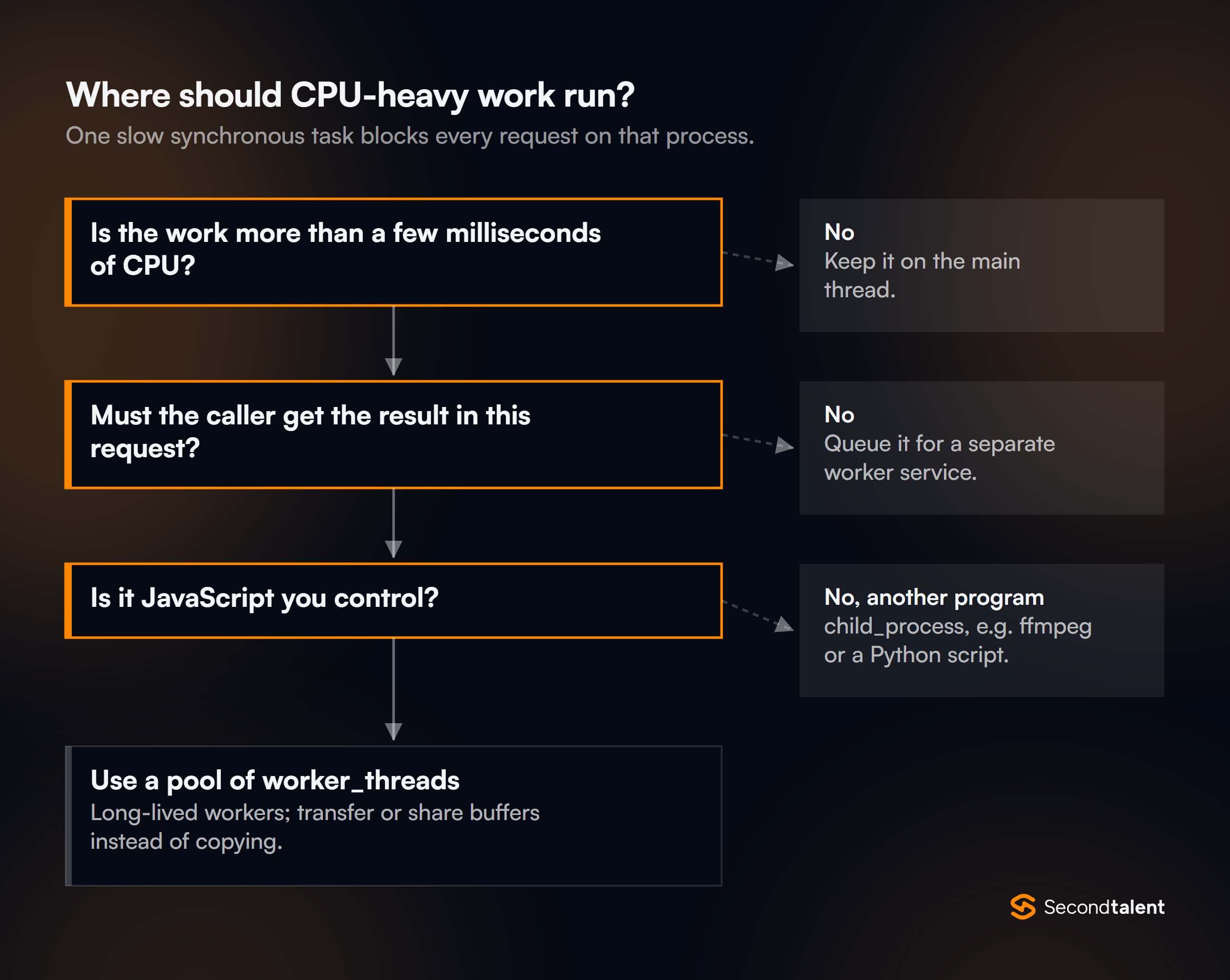
Off the main thread, and the right place depends on the work. worker_threads suits JavaScript computation that needs to return results quickly, such as image resizing or parsing a large file; workers can share memory through SharedArrayBuffer and transfer buffers without copying. child_process suits a separate program, such as ffmpeg or a Python script, or work that needs full process isolation.
- JavaScript in the same process
- Can share memory with
SharedArrayBuffer - For CPU-bound JS: parsing, hashing, image work
- A separate OS process, any program
- No shared memory; talks over stdio or IPC
- For other binaries or full isolation
Work that can wait belongs in a queue processed by separate worker services, so a traffic spike cannot starve request handling.
The cluster module solves a different problem: it runs several copies of the whole server to use more cores, and it does nothing for one slow request.
Starting a new worker per request is a common mistake; a pool of long-lived workers avoids paying the startup cost each time. See the worker_threads docs.
9. Memory grows until the container is killed. How do you find the leak?
Take heap snapshots and compare them.
Take one after warm-up, apply load, take a second and a third, and look in Chrome DevTools' comparison view for object types whose count keeps growing. v8.writeHeapSnapshot() takes one from code, and --heapsnapshot-near-heap-limit=1 writes one automatically as the heap approaches its limit, which captures the state just before the crash.
The usual causes are module-level caches with no eviction, event listeners added per request and never removed, timers that are never cleared, and closures that keep large request objects alive.
Two related checks: set --max-old-space-size below the container's memory limit so V8 collects before the kernel kills the process, and confirm the growth is in the heap at all, because native memory and buffers outside the heap show up in process.memoryUsage().rss, not in a snapshot.
The heap snapshot guide walks through the workflow.
10. How do you profile CPU usage?
Start the process with --cpu-prof, stable since Node.js 22.4. It writes a .cpuprofile file on exit that Chrome DevTools opens as a flame chart. For a running process, --inspect lets DevTools attach and record a profile on demand.
The older --prof flag produces a V8 tick log that node --prof-process turns into text.
Profile under realistic load, not on an idle process, and look for wide frames on the main thread.
In practice the hot spots are usually serialization (JSON.stringify of large responses), validation libraries run on every request, logging, and synchronous crypto. The flags are documented in the CLI reference.
11. Why is Buffer.allocUnsafe() "unsafe", and what does the buffer pool change?
Buffer.allocUnsafe(size) returns memory that has not been zeroed, so it can contain data from earlier allocations, including secrets.
It is faster than Buffer.alloc(), and it is only safe when every byte is overwritten before the buffer is read or sent.
Small allocations from allocUnsafe(), Buffer.from() and Buffer.concat() are sliced from a shared pool. According to the Buffer docs, Node.js 26.3 raised the default Buffer.poolSize from 8,192 to 65,536 bytes.
On Node.js 26, Buffer.from('abc').buffer.byteLength is 65,600: a three-byte buffer sits on a shared backing store of about 64 KiB.
Keeping thousands of tiny pooled buffers alive in a cache can therefore pin far more memory than their lengths suggest; Buffer.alloc() or copying the bytes out avoids it.
Modules and TypeScript
12. Can CommonJS code require() an ES module now?
Yes, with one limit. require(esm) has been available without a flag since Node.js 22.12 and 20.19, and the modules docs mark it no longer experimental from 25.4. It works when the ES module graph is synchronous.
If any module in the graph uses top-level await, require() throws ERR_REQUIRE_ASYNC_MODULE, and the caller has to use import() instead.
// app.cjs
const { x } = require('./lib.mjs');   // works
require('./uses-top-level-await.mjs'); // throws ERR_REQUIRE_ASYNC_MODULE
This is why the dual CommonJS and ESM builds most libraries shipped for years are no longer required. NestJS 12, for example, ships its core packages as ESM and relies on require(esm) to keep existing CommonJS apps working.
13. What does the "exports" field in package.json do?
"exports" defines a package's public entry points. Paths not listed cannot be imported, so consumers can no longer reach into my-lib/src/internal.js. Conditional exports choose a file by how the package is loaded:
{
  "name": "my-lib",
  "type": "module",
  "exports": {
    ".": {
      "types": "./dist/index.d.ts",
      "import": "./dist/index.js",
      "require": "./dist/index.cjs"
    },
    "./package.json": "./package.json"
  }
}
A senior answer mentions the dual package hazard: when the import and require conditions point at two different builds, an app can load both copies, and module-level state such as a singleton or an instanceof check silently splits in two.
With require(esm) available, shipping one ESM build avoids the problem. The packages docs define the resolution rules.
14. Can Node.js run TypeScript directly, and what are the limits?
Yes. Type stripping is on by default and was marked stable in Node.js 25.2 and 24.12. Node replaces type annotations with whitespace and runs the result, so no source maps are needed.
It does no type checking, ignores tsconfig.json, and rejects syntax that needs code generation:
enum Color { Red, Green }
// SyntaxError [ERR_UNSUPPORTED_TYPESCRIPT_SYNTAX]:
// TypeScript enum is not supported in strip-only mode
Node.js 26 also removed the --experimental-transform-types flag that used to cover enums and namespaces.
The TypeScript docs recommend erasableSyntaxOnly and verbatimModuleSyntax in tsconfig.json, so the compiler flags code Node cannot strip. CI still runs tsc --noEmit.
.ts extension, and .tsx files are not supported. Code that ran through ts-node with extensionless imports fails at the first import.15. How should a Node.js service load configuration?
From environment variables, validated once at startup. node --env-file=.env loads a file into process.env without the dotenv package; the flag stopped being experimental in 24.10 and 22.21, and values already set in the real environment take precedence over the file, as the CLI docs state. process.loadEnvFile() does the same from code.
The part candidates skip is validation. Parse every variable into a typed config object at boot with a schema, and exit with a clear error if DATABASE_URL is missing, rather than failing on the first request an hour later.
The .env file is for local development; production values come from the platform's secret store.
Production and Reliability
16. How do you shut down a Node.js server gracefully?
On SIGTERM, stop accepting connections, let in-flight requests finish, cancel outbound work, close pools, and exit before the orchestrator's grace period runs out (30 seconds by default in Kubernetes).
const shutdown = new AbortController();

process.once('SIGTERM', () => {
  shutdown.abort();                  // cancel in-flight outbound calls
  server.close(async () => {         // runs when open requests finish
    await pool.end();
    process.exit(0);
  });
  server.closeIdleConnections();     // drop idle keep-alive sockets now
  setTimeout(() => {                 // hard deadline
    server.closeAllConnections();
    process.exit(1);
  }, 25_000).unref();
});
Keep-alive is the detail most answers miss: server.close() waits for every open connection, and idle keep-alive sockets can hold it open.
Since Node.js 19, close() drops idle connections itself, and closeIdleConnections() and closeAllConnections() (added in 18.2) handle the rest; see the http docs.
The readiness probe should also start failing first, so the load balancer stops sending traffic.
17. How do you carry a request ID through every log line without passing it everywhere?
With AsyncLocalStorage from node:async_hooks. A value set with run() at the start of a request is readable from any function that request awaits, and concurrent requests keep separate values:
import { AsyncLocalStorage } from 'node:async_hooks';
const requestContext = new AsyncLocalStorage();

app.use((req, res, next) => {
  requestContext.run({ requestId: req.get('x-request-id') ?? randomUUID() }, next);
});

function log(msg) {
  const ctx = requestContext.getStore();
  console.log(JSON.stringify({ requestId: ctx?.requestId, msg }));
}
The async_context docs recommend it over building on the raw async_hooks API. Node.js 24 switched its implementation to AsyncContextFrame by default, which the release notes describe as more efficient.
Tracing libraries such as OpenTelemetry use the same mechanism to keep the active span.
18. How do you cancel async work, for example an outbound call when the client disconnects?
Pass an AbortSignal. fetch, timers, streams, fs/promises and events.once all accept one. AbortSignal.timeout(ms) creates a deadline, and AbortSignal.any(), available since 20.3, aborts when the first of several signals fires:
async function getStock(sku, requestSignal) {
  const signal = AbortSignal.any([
    requestSignal,              // client went away
    shutdown.signal,            // server is stopping
    AbortSignal.timeout(2_000), // our own deadline
  ]);
  const res = await fetch(`${INVENTORY_URL}/stock/${sku}`, { signal });
  return res.json();
}
A timeout rejects with a TimeoutError, and a manual abort with an AbortError, so callers can tell the two apart. This matters for fetch in particular, because undici's defaults allow 300 seconds each for headers and body.
The composition methods are listed in the globals reference.
19. How should a service handle an uncaught exception?
Log it and exit. The process docs call 'uncaughtException' "a crude mechanism" meant as a last resort, because after an unexpected throw the application is in an undefined state.
A supervisor, whether Kubernetes, systemd or a process manager, restarts the process.
The distinction to draw is between operational errors (a timeout, a 404 from a partner API, invalid input), which code expects and handles, and programmer errors (reading a property of undefined), which mean the code is wrong.
Wrapping low-level errors with new Error('charge failed', { cause: err }) keeps the original stack for the logs while giving callers a meaningful message.
20. Node.js is single-threaded. Can it still have race conditions?
Yes, whenever a read and a write are separated by an await. Other requests run during the wait and act on the same stale value:
async function withdraw(accountId, amount) {
  const { balance } = await db.getAccount(accountId); // read
  if (balance >= amount) {
    await db.setBalance(accountId, balance - amount); // write from a stale read
  }
}
// Two concurrent withdraw(80) calls on a balance of 100 both succeed.
In a local simulation of this code, two concurrent withdrawals of 80 from 100 left a balance of 20: both passed the check.
The fix moves the check into one atomic operation (UPDATE accounts SET balance = balance - $1 WHERE id = $2 AND balance >= $1), a transaction with a row lock, or a distributed lock when the resource is not in a database.
An in-process mutex only works while the service runs as a single instance.
21. How do you scale a Node.js API across CPU cores and machines?
Run more processes. Inside one machine, the cluster module forks workers that share a port; the primary distributes connections round-robin on every platform except Windows, according to the cluster docs.
In containers, most teams skip cluster and run one process per container with a CPU limit of about one core, letting the orchestrator add replicas.
Scaling out only works if the process is stateless: sessions, rate-limit counters and caches that must be shared live in Redis or the database.
WebSockets add a second requirement, a pub/sub layer so a message published on one instance reaches clients connected to another.
Security
22. What does the Node.js permission model protect against, and what not?
Started with --permission, a process cannot read or write files, spawn child processes, start workers, load native addons or, since Node.js 25, open network connections unless it is granted access with flags such as --allow-fs-read=/app and --allow-net.
A denied call throws ERR_ACCESS_DENIED. The model has been stable since 23.5 and 22.13, and 25.8 added --permission-audit, which reports violations without blocking them.
The permissions docs describe it as a "seat belt": it stops trusted code from reaching resources by accident and "does not provide security guarantees in the presence of malicious code."
A candidate who calls it a sandbox for untrusted packages is wrong, and that is worth probing.
23. Which vulnerabilities are specific to Node.js code?
Three come up most:
- Prototype pollution: merging user JSON into an object lets a
__proto__key add properties to every object in the process. UseObject.create(null)or aMapfor user-keyed data, and validate input against a schema. - Path traversal:
path.join(UPLOAD_DIR, req.params.name)accepts../../etc/passwd. Resolve the path and check it still starts with the allowed directory. - ReDoS: a regular expression with nested quantifiers can take seconds on a crafted string, and because it runs on the main thread, it stalls every request.
Injection through string-built SQL, missing security headers and unaudited dependencies apply too. The OWASP Node.js cheat sheet is a good reference list.
24. How do you store and check passwords with only the standard library?
Hash with a slow, salted key-derivation function and compare in constant time. crypto.scrypt is built in and runs on the thread pool, so it does not block the loop:
import { scrypt, randomBytes, timingSafeEqual } from 'node:crypto';
import { promisify } from 'node:util';
const scryptAsync = promisify(scrypt);

export async function hashPassword(password) {
  const salt = randomBytes(16);
  const key = await scryptAsync(password, salt, 64);
  return `${salt.toString('hex')}:${key.toString('hex')}`;
}

export async function verifyPassword(password, stored) {
  const [saltHex, keyHex] = stored.split(':');
  const key = await scryptAsync(password, Buffer.from(saltHex, 'hex'), 64);
  return timingSafeEqual(key, Buffer.from(keyHex, 'hex'));
}
timingSafeEqual stops an attacker from learning how many bytes matched by timing the response; a plain === returns as soon as one byte differs. Fast hashes such as SHA-256 are wrong for passwords.
Tie this back to question 3: every login uses a thread-pool slot, so a login storm can slow file I/O.
What Changed Recently
URLPattern global, --permission flag25. Which Node.js version should a production service run today?
Node.js 24, the Active LTS line, supported until April 30, 2028 per the Release working group schedule. Node.js 22 is in maintenance, receiving critical and security fixes until April 30, 2027.
Node.js 20 reached end of life on April 30, 2026, so a service still on it gets no security patches.
Node.js 26 is the Current release and becomes LTS on October 28, 2026, supported to April 30, 2029. Teams starting a service now can build on 26 and ship once it reaches LTS.
A good answer also names the dates that force work: 24 moves to maintenance on October 20, 2026.
26. How is the Node.js release schedule changing?
From Node.js 27 there is one major release a year, and every release becomes LTS.
The announcement of March 10, 2026 sets the cycle: six months of alpha releases from October, a Current release in April, LTS from October, and 30 months of LTS support, for 36 months in total.
Alpha releases take over the role odd-numbered releases used to play, with one difference: semver-major changes may still land during alpha.
Alpha builds are signed, tested against popular packages, and meant for library authors and CI rather than production.
Version numbers follow the calendar year, so 27.0.0 ships in April 2027. A candidate who still says "odd versions never go to production" is describing a rule that ends with Node.js 26.
27. What changed in Node.js 26?
The 26.0.0 release notes list four changes worth knowing:
- Temporal on by default: the new date and time API is a global, with no flag.
- V8 14.6: adds
Map.prototype.getOrInsert(),getOrInsertComputed()andIterator.concat(). - Undici 8 behind
fetch. - Removals:
http.Server.prototype.writeHeader(), the legacy_stream_*modules and the--experimental-transform-typesflag;module.register()is runtime-deprecated.
Later 26.x releases changed defaults too, including the larger Buffer.poolSize in 26.3.
Upgrades from 24 should run the test suite with deprecation warnings visible, because a runtime deprecation today is usually a removal in the next major.
28. What does explicit resource management add, and where does Node.js use it?
using and await using, added with V8 13.6 in Node.js 24, release a resource when the block exits, even if it throws. An object opts in by implementing Symbol.dispose or Symbol.asyncDispose:
async function exportOrders() {
  await using conn = await pool.connect(); // assuming the client implements Symbol.asyncDispose
  const rows = await conn.query('SELECT * FROM orders');
  return toCsv(rows);
} // conn is released here, on success or on throw
It replaces most try/finally cleanup blocks. Node.js core has been adding disposers to its own APIs; 22.18 made Worker async-disposable, for example.
The same V8 update added RegExp.escape, Error.isError and Float16Array, as the 24.0.0 release notes list.
29. Can the built-in test runner replace Jest or Vitest?
For many backend services, yes. node:test has been stable since Node.js 20 and includes mocks, timers, snapshot tests, a watch mode and coverage, with no dependencies and no transform step.
Since Node.js 24 it waits for subtests automatically, which removed a common source of tests that passed without running their assertions.
import { test, mock } from 'node:test';
import assert from 'node:assert/strict';

test('retries once after a 503', async () => {
  const fetchPrice = mock.fn(async () => 42);
  fetchPrice.mock.mockImplementationOnce(async () => { throw new Error('503'); });
  assert.equal(await priceWithRetry(fetchPrice), 42);
  assert.equal(fetchPrice.mock.callCount(), 2);
});
The gaps are in the details: coverage and watch mode are still marked experimental, and mock.module() is at "early development" in the test runner docs.
Frontend-heavy code and large suites that lean on module mocking usually stay on Vitest; see our Vitest interview questions.
30. What do Temporal and the Web platform globals change for Node.js code?
Less code depends on npm packages. Node.js 26 ships Temporal for dates and time zones, Node.js 24 made URLPattern a global for route matching, and fetch, WebSocket, structuredClone and Web Streams are all built in.
Node.js 25 also enabled the Web Storage API by default, though localStorage still needs a --localstorage-file path to persist anything.
const due = Temporal.Now.plainDateISO('Asia/Manila').add({ days: 30 });
const route = new URLPattern({ pathname: '/orders/:id' });
route.exec('https://api.example.com/orders/42').pathname.groups.id; // '42'
The practical question is which packages a new service still needs. A senior candidate reaches for Temporal before a date library and for fetch before an HTTP client.
They also know where the built-in version stops. fetch has no retries, and connection-pool tuning needs undici's Agent.
Signs of a Strong Answer
- They separate main-thread work from thread-pool work without prompting, and can name what shares the 4 default pool threads.
- They reach for
pipeline()and anAbortSignalby habit, and mention cleanup on the failure path, not only the happy path. - They describe a leak or latency incident with the tool they used (heap snapshot comparison,
--cpu-prof, event loop delay) and the cause they found. - They spot the race in a read,
await, write sequence and move the check into the database. - They know the version facts that affect a real upgrade: Node.js 20 is end of life, type stripping rejects enums, and
require(esm)fails on top-levelawait. - They call the permission model a seat belt, not a sandbox.
Hiring Node.js Developers
These questions suit a technical round with a mid-level or senior backend engineer.
For the rest of the loop, with live exercises, design prompts and red flags written for the interviewer, use our Node.js developer interview questions for hiring managers.
Second Talent places pre-vetted Node.js developers from Asia, screened on the topics above. See what a Node.js developer costs, or tell us the role and we send a shortlist.